Is 50 Celsius Hot for a Gpu: Safe or Overheating Warning?
Is 50 Celsius hot for a GPU? If you’ve ever peeked at your computer’s temperature and wondered whether 50°C is a cause for concern, you’re not alone.
Your GPU works hard, and keeping it cool is key to its performance and lifespan. But what exactly does 50°C mean for your graphics card? Is it safe, or should you worry about overheating? Keep reading to find out how to interpret your GPU’s temperature and what steps you can take to keep your system running smoothly.

Credit: www.bestbuy.com
Gpu Temperature Basics
Understanding GPU temperature is important for keeping your computer safe. The GPU works hard, especially during games or heavy tasks. Heat is a natural result of this work. Knowing what temperature is normal helps you avoid damage.
Normal Operating Range
Most GPUs run safely between 30°C and 85°C. Idle temperatures usually stay around 30°C to 50°C. During use, the temperature can rise up to 80°C or a bit higher. A GPU at 50°C is quite cool and safe. It means the GPU is not under heavy load or the cooling is effective.
Factors Affecting Temperature
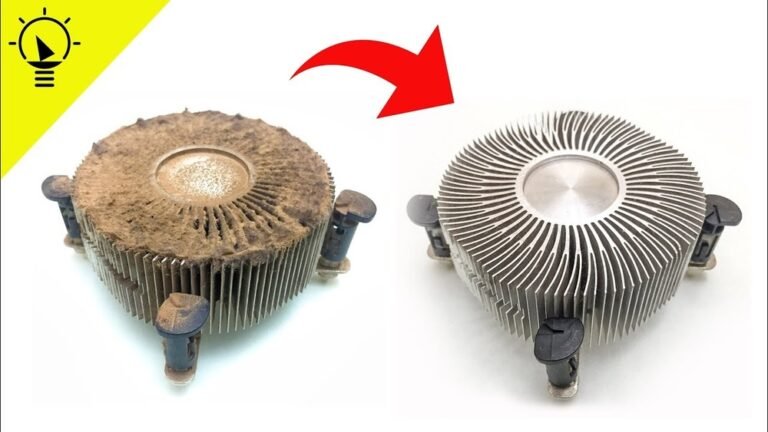
Several things affect GPU temperature. The workload is a big factor. Gaming or video editing raises the temperature. The cooling system also matters. Fans and heatsinks help lower the heat. Case airflow plays a role too. Poor airflow can trap heat inside the case. Room temperature affects GPU heat as well. Warmer rooms make GPUs run hotter. Dust buildup on fans and vents can block airflow and raise temperature.

Credit: www.g-locbrakes.com
Is 50 Celsius Hot For A Gpu
Wondering if 50 Celsius is hot for a GPU? Understanding GPU temperatures is key to keeping your computer safe. GPUs run at different temperatures depending on tasks and environment. Knowing what counts as normal helps you spot problems early. Let’s explore what 50 Celsius means for your GPU’s health.
Comparison With Typical Gpu Temps
Most GPUs operate safely between 30°C and 85°C. Idle temperatures usually fall between 30°C and 50°C. Under heavy load, GPUs can reach 70°C to 85°C without issues. At 50°C, your GPU temperature is quite cool. It is far from the danger zone, which starts above 90°C. This temperature shows your GPU is well-cooled and working efficiently.
Idle Vs Load Temperatures
Idle temperature means when your GPU is not busy. Load temperature means when your GPU handles games or tasks. At idle, 50°C is slightly warm but still normal for many GPUs. Some GPUs run cooler at idle, around 30°C to 40°C. Under load, 50°C is very cool. Most GPUs get much hotter during heavy use. If your GPU stays near 50°C while gaming, your cooling system works well.
Gpu Temperature Limits
GPUs have a safe temperature range to work well and last long. Too much heat can cause damage or reduce performance. Knowing these limits helps keep your GPU safe and fast.
Different GPUs handle heat in different ways. Some can run hotter without problems. Others need cooler conditions to stay healthy. Understanding these limits helps you avoid issues.
Manufacturer Recommendations
GPU makers set temperature guidelines to protect their products. Most recommend keeping the GPU under 85°C during heavy use. Some models can handle up to 90°C, but it is not ideal.
Operating below these temperatures helps extend the GPU’s life. It also keeps the system stable and prevents crashes. Always check the specific advice for your GPU model.
Thermal Throttling Thresholds
Thermal throttling stops the GPU from overheating by slowing it down. This usually happens around 90°C to 100°C. It protects the hardware but lowers performance.
50°C is far below this threshold and is considered very safe. At this temperature, the GPU runs smoothly without any slowdowns. Keeping the GPU cool improves gaming and work experiences.
Risks Of High Gpu Temperatures
High GPU temperatures can cause serious problems for your computer. Heat affects how well your GPU works and how long it lasts. Understanding the risks helps you keep your system safe and fast.
Performance Impact
High temperatures slow down your GPU. The chip reduces speed to avoid damage. This process is called throttling. It lowers frame rates and causes lag in games. Your computer may run slower during heavy tasks. Consistent heat can hurt overall performance over time.
Hardware Damage Potential
Heat wears out GPU parts faster. Too much heat can melt small components. It may cause permanent damage to the graphics card. Solder joints and circuits are at risk. Long exposure to high heat shortens GPU lifespan. Cooling is essential to protect your hardware.
Keeping Gpu Temperature Safe
Keeping GPU temperature safe is key for a long-lasting graphics card. High heat can cause damage and lower performance. A stable temperature helps the GPU run smoothly and avoid crashes. Many factors affect GPU heat, so managing it well is important.
Cooling Solutions
Cooling solutions help reduce GPU temperature effectively. Fans are the most common tool. They blow air over the GPU to cool it down. Some GPUs use liquid cooling for better heat control. This system moves heat away faster. Using the right cooling solution keeps the GPU safe from overheating.
Proper Airflow
Proper airflow inside the PC case is vital. It moves hot air out and brings fresh air in. Position fans to push hot air out the back or top. Avoid blocking vents or fans with cables. Good airflow lowers GPU temperature and stops heat buildup.
Monitoring Tools
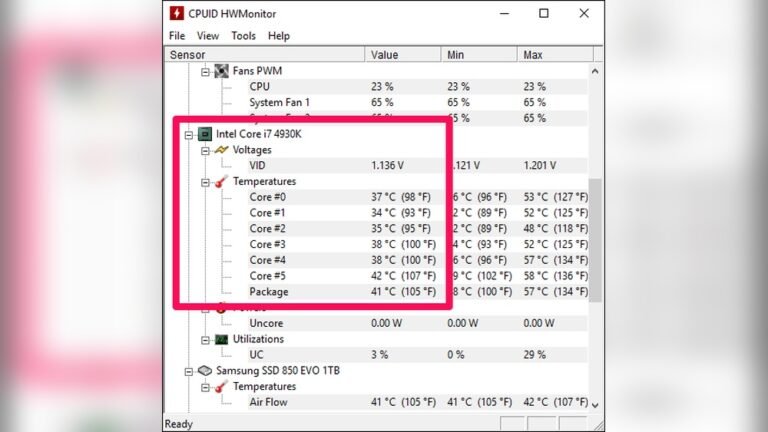
Monitoring tools track the GPU temperature in real-time. They alert you when the GPU gets too hot. Programs like MSI Afterburner and HWMonitor show temperature and fan speed. Regular checks help catch problems early. Monitoring keeps the GPU safe and working well.

Credit: www.corsair.com
When To Be Concerned
Knowing when a GPU temperature is too high is important. A GPU running at 50°C is usually safe. But sometimes, this temperature can signal a problem. Watching for signs helps prevent damage and keeps your system stable.
Signs Of Overheating
Look for sudden slowdowns during tasks. The computer may freeze or crash unexpectedly. Fans might spin loudly all the time. The GPU case can feel very hot to touch. Graphics may glitch or flicker on screen. These signs show the GPU might be too hot.
Troubleshooting Steps
First, check if the fans are clean and working. Dust can block airflow and raise temperature. Make sure your PC is in a cool place. Avoid placing it near heat sources. Update your GPU drivers to the latest version. Use software to monitor GPU temperature regularly. Consider improving case ventilation for better airflow.
Frequently Asked Questions
Is 50 Celsius Considered Hot For A Gpu?
No, 50°C is generally a safe and normal temperature for a GPU during operation. It indicates the GPU is running efficiently without overheating.
Can A Gpu Handle 50 Celsius Temperature Safely?
Yes, most GPUs are designed to operate safely at 50°C. This temperature is well below the critical thermal limits set by manufacturers.
How Does 50 Celsius Affect Gpu Performance?
At 50°C, a GPU performs optimally without thermal throttling. It ensures stable performance and longevity of the hardware components.
Should I Worry If My Gpu Reaches 50 Celsius?
No, reaching 50°C is normal during gaming or heavy tasks. However, continuous higher temperatures may require better cooling solutions.
Conclusion
A GPU running at 50 Celsius is generally safe and normal. This temperature shows the card is working well without stress. Many GPUs can handle higher heat without harm. Keeping your PC clean helps keep temperatures low. Good airflow inside the case also matters a lot.
Watch the temperature during heavy use to avoid problems. Staying aware of your GPU’s heat keeps it healthy. So, 50 Celsius is not too hot for most GPUs. Just keep an eye on it and enjoy smooth performance.