Does Dual Gpu Increase Fps: Ultimate Guide to Boost Gaming Performance
Are you wondering if adding a second GPU will boost your gaming performance? You’ve probably heard that dual GPUs can double your frame rates, but is that really true?
Before you invest in expensive hardware, it’s important to understand how dual GPUs work and what impact they actually have on your FPS. You’ll discover the surprising facts about dual GPU setups and learn whether they’re worth it for your gaming rig.
Keep reading to find out if a second GPU will give you the smooth, lag-free gameplay you’re aiming for.
How Dual Gpus Work
Understanding how dual GPUs work helps to see their impact on FPS. Two graphics cards can work together to share the load. This can improve performance in games and other graphics-heavy tasks. The setup involves more than just adding a second card. How these GPUs communicate and split work matters a lot.
Basics Of Multi-gpu Setup
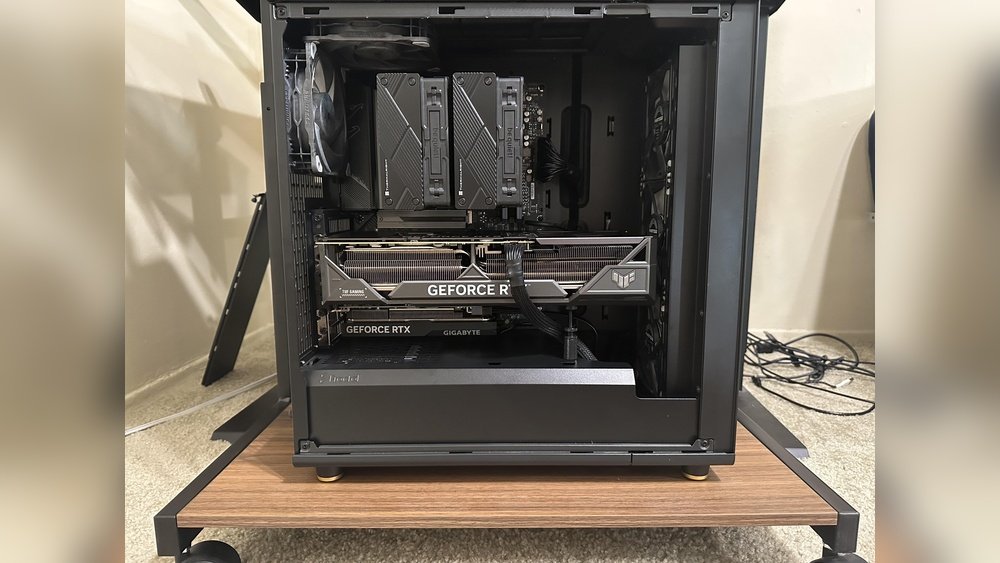
A multi-GPU setup uses two or more graphics cards. These cards work in parallel to render images faster. Each GPU handles part of the graphics processing. This can lead to smoother gameplay and higher frame rates. The system needs to support multiple GPUs to function correctly. Power supply and cooling are also important for stability.
Types Of Dual Gpu Configurations
There are different ways to connect dual GPUs. SLI and CrossFire are common methods for Nvidia and AMD cards. SLI links Nvidia cards, while CrossFire connects AMD cards. Some setups use explicit multi-GPU through software support. Each type has its own benefits and limits. Not all games or programs support dual GPU setups well.
Communication Between Gpus
GPUs in a dual setup must communicate efficiently. They share data to divide rendering tasks evenly. This happens through a fast connection like PCIe or dedicated bridges. Good communication reduces delays and improves frame output. Poor syncing can cause stuttering or frame drops. Proper driver support is essential to manage this communication smoothly.
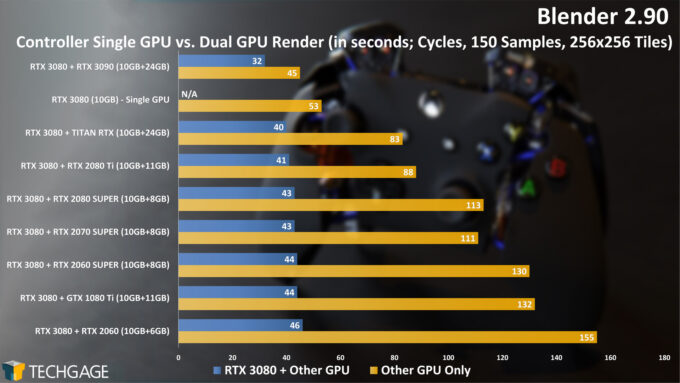
Credit: techgage.com
Impact On Gaming Fps
Dual GPU setups can affect gaming FPS in different ways. Some games show clear improvement, while others do not benefit much. The impact depends on the game’s design and how well it uses multiple GPUs. Understanding these factors helps set realistic expectations for performance.
Performance Gains In Popular Games
Many popular games support dual GPUs and show noticeable FPS boosts. Titles like “Shadow of the Tomb Raider” and “Metro Exodus” can run smoother with two GPUs. Players often see higher frame rates in high-resolution settings. This helps games look better without slowing down gameplay. The extra power from dual GPUs handles complex graphics faster.
Scenarios With Limited Fps Improvement
Some games do not gain much FPS from dual GPUs. Older or less optimized games may ignore the second GPU. Games with simple graphics or low system demands see little change. Sometimes, adding a second GPU uses more power but does not improve speed. This can lead to wasted resources and extra heat.
Bottlenecks And Scaling Issues
Dual GPUs face challenges like bottlenecks and poor scaling. The CPU or memory speed can limit FPS gains. If these parts are slow, two GPUs cannot reach full potential. Software must support multi-GPU use; otherwise, performance drops. Drivers and game updates affect scaling quality. Many setups show less than double FPS, often around 50-70% improvement.
Compatibility And Support
Using dual GPUs can boost your computer’s graphics power. But compatibility and support play a big role in whether you see better FPS. Not all games and systems handle two GPUs well. Knowing the limits helps set the right expectations.
Game And Driver Support
Games must support multiple GPUs to benefit from them. Some games run fine on one GPU only. Others use both cards to improve performance. Drivers from GPU makers help manage this process. Without good driver support, two GPUs may not work together well.
Operating System Requirements
Your operating system needs to support dual GPU setups. Most modern systems do, but older versions might not. Windows 10 and 11 handle multiple GPUs better. This support lets the system spread work across both cards efficiently.
Hardware Compatibility
The motherboard must have slots for two GPUs. It also needs enough power and cooling. Your power supply should provide enough watts for both cards. Cooling is important because two GPUs create more heat. Check all hardware parts before adding a second GPU.
Pros And Cons Of Dual Gpus
Using two GPUs in one system has its clear upsides and downsides. This setup can improve gaming performance but also brings some challenges. Understanding the pros and cons helps decide if dual GPUs are right for your needs.
Advantages For Gamers
Dual GPUs can boost frame rates in games that support multi-GPU setups. This means smoother gameplay and better graphics quality. They allow higher settings without losing performance. Some games benefit from improved load times and less lag. Gamers who play at very high resolutions often see the best results. Dual GPUs also help in rendering tasks beyond gaming, like video editing.
Drawbacks And Challenges
Not all games support dual GPUs well. Some titles show little or no improvement. Others may experience stuttering or crashes. Setting up dual GPUs can be complex for beginners. Software and driver issues can cause instability. Scaling is not always perfect, so performance may not double. Compatibility problems with motherboards and power supplies add extra hurdles.
Power Consumption And Heat
Two GPUs consume much more power than one. This means higher electricity bills and a need for a strong power supply. More heat is generated, requiring better cooling solutions. Overheating risks can lower hardware lifespan. Noise levels may increase due to extra fans. Proper case ventilation becomes essential to manage heat.
Alternative Ways To Boost Fps
Boosting your FPS can improve your gaming experience a lot. Dual GPUs are not the only way to get better frame rates. Some simpler steps help increase FPS without extra hardware. These methods work well and cost less.
Upgrading Single Gpu
Upgrading to a newer, stronger single GPU often improves FPS. Modern GPUs have better speed and efficiency. Choose one that fits your budget and games. This upgrade avoids the complexity of dual GPU setups. It also uses less power and creates less heat.
Optimizing Game Settings
Lowering game settings can boost FPS quickly. Reduce options like shadows, textures, and effects. Turn off features like motion blur or anti-aliasing. Use preset settings like “medium” or “low” for smoother gameplay. Small changes can make a big difference in frame rates.
Using Software Enhancements
Some software tools help improve FPS by optimizing your system. Game mode features in Windows prioritize resources for gaming. Update your GPU drivers regularly for best performance. Third-party apps can also tweak settings to reduce lag. These tools keep your games running smoothly.

Credit: www.youtube.com
Future Of Dual Gpu Technology
The future of dual GPU technology holds promise for better graphics performance. Developers and hardware makers continue to explore ways to improve multi-GPU setups. This technology could change how computers handle games and heavy tasks. Understanding the trends and innovations helps us see what lies ahead.
New designs and software improvements aim to solve past challenges. These changes may make dual GPUs more useful for everyday users. The path forward depends on progress in hardware and software working well together.
Emerging Trends And Innovations
Manufacturers are working on smarter ways to connect two GPUs. New software tools help GPUs share work more efficiently. This means less lag and better frame rates. Some ideas focus on reducing power use while boosting speed. The goal is smooth gaming and fast rendering without extra heat.
Impact Of New Architectures
New GPU designs support better communication between two graphics cards. These architectures allow faster data sharing and load balancing. They reduce delays that hurt performance in older setups. Improved designs help games run smoother with less stutter. These advances may also lower the cost of dual GPU systems.
Potential For Mainstream Adoption
Dual GPU setups might become common in powerful gaming PCs. Easier installation and better driver support can attract more users. As prices drop, more gamers and creators could choose dual GPUs. Software developers may optimize games to use multiple GPUs well. This could make dual GPU technology a practical choice for many.
Credit: www.solveiq.com
Frequently Asked Questions
Does Dual Gpu Always Increase Fps In Games?
Dual GPUs can boost FPS, but not always. Performance depends on game support, drivers, and system balance. Some games benefit significantly, while others show minimal or no improvement.
What Are The Main Benefits Of Using Dual Gpus?
Dual GPUs improve graphics rendering and increase FPS in supported games. They allow higher settings and smoother gameplay but require compatible hardware and software.
Are There Compatibility Issues With Dual Gpu Setups?
Yes, dual GPU setups may face compatibility issues. Not all games or applications support them, and driver conflicts can cause instability or reduced performance.
Does Dual Gpu Affect Power Consumption And Heat?
Dual GPUs consume more power and generate extra heat. Efficient cooling and a strong power supply are essential to maintain system stability and performance.
Conclusion
Dual GPUs can increase FPS in certain games and setups. But not all games support dual GPU use well. Sometimes, one GPU does the job just fine. Dual GPUs may cause extra heat and power use. They also need a compatible motherboard and power supply.
For many users, a single strong GPU works better. Think about your budget and needs before choosing. Testing your specific games helps make the best choice. In the end, dual GPUs can help, but not always. Choose what fits your system and gaming style best.