What Pc Parts Affect Gaming Performance: Ultimate Guide to Boost FPS
Are you wondering why your games don’t run as smoothly as you want? The secret lies in your PC parts.
Each component inside your computer plays a key role in how well your games perform. Knowing which parts matter most can help you boost your gaming experience without wasting money. You’ll discover exactly what PC parts affect gaming performance and how to make smart choices to get the best results.
Keep reading to unlock the power of your gaming setup!
Credit: www.intel.com
Key Components Impacting Fps
Frames per second (FPS) is a key measure of gaming performance. It shows how smooth your game runs. Several PC parts affect FPS. Understanding these helps improve your gaming experience. Focus on the main components that impact FPS.
Graphics Card Role
The graphics card handles the game’s images and visuals. It processes textures, lighting, and effects. A strong graphics card delivers higher FPS and better graphics quality. Games with detailed scenes need powerful GPUs. Without a good graphics card, games may lag or look poor.
Processor Influence
The processor controls the game’s logic and calculations. It manages tasks like AI and physics. A fast processor ensures smooth gameplay and quick responses. Some games rely more on the CPU than the graphics card. A weak processor can cause stuttering and low FPS.
Ram Importance
RAM stores game data temporarily for quick access. Enough RAM prevents slowdowns and freezes. It helps load game levels and assets faster. Low RAM causes lag and longer loading times. Most games run well with 8GB or more of RAM.
Storage Speed Effects
Storage speed affects how fast games load and save. SSDs load games much quicker than HDDs. Faster storage reduces wait times during gameplay. It does not directly increase FPS but improves overall smoothness. Upgrading to an SSD enhances the gaming experience.
Choosing The Right Graphics Card
Choosing the right graphics card is key to good gaming performance. It affects how smooth and clear your games look. A strong graphics card helps run games faster and with better visuals. Picking the best one depends on several important factors. Understanding these can help you find a card that fits your needs and budget.
Vram And Resolution
VRAM is the memory on the graphics card. It stores images and textures for games. More VRAM helps with higher screen resolutions. For 1080p gaming, 4GB VRAM is usually enough. For 1440p or 4K, 6GB or more is better. Low VRAM can cause slowdowns and poor image quality.
Gpu Architecture
The GPU architecture is how the card’s chips are built. Newer architectures use power and speed more efficiently. This means better performance and cooler temperatures. Cards with the latest architecture handle modern games well. Older designs may struggle or consume more power.
Cooling Solutions
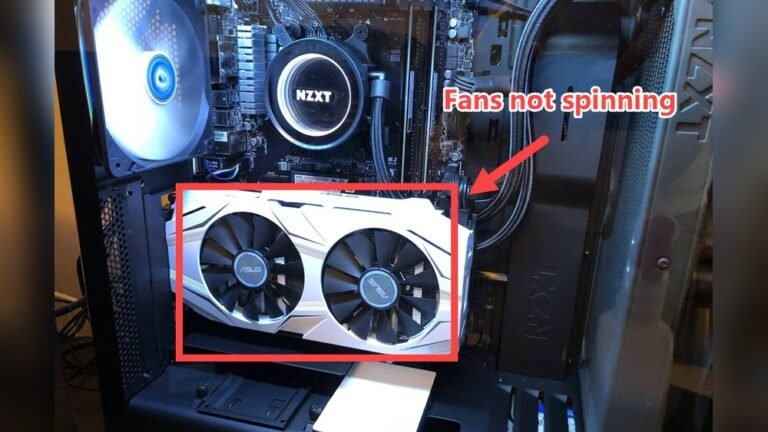
Graphics cards get hot during gaming. Good cooling keeps the card safe and fast. Some cards have one fan, others have two or three. More fans usually mean better cooling. Some cards use liquid cooling for very high-end models. Proper cooling prevents overheating and lowers noise.
Processor’s Role In Gaming
The processor plays a key role in gaming performance. It controls how fast the game runs and how smooth it feels. Games need a processor that can handle many tasks at once. The processor works with other parts, like the graphics card and memory, to create a good gaming experience.
Core Count And Clock Speed
The number of cores affects how many tasks the processor can do at the same time. More cores help with games that use many threads. Clock speed shows how fast each core works. Higher clock speeds mean faster game performance in single-thread tasks. Both core count and clock speed matter for smooth gameplay.
Single-core Vs Multi-core Performance
Some games rely more on single-core speed. Others benefit from multiple cores working together. Older games often need stronger single-core performance. Newer games use multiple cores to run better. Choosing a balanced processor helps run many types of games well.
Overclocking Benefits
Overclocking increases the processor’s speed beyond its default rate. This can boost game frame rates and reduce lag. Overclocking needs good cooling to keep the processor safe. It gives extra power but may shorten the processor’s life if done poorly.
Memory And Its Impact
Memory plays a key role in gaming performance. It helps the computer store and access game data quickly. Better memory means smoother gameplay and less lag. The amount, speed, and setup of RAM all affect how well games run.
Ram Capacity
RAM capacity means how much memory your PC has. More RAM lets your system handle bigger games and multitask better. Games need enough RAM to load textures, maps, and characters fast. Usually, 8GB is the minimum for gaming. But 16GB or more is better for newer games.
Ram Speed And Latency
RAM speed measures how fast data moves in memory. Higher speed means quicker game loading and less delay. Latency is the time it takes for RAM to respond. Lower latency means faster reactions in games. Both speed and latency affect frame rates and smoothness.
Dual Channel Vs Single Channel
Dual channel means using two RAM sticks together. This setup doubles the data paths to the processor. It improves memory bandwidth and game performance. Single channel uses only one RAM stick, limiting speed. Dual channel is better for faster and smoother gaming.
Storage And Load Times
Storage plays a key role in gaming performance. It affects how fast games load and how smooth the experience feels. Slow storage can cause long wait times. Fast storage helps games start quickly and run better. Gamers often focus on storage type to improve load times and overall play.
Ssd Vs Hdd
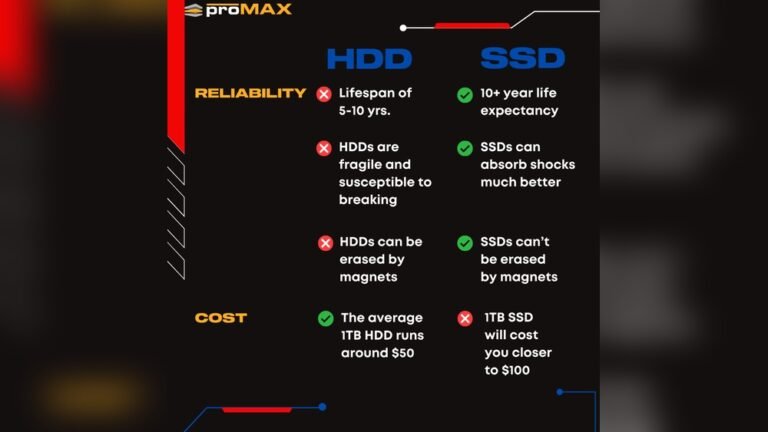
SSDs (Solid State Drives) are much faster than HDDs (Hard Disk Drives). SSDs use flash memory with no moving parts. This means data loads quickly. HDDs have spinning disks and take longer to read data. Games on SSDs start faster and reduce in-game loading screens. HDDs are cheaper but slower. For better gaming, SSDs are the better choice.
Nvme Advantages
NVMe SSDs use a faster interface than regular SSDs. This lets them transfer data at much higher speeds. Games load faster with NVMe drives. They reduce wait times during game startup and level changes. NVMe also helps with quick data access in open-world games. The speed difference between NVMe and SATA SSDs is noticeable in gaming.
Impact On Game Streaming
Storage speed affects game streaming quality too. Fast drives reduce lag and buffering. They allow quick access to game files during streaming. This means smoother gameplay for viewers. Slow storage can cause delays and lower stream quality. Choosing the right storage helps keep streams stable and enjoyable.

Credit: www.hp.com
Motherboard And Power Supply
The motherboard and power supply are key parts of a gaming PC. The motherboard connects all components. It allows the CPU, RAM, and graphics card to work together. The power supply sends electricity to every part. It must provide stable and enough power. Both affect how well your game runs.
Compatibility Considerations
The motherboard must fit your CPU and RAM types. It has specific sockets for the processor. RAM slots support certain speeds and sizes. The motherboard also decides the number of USB ports and slots for graphics cards. The power supply must match your PC’s power needs. Check wattage and connector types. Using the wrong parts can stop the PC from working.
Power Delivery
The power supply feeds electricity to the whole system. It must provide steady power to avoid crashes. High-quality power supplies keep voltage stable. The motherboard manages power to each component. Good power delivery improves system stability. Weak power supply can cause freezes or shutdowns during gaming.
Upgrade Paths
A motherboard with extra slots allows future upgrades. More RAM slots help increase memory later. Extra PCIe slots let you add more graphics cards or storage. A strong power supply supports new, power-hungry parts. Planning upgrades early saves money. It keeps your gaming PC ready for new technology.
Cooling And Its Effect On Performance
Cooling plays a key role in gaming PC performance. It helps keep parts at safe temperatures during intense gaming sessions. Good cooling stops your computer from slowing down or shutting off. Without it, your PC parts can get too hot and cause problems.
Air Vs Liquid Cooling
Air cooling uses fans to move air over heat sinks. It is simple and usually cheaper. Fans pull heat away from the CPU and GPU. Liquid cooling uses water or coolant to carry heat away. It often cools parts better and works quietly. Liquid cooling is popular for powerful gaming PCs.
Thermal Throttling
Thermal throttling happens when parts get too hot. The CPU or GPU lowers its speed to cool down. This slows your game and reduces performance. Good cooling prevents thermal throttling. Keeping temperatures low means your PC runs at full power longer.
Case Airflow
Case airflow moves cool air in and hot air out. It affects how well your cooling system works. Poor airflow traps heat inside the case. Fans should be placed to create a smooth air path. Clean dust filters and vents help maintain airflow. Proper airflow supports better overall cooling and gaming performance.
Optimizing Settings For Better Fps
Optimizing your settings plays a big role in boosting your gaming FPS. It helps your PC run games smoothly. Small changes in settings can improve your game speed and reduce lag. You don’t need to change your hardware to see better results.
In-game Graphics Options
Adjust graphics settings inside the game to improve FPS. Lower options like shadows, textures, and effects. Turn off features like motion blur and anti-aliasing. These changes reduce the load on your GPU and CPU. Try different settings to find a good balance between quality and speed.
Driver Updates
Keep your graphics card drivers up to date. New drivers can fix bugs and improve performance. Visit your GPU maker’s website or use software to update drivers. Updated drivers make games run smoother and fix compatibility issues. Check for updates regularly to maintain good FPS.
Background Processes
Close unnecessary programs running in the background. These use CPU, memory, and disk resources. Use Task Manager to see and stop these tasks. Running fewer processes frees up power for your game. This helps your PC focus on delivering better FPS.

Credit: www.youtube.com
Frequently Asked Questions
Which Pc Part Impacts Gaming Performance The Most?
The graphics card (GPU) affects gaming performance the most. It renders images and handles visual effects. A powerful GPU ensures smooth gameplay and higher frame rates.
How Does Ram Affect Gaming Performance?
RAM influences game loading speed and multitasking ability. More RAM helps games run smoothly and prevents stuttering during gameplay.
Does Cpu Choice Matter For Gaming?
Yes, the CPU processes game logic and physics. A strong CPU improves game responsiveness and reduces lag in complex scenes.
Can Storage Type Affect Gaming Performance?
Yes, SSDs load games faster than HDDs. Faster storage reduces game load times and improves overall system responsiveness.
Conclusion
Choosing the right PC parts shapes your gaming experience. The graphics card and processor greatly impact speed and visuals. RAM helps games run smoothly without lag. Storage affects how fast games load and save. Power supply keeps everything running safely.
Cooling stops overheating during long sessions. Each part plays a role in performance. Balance your budget and needs carefully. Good choices lead to better gameplay and fun. Keep learning about parts to improve your setup. Gaming gets better with the right hardware.