How to Ship a Gpu: Expert Tips for Safe, Secure Delivery
Shipping a GPU might seem simple, but one wrong move can damage your valuable hardware or cause delays. You want to make sure your graphics card arrives safely and on time.
In this guide, you’ll learn the best ways to pack, protect, and send your GPU without hassle. Keep reading to discover easy tips that save you money and stress, so your GPU reaches its destination in perfect condition.
Credit: www.fulfyld.com
Choosing The Right Packaging
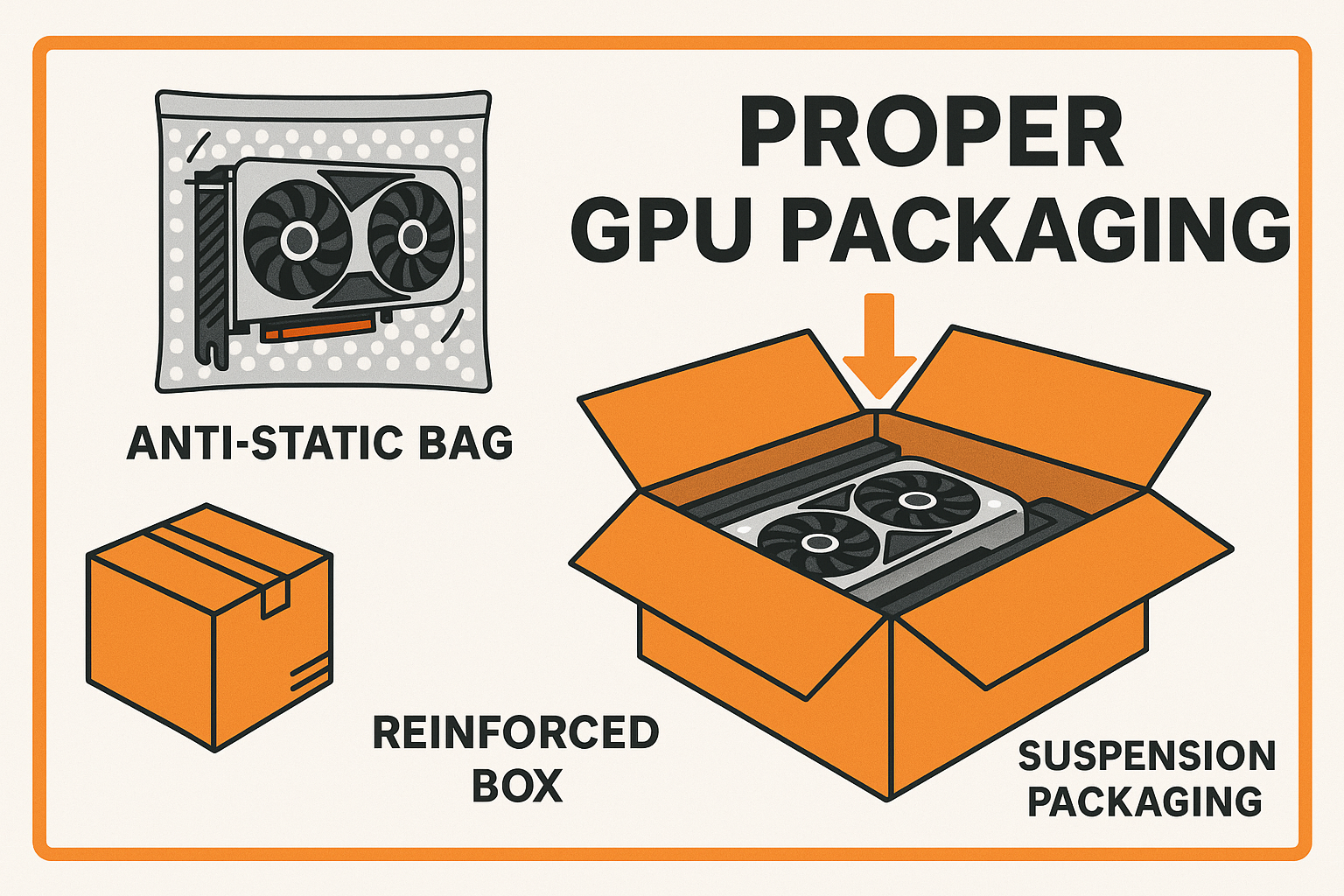
Choosing the right packaging is key to shipping a GPU safely. The packaging protects the GPU from damage during transit. It helps keep the GPU secure from shocks, dust, and static electricity. Picking the right materials and box size reduces the risk of harm. This section explains how to select suitable packaging for your GPU.
Selecting A Suitable Box
Use a sturdy box that fits the GPU well. Avoid boxes that are too large or too small. A box with strong walls helps protect the GPU from pressure. Double-walled cardboard boxes offer extra strength. Make sure the box can close tightly without forcing it. This prevents the GPU from moving inside the box.
Using Anti-static Materials
GPUs are sensitive to static electricity. Use anti-static bags to wrap the GPU before packing. These bags stop static from damaging electronic parts. Avoid regular plastic bags, as they can create static. Place the GPU in an anti-static bag and seal it well. This adds an important layer of protection.
Adding Cushioning And Padding
Cushioning absorbs shocks and keeps the GPU safe. Use foam, bubble wrap, or packing peanuts around the GPU. Wrap the GPU gently but fully to avoid pressure points. Fill empty spaces inside the box to stop movement. Proper padding reduces the chance of damage during shipping.

Credit: www.youtube.com
Preparing The Gpu For Shipping
Preparing a GPU for shipping takes careful steps. It helps protect the card from damage during transit. Small mistakes can lead to broken parts or poor performance later.
Follow simple tasks to keep your GPU safe. These steps reduce dust, secure parts, and prevent scratches. Proper preparation makes shipping smooth and worry-free.
Cleaning The Gpu
Remove dust and dirt gently. Use a soft brush or compressed air. Avoid using liquids or harsh cleaners. Dust can cause overheating or short circuits.
Clean the fans and heatsinks carefully. Make sure no particles block the vents. A clean GPU arrives ready to work without issues.
Removing Loose Components
Take off any loose parts like cables or adapters. These can move and damage the GPU inside the box. Pack them separately in small bags or containers.
Check if screws or clips are tight. Loose screws can fall out and cause damage. Keep all small parts organized for easy reassembly.
Securing Sensitive Parts
Protect fragile parts such as fans and connectors. Use foam or bubble wrap around these areas. Avoid applying pressure directly on the GPU chip.
Wrap the GPU in an anti-static bag. This prevents static electricity from harming the circuits. Place the wrapped GPU in a sturdy box with padding.
Labeling And Documentation
Labeling and documentation are key steps in shipping a GPU safely. Proper labels and clear documents help the package reach the right place without delay. They also protect your shipment from loss or damage during transit.
Clear labels show the carrier where to deliver and how to handle the package. Good documentation provides proof of contents and value. This helps with insurance claims if the GPU gets lost or damaged.
Proper Shipping Labels
Use a strong, waterproof label on the package. Print the recipient’s full name and address clearly. Include your return address in case the package cannot be delivered. Avoid handwriting to reduce errors. Place the label flat on the largest side of the box.
Including Return Information
Always add your return address on the package. This helps the carrier return the GPU if delivery fails. Include a phone number or email for quick contact. Inside the box, place a copy of the return information. This ensures you can get the GPU back if needed.
Declaring Value And Contents
Fill out all customs forms honestly if shipping internationally. Declare the GPU’s value and describe it as “computer hardware.” This protects your shipment with insurance. Avoid undervaluing to prevent issues with customs or claims. Keep copies of all documents for your records.
Choosing The Best Shipping Service
Choosing the best shipping service is key to sending your GPU safely. The right carrier ensures your graphics card reaches its destination without damage. It also affects cost, delivery speed, and tracking options. This section helps you pick the best service for your needs.
Comparing Carrier Options
Many carriers ship electronics, but not all treat GPUs the same. Major carriers like UPS, FedEx, and USPS offer different prices and services. UPS often provides strong packaging guidelines. FedEx has fast delivery but can be pricier. USPS is affordable but slower. Choose a carrier known for handling fragile items carefully.
Selecting Insurance Coverage
Insurance protects your GPU if it gets lost or damaged. Standard shipping often covers only a small amount. Buy extra insurance based on your GPU’s value. Check if the carrier offers specific insurance for electronics. This step saves money and stress if the package is mishandled.
Tracking And Delivery Speed
Tracking lets you see where your package is at all times. Most carriers offer tracking, but some provide more detailed updates. Faster delivery reduces the time your GPU is in transit, lowering risk. Balance speed with cost. Choose a service that fits your timeline and budget.
Handling And Storage Tips
Proper handling and storage of your GPU are vital for safe shipping. Careless treatment may cause damage or reduce its lifespan. Follow simple tips to protect your GPU during this process.
Avoiding Extreme Temperatures
Keep your GPU away from very hot or cold places. High heat can warp parts and harm chips inside. Cold temperatures may cause condensation, leading to rust. Store and ship in a place with mild, steady temperature.
Minimizing Physical Shocks
Handle your GPU gently to avoid drops or hits. Physical shocks can break delicate circuits. Use bubble wrap or foam to cushion it well. Place it in a sturdy box that fits tightly to stop movement.
Storing Before Shipment
Store your GPU in an anti-static bag to prevent static damage. Keep it in a dry, clean area free from dust. Avoid stacking heavy items on top of it. Label the box clearly to ensure careful handling during transport.
Tips For International Shipping
Shipping a GPU internationally needs careful planning. Many details can affect the safe and smooth delivery of your graphics card. Knowing key tips helps avoid delays and extra costs. Focus on customs rules, documentation, and shipping expenses to keep the process easy and stress-free.
Customs Regulations
Each country has different rules for electronics. Check the destination country’s customs regulations before shipping. Some countries require special permits or taxes for GPUs. Declaring the item correctly avoids fines or confiscation. Research import restrictions to prevent surprises at the border.
Proper Documentation
Complete and accurate paperwork speeds up customs clearance. Include a detailed invoice with the GPU’s description, value, and purpose. Attach any certificates required by the destination country. Label the package clearly to show it contains an electronic device. Keep copies of all documents for tracking and proof.
Managing Shipping Costs
Shipping internationally can be expensive. Compare prices from several carriers to find the best rate. Choose a shipping option with tracking and insurance for protection. Pack the GPU securely to avoid damage and extra charges. Consider the delivery speed and balance it with your budget.

Credit: www.reddit.com
Frequently Asked Questions
How Do I Package A Gpu For Shipping Safely?
Use anti-static bags and bubble wrap to protect the GPU. Place it in a sturdy box with cushioning. Avoid loose movement inside the box to prevent damage during transit.
What Shipping Carrier Is Best For Sending A Gpu?
Choose carriers like FedEx, UPS, or DHL for reliable and insured GPU shipping. They offer tracking and fast delivery, ensuring your GPU arrives safely.
Should I Insure My Gpu Shipment?
Yes, always insure your GPU shipment. This covers loss or damage during transit, providing peace of mind and financial protection for valuable hardware.
How Do I Label A Gpu Package Correctly?
Label the package clearly with the recipient’s and sender’s full addresses. Add “Fragile” and “Handle with Care” stickers to ensure careful handling during shipping.
Conclusion
Shipping a GPU takes care and simple steps. Use strong packaging to protect it well. Label the box clearly with correct addresses. Choose a reliable shipping service you trust. Track the package to know where it is. Keep the receipt for proof of shipment.
Follow these tips to send your GPU safely. Safe shipping means your GPU arrives without damage. Easy and careful shipping saves time and worry.