How Many Cores Does Gpu Have: Unlocking Ultimate Performance Facts
Have you ever wondered how many cores your GPU actually has? Understanding this can unlock the secret to better gaming, faster video editing, and smoother graphics performance.
Knowing the number of cores in your GPU helps you make smarter choices when buying or upgrading your computer. You’ll discover what GPU cores are, why they matter, and how to find out exactly how many cores your graphics card contains.
Stick with me, and you’ll gain the knowledge to boost your device’s power like a pro.

Credit: researchcomputing.princeton.edu
Gpu Core Basics
Understanding GPU cores is key to knowing how graphics cards work. These cores handle many tasks at once. This allows smooth images and fast video rendering. Let’s explore the basics of GPU cores.
Knowing what GPU cores are and their role helps you grasp why GPUs are powerful. You will also see how they differ from CPU cores. This knowledge is useful for gamers, designers, and tech enthusiasts.
What Are Gpu Cores
GPU cores are small processors inside a graphics card. They work together to process images and videos. Unlike a single powerful processor, many GPU cores share the workload. This teamwork speeds up graphics rendering.
Each core handles a tiny part of the image. This makes complex visuals possible in games and software. More cores usually mean better performance for graphics tasks.
Difference Between Cpu And Gpu Cores
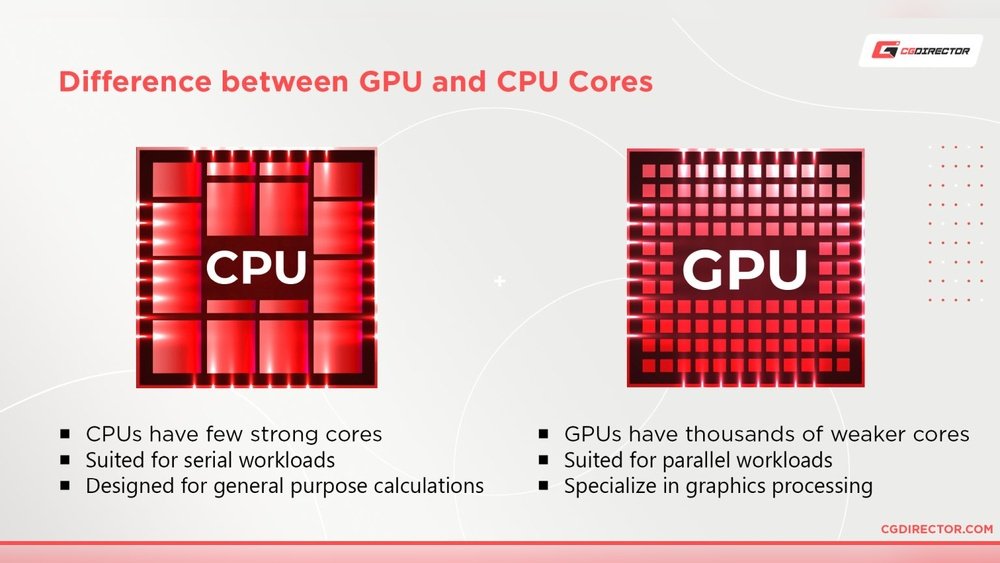
CPU cores focus on few tasks but do them well and fast. GPUs have many more cores but each is simpler. CPU cores handle general tasks like running programs and system operations.
GPU cores are designed to handle many similar tasks simultaneously. This makes GPUs ideal for graphics and parallel processing jobs. CPUs and GPUs work together to run your computer efficiently.
Role Of Cores In Graphics Processing
GPU cores process pixels, textures, and shading in images. They calculate colors, light, and shadows for realistic graphics. The more cores available, the faster these calculations happen.
This speed creates smooth animations and crisp images. GPU cores also help with video editing and 3D rendering. Their role is crucial in delivering high-quality visuals quickly.
Core Counts In Popular Gpus
GPU core counts vary widely across different models and brands. These cores handle many small tasks at the same time. This ability makes GPUs great for graphics and computing work. Core counts give a quick idea about the power of a GPU. They range from a few hundred to several thousand. Understanding core numbers helps choose the right GPU for your needs.
Core counts depend on the GPU’s target use and price. Popular GPUs fit into three groups: entry-level, mid-range, and high-end. Each group offers different core numbers and performance levels.
Entry-level Gpu Core Numbers
Entry-level GPUs usually have between 300 and 800 cores. These GPUs fit casual users who want basic gaming and video tasks. They can handle everyday apps smoothly. Examples include NVIDIA GTX 1650 and AMD RX 6400. Their lower core count keeps costs and power use down. Good for light gaming and simple creative work.
Mid-range Gpu Core Counts
Mid-range GPUs often pack 1,000 to 3,000 cores. These models suit gamers and creators who want better visuals and speed. Examples include NVIDIA RTX 3060 and AMD RX 6700 XT. They run modern games at medium to high settings well. Core numbers here balance price and strong performance. Ideal for users who want more power without a high cost.
High-end Gpu Core Configurations
High-end GPUs have 4,000 to over 10,000 cores. These are for professionals and gamers wanting top performance. Examples include NVIDIA RTX 4090 and AMD RX 7900 XTX. They handle 4K gaming, 3D rendering, and AI tasks with ease. High core counts mean very fast parallel processing. These GPUs come with a premium price and power use.
Core Architecture And Performance
GPU core architecture plays a big role in its performance. It affects how fast and well a GPU can handle tasks. Cores in a GPU are different from CPU cores. They are designed to work together on many small tasks at once. This design helps GPUs excel in graphics and parallel processing.
Understanding core architecture helps explain why some GPUs perform better. The number of cores alone does not tell the whole story. Core design, efficiency, and clock speed also matter a lot. These factors work together to shape overall GPU power.
Impact Of Core Design
Core design impacts how a GPU processes data. Different GPU models use various core structures. Some have simple cores with many units. Others have fewer but more powerful cores. The design affects speed and energy use. Efficient designs run cooler and consume less power.
Core design also influences how well the GPU handles graphics. It determines the quality and detail of images. A good core design balances power and efficiency well.
Parallelism And Core Efficiency
GPUs use parallelism to handle many tasks simultaneously. This means many cores work together at once. This is why GPUs have thousands of cores. Each core handles a small part of a big task. This method makes GPUs fast for rendering and data processing.
Core efficiency shows how well each core uses power. Efficient cores give better results without wasting energy. High efficiency means better performance per watt. This is important for gaming laptops and mobile devices.
Clock Speed Vs Core Count
Clock speed measures how fast cores run. Core count shows how many cores a GPU has. Both affect GPU performance differently. Higher clock speed means faster core operation. More cores mean more tasks done at once.
Choosing between clock speed and core count depends on the task. Some tasks need fast cores. Others benefit from many cores working together. A balance of both gives the best results in most cases.

Credit: www.researchgate.net
Core Types And Functions
GPUs contain different types of cores, each designed for specific tasks. These cores work together to process graphics and complex calculations quickly. Understanding the core types helps explain how GPUs handle various workloads efficiently.
Each core type has a unique role that supports modern computing needs. Some focus on graphics, others on artificial intelligence, and some enhance visual effects. Let’s explore the main core types and their functions.
Shader Cores Explained
Shader cores are the primary processing units in a GPU. They perform calculations to render images and videos. These cores handle tasks like coloring, shading, and lighting effects. Shader cores process many small tasks in parallel, speeding up graphics rendering.
They work on pixels and vertices, the building blocks of images. More shader cores usually mean better performance in games and 3D applications. Their flexibility makes them essential for both gaming and video editing.
Tensor Cores For Ai Tasks
Tensor cores specialize in AI and machine learning calculations. They handle large matrix operations needed for deep learning. These cores accelerate AI tasks like image recognition and natural language processing.
Tensor cores improve speed and efficiency in neural network training. They help GPUs perform AI work faster than traditional cores. Many modern GPUs include tensor cores to support AI-driven software.
Ray Tracing Cores And Graphics
Ray tracing cores focus on realistic lighting and shadow effects. They simulate how light behaves in real environments. This creates more lifelike graphics with reflections and refractions.
Ray tracing cores process complex light paths quickly. They enhance visual quality in games and simulations. These cores work alongside shader cores to produce stunning graphics.
Choosing Gpus By Core Count
Choosing a GPU by core count is a common step in selecting the right graphics card. Core count affects how a GPU handles tasks. But core number alone does not define performance. Understanding how cores impact different uses helps pick the best GPU.
Gaming Performance And Cores
Games use many GPU cores to render graphics fast. More cores can mean smoother gameplay and better frame rates. Some games need more cores to process complex scenes. But clock speed and memory also affect gaming performance. A balanced GPU with good cores and speed works best for gaming.
Professional Workloads And Core Needs
Professional tasks like 3D rendering or video editing need many cores. These tasks break work into small parts that many cores can do at once. More cores reduce the time needed to finish projects. Not all professional software uses cores equally. Check software requirements to match core count properly.
Balancing Core Count With Other Specs
High core count is not the only factor to consider. Memory size and speed help handle large files and data. GPU architecture and driver support impact efficiency. Power consumption and cooling are also important for stability. Choose a GPU with a good mix of cores and other features for best results.

Credit: community.adobe.com
Future Trends In Gpu Cores
GPU cores have changed a lot over the years. The future holds even more growth and change. New designs and technologies aim to boost power and efficiency. These changes will affect many fields, from gaming to science.
Understanding these trends helps us see what GPUs will do next. It shows how developers can use GPUs better. Let’s explore the key trends shaping GPU cores.
Increasing Core Density
GPU makers pack more cores into smaller chips. This increase means more processing power in the same space. Smaller cores also use less energy. This trend helps GPUs run faster and cooler. It supports more complex tasks without bigger hardware.
Emerging Core Technologies
New types of cores are appearing in GPUs. Some focus on specific jobs like ray tracing or AI. These special cores improve speed and quality for those tasks. The mix of general and special cores makes GPUs more flexible. This shift changes how software uses GPU power.
Impact On Ai And Machine Learning
AI and machine learning need many GPU cores. More cores help run many calculations at once. This speed helps train models faster and handle big data. Future GPUs will have cores designed just for AI. This design makes AI work smoother and quicker.
Frequently Asked Questions
How Many Cores Does A Typical Gpu Have?
A typical GPU has hundreds to thousands of cores. These cores enable parallel processing for graphics and computation tasks. The exact number varies by model and manufacturer. Modern GPUs from NVIDIA or AMD often have 1,000+ cores, enhancing performance in gaming and AI applications.
What Is The Difference Between Gpu And Cpu Cores?
GPU cores are designed for parallel processing, handling many tasks simultaneously. CPU cores focus on sequential processing, managing fewer tasks with higher complexity. GPUs have more cores but simpler architecture, ideal for graphics and data-heavy computations, while CPUs handle general-purpose computing.
How Do Gpu Cores Impact Gaming Performance?
More GPU cores improve rendering speed and visual quality in games. They allow smoother frame rates and better handling of complex graphics. However, core count is just one factor; clock speed and memory also affect gaming performance significantly.
Can Gpu Cores Be Used For Non-graphics Tasks?
Yes, GPU cores handle parallel tasks beyond graphics, like AI, data analysis, and scientific simulations. Technologies like CUDA and OpenCL enable developers to utilize GPU cores for general-purpose computing, accelerating complex computations efficiently.
Conclusion
GPU cores vary widely depending on the model and purpose. Some have a few hundred cores, while others feature thousands. These cores work together to handle graphics and compute tasks quickly. Understanding core count helps when choosing a GPU for games or work.
Remember, more cores do not always mean better performance alone. Other factors like clock speed and architecture matter too. Knowing these basics makes it easier to pick the right GPU for your needs. Keep learning and exploring to find the best fit.