Best Curved Monitor For Eye Strain: Top Picks For Comfort
I recommend curved monitors with gentle curvature and eye care features. I often feel eye fatigue after long workdays. When I switched to a curved screen built for comfort, my focus lasted longer and headaches faded. The best curved monitor for eye strain reduces glare, keeps colors natural, and supports low blue light and flicker-free tech. I look for size, curvature, and certified eye care when I choose screens. If you want less eye strain, a curved panel that wraps slightly around your view helps. The best curved monitor for eye strain blends comfort with clear text and reliable connectors for work and play.
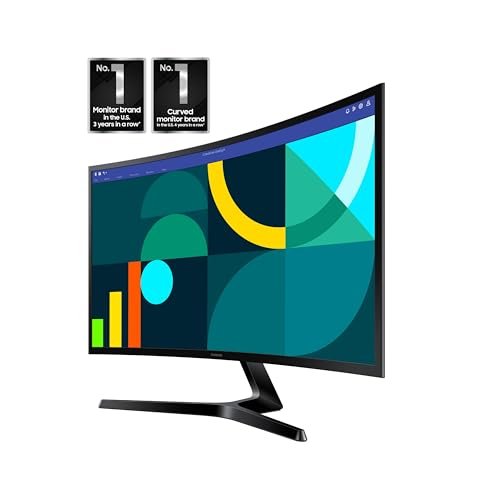
Samsung 27″ Essential S3 1800R FHD

Product Overview
This 27-inch Samsung Essential S3 uses a 1800R curve and FHD clarity to ease eye fatigue. It runs 100Hz and includes Game Mode, HDMI and legacy D-Sub ports. Advanced eye comfort features cut blue light and flicker, making long sessions gentler on eyes. The compact stand fits small desks and the panel reduces glare for steady focus.
I rely on the Essential S3 for clear text and smooth motion. The built-in eye comfort keeps me working longer without strain, so it ranks high among options for the best curved monitor for eye strain.
Advantages
- 1800R curvature reduces eye movement
- Advanced eye comfort with low blue light
- 100Hz refresh for smooth motion
- Multiple inputs including HDMI and D-Sub
- Compact size fits small desks
Limitations
- FHD resolution on 27″ less sharp than QHD
- Basic stand with limited ergonomics
- No USB-C for single-cable laptops
Our Verdict
I recommend this Samsung 27″ for budget-focused users who need the best curved monitor for eye strain without extra cost. It’s great for office work, casual gaming, and mixed media. The eye comfort modes and 1800R curve give clear value if you strain after long screen time.
Best For
| Best for | Why |
|---|---|
| Budget buyers | Affordable eye comfort features |
| Small desks | Compact 27″ footprint |
| Office work | Text clarity and low blue light |
Samsung Viewfinity S65UA 34″ Ultrawide

Product Overview
The Samsung Viewfinity S65UA is a 34-inch ultrawide QHD curved monitor with USB-C and HDR10. It offers a 100Hz refresh rate and TUV-certified Intelligent Eye Care to cut blue light and reduce flicker. The height-adjustable stand allows ergonomic placement, and the wide color gamut helps accurate work and natural tones. Ultrawide space reduces window hopping and eye strain for multitaskers.
I use this when I need big workspace and gentle viewing. It stands out as a top choice when searching for the best curved monitor for eye strain, especially for designers and heavy multitaskers.
Advantages
- TUV-certified Intelligent Eye Care
- 34″ ultrawide QHD expands workspace
- USB-C for single-cable laptop charging
- Height-adjustable stand for ergonomics
- 1 billion colors with HDR10 support
Limitations
- Larger footprint needs wide desks
- Higher price than basic curved models
- HDR limited by peak brightness
Our Verdict
This Viewfinity is best for professionals and multitaskers who want the best curved monitor for eye strain and a roomy workspace. I value the USB-C and height adjust for clean desks. It’s worth the investment if you need long comfortable sessions and accurate colors.
Best For
| Best for | Why |
|---|---|
| Designers | Wide color and ultrawide canvas |
| Remote workers | Ergonomic stand and USB-C |
| Multitaskers | Large screen reduces switching |
Samsung 32″ S3 100Hz Curved Monitor

Product Overview
The Samsung 32-inch S3 delivers FHD clarity on a large curved panel with 100Hz refresh and built-in speakers. Eye Saver Mode and Game Mode tailor settings for work or play while reducing blue light and flicker. HDMI connectivity keeps setups simple and multiple presets help cut visual fatigue over long hours.
I choose this model when I want a roomy display with comfort features. It balances display size and eye care, making it a strong pick for the best curved monitor for eye strain in larger home offices.
Advantages
- Large 32″ screen for better focus
- Eye Saver Mode reduces blue light
- 100Hz refresh for smoother visuals
- Built-in speakers for basic audio
- Multiple connectivity options
Limitations
- FHD on 32″ may seem less sharp
- Limited ergonomic adjustments
- Basic color performance for pros
Our Verdict
I’d pick the 32″ S3 for users who want the best curved monitor for eye strain with a larger screen. It fits home offices where visual comfort and budget matter. If you need sharper text, consider higher resolution, but for comfort it delivers solid value.
Best For
| Best for | Why |
|---|---|
| Home office | Large screen aids focus |
| Casual gamers | 100Hz and Game Mode |
| Media viewing | Built-in speakers and size |
Samsung Odyssey G55C 32″ 1000R QHD

Product Overview
The Samsung Odyssey G55C is a 32-inch QHD 1000R curved gaming monitor with 165Hz and 1ms MPRT. Its deep curve matches human sight more closely and reduces eye scanning across the panel. Eye Care and glare-free coating help long sessions feel easier. AMD FreeSync syncs frames to cut stutter for smooth visuals.
I recommend this if you want speed and comfort together. It ranks as a compelling choice when you need the best curved monitor for eye strain that also handles fast gameplay and creative work.
Advantages
- 1000R curvature matches eye field
- QHD offers crisp text and detail
- 165Hz and 1ms for smooth motion
- Eye Care features and glare-free finish
- AMD FreeSync reduces tearing
Limitations
- Higher power draw than smaller panels
- Heavier stand and larger footprint
- Gaming-focused features may be excess for office use
Our Verdict
This Odyssey G55C is best for gamers and creators who need the best curved monitor for eye strain and fast refresh. I find the 1000R curve keeps eyes steady across wide views. It’s a premium pick when you want speed and comfort together.
Best For
| Best for | Why |
|---|---|
| Competitive gaming | 165Hz and 1ms response |
| Immersive work | 1000R wraps the view |
| Creative pros | QHD sharpness and colors |
Samsung 32″ S3 LS32D39D FHD Curved
Product Overview
This 32-inch Samsung S3 model focuses on comfort with Eye Saver Mode and a curved FHD panel designed to ease strain. The 100Hz refresh helps smooth movement, while built-in speakers and HDMI inputs make setup fast. The screen targets daily users who want comfort without extra complexity.
I favor this when I need a simple, effective screen to reduce tired eyes. It’s a practical option for those seeking the best curved monitor for eye strain without paying for pro-level features.
Advantages
- Large curved panel for reduced eye travel
- Eye Saver Mode and low blue light
- 100Hz refresh supports smoother motion
- Simple setup with HDMI
- Built-in speakers for convenience
Limitations
- FHD resolution on 32″ limits sharpness
- No USB-C or advanced ergonomics
- Not ideal for professional color work
Our Verdict
I recommend this Samsung 32″ S3 for everyday users who need the best curved monitor for eye strain on a simple setup. It’s ideal for web work, streaming, and general productivity. The comfort modes give good value for typical home and office use.
Best For
| Best for | Why |
|---|---|
| Everyday users | Simple comfort features |
| Students | Easy setup and size |
| Budget-conscious | Good comfort without extras |
FAQs of best curved monitor for eye strain
Do curved monitors reduce eye strain?
Yes. Curved monitors guide your eyes with a natural arc and paired eye care features lower blue light and flicker, which helps reduce eye strain.
What curvature is best for eye comfort?
Gentle curves like 1800R and deeper 1000R both help; 1000R matches human sight closely, while 1800R is milder and suits small desks.
Is QHD better than FHD for eye strain?
QHD gives sharper text and can reduce eye effort at larger sizes, so it often helps more than FHD on big screens.
Should I enable low blue light modes?
Yes. Low blue light and flicker-free settings cut eye fatigue, so enable them for long sessions to protect eyes.
Can a curved monitor fix headaches from screen time?
It can help. A curved monitor that reduces glare and blue light often lowers headaches tied to visual strain, especially combined with breaks and good posture.
I find the best curved monitor for eye strain blends a gentle curve, low blue light, and flicker-free tech. Pick a size and resolution that keeps text sharp and place the screen at a proper distance to maximize comfort.
My top picks cover budgets and needs: ultrawide for multitasking, 1000R for immersion, and 1800R for small desks. Each aims to cut eye strain and keep you focused.