Is Dual Channel Ram Better: Boost Your PC Performance Now
Are you wondering if upgrading your computer’s memory will really make a difference? You’ve probably heard about dual channel RAM and how it can boost performance.
But is it actually better for your setup? Understanding this can help you get the most out of your device without spending money on unnecessary upgrades. Keep reading, because what you learn here could change the way your computer runs—and save you time and frustration down the line.
Credit: gamersnexus.net
What Dual Channel Ram Means
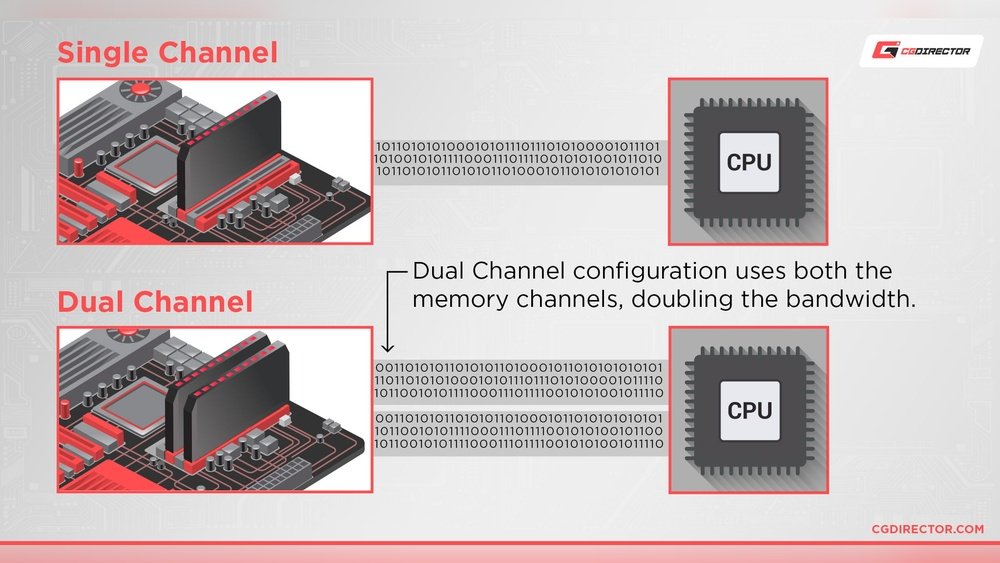
Dual channel RAM is a technology that helps your computer run faster. It uses two memory modules together instead of one. This can improve the speed of data transfer between the RAM and the processor.
This setup can make tasks like gaming, video editing, and multitasking smoother. It is important to understand how it works to see if it fits your needs.
Single Vs Dual Channel Explained
Single channel uses one memory module. It sends data through one channel at a time. This limits the speed of data transfer.
Dual channel uses two memory modules at the same time. It doubles the data path, allowing more data to move quickly. This can boost overall system performance.
How Dual Channel Works
Dual channel splits the memory load between two modules. Both modules work together to send and receive data. This reduces waiting time for the processor.
The motherboard must support dual channel mode. Modules must be installed in matching slots for the best effect. This setup balances the workload and improves speed.
Performance Gains With Dual Channel
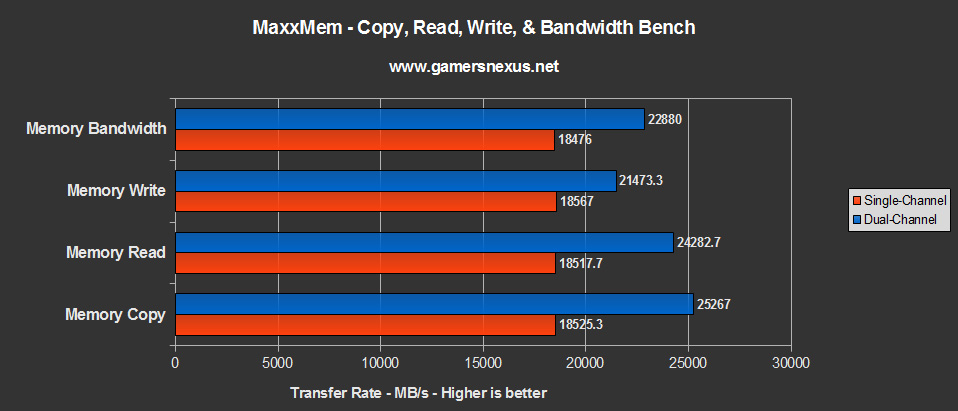
Dual channel RAM can improve computer speed by allowing more data to move at once. This setup uses two RAM sticks working together. It helps the system handle tasks faster and smoother. The performance boost depends on the type of work you do on your computer.
Impact On Gaming
Games often need quick access to memory. Dual channel RAM can reduce lag and increase frame rates. It helps load game textures faster. Some games show better performance with dual channel memory. Others may not see a big change.
Benefits For Content Creation
Content creators use programs that handle large files. Dual channel RAM speeds up video editing and rendering. It helps software run without delays. This can save time on complex projects. It improves the smoothness of multitasking during work.
Effect On Everyday Tasks
Everyday tasks like browsing and office work use less memory. Dual channel RAM may not show a huge difference here. Still, it can make switching between apps faster. It helps keep the system responsive and stable. Users notice smoother performance with dual channel setup.
Compatibility And Requirements
Choosing dual channel RAM can improve your computer’s speed and performance. But not every system supports it well. Compatibility and requirements matter for dual channel RAM to work properly. Understanding motherboard support, matching RAM modules, and BIOS settings helps to get the best results.
Motherboard Support
Motherboards must support dual channel memory to use it. Most modern boards have this feature. Check the motherboard manual or website for details. Slots are usually color-coded to show which pairs work together. Installing RAM in the correct slots activates dual channel mode.
Matching Ram Modules
RAM modules must match in size and speed for dual channel to work well. Using two sticks of the same brand and model is best. Different sizes or speeds can cause the system to run in single channel mode. This reduces the performance gains expected from dual channel RAM.
Bios Settings
Sometimes BIOS settings control dual channel operation. Most systems detect dual channel automatically. Still, checking BIOS can confirm the memory runs in dual channel mode. Updating BIOS can improve memory compatibility and performance. Adjust settings carefully to avoid system issues.

Credit: www.youtube.com
Comparing Dual Channel To Other Configurations
Choosing the right RAM configuration affects computer speed and performance. Dual channel is common, but other setups exist. Comparing these setups helps understand their benefits and limits. Let’s explore how dual channel compares to single and quad channel options.
Single Channel Vs Dual Channel
Single channel uses one RAM stick to handle data. It offers basic performance for everyday tasks.
Dual channel uses two sticks working together. This allows data to move faster between RAM and CPU.
In dual channel, memory bandwidth nearly doubles. This improves multitasking and load times.
For simple tasks, single channel works fine. For gaming or editing, dual channel is better.
Dual channel reduces bottlenecks in data flow. This results in smoother performance overall.
Dual Channel Vs Quad Channel
Quad channel uses four RAM sticks at once. It provides even higher memory bandwidth than dual channel.
Quad channel suits heavy tasks like video editing and 3D rendering. It boosts data transfer rates significantly.
Not all motherboards support quad channel. It is common in high-end desktops and workstations.
Dual channel offers good performance at lower cost. Quad channel is best for power users.
The difference between dual and quad channel is noticeable in large workloads. For daily use, dual channel is enough.
Installing And Testing Dual Channel Ram
Installing and testing dual channel RAM helps improve your computer’s speed and performance. Proper setup is important to make sure the RAM works well together. Testing ensures the system uses the RAM correctly in dual channel mode. Follow simple steps to install and check your RAM for better results.
Proper Installation Tips
Turn off your computer and unplug it before starting. Open the case carefully. Find the RAM slots on the motherboard. Insert the RAM sticks into the matching slots for dual channel. Usually, these slots have the same color or are labeled. Press the RAM firmly until it clicks in place. Close the case and plug your computer back in.
Tools To Check Ram Mode
Use software tools to see if your RAM runs in dual channel mode. CPU-Z is a popular free tool that shows RAM details. Open CPU-Z and go to the “Memory” tab. Look for the “Channel ” field. It should say “Dual” to confirm the mode. Other tools like Speccy or HWInfo can also check this.
Troubleshooting Issues
If your RAM does not work in dual channel, check the slots again. Make sure the RAM sticks match in size and speed. Remove and reinsert the RAM to ensure a good connection. Update your motherboard BIOS if the problem continues. Try swapping RAM sticks to find faulty modules. Testing one stick at a time helps find errors.
When Dual Channel May Not Make A Big Difference
Dual channel RAM can improve performance, but not always. Some situations limit its impact. Knowing these helps decide if upgrading RAM is worth it.
Cpu Bottlenecks
A slow CPU can block RAM from working fast. If the processor cannot handle data quickly, dual channel RAM offers little help. The CPU becomes the weak link, so faster RAM does not improve speed much.
Ssd Vs Ram Impact
Storage speed affects overall performance more than RAM in many cases. A slow hard drive can cause delays that RAM cannot fix. Upgrading to a fast SSD often shows better results than using dual channel RAM alone.
Software Limitations
Some programs do not use RAM efficiently. They run the same on single or dual channel setups. Older or simple software may not benefit from faster memory, making dual channel less useful.
Upgrading Ram For Maximum Performance
Upgrading RAM can boost your computer’s speed and multitasking ability. It helps programs run smoother and reduces delays. To get the best results, choose RAM that fits your needs and system. Understanding RAM speed, capacity, and channels makes a big difference in performance.
Choosing The Right Ram Speed
RAM speed affects how fast data moves between the memory and CPU. Higher speeds mean quicker response times for tasks and apps. Check your motherboard’s supported RAM speeds before buying. Matching speed with your system avoids compatibility issues. Faster RAM helps in gaming, video editing, and running heavy software.
Capacity Vs Channel Configuration
RAM capacity means how much memory you have. More capacity allows more programs to run at once. Channel configuration shows how RAM sticks communicate with the CPU. Dual channel uses two sticks to double data flow. This can improve performance, but capacity often matters more than channels. Balancing capacity and channels ensures better overall speed.
Future-proofing Your Setup
Think about your future needs when upgrading RAM. Choose a capacity that supports software upgrades and multitasking growth. Opt for slightly faster RAM to keep your system current longer. Buying compatible RAM with your motherboard helps avoid early replacements. A smart upgrade saves money and keeps your computer ready for new tasks.

Credit: www.youtube.com
Frequently Asked Questions
What Is Dual Channel Ram And How Does It Work?
Dual channel RAM uses two memory modules simultaneously for better data transfer. It doubles the communication channels between RAM and CPU. This setup enhances system performance by increasing memory bandwidth and reducing bottlenecks. It’s ideal for gaming, video editing, and multitasking tasks.
Does Dual Channel Ram Improve Gaming Performance?
Yes, dual channel RAM can boost gaming performance. It provides faster data access and reduces lag during gameplay. Many games benefit from increased memory bandwidth, especially when paired with a good CPU and GPU. However, the improvement varies by game and system configuration.
Can Dual Channel Ram Affect Overall System Speed?
Dual channel RAM improves system speed by increasing memory bandwidth. This leads to quicker data transfer between RAM and CPU. It helps in multitasking, faster application loading, and smoother video playback. Systems with dual channel often feel more responsive compared to single channel setups.
Is Dual Channel Ram Compatible With All Motherboards?
Most modern motherboards support dual channel RAM, but not all. You need to check your motherboard’s specifications to confirm compatibility. Proper slot placement is crucial to enable dual channel mode. Incorrect installation may default your RAM to single channel operation.
Conclusion
Dual channel RAM often improves computer speed and performance. It helps your system handle tasks more smoothly. Most users will notice better multitasking and faster load times. Single channel RAM can work fine but may limit speed. Choosing dual channel depends on your budget and needs.
For many, it offers good value for better performance. Keep in mind your motherboard must support dual channel. Overall, dual channel RAM is a smart choice for better computing.