Does Ram Affect Gaming Performance: Unlock Ultimate Speed Now
Are you tired of your games lagging or loading slowly? You might be wondering if your computer’s RAM is the real culprit.
Understanding how RAM affects gaming performance can change the way you experience your favorite games. Whether you’re a casual player or a serious gamer, knowing the truth about RAM can help you make smarter upgrades and get the smooth gameplay you crave.
Keep reading to discover how your RAM impacts gaming and what you can do to boost your performance right now.

Credit: www.youtube.com
How Ram Influences Gaming Speed
RAM plays a key role in how fast games run on your computer. It acts as a workspace for your game, holding data that the processor needs quickly. The amount and speed of RAM can affect how smooth and fast your gaming feels. Below are some ways RAM influences gaming speed.
Role Of Ram In Game Loading
RAM helps load games faster by storing game data temporarily. When you start a game, it loads assets like textures and maps into RAM. More RAM means more data can be stored, reducing loading times. Games with higher RAM can start quicker and switch between levels smoothly.
Impact On Frame Rates
Frame rates depend on how fast your system can process game data. RAM speed and size affect this process. If RAM is too small, the system struggles to keep up, causing low frame rates. Enough RAM ensures steady frame rates and smoother gameplay. Faster RAM can also slightly improve frame rates.
Effect On Multitasking During Gaming
Many gamers run other programs like chat apps or browsers while playing. RAM allows your computer to handle these tasks without slowing the game. More RAM means better multitasking and less lag. Low RAM can cause stuttering and slow down both games and other apps.
Choosing The Right Ram Size
Choosing the right RAM size is key for a smooth gaming experience. RAM helps your computer run games and other programs at the same time. Picking the right amount makes sure your game does not slow down or freeze. Too little RAM can cause lag, while too much RAM might not bring extra benefits. Understanding RAM needs helps you spend money wisely and enjoy better gameplay.
Minimum Ram For Modern Games
Most modern games need at least 8GB of RAM to run properly. This amount supports basic gameplay and simple graphics. Games with large worlds or many players may struggle with only 8GB. Running other apps while gaming also needs more RAM. 8GB is the baseline for a decent gaming experience today.
Benefits Of Higher Ram Capacity
More RAM can help games load faster and run smoother. It allows your PC to handle bigger game files and textures. Higher RAM also supports multitasking, like streaming or chatting. With 16GB, you get better performance in demanding games. Extra RAM reduces stutters and frame drops during gameplay.
When More Ram Makes A Difference
More RAM matters if you play large, complex games. Open world games and simulation games use more memory. If you run multiple programs while gaming, extra RAM helps. More RAM also benefits future games with higher demands. For casual or older games, extra RAM may not improve performance.
Ram Speed And Latency In Gaming
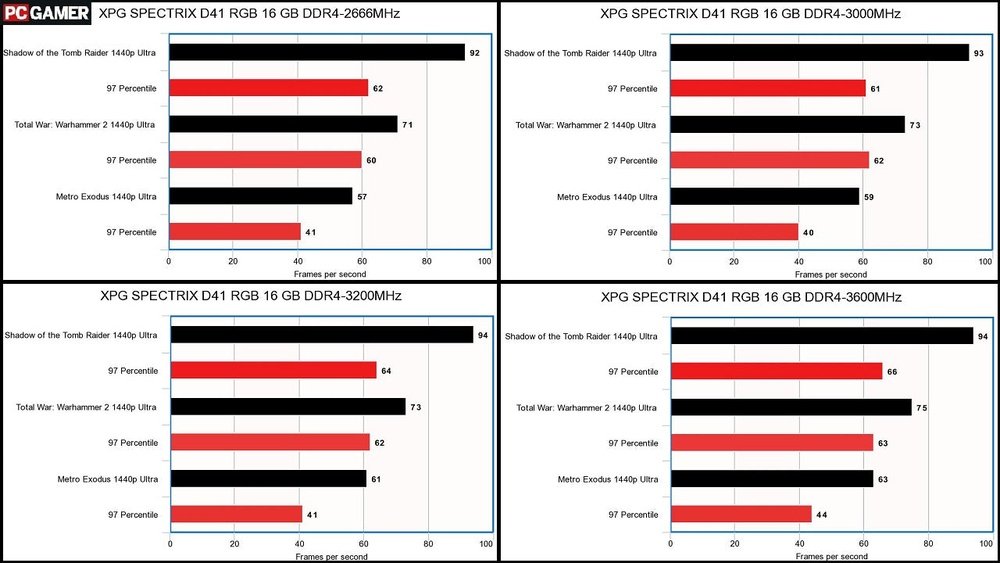
RAM speed and latency both affect how games run on your PC. Fast RAM can help load game data quicker. Low latency means the RAM responds faster to commands. These two factors work together to improve gaming performance.
Understanding Ram Frequency
RAM frequency shows how many cycles the memory completes per second. It is measured in megahertz (MHz). Higher frequency means RAM can handle more data each second. Games that use large textures and open worlds benefit from faster RAM.
However, not all games see big boosts from higher frequency. Simple games or those limited by the CPU may not improve much. Your motherboard and CPU also set limits on RAM speed.
Latency’s Role In Performance
Latency measures the delay before RAM starts to transfer data. It is often shown as CAS latency or CL number. Lower latency means less wait time for the RAM to respond. This can make a slight difference in frame rates and smoothness.
Games with quick actions or fast scenes gain more from low latency. Still, the difference is smaller compared to increasing RAM size or GPU power. Finding RAM with a good balance of speed and latency is key.
Balancing Speed And Stability
High-speed RAM might cause system crashes if unstable. Overclocking RAM can push speed beyond safe limits. Stability is crucial for long gaming sessions without errors.
Choosing RAM that matches your motherboard’s supported speeds helps avoid issues. Sometimes, slightly lower speed with better stability offers smoother gameplay. Test different settings to find what works best for your system.
Upgrading Ram For Better Gaming
Upgrading RAM can improve your gaming experience significantly. More RAM helps your computer run games smoothly and handle larger game files. It reduces lag and loading times, making gameplay more enjoyable. Not all games need a lot of RAM, but many modern titles do. Choosing the right amount and type of RAM is important for better gaming performance.
Signs You Need More Ram
Games take a long time to load or often freeze. Your computer slows down when playing games. You see warning messages about low memory. Background programs close automatically during gameplay. Frame rates drop suddenly in complex scenes. These signs show your system might need more RAM.
Best Ram Types For Gaming Pcs
DDR4 RAM is common and works well for most gaming PCs. Its speed supports modern games and multitasking. For newer builds, DDR5 RAM offers faster performance and future-proofing. Choose RAM with a speed of at least 3000 MHz. Dual-channel kits improve data flow between RAM and CPU. Prioritize brands known for quality and reliability.
Installation Tips For Optimal Performance
Turn off your PC and unplug it before installing RAM. Open the case carefully and locate RAM slots on the motherboard. Install RAM sticks firmly until clips click into place. Use matching RAM sticks for better stability and performance. Check your motherboard manual for correct slot placement. After installation, run a memory test to ensure proper setup.
Other Factors Affecting Gaming Performance
RAM is important for gaming, but it is not the only factor. Other parts of your computer affect how well games run. Understanding these factors helps improve your gaming experience. Let’s explore some key elements that impact gaming performance beyond RAM.
Cpu And Gpu Interactions With Ram
The CPU and GPU work together with RAM to run games smoothly. The CPU handles game logic and physics. The GPU processes graphics and visuals. Both need fast access to RAM to avoid delays. If either the CPU or GPU is slow, gaming performance drops. Good balance between these parts and RAM is essential for stable gameplay.
Storage Speed And Game Load Times
Storage devices like SSDs and HDDs affect how fast games load. SSDs offer quicker data access than HDDs. Faster storage reduces waiting times when starting games or loading new levels. It does not directly improve frame rates but makes gaming feel smoother. Slow storage can cause stuttering and long load screens.
Software Optimization And Background Processes
Game software must be well optimized for your hardware. Poor optimization can cause lag and crashes. Running many background programs uses CPU and RAM resources. This reduces the power available for games. Closing unnecessary apps before playing frees up memory and processing power. Keeping your system clean helps games run better.

Credit: www.youtube.com
Maximizing Gaming Speed With Ram Tweaks
Maximizing gaming speed with RAM tweaks can improve your gameplay experience. RAM plays a key role in how fast games load and run. Small changes to your RAM settings can make a noticeable difference. Understanding and adjusting these settings helps you get smoother performance.
Focus on safe and effective ways to enhance RAM speed. These tips work for most gaming PCs and laptops.
Overclocking Ram Safely
Overclocking means running your RAM faster than its standard speed. It can boost gaming speed but must be done carefully. Start by increasing the speed slightly. Test your system with stress tools to check stability. Watch the temperature to avoid overheating. Use gradual steps and keep backup settings. This reduces the risk of crashes or damage.
Using Dual Channel And Xmp Profiles
Dual channel mode doubles data paths between RAM and CPU. This improves memory speed and game loading times. Ensure your RAM sticks are installed in the correct slots. XMP profiles are preset settings from RAM makers. Enabling XMP in BIOS optimizes speed without manual tweaks. This simple change can improve performance with little effort.
Monitoring Ram Usage During Gameplay
Tracking RAM usage shows how much memory your games need. Use tools like Task Manager or third-party software. High RAM use may slow down your game or cause lag. Close background apps to free up memory. If RAM is always full, consider upgrading it. Monitoring helps find the right balance for smooth gaming.

Credit: www.reddit.com
Frequently Asked Questions
Does Ram Size Improve Gaming Performance?
Yes, larger RAM size allows smoother gameplay and faster loading times. It helps handle more background processes while gaming.
How Much Ram Is Ideal For Gaming?
Generally, 16GB RAM is ideal for modern gaming. It balances performance and cost for most games and multitasking needs.
Can Low Ram Cause Game Lag?
Low RAM can cause lag by limiting data processing speed. It leads to stutters, slow loading, and reduced frame rates.
Does Ram Speed Affect Game Performance?
RAM speed can slightly boost gaming performance. Faster RAM improves data transfer rates, benefiting certain games and reducing bottlenecks.
Conclusion
RAM plays a key role in gaming performance. It helps games run smoothly without lag. More RAM allows your computer to handle bigger games better. But having too much RAM won’t always improve speed. Balance your RAM with other parts like the CPU and graphics card.
Choose enough RAM for your game’s needs to enjoy good play. Upgrading RAM can fix slowdowns and improve your gaming experience. Remember, good RAM helps, but it’s just one part of the whole system.