
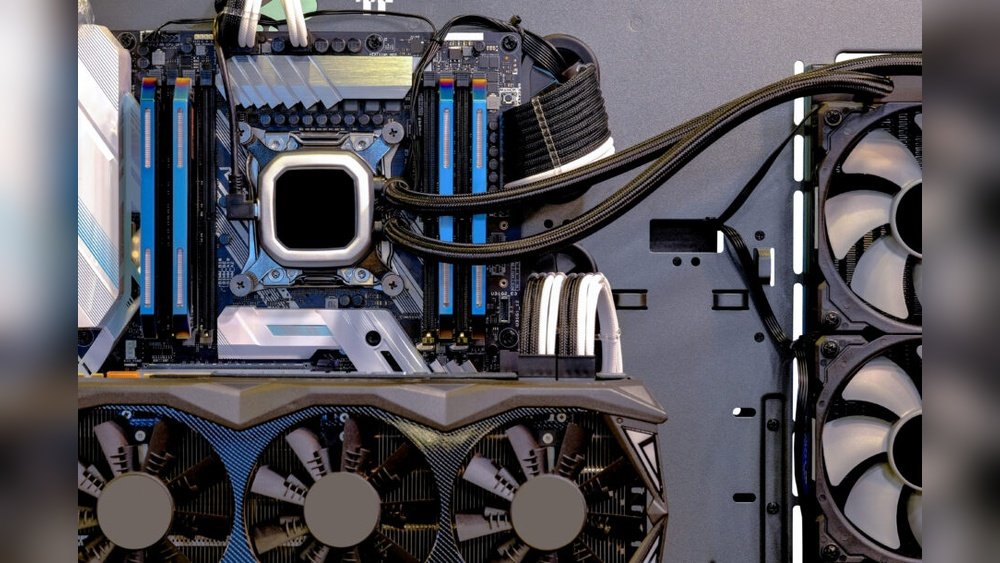
You might have heard a lot about liquid cooling and how it keeps your computer running smoothly. But is it really necessary for your setup?
Before you invest in expensive cooling systems, it’s important to know when liquid cooling actually makes a difference—and when it doesn’t. Understanding this can save you money, simplify your build, and keep your system running just fine without extra hassle.
Keep reading to find out if liquid cooling is really worth it for your needs.
Air Cooling Basics
Air cooling is the simplest way to keep computer parts cool. It uses air to move heat away from the CPU or GPU. This method has been reliable for many years. It works well for most everyday computers and even some gaming rigs. Understanding air cooling helps to know when liquid cooling is not needed.
How Air Cooling Works
Air cooling moves heat using fans and heatsinks. A heatsink is a metal block that sits on the hot chip. It pulls heat away from the chip. Then, fans blow air over the heatsink. The moving air carries heat out of the computer case. This process lowers the temperature of the parts. It keeps the computer running smoothly and safely.
Common Air Cooling Solutions
Many computers use simple air coolers. Stock coolers come with most CPUs and work fine for normal use. Larger aftermarket coolers have bigger heatsinks and stronger fans. These coolers are quieter and more efficient. Case fans also help by pushing air through the whole system. Together, these parts keep the inside cool without extra cost or complexity.
When Air Cooling Suffices
Air cooling remains the most common and practical choice for many computer users. It handles heat well for most tasks. It keeps systems stable and quiet without extra cost or complexity. Understanding when air cooling suffices helps avoid unnecessary expenses and setup.
Typical Use Cases
Air cooling works great for everyday tasks like browsing and office work. It manages heat well in systems with mid-range processors. Casual gamers also benefit from air cooling. It keeps temperatures safe during moderate gaming sessions. Basic video editing and streaming do not require advanced cooling. Air cooling meets the needs of most home and office computers.
Performance Limits Of Air Cooling
Air cooling has limits in extreme or heavy use. High-end gaming or 3D rendering pushes air coolers to their edge. Overclocking demands more efficient heat removal than air can provide. Large workloads can cause temperatures to rise, reducing performance. In such cases, liquid cooling offers better heat control. For typical users, air cooling remains reliable and effective.
Liquid Cooling Costs
Liquid cooling offers excellent heat management but comes with notable costs. These expenses can outweigh benefits for many users. Understanding the costs helps decide if liquid cooling is worth it.
Initial Investment
Liquid cooling systems cost more upfront than air cooling. You must buy pumps, tubes, radiators, and coolant. Installation needs skill and time, adding to the price. Many users find the initial cost too high for basic needs.
Maintenance Expenses
Liquid cooling requires regular upkeep to avoid leaks and blockages. Coolant needs replacing every few months. Failure to maintain can cause damage to PC parts. Maintenance adds ongoing costs and effort over time.
Risks Of Liquid Cooling
Liquid cooling can offer strong performance but carries some risks. These risks may make it unnecessary for many users. Understanding these risks helps decide if liquid cooling fits your needs.
Potential Leaks
Liquid cooling systems use tubes and water blocks. These parts can develop leaks over time. A leak can cause serious damage to computer parts. Even a small drip can short-circuit your hardware. Fixing leaks is often difficult and costly. This risk makes many users avoid liquid cooling.
Complex Installation
Installing liquid cooling is not simple. It requires careful setup and knowledge. The process takes more time than air cooling. Mistakes during installation can cause leaks or poor cooling. Many users find the setup confusing and frustrating. This complexity can lead to more problems than benefits.
Simplifying Your Setup
Simplifying your computer setup can save time and reduce problems. Skipping liquid cooling helps keep your system cleaner and easier to manage. This section explains how a simpler setup benefits you in two key ways.
Reducing Cable Clutter
Air cooling uses fewer cables than liquid cooling. Fewer cables mean less mess inside your case. This makes airflow better and keeps your parts cooler. It also looks tidier and makes your build easier to handle. No tubes or pumps to worry about. Just simple fans and power cables.
Easier Upgrades And Maintenance
With air cooling, upgrading parts is faster and less risky. No need to drain or refill any liquids. Cleaning fans is simple and quick too. You avoid leaks and other liquid cooling issues. This keeps your system running smoothly and extends its life. Maintenance feels less like a chore.

Credit: alphablugaming.com
Energy Efficiency Considerations
Energy efficiency is a key factor when deciding on cooling solutions for computers. Cooling methods affect how much power the system uses. Choosing the right cooling can save electricity and reduce costs. It also helps keep the environment safe by lowering energy waste.
Not all computers need liquid cooling to stay cool. Sometimes, simpler systems work well and use less power. Understanding how different cooling options impact energy use helps make smarter choices.
Power Consumption Comparison
Liquid cooling systems often use pumps and extra fans. These parts need electricity to run. This raises the total power used by the computer. Air cooling mainly uses fans, which usually consume less power. For basic or moderate tasks, air cooling often saves energy.
Power use is especially important in small or low-budget setups. High power consumption can increase electricity bills. It can also cause more heat, which needs even more cooling. Keeping power use low helps avoid this cycle.
Thermal Performance Impact
Liquid cooling can cool components quickly and quietly. It works well for high-performance systems that produce a lot of heat. But for average computers, air cooling is often enough to maintain safe temperatures. Using liquid cooling in such cases may not improve performance much.
When a system runs cooler, it can run faster and last longer. Still, the extra energy used by liquid cooling might not justify the small thermal gains for many users. Efficient air cooling balances good thermal performance with low power use.
When To Choose Liquid Cooling
Choosing the right cooling system matters for your computer’s health and speed. Not every setup needs liquid cooling. Knowing when to use it saves money and effort. Liquid cooling fits best in specific cases. These cases often involve higher demands on the system.
High-performance Systems
High-performance systems generate more heat than normal ones. These include powerful processors and multiple graphics cards. Air cooling might struggle to keep these parts cool. Liquid cooling removes heat faster and more quietly. It helps maintain stable temperatures during heavy tasks. This keeps your system running smoothly and safely.
Overclocking Needs
Overclocking pushes your CPU or GPU beyond standard speeds. This increases heat output significantly. Air cooling may not control this extra heat well. Liquid cooling handles higher temperatures better and avoids overheating. It allows safe overclocking for better performance. Choosing liquid cooling supports your system’s extra power safely.

Credit: prophetstor.com
Making The Right Choice
Choosing the right cooling system for your computer is important. Not every setup needs liquid cooling. Simple air cooling often does the job well. Understanding your needs can save money and effort. Let’s explore how to decide when liquid cooling is unnecessary.
Assessing Your Hardware
Start by looking at your computer parts. Check the processor and graphics card models. Many mid-range CPUs and GPUs run cool with air cooling. High-performance or overclocked parts generate more heat. Those might need liquid cooling to stay safe. If your hardware is standard or slightly above average, air cooling is enough.
Also, consider the case size and airflow. Small cases with poor airflow may cause heat build-up. Good air circulation helps keep parts cool without liquid systems. If your case has several fans and vents, liquid cooling may not add much benefit.
Budget And Future Plans
Think about how much you want to spend. Liquid cooling systems cost more than air coolers. Installation can be tricky and may require maintenance. If your budget is tight, investing in a good air cooler is smarter.
Plan for future upgrades. If you want to upgrade to high-end parts later, liquid cooling might be useful. For now, if you do not plan heavy upgrades, skip it. You can always add liquid cooling later when needed.

Credit: www.youtube.com
Frequently Asked Questions
When Is Liquid Cooling Not Necessary For Pcs?
Liquid cooling is unnecessary for PCs with low to moderate performance needs. Standard air cooling handles heat effectively in such cases. Budget builds and non-gaming setups typically don’t require liquid cooling systems.
Can Air Cooling Be Better Than Liquid Cooling?
Air cooling can be better for simplicity, cost, and maintenance. It is reliable, easier to install, and less prone to leaks compared to liquid cooling. For average users, air cooling often suffices.
Does Liquid Cooling Improve Gaming Performance?
Liquid cooling does not directly improve gaming performance. It helps maintain lower temperatures, potentially allowing higher overclocking. However, the actual frame rates depend mainly on the GPU and CPU.
Is Liquid Cooling Necessary For Overclocking?
Liquid cooling is beneficial but not always necessary for mild overclocking. High overclocks generate more heat, where liquid cooling offers better thermal management. Moderate overclockers can often rely on high-quality air coolers.
Conclusion
Liquid cooling suits high-performance computers best. For everyday use, air cooling works well. It costs less and needs less care. Many computers stay cool without liquid systems. Simple setups avoid leaks and extra parts. Choose cooling that fits your needs and budget.
Stay informed to keep your PC safe and quiet. Cooling doesn’t have to be complex or costly. Sometimes, less is truly more.
