
When you’re building or upgrading your PC, knowing which parts really boost your computer’s speed can save you time and money. You want your games to run smoother, your programs to open faster, and your overall experience to feel snappier.
But with so many components inside your machine, it’s easy to get confused about what actually makes the biggest difference. This guide will help you focus on the key PC parts that affect performance the most, so you can make smart choices and get the power you need without wasting resources.
Keep reading, and you’ll discover exactly where to invest for the biggest impact.

Credit: prestressconcrete.com
Processor Impact
The processor is one of the most important parts of a PC. It controls how fast your computer runs tasks. The processor affects everything from simple browsing to heavy software use. Understanding its role helps you choose the right CPU for your needs.
The impact of a processor on performance depends on several key features. These features determine how well your PC handles different jobs and programs.
Cpu Speed And Cores
CPU speed, measured in gigahertz (GHz), shows how many cycles a processor completes each second. Higher speeds mean faster task execution. However, the number of cores matters too. More cores let the CPU handle multiple tasks at once. Dual-core CPUs work well for basic use. Quad-core or higher is better for gaming and multitasking.
Architecture And Generation
Processor architecture refers to the design and technology inside the CPU. Newer generations use improved architecture. This means better efficiency and power use. A newer CPU generation often performs better than an older one at the same speed. This affects battery life and heat production too.
Overclocking Effects
Overclocking increases the CPU speed beyond its standard limit. It can boost performance for demanding tasks. But it also creates more heat and uses more power. Overclocking may reduce the CPU’s lifespan if not managed properly. Cooling solutions are important when overclocking.
Graphics Card Role
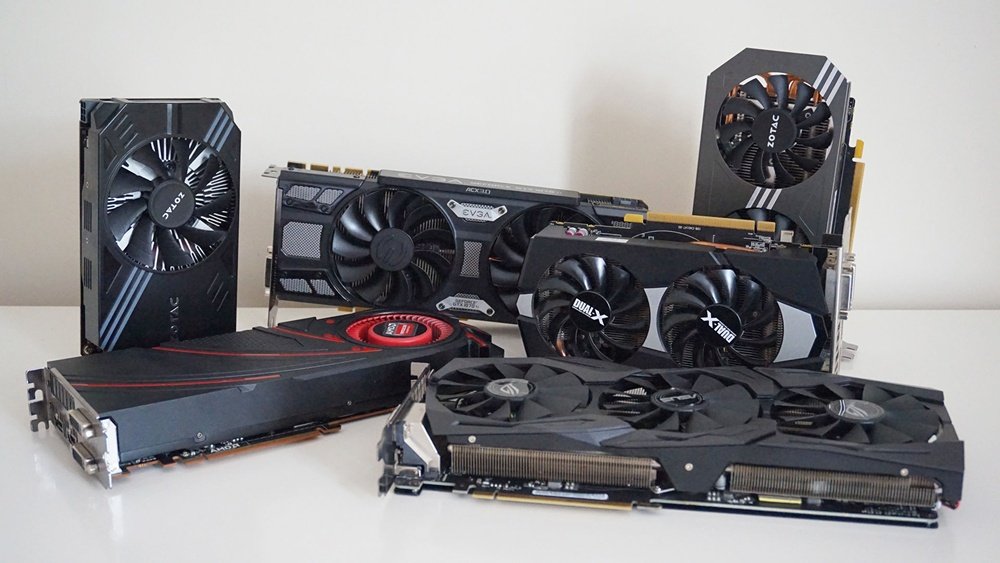
The graphics card is a key part of a PC. It controls how images and videos look on your screen. This part handles complex tasks quickly. It affects gaming, video editing, and 3D work. A strong graphics card means better visuals and faster work.
Choosing the right graphics card can improve your PC’s overall speed. It helps the processor by taking over heavy graphic tasks. This leads to smoother performance in many apps and games.
Gpu Power And Vram
The GPU is the brain of the graphics card. It processes all the images and videos. A more powerful GPU can handle more detailed graphics. VRAM is the memory on the graphics card. It stores images and textures for quick access. More VRAM means better handling of high-resolution textures. This makes games and videos look sharper and run smoothly.
Ray Tracing And Ai Features
Ray tracing creates realistic light and shadow effects. It makes games and animations look more lifelike. AI features help improve image quality and speed. They can also boost performance in creative software. These technologies require modern graphics cards. They add depth and realism to visual content.
Gaming Vs Productivity Gpus
Gaming GPUs focus on high frame rates and smooth graphics. They deliver fast and detailed visuals for games. Productivity GPUs are designed for tasks like video editing and 3D design. They handle complex calculations and large data better. Choosing the right GPU depends on what you use your PC for. Each type optimizes performance for different needs.
Memory Influence
Memory plays a key role in PC performance. It helps your computer store and access data quickly. Faster memory lets your system handle more tasks at once. Poor memory can slow down everything you do. Understanding how memory affects performance helps you choose the right parts.
Different factors in memory impact speed and efficiency. These include size, speed, and how memory is configured. Each factor affects your computer’s ability to run programs smoothly.
Ram Size And Speed
RAM size means how much data your computer can hold temporarily. More RAM lets you run more apps without slowing down. Speed shows how fast RAM can move data. Higher speed means quicker access to data. Both size and speed matter for a smooth experience.
Dual Channel Vs Single Channel
Dual channel means using two memory sticks together. This setup doubles the data paths to the processor. It improves memory bandwidth and speeds up tasks. Single channel uses only one memory stick. It limits data flow and can slow performance. Dual channel is better for faster data access.
Latency And Timing Effects
Latency is the delay before data starts moving. Lower latency means faster response from memory. Timing refers to the number of clock cycles for tasks. Smaller timing numbers lead to quicker data handling. Both latency and timing affect real-world speed. Fast memory with low latency improves performance.
Credit: www.starplastics.com
Storage Speed
Storage speed plays a big role in your PC’s overall performance. It affects how fast your computer starts, how quickly programs open, and how smooth files move. Faster storage means less waiting and better user experience.
Choosing the right storage can make your PC feel much faster. Different types of drives offer different speeds and features. Understanding these differences helps you pick the best option for your needs.
Ssd Vs Hdd Performance
Hard Disk Drives (HDDs) use spinning disks to store data. This makes them slower in reading and writing information. Solid State Drives (SSDs) have no moving parts. They read and write data much faster than HDDs.
SSDs reduce load times and make your system more responsive. Tasks like booting your PC or opening apps happen quicker. HDDs, while cheaper, slow down your system due to mechanical parts.
Nvme Vs Sata Ssds
NVMe SSDs connect through the PCIe bus, offering high speeds. SATA SSDs use an older interface, limiting their speed. NVMe drives can be 3 to 5 times faster than SATA SSDs.
This speed difference shows in large file transfers and heavy multitasking. NVMe SSDs improve gaming load times and video editing tasks. SATA SSDs still provide a big boost over HDDs but lag behind NVMe drives.
Storage Capacity Considerations
Choosing the right storage size matters for performance. A nearly full drive slows down your PC. Keep at least 20% of your drive free for smooth operation.
Think about your file sizes and usage. Larger SSDs cost more but give room for growth. Combining an SSD with an HDD can balance speed and storage space.
Motherboard Importance
The motherboard is the backbone of any PC. It connects all parts and allows them to work together smoothly. A good motherboard can boost your computer’s performance and stability. Choosing the right one is important for your system’s speed and future upgrades.
Chipset And Compatibility
The chipset controls how parts communicate. It affects the CPU, RAM, and storage support. Different chipsets support different processors and speeds. Picking a compatible chipset ensures your PC runs well. It also helps with future upgrades.
Expansion Slots And Features
Expansion slots let you add more parts, like graphics cards or sound cards. More slots mean more options for upgrades. Features like USB ports, M.2 slots, and Ethernet also matter. These add convenience and improve your PC’s performance.
Vrm Quality And Stability
The VRM supplies power to the CPU. Good VRM means stable and clean power delivery. This keeps the CPU running smoothly under heavy loads. A quality VRM helps prevent crashes and improves system life.
Power Supply Impact
The power supply plays a key role in PC performance. It provides energy to all components. A weak or unstable power supply can cause crashes or damage. Choosing the right power supply ensures smooth and reliable operation. It affects how well your PC runs under heavy loads.
Wattage And Efficiency
Wattage shows how much power the supply can deliver. A low wattage supply may fail with high-performance parts. Choose a supply with enough wattage for your system needs. Efficiency means how well the power supply converts electricity. Higher efficiency saves energy and reduces heat. Look for power supplies with 80 Plus ratings for better efficiency.
Stable Power Delivery
Stable power delivery keeps voltage steady for your components. Fluctuations can cause errors or shorten hardware life. Good power supplies use quality parts to maintain steady voltage. This stability helps your PC run without unexpected shutdowns. It supports peak performance during gaming or heavy tasks.
Modular Vs Non-modular
Modular power supplies let you connect only needed cables. This reduces cable clutter and improves airflow inside the case. Non-modular supplies have fixed cables that can be bulky. Modular designs make building and upgrading easier. Both types can perform well but modular offers better cable management.
Cooling And Performance
Cooling plays a key role in PC performance. It keeps the parts at safe temperatures. Without good cooling, parts can slow down or even get damaged. Efficient cooling helps your PC run smoothly and last longer.
Air Vs Liquid Cooling
Air cooling uses fans to move heat away from parts. It is simple and cheaper. Most PCs use air cooling because it works well for many users.
Liquid cooling uses water or special liquid to cool parts. It removes heat faster than air cooling. Liquid cooling is quieter and better for high-performance PCs.
Thermal Throttling Effects
Thermal throttling happens when a part gets too hot. The PC lowers its speed to cool down. This protects the hardware but reduces performance. Good cooling prevents thermal throttling and keeps speeds high.
Case Airflow Importance
Case airflow moves cool air inside and pushes hot air out. Poor airflow traps heat inside the case. This makes parts warmer and slows the PC down. Proper airflow helps keep all parts cool and working well.
Other Factors
Besides core hardware, other factors also impact PC performance. These elements influence how smoothly your system runs. They affect your experience in subtle but important ways.
Monitor Refresh Rate
The monitor’s refresh rate shows how many times the screen updates each second. Higher rates give smoother images. A 60 Hz monitor refreshes 60 times per second. Moving to 144 Hz or more can make animations look fluid. This helps especially in fast games and video playback. A low refresh rate may cause blurring or tearing. Choose a monitor that matches your GPU’s power for best results.
Peripheral Latency
Peripheral latency is the delay between your action and the computer’s response. Keyboards, mice, and controllers vary in latency. Lower latency means quicker response times. High latency can feel laggy or slow in games and apps. Wired devices usually have less delay than wireless ones. Choosing low-latency peripherals improves accuracy and control. This is crucial for competitive gaming and precision tasks.
Software Optimization
Software optimization means how well programs use your PC’s hardware. Poorly optimized software can slow down even strong systems. Efficient software runs fast and uses resources wisely. Updates often fix bugs and improve speed. Running too many background apps can reduce performance. Keep your system clean and updated for smooth operation. Good optimization balances speed and stability.
Credit: winformusic.org
Frequently Asked Questions
Which Pc Part Impacts Gaming Performance The Most?
The graphics card (GPU) impacts gaming performance the most. It processes images and renders visuals. A powerful GPU ensures smooth gameplay and higher frame rates.
How Does The Cpu Affect Overall Pc Speed?
The CPU handles all instructions and computations. A faster CPU improves multitasking and application speed. It directly influences system responsiveness and performance.
Does Ram Size Influence Pc Performance Significantly?
Yes, RAM size affects multitasking and application loading. More RAM allows smoother operation of multiple programs. Insufficient RAM can cause slowdowns and stuttering.
What Role Does Storage Type Play In Performance?
Storage type affects data access speed. SSDs offer faster boot times and load speeds than HDDs. Upgrading to an SSD greatly enhances overall system responsiveness.
Conclusion
Choosing the right PC parts affects your computer’s speed and smoothness. The processor, RAM, and graphics card play big roles. A fast CPU helps with most tasks. More RAM lets your PC handle many things at once. A good graphics card improves visuals and gaming.
Storage type also matters for loading times. Balancing these parts fits your needs and budget. Small changes can bring big improvements. Keep these points in mind to build a better PC. Simple upgrades can make your computer work much better.
