
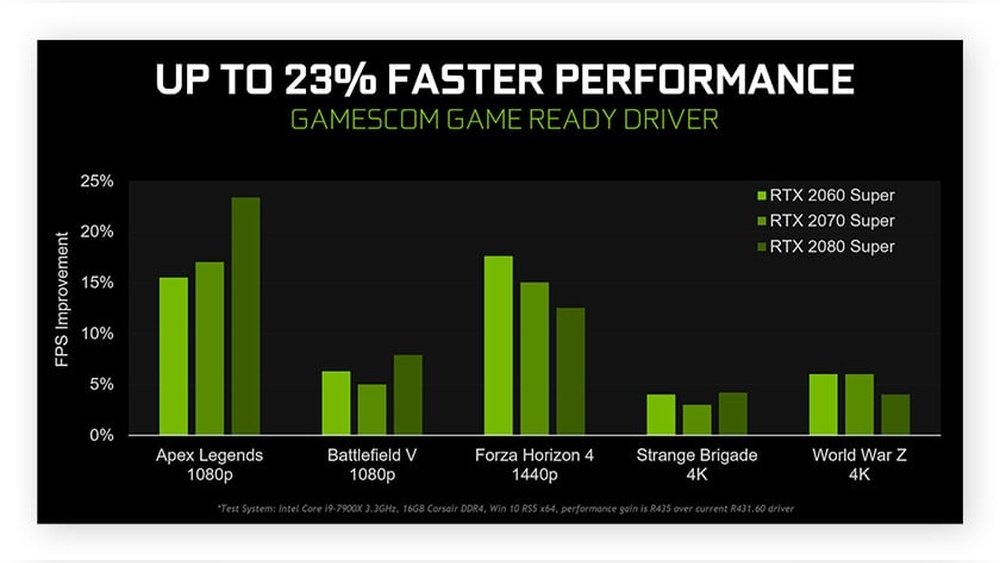
Are you frustrated by low FPS while gaming or working on your PC? You’re not alone.
Understanding what PC parts affect FPS can make a huge difference in how smoothly your games run. Your computer’s performance isn’t just about having the latest gear—it’s about knowing which components truly impact your frame rates. You’ll discover the key parts that control FPS and how upgrading them can transform your experience.
Keep reading to unlock the secret to smoother, faster gameplay.
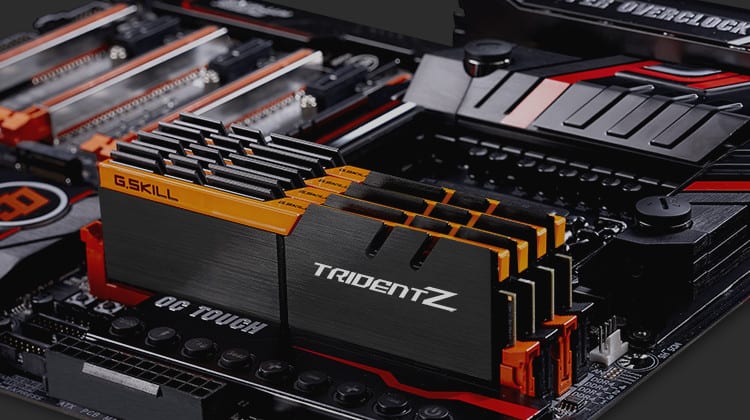
Credit: techguided.com
Graphics Card Impact
The graphics card plays a major role in your PC’s frame rate. It handles most of the visual work in games. A better graphics card often means smoother gameplay and higher FPS. Understanding how it works helps you pick the right part for your needs.
Not all graphics cards perform the same. Different features affect how well they render images and handle game data. Below are key factors that influence FPS directly linked to the graphics card.
Role In Rendering
The graphics card’s main job is rendering images on your screen. It processes game data and turns it into pixels you see. The faster it does this, the higher your FPS will be. A strong GPU can handle more complex graphics without slowing down.
Vram And Resolution
VRAM stores textures and graphic details for quick access. Higher screen resolution needs more VRAM to keep images sharp. If VRAM is too low, FPS drops because the card struggles to load data fast. More VRAM helps maintain smooth gameplay at higher resolutions.
Gpu Clock Speed
The GPU clock speed shows how fast the graphics card processes data. Higher clock speeds mean quicker frame rendering. This speed affects how many frames the card can produce each second. Overclocking can boost FPS but may increase heat and power use.

Credit: www.youtube.com
Processor Influence
The processor plays a key role in your PC’s gaming performance. It handles many tasks that help games run smoothly. A strong processor can improve your frame rate and reduce lag. Understanding how the processor influences FPS helps in choosing the right parts for gaming.
This section explains important processor features that affect FPS in games.
Core Count And Threads
The core count shows how many processing units the CPU has. More cores allow the processor to handle more tasks at once. Threads are virtual cores that help manage multiple tasks efficiently. Games that use many cores and threads perform better with higher counts. A processor with four or more cores and multiple threads usually supports modern games well.
Clock Speed Importance
Clock speed measures how fast a processor runs, shown in gigahertz (GHz). Higher clock speeds let the CPU process instructions quicker. This speed directly impacts how fast games respond. Even with many cores, a low clock speed can slow game performance. Choose a processor with a good balance of cores and clock speed for better FPS.
Cpu Bottlenecking
CPU bottlenecking happens when the processor limits the overall system speed. If the CPU is too slow, it holds back the graphics card. This causes lower frame rates and stutters in games. Avoid bottlenecks by pairing a strong CPU with a powerful GPU. Proper balance ensures smooth gameplay and better FPS results.
Ram Effects
RAM plays a key role in your computer’s gaming performance. It helps the processor handle game data quickly. The right RAM setup can improve your FPS by reducing delays and stutters. Let’s explore how different RAM features affect your frame rates.
Memory Size
More RAM allows your PC to run games smoothly. Games need enough memory to load textures and game files fast. If RAM is too small, the system uses slower storage, causing lag. For most modern games, 16GB is a good starting point. Smaller amounts can limit FPS and cause stuttering.
Speed And Latency
RAM speed affects how fast data moves to the CPU. Higher speed RAM can improve FPS slightly, especially in CPU-heavy games. Latency is the delay before data starts moving. Lower latency means quicker responses. Fast RAM with low latency helps reduce frame drops and keeps gameplay smooth.
Dual Channel Vs Single Channel
Dual channel RAM means two sticks work together. This doubles the data path, allowing faster data transfer. Single channel uses only one stick, cutting bandwidth in half. Dual channel setups often boost FPS by 5-15%. It is a simple upgrade that improves overall game performance.
Storage And Load Times
Storage plays a key role in how fast games load and run. It affects the time it takes to start a game and move between scenes. Faster storage means less waiting and smoother gameplay. Let’s explore how different types of storage affect your gaming experience.
Ssd Vs Hdd
SSDs (Solid State Drives) use flash memory to store data. They read and write data much faster than HDDs (Hard Disk Drives). HDDs have spinning disks that slow down data access. This speed difference changes how quickly games load. SSDs cut down loading times significantly. HDDs can cause longer waits before games start or levels load.
Impact On Game Performance
Storage speed does not directly change your FPS (frames per second). FPS depends more on your CPU and GPU. Still, storage affects how smooth the game feels. Slow storage can cause stutters when loading textures or maps during gameplay. Fast SSDs help keep the game running without interruptions. This means fewer freezes or delays while playing.
Motherboard Role
The motherboard plays a key role in your PC’s performance and FPS. It acts as the main hub connecting all parts. The right motherboard ensures smooth communication between the CPU, GPU, and memory. It affects how well your system can run games and handle graphics.
Compatibility And Features
Motherboards must match your CPU and RAM type. Using the wrong one limits your options and can lower FPS. Some motherboards support faster RAM, which helps improve frame rates. Also, the number of PCIe slots affects GPU upgrades. More slots mean easier upgrades and better performance.
Overclocking Support
Overclocking pushes your CPU or RAM beyond normal speeds. Not all motherboards support this feature. A good motherboard has strong power delivery and cooling options. This keeps your system stable during overclocking. Overclocking can boost FPS by increasing processing power.
Power Supply Influence
The power supply unit (PSU) plays a vital role in your PC’s performance. It provides energy to all components, including the graphics card and processor. A weak or unstable power supply can cause FPS drops and system crashes. The right PSU ensures smooth and consistent power delivery, which helps maintain stable frame rates during gaming.
Stable Power Delivery
Stable power delivery keeps your PC running without interruptions. Fluctuations in power can cause hardware to underperform or shut down. A quality power supply avoids sudden voltage drops and surges. This stability helps the GPU and CPU work at their best. As a result, you get smoother gameplay and better FPS.
Wattage And Efficiency
The wattage of your PSU must match your PC’s needs. Too little wattage can limit your hardware’s power, causing FPS issues. Too much wattage wastes energy and money. Efficiency ratings, like 80 Plus, show how well the PSU converts power. Higher efficiency means less heat and more reliable power. This balance supports long gaming sessions without drops in performance.
Cooling Solutions
Cooling solutions play a key role in keeping your PC running smoothly. Proper cooling helps parts stay at safe temperatures. This keeps your system stable and boosts performance. Poor cooling can cause problems that lower your FPS in games. Understanding cooling options helps you pick the right setup for your PC.
Thermal Throttling Prevention
Thermal throttling happens when a CPU or GPU gets too hot. The part slows down to avoid damage. This drop in speed reduces your FPS. Good cooling stops parts from overheating. This keeps your PC running fast and steady. Fans and heatsinks remove heat from parts quickly. Monitoring temperatures helps catch issues before throttling starts.
Air Vs Liquid Cooling
Air cooling uses fans and metal fins to cool parts. It is simple and easy to install. Air coolers are usually cheaper and need less maintenance. Liquid cooling uses water or coolant to move heat away. It can cool parts better and quieter. Liquid cooling works well for overclocked or high-end PCs. Both types help keep your FPS steady by controlling heat.

Credit: www.avg.com
Monitor And Display Settings
Monitor and display settings play a big role in your gaming experience. They directly affect how smooth and clear your games look. Choosing the right settings can improve your frames per second (FPS) and overall gameplay. Let’s explore how refresh rate and resolution impact FPS and gaming quality.
Refresh Rate Effects
The refresh rate is how many times your monitor updates the image per second. It is measured in Hertz (Hz). A higher refresh rate means smoother motion on screen. For example, a 144Hz monitor shows 144 frames per second. This can make games feel more fluid and responsive.
Lower refresh rates, like 60Hz, show fewer frames. This can cause a choppy or blurry image during fast movements. A high refresh rate monitor can improve your gameplay by reducing lag and motion blur. However, your PC must produce enough FPS to match the monitor’s refresh rate for the best effect.
Resolution Impact
Resolution is the number of pixels on your screen. Common resolutions include 1080p, 1440p, and 4K. Higher resolution means more pixels and sharper images. But it also demands more power from your PC.
Running games at 4K requires a strong graphics card and CPU. This can lower your FPS if your hardware is not strong enough. Lower resolutions like 1080p need less power and can give higher FPS. Choose a resolution that balances image quality and smooth gameplay for your PC setup.
Frequently Asked Questions
Which Pc Part Most Impacts Fps Performance?
The graphics card (GPU) most affects FPS. It renders game visuals and handles complex graphics processing. A powerful GPU improves frame rates and gaming smoothness significantly.
How Does The Cpu Affect Gaming Fps?
The CPU processes game logic and physics. A faster CPU reduces bottlenecks, allowing the GPU to perform better. This results in higher and more stable FPS in CPU-intensive games.
Does Ram Speed Influence Fps In Games?
Yes, RAM speed can impact FPS. Faster RAM improves data transfer between CPU and memory, enhancing game loading times and reducing stutters, especially in modern games with high memory demands.
Can Storage Type Affect Fps During Gameplay?
While storage type doesn’t directly impact FPS, SSDs reduce game loading times and texture streaming delays. This leads to smoother gameplay experience but doesn’t increase raw FPS numbers.
Conclusion
PC parts like the graphics card and processor impact FPS the most. RAM and storage also play important roles. A strong GPU helps run games smoothly. The CPU manages game calculations and tasks. Faster RAM speeds improve data flow. SSDs reduce load times and prevent stutters.
Balancing these parts creates better performance. Don’t forget to keep drivers updated. Small upgrades can make noticeable differences. Understanding these parts helps you choose wisely. Enjoy smoother gaming with the right PC setup.
