
Choosing the right motherboard size can feel confusing, but it doesn’t have to be. Your motherboard is the heart of your computer—it connects all the important parts and determines what you can build.
Picking the wrong size could mean wasted money or a setup that doesn’t fit your needs. By the end of this article, you’ll know exactly which motherboard size matches your goals, space, and budget. Ready to build a system that works perfectly for you?
Let’s dive in.
Credit: www.shoshitamam.com
Motherboard Sizes Explained
Choosing the right motherboard size is key for building a good PC. Motherboards come in different sizes. Each size fits certain cases and offers specific features. Knowing these sizes helps pick the best fit for your needs.
Here are the main motherboard sizes explained clearly. Each has unique advantages and limitations.
Atx
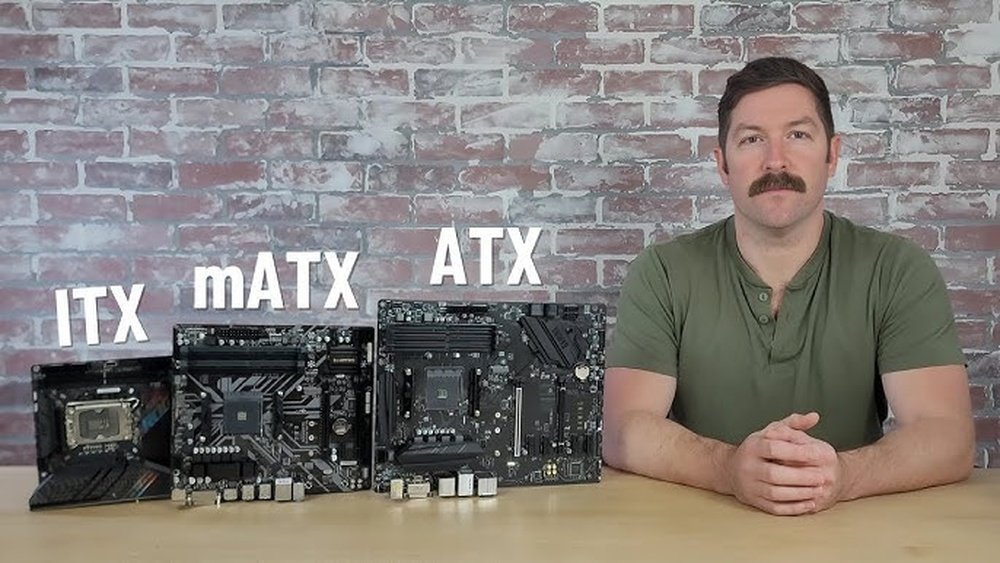
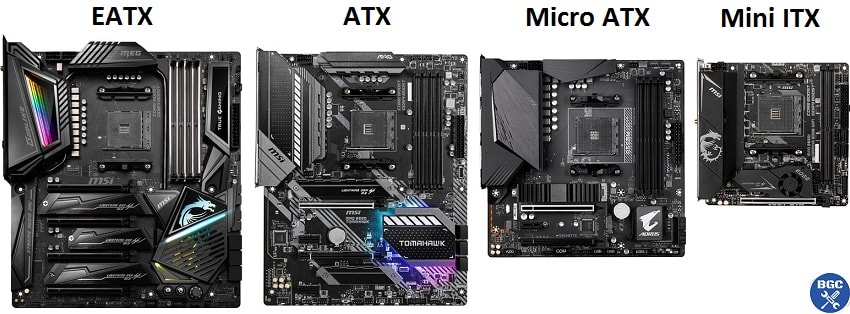
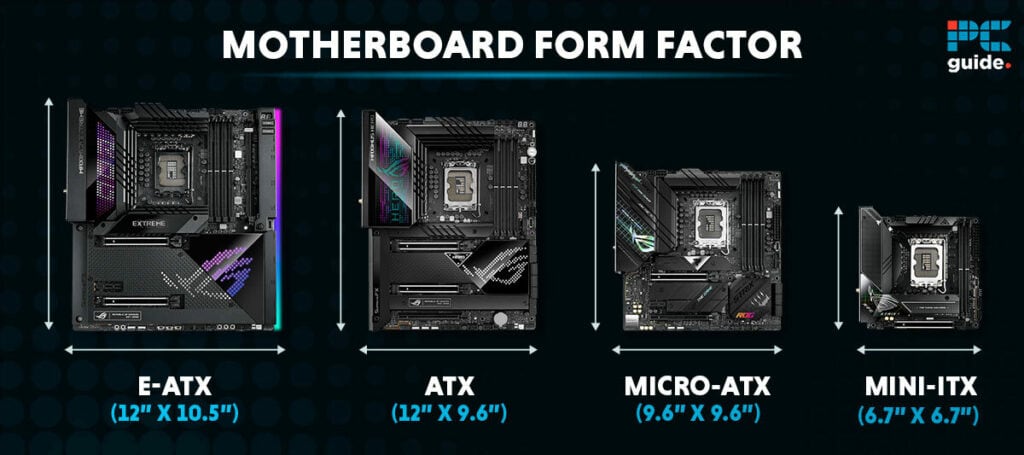
ATX is the most common motherboard size. It measures about 12 by 9.6 inches. It has many slots for RAM, graphics cards, and storage devices. ATX suits users who want expandability and power. Many desktop cases support ATX boards.
Micro-atx
Micro-ATX boards are smaller, around 9.6 by 9.6 inches. They still offer good features and some expansion slots. Micro-ATX fits smaller cases and saves space. It balances size and functionality well. Ideal for budget builds or compact PCs.
Mini-itx
Mini-ITX is a tiny motherboard size. It measures 6.7 by 6.7 inches. It has fewer slots and ports. Mini-ITX is perfect for very small or portable computers. It fits small cases but limits upgrades. Good for simple setups or small desks.
E-atx And Others
E-ATX stands for Extended ATX. It is bigger than ATX, about 12 by 13 inches. E-ATX offers more slots and power options. It suits high-end builds and workstations. Other sizes exist but are less common. Choose based on your case and usage needs.
Credit: www.magic-vacation.com
Factors Affecting Motherboard Size
Choosing the right motherboard size depends on several important factors. These factors influence how well your computer parts fit and work together. Understanding these elements helps you pick a motherboard that meets your needs without extra costs or problems.
Case Compatibility
Motherboards come in different sizes like ATX, Micro-ATX, and Mini-ITX. Your computer case must match the motherboard size. A large motherboard won’t fit in a small case. Check your case specifications before buying a motherboard.
Expansion Slots
Expansion slots allow you to add extra cards like graphics or sound cards. Larger motherboards have more slots. More slots mean more upgrade options for your computer. Choose a size that fits your planned expansions.
Port Availability
Ports connect external devices like USB drives and monitors. Bigger motherboards often offer more ports. Consider how many devices you will connect. This helps avoid buying extra adapters or hubs.
Cooling Requirements
Proper cooling keeps your computer safe and fast. Larger motherboards usually provide better airflow space. They also support more cooling fans or liquid cooling systems. Think about your cooling needs when choosing motherboard size.
Choosing Size Based On Usage
Choosing the right motherboard size depends on how you plan to use your computer. Different uses need different features and space. Picking a motherboard that fits your needs helps you build a better PC. It saves money and avoids extra parts you do not need.
Gaming Builds
Gaming PCs often need motherboards with strong power and many slots. Larger sizes like ATX offer more space for multiple graphics cards and extra cooling. They also support faster memory and more USB ports. This size helps keep your system cool during long gaming sessions.
Office And Productivity Pcs
Office computers usually do not need many extra features. Smaller motherboards like microATX or Mini-ITX work well here. They fit in compact cases and use less power. These sizes provide enough ports for keyboards, mice, and monitors. They keep your workspace neat and simple.
Home Theater Pcs
Home theater PCs focus on quiet and small design. Mini-ITX motherboards are perfect for this use. They fit inside tiny cases and connect easily to TVs. These boards offer enough ports for media playback and streaming. Their small size helps keep noise low and space free.
Workstations
Workstations need powerful motherboards with many expansion options. Larger boards like E-ATX give space for extra RAM and multiple GPUs. They support professional tasks like video editing and 3D rendering. This size helps handle heavy workloads and multiple devices smoothly.
Balancing Features And Size
Choosing the right motherboard size is about finding the best balance between features and physical space. Different sizes offer different capabilities and limits. Smaller motherboards fit compact cases but may lack some options. Larger boards provide more features but need bigger cases. Understanding key features helps pick the right size for your needs.
Connectivity Options
Motherboards vary in the number of USB ports, audio jacks, and video outputs. Larger boards usually offer more connections for devices. Smaller boards might have fewer ports but still cover basic needs. Check the ports you need for your keyboard, mouse, and other devices. Make sure the board size matches the connectivity you want.
Overclocking Support
Overclocking means running your CPU faster than usual. This needs strong power delivery and cooling. Bigger motherboards often have better power phases for stable overclocking. Smaller boards may not support high overclocking well. Choose a size that fits your plan for CPU speed and heat management.
Ram Capacity
The number of RAM slots depends on motherboard size. Larger boards can hold more RAM sticks. More RAM slots mean easier upgrades and better multitasking. Smaller motherboards might have only two slots. Think about how much memory you need now and later before picking a size.
Storage Options
Storage includes hard drives and SSDs connected to the motherboard. Bigger motherboards usually offer more SATA ports and M.2 slots. This allows more drives for games, files, and backups. Smaller boards may limit storage expansion. Choose a size that supports your current and future storage needs.
Budget Considerations
Choosing the right motherboard size affects your budget. Different sizes come with different prices. Knowing the cost differences helps you pick the best option for your money. It also shows how much value you get for the price. Planning your budget carefully avoids overspending or missing important features.
Price Differences By Size
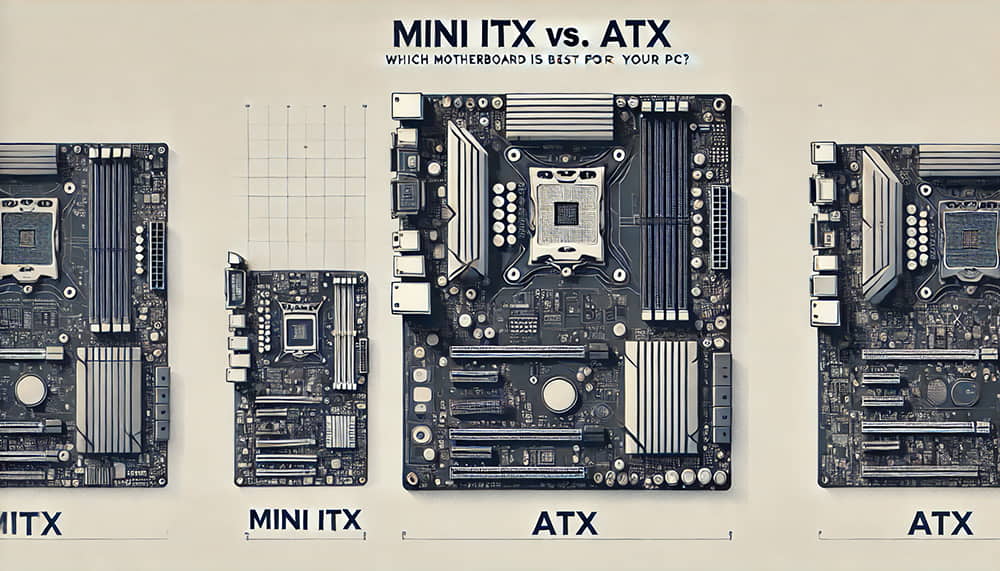
Motherboards come in various sizes like ATX, Micro-ATX, and Mini-ITX. ATX boards are usually the most expensive. They have more slots and ports, which add to the cost. Micro-ATX boards cost less but still offer good features. Mini-ITX boards are the cheapest but have fewer slots. Your budget decides which size fits best.
Value For Money
Price alone does not show true value. Larger motherboards often offer more ports and slots. This helps if you need many devices or upgrades. Smaller boards save money but may limit your options. Check what features you need before buying. Choose a motherboard that gives the best features for the price.
Future Upgrade Potential
Think about future upgrades before buying. Bigger motherboards usually have more space for extra parts. This means you can add more RAM, GPUs, or storage later. Smaller boards limit how much you can upgrade. Picking a board with upgrade options saves money in the long run. It helps your PC last longer and stay powerful.
Tips For Perfect Fit
Choosing the right motherboard size is important for a smooth PC build. A perfect fit means your parts work well and fit inside your case. These tips help you pick the best motherboard size for your needs.
Start by understanding your case size and what it supports. Then check if your parts match the motherboard size. Finally, plan how to arrange everything inside your build.
Measuring Your Case
Check your PC case for supported motherboard sizes. Use a ruler or tape to measure the space inside. Look for labels like ATX, Micro-ATX, or Mini-ITX on the case box. Match your motherboard size to these labels to ensure fit.
Checking Component Compatibility
Confirm your CPU fits the motherboard socket. Verify RAM slots and GPU size match your parts. Look at the number of SATA and PCIe ports. The right motherboard keeps all parts working smoothly together.
Planning Your Build Layout
Think about airflow and cable management inside the case. Place big parts like the GPU and cooler first. Leave enough space around the motherboard for connections. A good layout helps keep your PC cool and easy to upgrade.
Credit: www.pcguide.com
Frequently Asked Questions
What Are The Common Motherboard Sizes Available?
Motherboards come in ATX, Micro-ATX, and Mini-ITX sizes. ATX offers maximum expansion slots. Micro-ATX fits mid-sized builds. Mini-ITX suits compact PCs. Each size balances features, compatibility, and space differently.
How To Choose The Right Motherboard Size?
Consider your PC case size and component needs. Larger motherboards offer more slots and ports. Smaller ones save space but limit expansion. Match the motherboard size with your build goals for best performance.
Does Motherboard Size Affect Pc Performance?
Motherboard size itself doesn’t impact performance. It determines available slots, ports, and upgrade options. Performance depends on CPU, RAM, GPU, and cooling solutions. Choose a size that supports your hardware and future upgrades.
Can A Smaller Motherboard Fit All Components?
Smaller motherboards have fewer slots and ports. They support fewer RAM sticks and expansion cards. Check component compatibility before choosing. Mini-ITX motherboards fit compact builds but limit upgrades compared to larger sizes.
Conclusion
Choosing the right motherboard size depends on your needs and space. Smaller boards fit compact cases but offer fewer slots. Larger boards provide more features but need bigger cases. Think about your computer parts and future upgrades. Balance size, features, and budget carefully.
The right choice helps your PC run well and last longer. Take time to compare sizes before buying. This will save you trouble later. Your perfect motherboard size is out there. Find it and build your ideal computer.
