
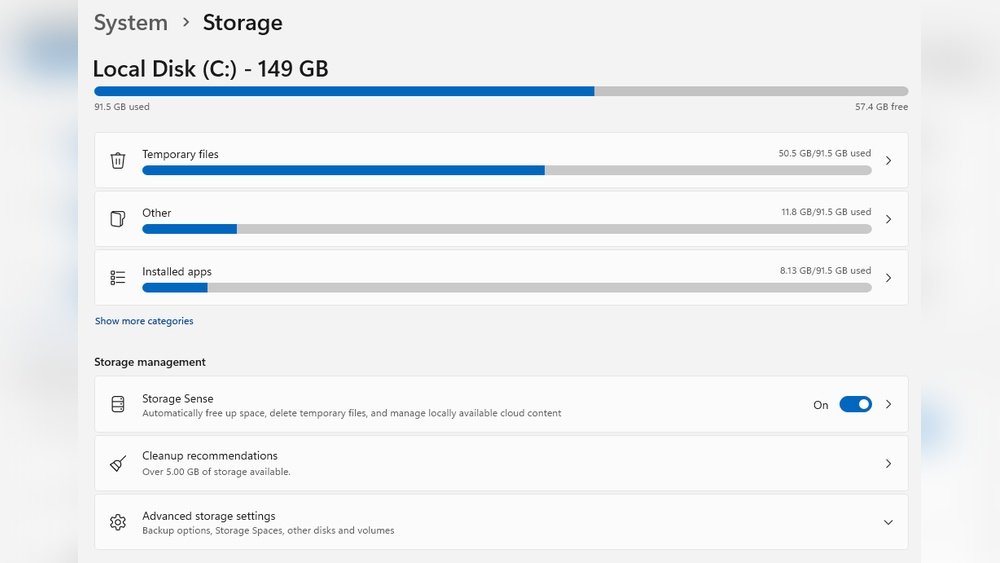
Have you ever wondered where all your photos, videos, and important files actually live on your computer? Understanding what PC storage is used for can change the way you manage your digital life.
Whether you’re saving work documents, installing games, or backing up memories, your PC’s storage plays a crucial role. Keep reading to discover how storage affects your computer’s performance and why knowing this can make your everyday tasks easier and faster.
Types Of Pc Storage
PC storage is essential for saving files, programs, and the operating system. Different types of storage devices serve various needs. Each type has strengths and weaknesses. Choosing the right storage depends on speed, capacity, and price.
Hard Disk Drives (hdd)
Hard Disk Drives store data on spinning disks inside a metal case. They offer large storage space at a low cost. HDDs are slower than newer storage types but remain popular. They are good for storing big files like videos and photos.
Solid State Drives (ssd)
Solid State Drives use flash memory with no moving parts. SSDs are much faster than HDDs. They load programs and files quickly. SSDs are more expensive but provide better performance. They improve overall computer speed and responsiveness.
Hybrid Drives
Hybrid Drives combine HDD and SSD technologies. They use SSD for fast access to important data. HDD stores larger files with slower speed. Hybrid drives balance cost, speed, and capacity. They are a middle ground between HDD and SSD.
External Storage Options
External storage connects to a PC via USB or other ports. Common types include external HDDs and SSDs. They offer extra space for backups and file transfer. External drives are portable and easy to use. Perfect for expanding storage without opening the PC.

Credit: en.wikipedia.org
Role Of Storage In Pc Performance
Storage plays a key role in how well a PC performs. It is where all data, programs, and files are kept. The type and speed of storage affect many parts of the user experience. Faster storage means quicker access to files and smoother operation.
Good storage helps the PC run tasks faster and respond better. It impacts boot time, loading of software, and handling multiple tasks at once. Choosing the right storage can improve overall efficiency and reduce waiting time.
Data Access Speed
Data access speed refers to how fast the PC can read or write information. Solid-state drives (SSDs) offer higher speeds than traditional hard drives (HDDs). Faster access means apps open quickly and files load without delay. Slow storage causes lag and longer wait times.
Boot Time And Load Times
Storage type directly affects boot time and app load times. SSDs start the computer much faster than HDDs. Programs and games also load quicker with fast storage. This saves time and keeps the user experience smooth.
Multitasking Efficiency
Fast storage helps the PC manage multiple tasks better. It allows quick switching between apps and files. This reduces freezing and slowdowns during heavy use. Efficient storage supports smooth multitasking, improving productivity.
Choosing The Right Storage For Your Needs
Choosing the right PC storage can make a big difference in how your computer works. Storage affects how much data you can keep and how fast your system runs. Different types of storage suit different needs. Understanding key factors helps you pick the best option for your setup.
Storage Capacity Considerations
Think about how much space you need. Simple tasks like web browsing need less storage. Large files like videos or games need more space. It is smart to have extra room for future files. Avoid buying storage that fills up too fast.
Speed Vs. Cost
Storage speed impacts how quickly your computer accesses files. Faster storage means quicker load times and better performance. Solid State Drives (SSDs) are faster but cost more. Hard Disk Drives (HDDs) offer more space for less money but are slower. Balance speed and price based on your budget and needs.
Durability And Reliability
Storage durability is important for data safety. SSDs have no moving parts and resist shocks well. HDDs can fail if dropped or shaken. Choose reliable brands with good reviews. Backup important data regularly to avoid loss.

Credit: en.wikipedia.org
Optimizing Storage For Better Performance
Optimizing PC storage improves overall system speed and efficiency. Proper storage management reduces slowdowns and system errors. It helps keep your computer running smoothly for longer periods. Simple steps can make a big difference in performance.
Regular Disk Cleanup
Disk cleanup removes unwanted files from your hard drive. Temporary files, caches, and system logs take up space. Clearing these files frees up storage for important data. It also helps your computer run faster. Schedule cleanup regularly to maintain good system health.
Defragmentation Techniques
Defragmentation rearranges fragmented data on your hard drive. Fragmented files slow down read and write speeds. Defragmenting organizes files in a continuous order. This reduces the time your PC takes to access data. Use built-in defragmentation tools for best results.
Using Ssd Optimization Tools
Solid-state drives (SSDs) need special care for peak performance. SSD optimization tools help manage data efficiently on your drive. These tools reduce unnecessary writes and improve lifespan. They also enable features like TRIM to keep your SSD fast. Regular use of these tools maintains optimal SSD health.
Upgrading Storage Components
Upgrading storage components can boost your PC’s performance and increase space. It helps your computer run faster and store more files. Many users upgrade to meet their growing needs or improve speed. The process is simple and worth the effort.
When To Upgrade
Notice slow loading times or low disk space? It might be time to upgrade. New software and games need more storage and faster access. If your PC struggles to save or open files, consider upgrading. Upgrading keeps your system running smoothly and avoids crashes.
Installing An Ssd
Installing a Solid State Drive (SSD) greatly improves speed. SSDs read and write data faster than traditional hard drives. Your computer boots quicker and programs open instantly. Many PCs allow easy SSD installation in place of old drives. Backup data before starting the installation to avoid loss.
Expanding Storage With External Drives
External drives add extra space without opening your PC. They connect via USB and store large files or backups. Portable and easy to use, they work with many devices. External drives are perfect for users needing more space on the go. Choose one with enough capacity for your needs.
Storage And Data Security
PC storage is not just about saving files. It plays a big role in protecting your data. Storing data safely keeps your information private and secure. Good storage helps avoid losing important files.
Data security means guarding your information from theft or damage. Using the right methods can stop hackers and viruses. It also helps recover files after accidents or system failures.
Backup Strategies
Backup means copying your files to another place. This protects data if your PC breaks. Regular backups keep your information safe. Use external drives or cloud services. Set backups to happen automatically. This saves time and avoids forgetting.
Encryption Methods
Encryption changes data into code. Only people with a key can read it. This stops others from stealing your data. Many PCs have built-in encryption tools. You can also use special software. Encrypt sensitive files for better protection.
Preventing Data Loss
Data loss happens from errors or hardware failure. Use reliable storage devices to reduce risks. Keep your PC clean and virus-free. Avoid sudden shutdowns to protect files. Regularly check your storage health. Taking simple steps keeps data safe and sound.
Credit: www.ozoraglobal.com
Frequently Asked Questions
What Is Pc Storage Used For?
PC storage is used to save data, files, and software permanently. It holds your operating system, documents, photos, and applications. Storage ensures quick access and retrieval of information when needed by the computer.
How Does Pc Storage Affect Computer Performance?
PC storage speed and capacity directly impact performance. Faster storage, like SSDs, improves boot time and file access. Limited storage can slow down your system by restricting space for temporary files and updates.
What Are Common Types Of Pc Storage?
Common PC storage types include HDDs, SSDs, and hybrid drives. HDDs are traditional and cost-effective, while SSDs offer faster data access and reliability. Hybrid drives combine both for balanced performance and storage space.
Why Is Storage Capacity Important In A Pc?
Storage capacity determines how much data your PC can hold. Larger capacity allows more files, programs, and media without slowing performance. Insufficient storage can cause system errors and limit software installations.
Conclusion
PC storage holds your files, programs, and system data safely. It helps your computer run smoothly and quickly. Without enough storage, your PC can slow down or stop working well. Choosing the right storage type matters for your needs. Remember to keep some free space for updates and new files.
Good storage keeps your digital life organized and easy to access. Think of storage as your PC’s memory box. It stores everything you need, whenever you need it.
