

Thinking about building your own PC but not sure where to start? Knowing the basic parts you need is the first step to turning that idea into reality.
Imagine having a custom machine that fits your needs perfectly—whether for gaming, work, or everyday use. You’ll discover the essential components that make up a PC and why each one matters. By the end, you’ll feel confident about choosing the right parts and putting them together.
Ready to unlock the secrets of building your own powerful computer? Let’s dive in!
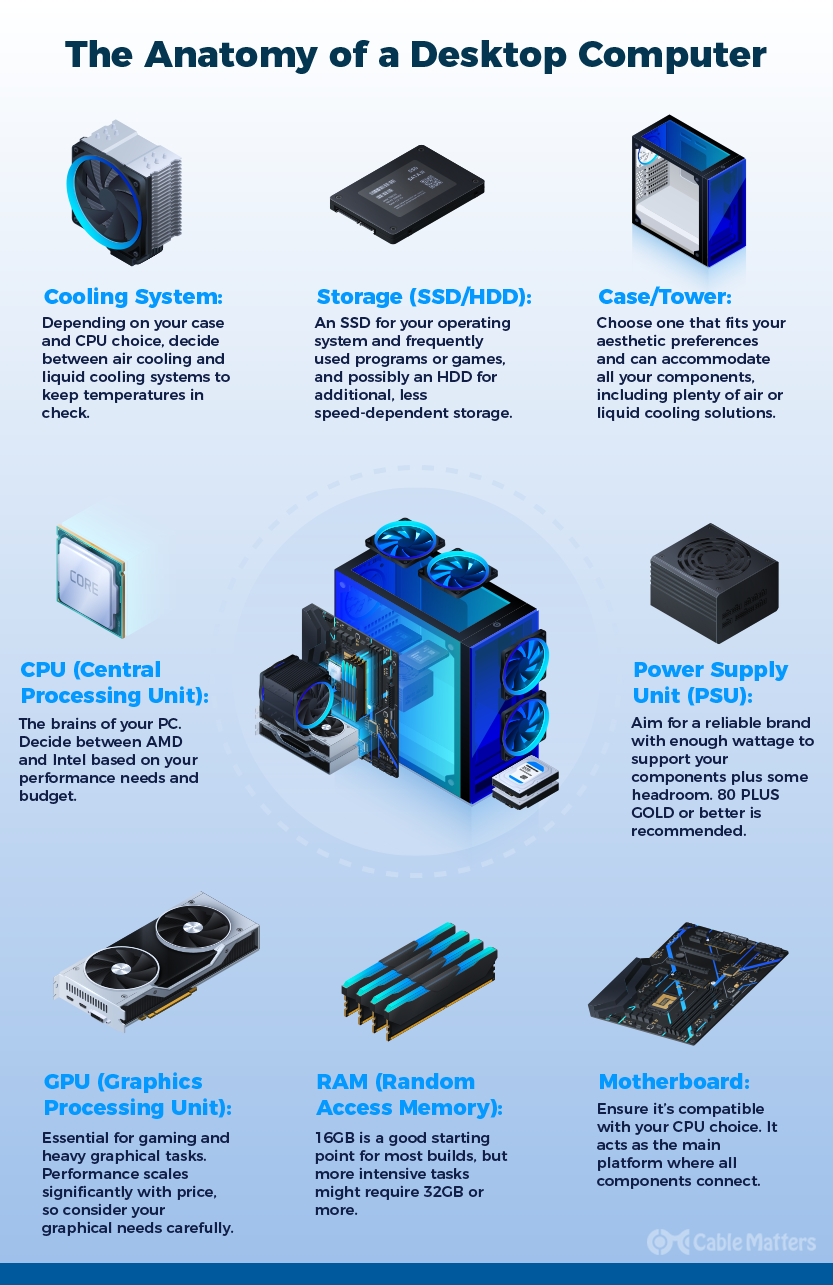
Credit: www.cablematters.com
Core Components
Building a PC starts with understanding its core components. These parts work together to make the computer run. Each component has a special role. Choosing the right parts helps your PC perform well. Let’s explore the main pieces you need.
Central Processing Unit (cpu)
The CPU is the brain of the computer. It processes instructions and handles tasks. A good CPU speeds up your PC. Different CPUs offer various speeds and cores. More cores help with multitasking and complex programs.
Motherboard
The motherboard connects all parts of the PC. It holds the CPU, memory, and other components. A compatible motherboard ensures everything fits and works. It also controls communication between devices. Choosing the right size and features matters.
Memory (ram)
RAM stores data that the CPU uses quickly. More RAM means smoother multitasking. It helps programs run without delay. RAM size affects how many apps you can open. Faster RAM improves overall system speed.
Storage Drives
Storage holds your files and programs. Hard drives (HDD) offer more space at a lower cost. Solid State Drives (SSD) are faster and more reliable. Many use SSDs for the operating system and HDDs for extra storage. Storage speed affects how fast your PC boots and loads files.

Credit: www.davestipjar.com
Power And Cooling
Power and cooling are key for building a strong PC. The power system keeps the computer running. Cooling parts stop it from getting too hot. Heat can damage parts and slow your PC down.
Good power and cooling help your PC work well and last longer. They keep everything safe and stable during use. Let’s explore the main parts for power and cooling.
Power Supply Unit (psu)
The Power Supply Unit, or PSU, gives power to all PC parts. It changes electricity from the wall into usable power. A good PSU ensures steady and safe power flow. It protects your PC from power surges and failures. Choose a PSU with enough watts for your PC’s needs.
Cooling Systems
Cooling systems keep your PC parts from overheating. There are two main types: air cooling and liquid cooling. Air cooling uses fans and heatsinks to move heat away. Liquid cooling uses a liquid to carry heat out faster. Pick a cooling system that fits your PC size and power use.
Case Fans
Case fans help move air inside the computer case. They bring in cool air and push out hot air. Proper airflow stops heat from building up inside. Place fans at the front and back for best results. More fans mean better cooling but can be louder.
Graphics And Display
The graphics and display parts shape how your computer shows images and videos. These parts affect gaming, watching videos, and daily tasks. Good graphics parts give clear, smooth visuals and better colors. Choosing the right components is key for a good experience.
Graphics Processing Unit (gpu)
The Graphics Processing Unit, or GPU, handles all images and videos on your PC. It takes load off the main processor and speeds up graphic tasks. A strong GPU helps in games, video editing, and 3D work. Some CPUs have built-in graphics, but a separate GPU is better for high-quality visuals. Pick a GPU that fits your needs and budget.
Monitor Compatibility
Your monitor shows what the GPU processes. It must match the GPU’s output ports and support its resolution. Common connections include HDMI, DisplayPort, and DVI. A monitor with high resolution and refresh rate gives clearer and smoother images. Check your GPU and monitor specs to ensure they work well together. This match improves your viewing and gaming experience.
Input And Output
Input and output devices let you interact with your PC. They send commands to the computer and show you the results. Both are essential for a smooth computing experience. Without them, using a PC would be very difficult.
Keyboard And Mouse
The keyboard and mouse are the main input devices. The keyboard lets you type letters, numbers, and commands. It is essential for writing and communication. The mouse helps you click, drag, and drop items on the screen. It makes navigation easier. Both devices connect to the PC through USB or wireless signals.
Ports And Connectivity
Ports allow you to connect input and output devices to your PC. Common ports include USB, HDMI, and audio jacks. USB ports connect keyboards, mice, and storage devices. HDMI ports connect monitors or TVs for video output. Audio jacks link speakers or headphones. Good port options improve your PC’s flexibility and usability.
Additional Essentials
Building a PC requires more than just core parts like the processor and motherboard. Additional essentials help bring the whole system together. These parts protect, power, and make the PC usable. Without them, the PC won’t work properly.
Computer Case
The computer case holds all the internal parts. It protects the components from dust and damage. Cases come in different sizes to fit various builds. Good airflow inside the case keeps parts cool. Choose a case that fits your needs and space.
Operating System
The operating system (OS) controls the PC. It manages hardware and software tasks. Popular options include Windows, Linux, and macOS. The OS lets you install programs and use the internet. You need a valid OS to start your computer.
Peripheral Devices
Peripherals let you interact with your PC. Common devices are a keyboard, mouse, and monitor. Printers and speakers also connect to the PC. These devices complete the user experience. Without peripherals, you cannot use the computer effectively.
Building Tips
Building a PC can feel tricky, but simple tips make it easier. These tips help avoid common mistakes. They save time and protect your parts. Follow them to build a strong and reliable computer.
Compatibility Checks
Check all parts fit and work well together. The CPU and motherboard must match their socket type. RAM should be supported by the motherboard. The power supply must provide enough power for all parts. Confirm the case size fits your motherboard and graphics card.
Static Safety
Static electricity can harm PC parts quickly. Always ground yourself before touching components. Use an anti-static wrist strap for best safety. Work on a non-metal surface to reduce risk. Avoid wearing wool or synthetic clothes that create static.
Cable Management
Organize cables neatly inside the case. Use zip ties or Velcro straps to bundle cables. Keep cables away from fans to prevent blockages. Proper cable management improves airflow and cooling. It also makes future upgrades easier and cleaner.

Credit: www.pcmag.com
Frequently Asked Questions
What Are The Essential Parts To Build A Pc?
The essential parts include a CPU, motherboard, RAM, storage, power supply, and a case. These components form the core system. Optional parts like GPU and cooling systems depend on your needs.
How Important Is The Motherboard In Pc Building?
The motherboard connects all components and ensures they communicate properly. It affects compatibility and upgrade options. Choosing the right motherboard is crucial for system performance and expansion.
Do I Need A Dedicated Gpu For My Pc?
A dedicated GPU is necessary for gaming, video editing, or heavy graphics tasks. For basic use, integrated graphics in the CPU may suffice. Your usage determines if a GPU is essential.
What Type Of Storage Is Best For A New Pc?
SSD drives offer faster speed and better performance than HDDs. Combining SSD for the operating system and HDD for storage is common. Storage choice impacts boot time and file access speeds.
Conclusion
Building a PC starts with knowing the basic parts you need. A good motherboard, processor, memory, and storage are essential. Don’t forget the power supply and case to hold everything. Each part plays a key role in your computer’s performance.
Taking time to choose the right components helps avoid problems later. With these basics, assembling a PC becomes easier and more fun. Ready to build? Now you know what parts to gather first.
