
Is your PC shutting down suddenly when you’re gaming, working, or running heavy programs? It’s frustrating, right?
This usually points to a power supply issue, and fixing it can save you from expensive repairs or losing important work. You’ll discover simple, effective ways to diagnose and fix your power supply so your PC stays on, even under heavy load.
Keep reading—your PC’s stability depends on it.
Credit: gamemaxpc.com
Symptoms Of Power Supply Issues
Power supply problems often show clear signs before causing serious damage. Recognizing these signs early helps avoid data loss and hardware failure. Your PC might act strange, especially under heavy use. Watch for unusual behavior during gaming or intense tasks. These symptoms hint that the power supply might be failing or unable to deliver enough power.
Sudden Shutdowns During Gaming
Gaming demands high power from your PC. A weak power supply may not keep up. The system might shut down without warning. This happens because the power supply cannot handle the load. Sudden shutdowns often occur during intense graphics or processing. This symptom is a strong sign of power supply trouble.
Unexpected Restarts Under Load
Your PC may restart randomly when running heavy programs. This means the power supply is unstable. It fails to provide steady power to the components. Restarts might happen during video editing, gaming, or other tasks. This issue disrupts your work and damages hardware over time. Watch for this sign to catch power supply problems early.
Error Messages And Beep Codes
Some PCs show error messages or beep sounds on startup. These signals often point to power supply issues. The motherboard uses beep codes to report hardware problems. Power supply faults trigger specific beep patterns or warnings. Pay attention to these alerts. They help diagnose and fix the power supply before bigger issues arise.
Common Causes Of Shutdowns
PC shutdowns under load often happen because of power supply problems. Several common causes can lead to this issue. Understanding these causes helps to fix the problem quickly. This section explains the main reasons for shutdowns during high power use.
Insufficient Power Capacity
Sometimes, the power supply unit (PSU) cannot provide enough power to all parts. High-performance components like graphics cards need more power. If the PSU wattage is too low, the PC shuts down to protect itself. Using a PSU with higher capacity often solves this problem.
Overheating Components
Heat can cause a PC to shut down suddenly. Overheating happens when fans or cooling systems fail. The CPU or GPU may get too hot under heavy load. The PC shuts down to avoid damage. Cleaning fans and replacing thermal paste helps keep temperatures low.
Faulty Or Aging Psu
A PSU that is old or damaged may fail under stress. Internal parts wear out over time and cause instability. This leads to sudden shutdowns during high load. Replacing the PSU with a new, reliable model fixes these issues.
Loose Or Damaged Connections
Power cables and connectors must be secure and undamaged. Loose connections cause power interruptions and shutdowns. Check all cables, including motherboard and GPU power lines. Repairing or replacing damaged cables prevents unexpected shutdowns.
Basic Troubleshooting Steps
Basic troubleshooting helps identify common issues with your PC’s power supply. Start with simple checks before moving to complex fixes. These steps save time and prevent unnecessary repairs.
Checking Power Cables And Connections
Loose or damaged cables cause power problems. Unplug and replug all power cables tightly. Look for cuts, frays, or bent pins on cables. Replace any damaged cables to avoid power loss.
Inspecting Psu Fan And Vents
Overheating can shut down your PC under load. Check the PSU fan to see if it spins freely. Clear dust from fan blades and vents using compressed air. Good airflow prevents overheating and shutdowns.
Testing With A Different Power Outlet
The power outlet might be faulty or unstable. Plug your PC into another outlet or power strip. This step ensures your power source is stable and delivers enough current. A stable outlet stops sudden shutdowns.
Testing The Power Supply Unit
Testing the power supply unit (PSU) is a key step to fix a PC that shuts down under load. The PSU delivers power to all parts of your computer. If it fails, the PC might turn off suddenly.
To check the PSU, use tools and methods that measure its output and stability. This helps find out if the PSU causes the shutdown problem.
Using A Psu Tester
A PSU tester is a simple device made for checking power supplies. Plug the PSU cables into the tester. It shows if the voltages are within safe limits. This tool gives quick results and is easy to use. It shows if the PSU needs replacement or repair.
Multimeter Testing Techniques
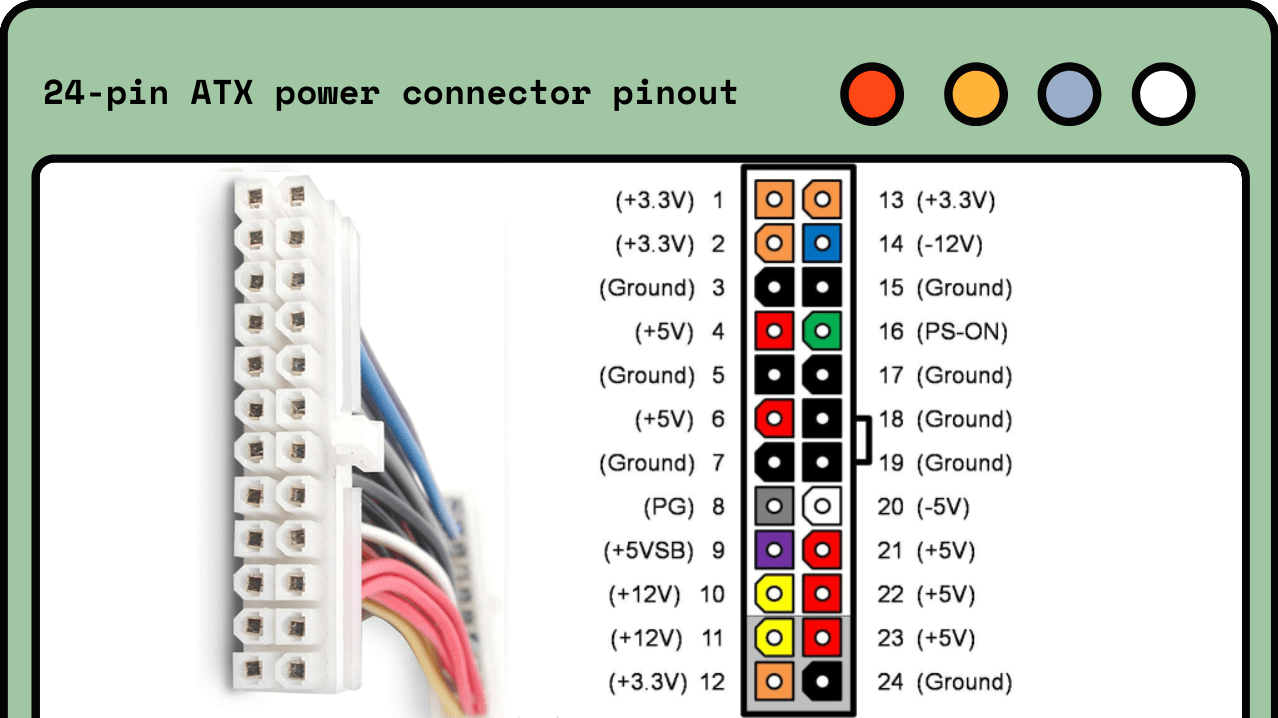
A multimeter measures voltage, current, and resistance. Set it to measure DC voltage. Test the PSU cables while the PC is on. Check if voltages match the PSU labels. If voltages are too low or unstable, the PSU may be faulty. This test requires care to avoid shorts and damage.
Swap Testing With A Known Good Psu
Swap testing means replacing your PSU with a working one. Turn off the PC and unplug the cables. Connect the known good PSU to your PC. Turn on the PC and run a heavy task. If the PC stays on, your PSU is likely the problem. This method is simple and very effective for diagnosis.
Quick Fixes To Try At Home
PC shutting down under load can be a sign of power supply issues. Some problems are easy to fix at home. Trying simple steps can save time and money. These quick fixes can often solve the problem without expert help.
Cleaning Dust And Debris
Dust blocks airflow and causes overheating. Overheating can make your PC shut down. Open the case carefully. Use a soft brush or compressed air to clean inside. Focus on fans, vents, and power supply. Clean regularly to keep the PC cool and stable.
Re-seating Internal Components
Loose connections cause power problems. Turn off the PC and unplug it. Open the case and check cables and cards. Push RAM, GPU, and power cables back firmly. Proper seating ensures good power flow. This step often fixes shutdowns under load.
Adjusting Power Settings In Bios
BIOS controls hardware settings, including power. Restart the PC and enter BIOS setup. Look for power management or voltage settings. Lower voltage or disable power-saving modes that cause shutdowns. Save changes and reboot. Correct BIOS settings help maintain power stability.

Credit: www.reddit.com
When To Replace Your Psu
Knowing when to replace your power supply unit (PSU) is important for a stable PC. A failing PSU can cause your computer to shut down under load. This can lead to data loss or hardware damage. Replacing the PSU at the right time helps keep your system safe and reliable.
Signs Of Hardware Failure
Look for sudden shutdowns during heavy tasks. Strange noises or burning smells from the PSU are warning signs. Your PC might fail to start or reboot randomly. Check for unusual voltage drops or system crashes. These issues often point to PSU failure.
Choosing The Right Wattage
Pick a PSU with enough wattage for all components. Underpowered units struggle during peak loads. Calculate the total power your PC parts need. Add some extra wattage for future upgrades. A proper wattage PSU runs cooler and lasts longer.
Selecting Quality Brands
Choose PSUs from trusted brands with good reviews. Cheap units often use low-quality parts. Reliable brands offer better safety features and warranties. A quality PSU protects your PC from power surges. Investing in a strong brand saves money over time.
Preventing Future Power Issues
Preventing future power issues is key to keeping your PC stable under heavy use. Simple steps can protect your system from unexpected shutdowns. These actions save time and money by avoiding frequent repairs. Follow easy practices to improve your PC’s power reliability.
Regular Maintenance Tips
Clean dust from inside your PC regularly. Dust blocks airflow and causes overheating. Check all cables for tight connections. Loose cables can cause power interruptions. Update your PC’s BIOS and drivers often. Updates fix bugs that affect power use. Monitor system temperatures with free software. High temps can trigger shutdowns under load.
Upgrading Components Wisely
Choose a power supply with enough wattage for your PC. An underpowered supply can cause shutdowns. Select parts that match your PC’s needs. Avoid overloading the power supply. Use energy-efficient components to reduce power strain. Check compatibility before buying new parts.
Using Surge Protectors And Ups
Plug your PC into a surge protector to block power spikes. Power surges can damage the power supply. Use an uninterruptible power supply (UPS) for backup power. A UPS prevents shutdowns during outages. It also stabilizes voltage for safer operation. Replace old surge protectors and UPS units regularly.

Credit: en.wikipedia.org
Frequently Asked Questions
Why Does My Pc Shut Down Under Load?
Your PC may shut down under load due to an inadequate or failing power supply. Overheating, insufficient wattage, or faulty PSU components can cause sudden shutdowns to protect your hardware.
How To Fix Power Supply Issues Causing Shutdowns?
Check your PSU wattage and ensure it matches your system’s needs. Clean dust from components, improve ventilation, or replace the PSU if faulty to resolve shutdown issues.
Can Overheating Cause Power Supply Failure?
Yes, overheating can damage the power supply’s internal components. High temperatures reduce efficiency, causing shutdowns or permanent hardware failure if not addressed promptly.
What Psu Wattage Is Ideal For Gaming Pcs?
Gaming PCs typically need 500-750 watts, depending on components. Always choose a PSU with some extra headroom to handle peak power demands safely.
Conclusion
A PC shutting down under load often points to power supply issues. Checking and fixing the PSU can solve many sudden shutdown problems. Use a reliable power supply with enough wattage for your system. Keep your PC clean and well-ventilated to avoid overheating.
Simple steps can save you time and money. Stay patient and test each fix carefully. Your PC will run smoother and last longer with proper care. Keep these tips handy for future troubleshooting.
