

Have you ever wondered if VRAM and GPU are the same thing? If you’re trying to understand how your computer handles games or graphics, this question might have crossed your mind.
Knowing the difference between VRAM and GPU can help you make smarter choices when buying or upgrading your system. You’ll discover what each one does and why they matter to your computer’s performance. Keep reading to clear up the confusion and get the facts you need.

Credit: www.reddit.com
What Is Gpu
The GPU, or Graphics Processing Unit, is a key part of a computer. It helps create images and videos on your screen. The GPU works alongside the CPU but focuses on graphics tasks. It processes many tasks at once, making it very fast for visual work. Understanding the GPU helps you know how computers handle graphics and speed.
Core Functions
The GPU mainly processes images and videos. It renders 2D and 3D graphics for games and apps. It handles complex calculations for lighting and shading. The GPU also speeds up video playback and editing. It works in parallel, doing many tasks at the same time. This makes graphics smooth and clear.
Types Of Gpus
There are two main types of GPUs: integrated and dedicated. Integrated GPUs are built into the CPU or motherboard. They share memory with the CPU and use less power. Dedicated GPUs are separate cards installed inside the computer. They have their own memory and offer higher performance. Dedicated GPUs are better for gaming and heavy graphic work.
Role In Computing
The GPU helps computers handle visual content fast. It reduces the load on the CPU by managing graphics tasks. This allows better multitasking and smoother performance. GPUs also support AI, machine learning, and scientific computing. They accelerate complex calculations beyond just graphics. The GPU is vital for modern computing needs.
What Is Vram
VRAM stands for Video Random Access Memory. It is a special type of memory used in graphics cards. VRAM stores image data that the computer screen displays. It helps to show clear and smooth pictures, videos, and games. Without enough VRAM, visuals may look blurry or slow.
Purpose Of Vram
VRAM holds the data needed to create images on your screen. It stores textures, colors, and frame buffers. This memory allows the GPU to access visual information quickly. The faster VRAM works, the better the graphics performance. It helps reduce delays and improves image quality.
Types Of Vram
There are several types of VRAM used in computers. Common types include DDR, GDDR, and HBM. GDDR (Graphics Double Data Rate) is widely used in modern GPUs. HBM (High Bandwidth Memory) is faster and found in high-end cards. Each type offers different speeds and bandwidths.
How Vram Works
VRAM works by storing image data for the GPU to use. When you open a game or video, the GPU reads VRAM. It quickly fetches textures and frame information. This process helps the GPU render images smoothly. VRAM acts as a buffer between the GPU and display.
Key Differences Between Gpu And Vram
Understanding the differences between GPU and VRAM helps you know how your computer handles graphics. Both are important but serve different roles in processing images and videos. Knowing these key differences can help you make better choices for your computer needs.
Functionality Contrast
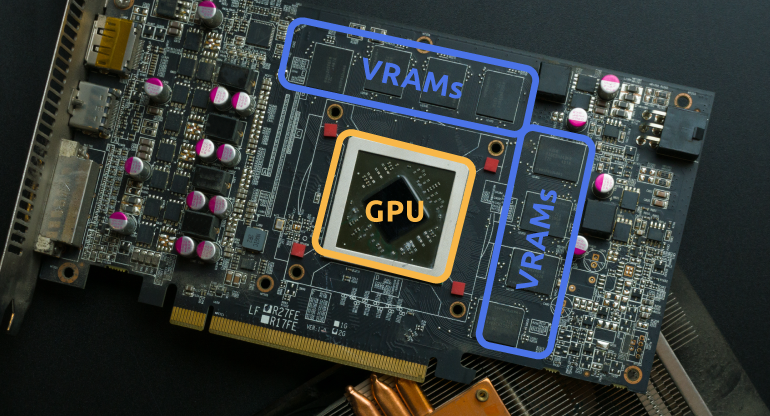
The GPU, or Graphics Processing Unit, is the brain that processes graphics. It calculates and renders images for display. VRAM, or Video RAM, stores the data that the GPU uses. It holds textures, frame buffers, and other graphics information. The GPU works on the data, while VRAM keeps it ready for quick access.
Hardware Structure
The GPU is a chip on the graphics card or motherboard. It contains many small processors called cores. VRAM is a type of memory chip located near the GPU. It is separate from the main system RAM. VRAM has a fast connection to the GPU, which helps speed up data transfer.
Performance Impact
The GPU’s speed and number of cores affect how fast graphics are processed. More powerful GPUs produce smoother images and better video quality. VRAM size limits how much graphics data can be stored at once. Low VRAM can cause slowdowns or lower image quality. Both GPU and VRAM work together to deliver good graphics performance.
Credit: www.nicehash.com
How Gpu And Vram Work Together
Understanding how GPU and VRAM work together helps clarify their roles in graphics performance. The GPU processes the graphics data, while VRAM stores the data temporarily. This partnership is vital for smooth visuals and fast rendering.
Data Processing Flow
The GPU fetches data from VRAM to create images. It processes textures, colors, and shapes step by step. The processed data then moves to the display for viewing. The speed of this flow affects how smooth graphics appear.
Memory Management
VRAM holds the data the GPU needs quickly. It stores textures, frame buffers, and shaders for fast access. The GPU reads and writes data from VRAM constantly. Proper memory management avoids delays and lag during rendering.
Effect On Graphics Quality
More VRAM allows storing larger textures and higher resolutions. The GPU uses this data to produce detailed and sharp images. Limited VRAM can reduce graphics quality and cause stuttering. Both GPU power and VRAM size shape the final visual output.
Common Misconceptions
Many people mix up VRAM and GPU, thinking they are the same. This confusion leads to misunderstandings about how computers work. Knowing the difference helps you make better choices for gaming and design.
Vram Vs Gpu Confusion
VRAM is the memory used by the graphics card. It stores images and data for quick access. The GPU is the chip that processes graphics tasks. It uses VRAM but is not the same as it. VRAM and GPU work together but have different roles.
Impact On Gaming And Rendering
Games and 3D programs need both VRAM and GPU power. VRAM affects how much detail and texture can be shown. The GPU controls the speed and quality of graphics processing. Low VRAM can cause slower loading or blurry images. A weak GPU can lower frame rates and cause lag.
Upgrading Considerations
Upgrading VRAM means choosing a graphics card with more memory. Upgrading the GPU means getting a faster or newer chip. More VRAM helps with larger textures and higher resolutions. A better GPU improves overall performance and smoothness. Check both VRAM and GPU to match your needs.

Credit: mecanica.uaz.edu.mx
Choosing The Right Gpu And Vram
Choosing the right GPU and VRAM matters for your computer’s performance. These two parts work together but serve different roles. Picking the best combination helps your system run smoothly. It also avoids wasting money on unnecessary features. Understand your needs first. Then balance power and memory wisely. Think about future use too. This way, your setup stays good for longer.
Assessing Your Needs
Start by deciding what you want your computer to do. Are you playing games, editing videos, or browsing the web? Different tasks require different power. Games and video editing demand a strong GPU and enough VRAM. Simple tasks need less. Check the software or games you use. See their recommended GPU and VRAM specs. This helps pick a card that matches your needs.
Balancing Gpu And Vram
GPU handles graphics processing, while VRAM stores images and textures. Both must work well together. A powerful GPU with too little VRAM can slow down your system. Lots of VRAM with a weak GPU also limits performance. Choose a GPU and VRAM combo that fits your tasks. Aim for balance, not just the highest numbers. This ensures smooth and fast graphics.
Future-proofing Tips
Technology changes fast. Buying a GPU with more VRAM than you need now helps avoid upgrades soon. Look for cards supporting new features and updates. Consider your budget but think long term too. A little extra VRAM can handle bigger files and newer games. This keeps your computer ready for future software demands without slowing down.
Frequently Asked Questions
What Is The Main Difference Between Vram And Gpu?
VRAM is the memory storing graphical data, while GPU processes this data. VRAM supports GPU performance but they are distinct components.
Can A Gpu Function Without Vram?
No, a GPU cannot function efficiently without VRAM. VRAM stores textures and images needed for rendering.
How Does Vram Affect Gpu Performance?
More VRAM allows the GPU to handle higher resolution textures and complex graphics faster, improving performance in demanding applications.
Is Vram Upgradeable Separately From Gpu?
VRAM is usually integrated into the GPU, so it cannot be upgraded separately in most cases.
Conclusion
VRAM and GPU serve different roles in your computer. The GPU handles graphics calculations, while VRAM stores the data the GPU uses. Both work together to create smooth visuals and better performance. Knowing their difference helps you choose the right parts for your needs.
Don’t confuse VRAM with the GPU itself; each is important in its own way. Understanding this makes tech talk easier and shopping smarter. Remember, a good balance between GPU and VRAM leads to better results. Simple, clear, and useful to keep in mind.
