
Are you looking to get more from your GPU without risking damage? You might have heard about undervolting—lowering the voltage your graphics card uses to run cooler and quieter.
But is undervolting your GPU really safe? You probably have questions like: Will it harm your hardware? Can it improve performance? Or could it cause crashes and instability? You’ll discover the truth about undervolting, how it works, and whether it’s a smart move for your setup.
Keep reading to find out how to protect your investment while squeezing out better efficiency.
Basics Of Gpu Undervolting
Undervolting a GPU means lowering the voltage it uses. This can help reduce heat and power use. It may also make your computer quieter. Many people want to know if it is safe and how it works.
Understanding the basics helps you decide if undervolting fits your needs. It also clears up some common myths around the topic. Let’s explore what undervolting means and why some users choose to do it.
What Is Undervolting
Undervolting a GPU means reducing the electrical power sent to it. The GPU still works, but with less voltage. This lowers temperature and power consumption. It does not change the GPU’s speed or performance directly. The goal is to find the lowest voltage that keeps the GPU stable.
Why Undervolt Your Gpu
Undervolting can make your GPU run cooler. Lower heat means less wear and longer life. It also lowers your electricity bill slightly. Quiet fans are a bonus because the GPU stays cool with less noise. Some users want more stable systems by reducing power strain. It is a way to improve efficiency without losing speed.
Common Myths About Undervolting
One myth is that undervolting will harm your GPU. Proper undervolting does not damage hardware. Another myth says undervolting reduces performance. If done right, performance stays the same or improves slightly. Some think undervolting is only for experts. Many tools now make it easy for beginners. Understanding facts helps you avoid fear and confusion.
Benefits Of Gpu Undervolting
Undervolting a GPU can bring several advantages. It reduces the voltage sent to the graphics card. This simple change can improve the overall experience of using your PC. Many users find better performance and longer hardware life after undervolting.
These benefits make undervolting a popular choice for gamers and PC builders. It helps in managing power, heat, and stability effectively.
Improved Power Efficiency
Lowering the voltage decreases the power consumption of the GPU. This means your computer uses less electricity. It can also extend battery life on laptops. Efficient power use helps reduce your energy bills and environmental impact.
Lower Temperatures
Less voltage means the GPU produces less heat. Cooler hardware runs better and lasts longer. It also reduces the need for loud cooling fans. A cooler system is quieter and more comfortable to use.
Enhanced System Stability
Undervolting can make the GPU run more smoothly. It reduces the chance of crashes and freezes caused by overheating. Stable performance is important during long gaming or work sessions. This makes your computer more reliable and enjoyable.
Risks And Challenges
Undervolting a GPU can bring benefits like lower heat and less power use. But it also comes with risks and challenges. Knowing these helps you decide if undervolting is right for you. Some problems may affect your computer’s stability and performance. Others might impact your hardware’s warranty. It is important to understand these points before making changes.
Potential Instability Issues
Undervolting can cause your GPU to become unstable. The graphics card may crash or freeze during use. This happens because the GPU does not get enough power to work correctly. You might see errors or sudden restarts. Testing and adjusting settings carefully can reduce these problems. Yet, instability is a common risk when undervolting.
Impact On Performance
Lowering the voltage may reduce your GPU’s speed. Some games or applications may run slower than usual. The GPU might not reach its full potential. This happens because it gets less power to operate at high speeds. Finding the right balance between power saving and performance is key. Too low voltage can hurt your gaming or work experience.
Hardware Warranty Considerations
Changing your GPU’s voltage might void its warranty. Manufacturers often do not support modifications like undervolting. If your GPU has problems later, repairs might not be covered. It is important to check your warranty terms before undervolting. This avoids surprises if your hardware stops working properly.

Credit: technoidinc.com
Safe Undervolting Practices
Safe undervolting practices help protect your GPU while improving efficiency. Lowering voltage reduces heat and power use. It can extend your GPU’s lifespan. Careful tuning avoids crashes and damage. Follow clear steps and test often to stay safe.
Step-by-step Tuning Process
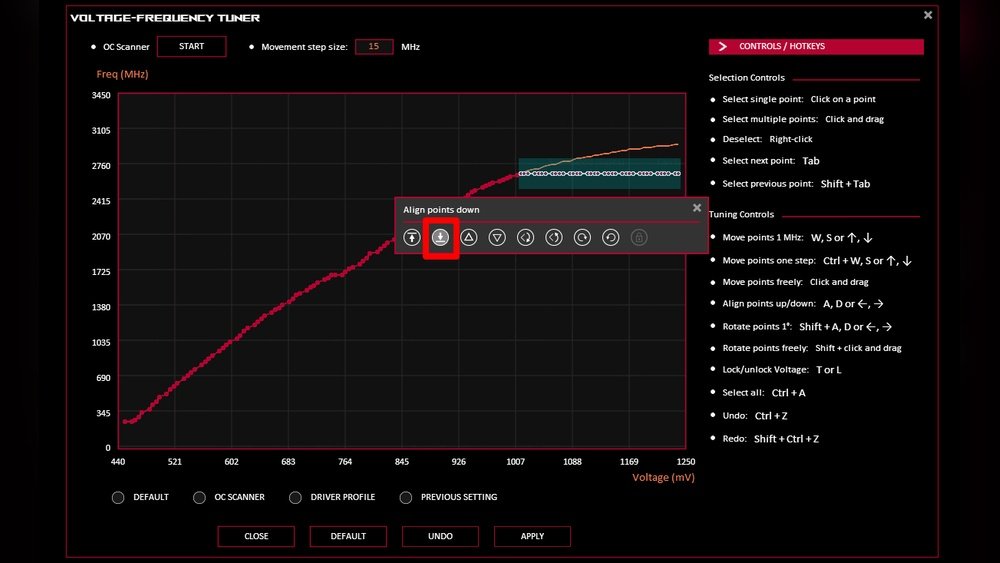
Start by reducing voltage in small amounts. Change settings slowly, about 10-20 mV at a time. After each change, check for errors or crashes. Keep a record of safe voltage points. Avoid large drops that cause instability. Take your time and be patient.
Using Reliable Software Tools
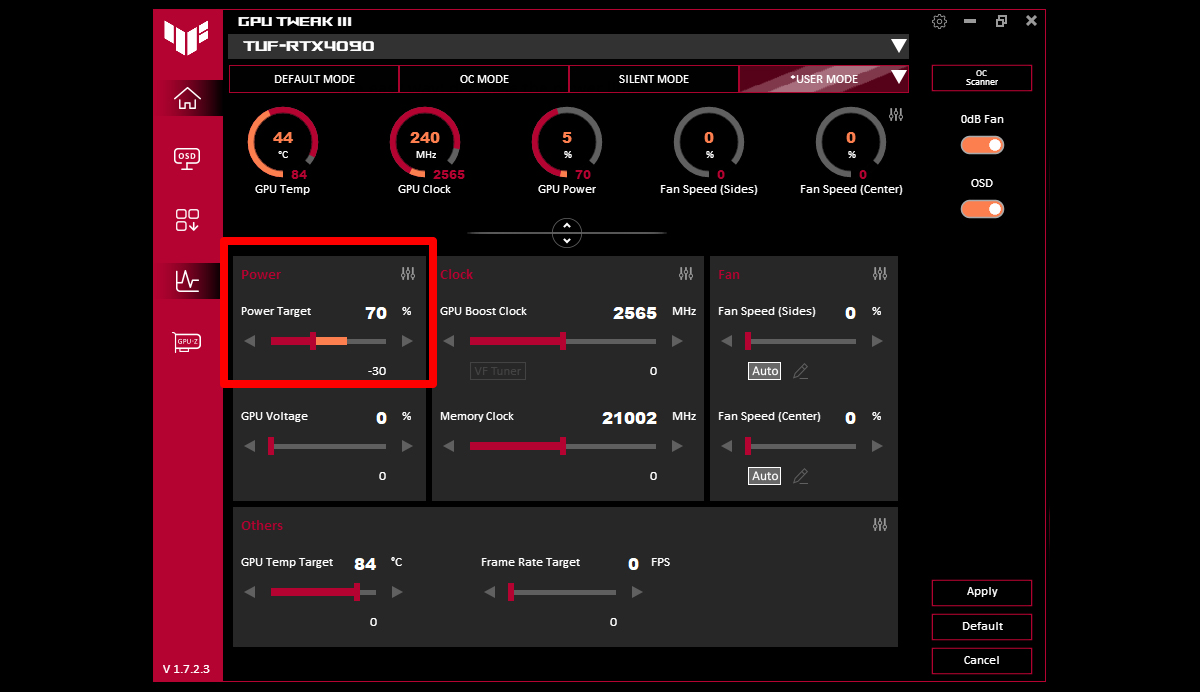
Choose trusted software designed for undervolting. Popular tools include MSI Afterburner and AMD Wattman. These apps show real-time voltage and temperature data. They allow easy and safe voltage adjustments. Avoid unknown or unverified programs to prevent risks.
Testing Stability And Performance
Run stress tests after each voltage change. Use programs like FurMark or 3DMark for testing. Watch for crashes, freezes, or artifacts on screen. Check temperature and frame rates carefully. If problems appear, raise voltage slightly. Keep testing until stable performance is reached.
Monitoring And Maintenance
Monitoring and maintenance are key to keeping your GPU safe after undervolting. Checking your system often helps catch problems early. This keeps your hardware running well and extends its life.
Tracking Temperature And Power Usage
Watch your GPU temperature closely. Too much heat can cause damage. Use software tools to see real-time temperature and power data. Keep these numbers within safe limits to avoid risks.
Regular Benchmarking
Run benchmarks to test GPU performance regularly. This shows if undervolting affects speed or stability. Compare results over time to spot any drops or issues. Consistent tests help keep your GPU reliable.
When To Revert Settings
Change settings back if you see crashes or freezes. High temperatures or poor performance are signs to stop undervolting. Always have a backup of original settings. Safety first to protect your GPU from harm.
Credit: rog.asus.com
Expert Tips For Risk-free Tuning
Undervolting a GPU can boost performance and lower heat and noise. Doing it safely matters. Experts share tips to avoid problems and keep your hardware healthy. Follow these steps to tune your GPU without risks.
Small changes help find the best balance between power and stability. Backing up settings protects your original setup. Getting advice from others adds useful insights.
Start With Small Adjustments
Make tiny voltage changes at first. Large jumps can cause crashes or damage. Test your GPU after each step. Watch temperature and performance closely. This cautious approach helps avoid hardware stress.
Backup Original Settings
Save your GPU’s original voltage and clock settings. Use software tools for easy backups. If tuning goes wrong, restoring these settings is quick. This safety net prevents permanent damage or data loss.
Seek Community Feedback
Join forums and groups focused on undervolting. Learn from others’ experiences and tips. Share your results and ask questions. Community advice helps spot risks and improves your tuning process.
Future Trends In Gpu Power Management
Future trends in GPU power management focus on making GPUs more efficient and cooler. These changes help reduce energy use and extend hardware life. New methods will also improve performance without raising heat or noise.
Experts work on better designs and smarter software to control power. These efforts will benefit gamers and professionals by offering smoother and more stable experiences. The future holds many improvements that will change how GPUs handle power.
Advancements In Hardware Design
GPU makers develop chips that use less power but keep speed. New materials and smaller parts help lower heat output. Designs now include better cooling systems to support undervolting. These upgrades allow GPUs to run quieter and last longer.
Software Innovations
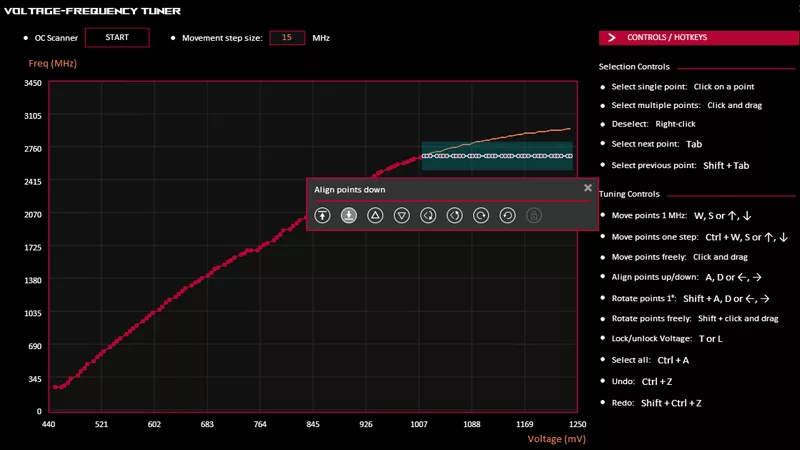
Software now adjusts GPU power more precisely. It can lower voltage dynamically based on the task. This smart control prevents wasting energy during light use. Updates also improve undervolting tools to make them safer and easier to use.
Impact On Gaming And Professional Use
Better power management means games run smoothly with less lag. Gamers enjoy cooler, quieter sessions. Professionals benefit from stable performance in design and editing work. Overall, efficient GPUs reduce electricity bills and help the environment.
Credit: rog.asus.com
Frequently Asked Questions
Is Undervolting A Gpu Safe For Beginners?
Yes, undervolting a GPU is generally safe if done carefully. Start with small voltage reductions and monitor temperatures and performance to avoid instability or crashes.
What Are The Benefits Of Undervolting A Gpu?
Undervolting reduces power consumption and heat output. This can lead to quieter cooling, improved GPU lifespan, and better energy efficiency without sacrificing performance.
Can Undervolting Damage My Gpu?
Undervolting does not damage your GPU if done correctly. It lowers voltage, reducing stress on components, unlike overvolting which can cause damage.
How Does Undervolting Affect Gpu Performance?
Proper undervolting maintains stable performance while lowering power use. Poor undervolting may cause crashes or stuttering, so test settings carefully.
Conclusion
Undervolting a GPU can help reduce heat and power use. It often keeps your system cooler and quieter. Many users find it safe when done carefully. Yet, testing your settings is important to avoid crashes. Start with small changes and watch performance closely.
This way, you keep your GPU stable and efficient. Remember, each GPU may react differently to undervolting. Take your time and adjust step by step. With patience, undervolting can be a smart way to improve your PC’s lifespan and comfort.
