
Are you noticing your games or apps aren’t running as smoothly as you expected? You might be wondering if your CPU is holding back your powerful GPU.
It’s frustrating when you invest in a great graphics card, only to see less-than-stellar performance. But how can you tell if your CPU is the real bottleneck? Understanding this can unlock the full potential of your system and give you the smooth experience you deserve.
Keep reading, and you’ll learn simple ways to find out if your CPU is slowing down your GPU—and what you can do about it.
Signs Of Cpu Bottlenecking
CPU bottlenecking happens when your processor limits your graphics card’s performance. It stops your GPU from running at its full power. Recognizing signs of CPU bottlenecking helps improve your gaming experience. It guides you to fix or upgrade your system parts wisely.
Low Cpu Usage Vs High Gpu Usage
Watch your CPU and GPU usage during games. Low CPU usage paired with high GPU usage often shows a balanced system. But if your CPU usage is very high and GPU usage is low, it means the CPU is holding back your GPU. The CPU can’t keep up with the graphics card’s demand.
Frame Rate Drops And Stuttering
Notice sudden frame rate drops or stuttering in games. These can result from a CPU bottleneck. The processor struggles to send data fast enough to the GPU. This causes uneven frame delivery and a choppy gaming experience.
Performance In Cpu-intensive Games
Some games rely more on the CPU than the GPU. Strategy, simulation, or open-world games need strong CPUs. Poor performance in these games, despite a good GPU, points to a CPU bottleneck. The CPU cannot handle the game’s complex calculations efficiently.

Credit: www.reddit.com
How To Check For Bottlenecks
Checking for CPU bottlenecks helps you understand if your processor limits your GPU’s performance. It shows where your system needs improvement. Simple tools and tests reveal how your CPU and GPU work together. This section explains easy steps to find bottlenecks fast.
Using Task Manager And Resource Monitor
Open Task Manager by pressing Ctrl + Shift + Esc. Go to the Performance tab to see CPU and GPU usage. If your CPU runs at 90-100% but GPU stays low, the CPU may bottleneck.
Resource Monitor gives more details. Type “Resource Monitor” in the search bar and open it. Watch CPU and GPU usage while running a game or app. High CPU use with low GPU use signals a bottleneck.
Benchmarking Tools To Test Performance
Benchmarking tools test your CPU and GPU under load. Programs like 3DMark and Cinebench run stress tests. They show if your CPU or GPU hits limits first.
Compare scores online for your hardware. Lower CPU scores with high GPU scores point to CPU bottlenecks. These tools give clear numbers to help you decide.
Analyzing Frame Times And Fps
Frame times show how long each frame takes to render. Use tools like MSI Afterburner to monitor frame times and FPS. If frame times vary a lot, the CPU might struggle to keep up.
Consistent low FPS with high CPU usage is a sign of bottleneck. Smooth frame times and balanced CPU-GPU use mean no bottleneck. Tracking these helps improve gaming and app performance.
Common Causes Of Bottlenecking
Bottlenecking happens when one part of your computer slows down another part. This often occurs between the CPU and GPU. Understanding common causes helps you spot and fix bottlenecks. The CPU may not keep up with the GPU’s power. This limits performance and causes lag in games or software. Here are the main reasons for CPU bottlenecking.
Outdated Cpu Architectures
Older CPUs use older designs. These designs handle fewer tasks at once. They also lack modern features that improve speed. Newer GPUs need fast CPUs with better architecture. Using an outdated CPU can cause slowdowns even if your GPU is strong.
Insufficient Cpu Clock Speeds
The CPU clock speed shows how fast it processes data. Low clock speeds mean slower task handling. If your CPU runs at a low speed, it cannot feed the GPU fast enough. This mismatch leads to bottlenecks during heavy gaming or work.
Background Processes And Software
Many programs can run silently in the background. These use CPU resources without you noticing. Too many background tasks reduce CPU power for games or apps. Closing unnecessary software frees up CPU and improves GPU performance.

Credit: www.reddit.com
Fixes For Cpu Bottlenecking
CPU bottlenecking can slow down your GPU and reduce gaming performance. Fixing this issue helps balance your system. It lets your GPU perform at its best without waiting on the CPU. Several practical steps can reduce or remove CPU bottlenecks.
Start with simple changes in your game settings. Then explore safe ways to boost your CPU speed. Finally, consider hardware upgrades if needed. Each method improves your system’s balance and gaming experience.
Adjusting In-game Settings
Lower CPU-heavy settings like shadows and draw distance. These settings use more CPU power and can cause lag. Reducing them frees your CPU to handle other tasks. Focus on settings that affect CPU load, not just graphics quality. This approach helps balance workload between CPU and GPU.
Overclocking Your Cpu Safely
Increasing CPU speed can reduce bottlenecks. Use reliable software or BIOS settings to overclock. Keep temperatures and voltages within safe limits. Overclocking boosts CPU performance without new hardware. Test stability after overclocking to avoid crashes or damage.
Upgrading Cpu Or Motherboard
Older CPUs may limit newer GPUs. Upgrading to a faster CPU solves bottlenecks effectively. Sometimes, a new motherboard is needed for the latest CPU. Check compatibility before buying new parts. This upgrade provides long-term performance improvements for gaming.
Optimizing System For Better Balance
Optimizing your system helps balance the performance between your CPU and GPU. A well-balanced system reduces slowdowns and improves your computer’s overall speed. It also helps you get the best experience from your hardware. Small changes can make a big difference.
Updating Drivers And Bios
Keeping your drivers updated ensures your CPU and GPU work smoothly. Graphics card drivers improve game and app performance. CPU drivers and BIOS updates fix bugs and improve hardware compatibility. Check the manufacturer’s website regularly for updates. Use trusted tools to install the latest versions safely.
Managing Startup Programs
Many programs start automatically and use CPU resources. This can slow down your system and affect GPU performance. Disable unnecessary startup programs to free up CPU power. Use the task manager or system settings to manage startup apps. A cleaner startup means faster and smoother operation.
Improving Cooling And Power Supply
Heat slows down CPU and GPU performance. Good cooling keeps your system stable and fast. Clean dust from fans and vents often. Consider adding extra fans or upgrading your CPU cooler. A strong, reliable power supply keeps your components running well. Check your PSU wattage to match your hardware needs.
Credit: softwareg.com.au
Balancing Cpu And Gpu For Gaming
Balancing your CPU and GPU is key for smooth gaming. Both parts work together to deliver good performance. If one is much stronger, it can slow down the other. This is called bottlenecking. Understanding how to balance these components helps avoid this issue. It improves game speed and reduces lag.
Choosing Compatible Components
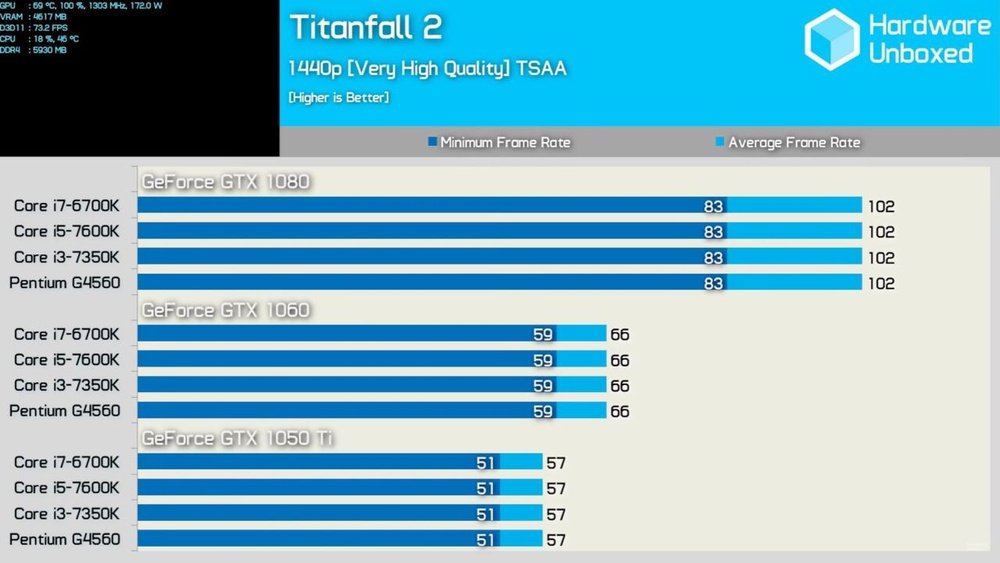
Choose a CPU and GPU that match in power. A strong GPU needs a strong CPU to keep up. A weak CPU can slow down a powerful GPU. Look at benchmarks to see how parts perform together. Pick parts made for similar performance levels. This keeps the system balanced and efficient.
Setting Resolution And Graphics Options
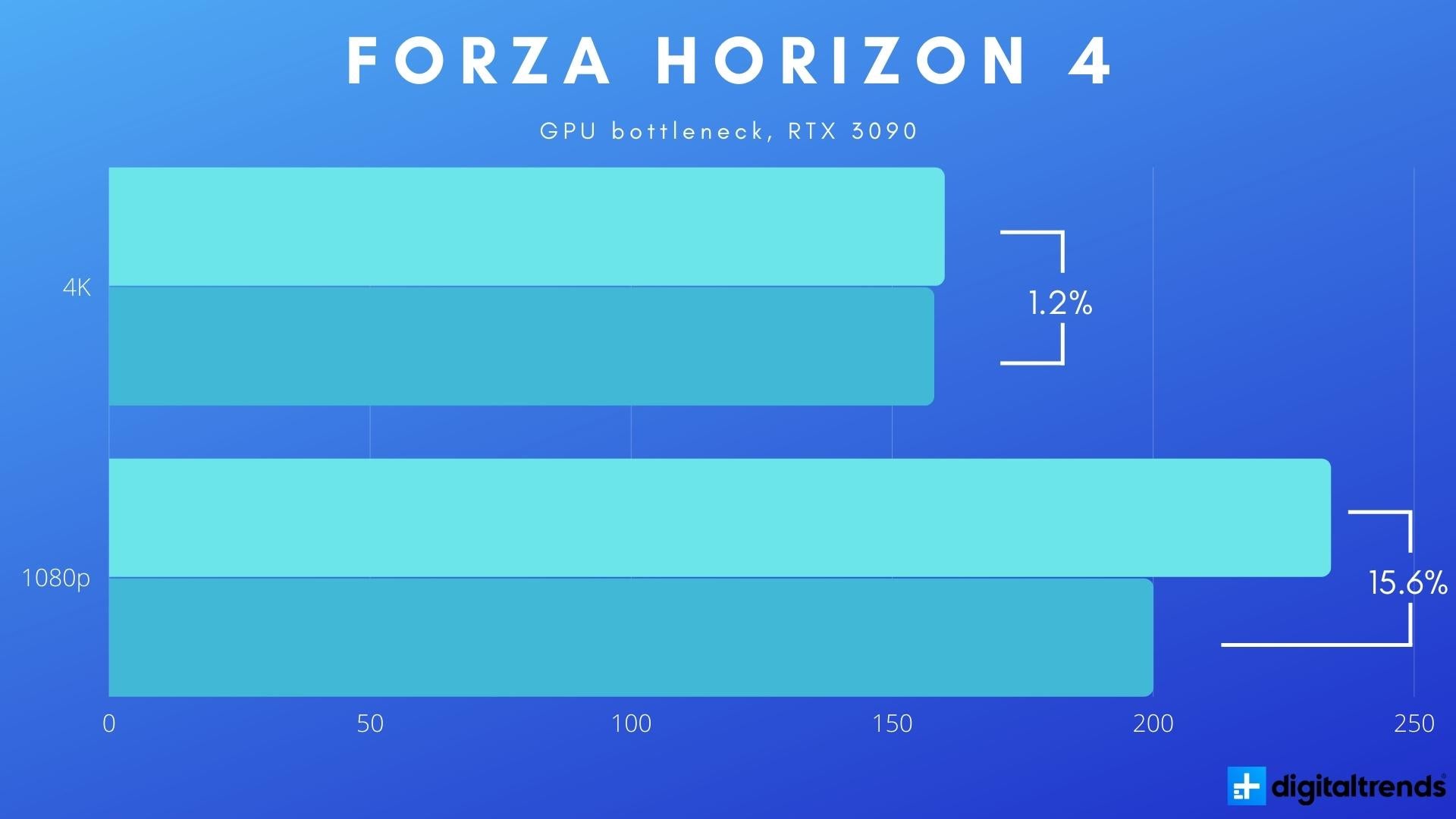
Adjust game settings to reduce CPU or GPU load. Higher resolution mostly stresses the GPU. Lowering resolution helps if the GPU struggles. Graphics options like shadows or textures affect the GPU too. Turn down CPU-heavy settings like physics or AI. This balances the work between the CPU and GPU.
Using Frame Rate Caps And Sync
Frame rate caps limit how many frames your system makes. This stops the GPU from working too hard. Sync options like V-Sync match frame rates to your monitor. They reduce screen tearing and smooth gameplay. These settings help avoid overloading the CPU or GPU. The result is a more balanced gaming experience.
When To Consider Hardware Upgrades
Knowing when to upgrade your hardware helps keep your PC running well. Over time, your CPU or GPU may stop working at their best. Upgrades can fix slow performance and give you a better experience.
Choosing the right time to upgrade saves money and avoids unnecessary work. Focus on what limits your system and what fits your needs.
Identifying Performance Limits
Watch your PC’s speed during games or apps. If the GPU is not fully used but the CPU is maxed out, the CPU may be the limit. Check task manager or software tools for usage stats. Slow frame rates or stutters often point to bottlenecks. Understanding which part slows your system helps decide what to upgrade.
Budgeting For Cpu Vs Gpu Upgrades
Set a clear budget before buying new parts. GPUs often cost more but give big boosts in games. CPUs affect overall system speed and multitasking. Balance your spending based on what needs fixing most. Sometimes, a smaller CPU upgrade helps more than a new GPU, or vice versa. Plan purchases carefully for best value.
Future-proofing Your Build
Pick parts that last longer with new software and games. Aim for a CPU and GPU that meet or exceed current requirements. Avoid very old models that might fail soon. Investing in quality parts reduces the need for early upgrades. Think about your future needs when choosing components now.
Frequently Asked Questions
How Can I Tell If My Cpu Bottlenecks My Gpu?
Check your CPU and GPU usage while gaming. If CPU hits 100% and GPU is lower, your CPU may bottleneck the GPU. This limits overall performance and frame rates.
What Causes Cpu Bottleneck In Gaming Pcs?
CPU bottleneck happens when the processor can’t keep up with the GPU’s speed. It occurs due to weak CPU, high game CPU demand, or poor optimization.
Can Upgrading My Cpu Fix Gpu Bottlenecking?
Yes, upgrading to a faster CPU can reduce or remove bottlenecks. A stronger CPU processes game data faster, allowing your GPU to perform optimally.
Does Overclocking Help Reduce Cpu Bottleneck On Gpu?
Overclocking your CPU can improve performance and reduce bottlenecking. However, it depends on the CPU’s cooling, stability, and game demands.
Conclusion
A CPU can limit how well your GPU performs. Check your games and tasks to spot any slowdowns. Simple tests help find if your CPU holds back your GPU. Upgrading parts might fix the issue but depends on your setup.
Balance matters for smooth and fast computer work. Understanding this helps you get better performance from your PC. Keep your system parts working well together for the best results.
