
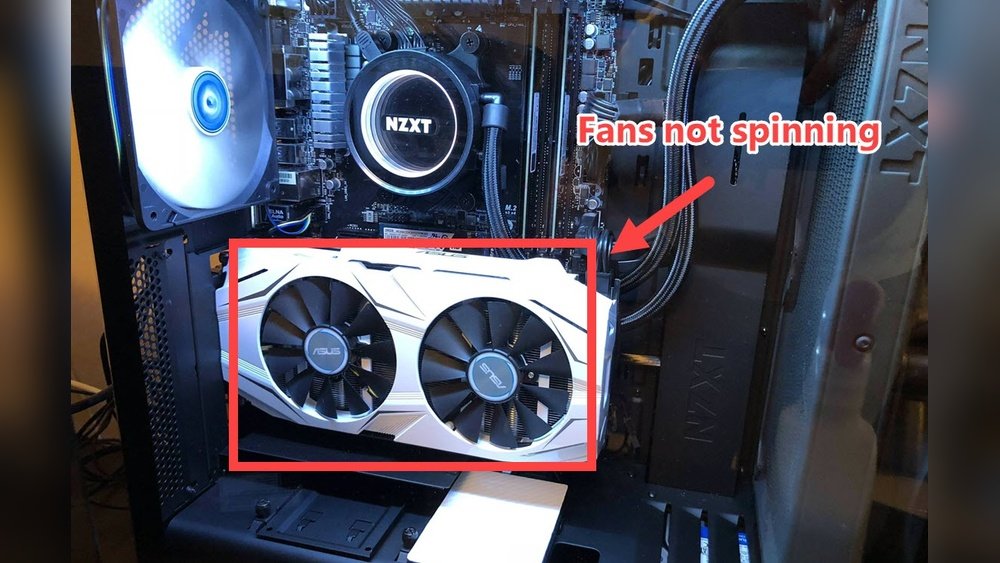
Have you ever noticed your GPU fans not spinning and wondered if that’s normal? It can be worrying to see those fans still when you expect them to be working hard.
But the truth is, sometimes your GPU fans staying still is completely okay. Understanding why this happens can save you from unnecessary stress and help you protect your computer. Keep reading to find out when your GPU fans should spin, what it means if they don’t, and how to keep your system running smoothly.
Credit: www.reddit.com
Why Gpu Fans Sometimes Don’t Spin
Gpu fans not spinning can seem odd at first. Many expect the fans to run all the time. Yet, this is not always true. Modern graphics cards use smart fan control. This helps reduce noise and wear on the fans. Understanding why gpu fans sometimes don’t spin helps clear worries.
Idle Mode Fan Behavior
Gpu fans often stay still when the card is idle. The card uses little power in this state. It does not produce much heat. Fans do not need to run. This saves energy and extends fan life. You might see the fans start only when you use the gpu for tasks that need more power.
Temperature-based Fan Activation
Gpu fans usually start spinning once the temperature rises. The card monitors its own heat level. Fans activate only when the temperature passes a set point. This point varies by model. It helps keep the gpu cool without unnecessary noise. The fans stop again when the temperature drops. This system balances cooling and quiet operation well.
When Should Gpu Fans Start Spinning
Knowing when GPU fans should start spinning helps you understand your graphics card’s behavior. GPU fans do not always spin immediately after powering on the computer. They often wait for a certain temperature or workload before activating. This helps reduce noise and wear on the fans.
Temperature Thresholds
GPU fans usually start spinning once the GPU reaches a specific temperature. This temperature is often around 50 to 60 degrees Celsius. Below this, the GPU can stay cool enough without fan help. The fans turn on to prevent overheating once the temperature passes this limit.
Load Conditions Affecting Fans
GPU fans also respond to how much work the GPU is doing. During light tasks like browsing or watching videos, fans might stay off. When running games or heavy programs, the GPU heats up faster. Fans then spin faster to cool the GPU and keep it safe.
Common Reasons For Non-spinning Gpu Fans
GPU fans may stop spinning for several common reasons. Knowing these helps you decide if there is a real problem. Sometimes, fans do not spin because of simple issues. Other times, software controls affect their movement. Understanding these causes can save you time and worry.
Dust And Debris Build-up
Dust often collects inside your GPU over time. This dirt can block fan blades or clog vents. Fans struggle to spin if they get stuck in dust. Cleaning dust gently can bring fans back to life. Regular maintenance keeps your GPU cool and safe.
Fan Connection Issues
Loose or unplugged fan cables stop fans from spinning. Check the fan connector on the GPU board carefully. Sometimes the cable slips out during installation or transport. Secure connections ensure power reaches the fans. A quick check often solves the problem.
Software And Firmware Settings
Some GPUs stop fans at low temperatures to reduce noise. Fan speed depends on software or firmware rules. Your GPU might not spin fans until it gets hot. Updating drivers or tweaking settings can restore normal fan behavior. Always use official software for these adjustments.
Credit: www.reddit.com
How To Check If Your Gpu Fans Are Working
Checking if your GPU fans are working is important for keeping your computer cool. Fans help stop your graphics card from overheating. Sometimes, fans may not spin right away or at all. Knowing how to check them can save your GPU from damage.
This guide shows easy ways to see if your GPU fans work well. You can do these checks with simple tools and steps. It helps you find out if the fans need fixing or replacement.
Visual Inspection Techniques
First, look closely at your GPU fans. Make sure the fans are not blocked by dust or cables. Clean any dirt gently using a soft brush or compressed air. Check if the fan blades move freely by spinning them with your finger. If the blades feel stuck or tight, the fan may have a problem.
Turn on your computer and watch the fans. Fans usually spin faster when the GPU is under load. Run a game or heavy program to see if fans start spinning. If fans stay still, there might be an issue with the fan motor or connection.
Using Monitoring Software
Use software tools to check fan speeds and GPU temperature. Programs like MSI Afterburner or HWMonitor show fan activity in real-time. Open the software and look for fan speed readings, usually in RPM (rotations per minute). If the fan speed stays at zero while the GPU is hot, the fans may not work properly.
Software can also help control fan speeds. Set fan speed to higher levels and watch if fans respond. No change means a possible hardware fault.
Testing Fan Manually
Turn off your computer and unplug it from power. Gently try to spin the GPU fan by hand. It should turn smoothly without much force. If the fan feels stuck or rough, it may need repair or replacement.
You can also test the fan by supplying power directly. This step is for advanced users. Use a 12V power source to run the fan and check if it spins. If it does not spin, the fan is likely defective and should be replaced.
Risks Of Gpu Fans Not Spinning When Needed
GPU fans play a key role in keeping your graphics card cool. When these fans do not spin at the right time, it can cause serious risks. Understanding these risks helps protect your computer and its parts.
Overheating Concerns
GPU fans stop heat from building up inside your graphics card. No spinning means heat stays trapped. This causes the GPU to get too hot fast. Overheating can slow down your computer. It may also cause crashes or unexpected shutdowns.
Potential Hardware Damage
High heat can damage GPU parts. The chip inside may burn or wear out sooner. Other components like memory and power circuits can also break. Long-term heat damage lowers your GPU’s life. Replacing a damaged GPU is expensive and time-consuming.
Troubleshooting Steps For Non-spinning Fans
GPU fans that do not spin can cause your graphics card to overheat. This leads to poor performance or damage. Troubleshooting non-spinning fans is important to keep your PC safe. Follow these simple steps to identify and fix common fan problems.
Cleaning And Maintenance Tips
Dust and dirt block fan blades and stops them from spinning. Use compressed air to blow dust away from the GPU fans. Clean gently to avoid damaging the fan. Check for any hair or debris stuck between the blades. Regular cleaning keeps fans working smoothly and extends GPU life.
Updating Drivers And Firmware
Old or corrupted drivers can cause fan issues. Visit the GPU manufacturer’s website for the latest driver updates. Install firmware updates if available. Updated software helps the fan control system work correctly. This can fix problems where fans do not spin at low temperatures.
Adjusting Fan Curves
Fan curves control when and how fast GPU fans spin. Use software like MSI Afterburner to adjust fan speed settings. Set the fans to start spinning at lower temperatures. This prevents fans from staying still when the GPU gets warm. Proper fan curves improve cooling and reduce noise.
When To Replace Or Repair Gpu Fans
Knowing when to replace or repair GPU fans is important. Fans keep your graphics card cool and prevent damage. Sometimes, fans stop spinning or make noise. This can cause your GPU to overheat. Overheating lowers your computer’s performance and can cause permanent damage. Acting quickly helps save your GPU and your money.
Signs Of Fan Failure
Fans that do not spin properly show clear signs. The most common sign is overheating. Your computer may shut down suddenly to protect itself. Loud or unusual noises from the GPU area also indicate fan trouble. Another sign is the fan spinning only sometimes or very slowly. Dust buildup can cause these problems but cleaning may not always help. Check your GPU temperature using software tools. High temperatures mean the fan might be failing.
Professional Repair Vs Replacement
Deciding between repair and replacement depends on the damage. Small issues like dust or stuck fans can be repaired easily. Professionals can clean and fix the fan or replace the motor. If the fan blades are broken or the motor is damaged, replacement is better. Replacing the entire fan or GPU ensures long-term reliability. Repair costs are usually lower than replacement but may not last long. A new fan offers better cooling and quieter operation.

Credit: www.wikihow.com
Frequently Asked Questions
Why Are My Gpu Fans Not Spinning At Startup?
GPU fans often stay off at low temperatures to reduce noise. They start spinning only when the GPU reaches a certain heat level. This is normal behavior in many modern graphics cards with zero RPM fan modes.
Is It Safe If Gpu Fans Stop Spinning Sometimes?
Yes, it is safe if fans stop spinning during light use. The GPU manages fan speed based on temperature. However, if fans never spin under heavy load, it may indicate a hardware or software issue.
How Can I Check If My Gpu Fans Are Working?
You can monitor GPU temperature using software like MSI Afterburner. Increase the load with a game or benchmark. Fans should start spinning once the GPU temperature rises above the threshold.
Can Dust Cause Gpu Fans To Stop Spinning?
Yes, dust buildup can block fan movement or cause overheating. Regular cleaning helps maintain proper airflow and fan function. Use compressed air to remove dust from your GPU fans carefully.
Conclusion
GPU fans may not spin all the time, and that can be normal. Many GPUs keep fans off when the temperature is low. This helps reduce noise and wear on the fan. But if your GPU gets hot and fans still don’t spin, check for dust or connection problems.
Keeping your GPU cool is important for good performance. Regular cleaning and monitoring can prevent issues. Understanding how your GPU fan works helps you keep your computer safe and running well.
