
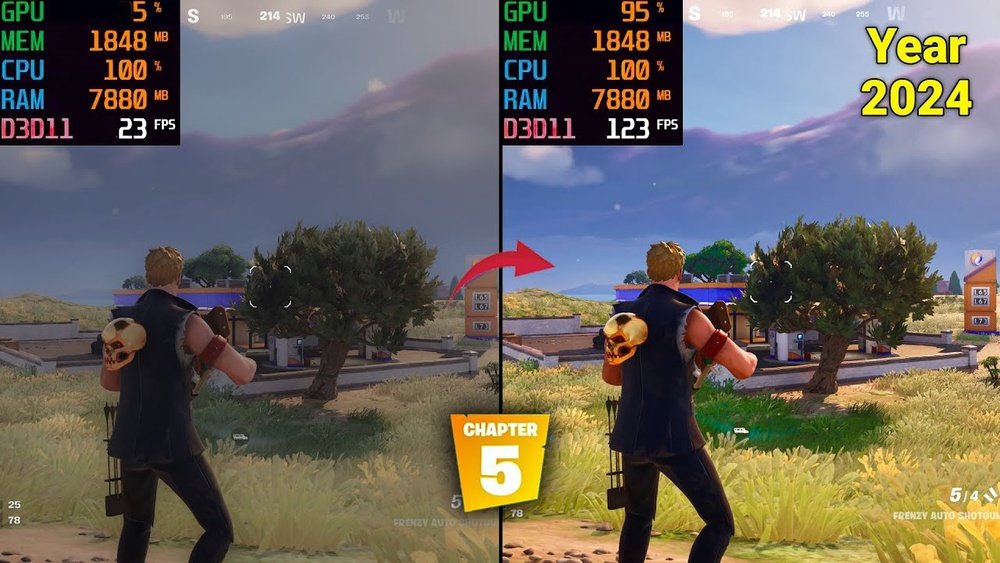
Are you wondering whether Fortnite relies more on your CPU or GPU to run smoothly? If you’ve ever struggled with lag or low frame rates, knowing which part of your computer really drives the game can help you get the best performance.
Understanding this can save you time, money, and frustration when upgrading your setup. Keep reading to discover the key to unlocking Fortnite’s full potential and how you can make your gaming experience flawless.
Fortnite Game Mechanics
Fortnite is a popular battle royale game that mixes shooting and building. Players fight to be the last one alive on a large map. The game has fast action and requires quick thinking. Understanding Fortnite’s game mechanics helps explain how it uses computer parts.
The game runs many tasks at once. It handles player movements, building structures, and shooting. These tasks affect how the game works with your computer’s CPU and GPU.
Core Gameplay Elements
Fortnite’s core gameplay includes running, shooting, and building. Players gather resources like wood, brick, and metal. They use these to build walls, ramps, and forts quickly. The building adds a unique layer to the gameplay.
Players also need to aim and shoot accurately. The game tracks many players at the same time. It updates their positions and actions every second. This keeps the game smooth and competitive.
Impact On Hardware Usage
The CPU handles game logic, player movements, and building actions. It processes many small tasks fast to keep the game responsive. The CPU also manages the game’s physics and AI opponents.
The GPU focuses on rendering graphics. It draws the game world, characters, and effects. Fortnite’s bright colors and detailed environments demand good GPU power. Smooth graphics need the GPU to work hard.
Both CPU and GPU are important for Fortnite. A strong CPU helps with fast gameplay and building. A powerful GPU ensures clear and smooth visuals. Balancing both parts gives the best gaming experience.
Cpu Role In Fortnite
The CPU plays an important role in Fortnite. It controls many parts of the game that the GPU does not handle. The CPU works behind the scenes to make the game run smoothly.
Without a good CPU, Fortnite can feel slow or laggy. It handles tasks that keep the game logic and player interactions working well. Understanding the CPU’s role helps to know how Fortnite performs on your computer.
Processing Game Logic
The CPU processes the rules and actions in Fortnite. It calculates player movements, building placement, and weapon use. This processing makes sure the game reacts correctly to every action.
Game logic includes physics, damage, and item effects. The CPU ensures these happen in real time. This keeps gameplay fair and fun for all players.
Handling Multiplayer And Ai
The CPU manages connections between players in multiplayer matches. It syncs player positions and actions across the network. This keeps all players’ games matched and smooth.
AI characters, like bots, also rely on the CPU. The CPU controls their behavior, making them act like real players. This adds challenge and excitement to the game.
Influence On Frame Rates
The CPU affects the game’s frame rates by how fast it processes data. A slow CPU can cause lower frame rates and stuttering. A good CPU keeps the game running at steady frame rates.
While the GPU handles graphics, the CPU supports overall speed. Both must work well to provide smooth Fortnite gameplay.
Gpu Role In Fortnite
The GPU plays a key role in Fortnite. It handles the visual parts of the game. The smoothness and beauty of the game depend a lot on the GPU. It works to create the images and effects you see on the screen. This helps make the game fun and immersive.
Rendering Graphics
The GPU creates all the graphics in Fortnite. It turns the game data into pictures. This includes characters, buildings, and the environment. The better the GPU, the clearer and sharper the graphics look. It processes many details fast to keep the game running smoothly.
Effects And Visual Quality
Special effects like shadows, lighting, and textures rely on the GPU. It makes these effects look real and attractive. A strong GPU can handle higher quality effects without slowing down the game. This improves the overall visual experience for players.
Resolution And Frame Timing
The GPU controls the game’s resolution and frame rate. Higher resolution means clearer images. The GPU also keeps the game running at a steady frame rate. This prevents lag and makes the gameplay smooth. Good frame timing is important for fast action in Fortnite.

Credit: softwareg.com.au
Balancing Cpu And Gpu
Fortnite needs both CPU and GPU to work well. The game sends many tasks to the CPU, like managing player actions and game logic. The GPU handles graphics, showing textures and effects on the screen. A good balance between these parts helps the game run smoothly. Too much load on one part slows the whole game down.
Choosing the right hardware matters. Both CPU and GPU must be strong enough to handle Fortnite’s demands. This balance avoids slowdowns and lag during play.
Bottleneck Scenarios
Bottlenecks happen when one part limits the performance of the other. For example, a slow CPU can’t send data fast enough to a powerful GPU. The GPU waits and sits idle, which wastes its potential. On the other hand, a weak GPU cannot keep up with a fast CPU. The CPU finishes tasks quickly but the GPU slows down the frame rate.
In Fortnite, bottlenecks reduce frames per second and cause stutter. Identifying which part is the bottleneck helps to fix the problem. Upgrading the weaker part brings better balance and improved gameplay.
Optimizing System Performance
Optimizing means making your system run Fortnite better. Start by updating drivers for both CPU and GPU. These updates fix bugs and improve speed. Next, close background apps that use CPU power. This frees resources for Fortnite to use.
Adjust game settings to reduce GPU load. Lowering shadows and effects helps if the GPU is weak. If the CPU is the bottleneck, reduce the number of players or settings that need heavy calculations.
Regularly cleaning your computer and checking for overheating also helps. Cooler parts run faster and last longer. Balancing CPU and GPU with these steps ensures smoother Fortnite play.
System Requirements For Fortnite
Fortnite demands specific hardware to run smoothly. Understanding the system requirements helps players enjoy the game without lag or crashes. Both the CPU and GPU play roles, but knowing the specs is key for a good experience.
Minimum Vs Recommended Specs
The minimum specs allow Fortnite to run at low settings. A basic CPU like Intel Core i3 and an integrated GPU often meet these needs. At least 4 GB of RAM is necessary.
The recommended specs offer a much better experience. A stronger CPU such as Intel Core i5 and a dedicated GPU like Nvidia GTX 660 improve graphics and speed. At least 8 GB RAM is ideal for smooth gameplay.
Impact Of Updates And Patches
Fortnite updates often increase the hardware demand. New features and better graphics need more CPU and GPU power. Players with minimum specs may face slower performance after updates.
Keeping drivers and system software updated can help. Sometimes, adjusting game settings after a patch improves stability. Regularly checking Epic Games’ announcements is useful to stay informed.

Credit: www.datajudicial.com.ar
Performance Tuning Tips
Performance tuning in Fortnite is key for smooth gameplay. Small changes can make big differences. Focus on your CPU and GPU to improve your experience. Below are simple tips to help you get better performance.
Adjusting Graphics Settings
Lower the resolution to reduce the load on your system. Turn off shadows and lower texture quality. Set effects and post-processing to medium or low. These settings help your CPU and GPU run faster. Avoid high settings that cause lag or stutter.
Cpu Optimization Tricks
Close background apps to free up CPU power. Update your operating system to ensure best performance. Use a game mode or high-performance power plan in settings. Disable unnecessary startup programs that slow down the CPU. Keep your CPU cool with good ventilation or a fan.
Gpu Overclocking And Drivers
Update your GPU drivers regularly for better compatibility. Overclock your GPU carefully to gain extra speed. Use trusted software and increase clock speed slowly. Monitor temperatures to avoid overheating. Proper driver updates can fix bugs and improve Fortnite’s graphics.
Benchmarking Fortnite
Benchmarking Fortnite helps to understand how well your computer can run the game. It shows the role of CPU and GPU in delivering smooth gameplay. Testing different hardware setups helps find the best balance for good performance.
Gamers use benchmarking to see if their system meets Fortnite’s demands. This process measures frame rates, loading times, and overall game stability. Knowing these details improves the gaming experience and helps avoid lag or crashes.
Popular Testing Tools
Several tools are popular for benchmarking Fortnite. FRAPS and MSI Afterburner record frame rates during gameplay. 3DMark tests the GPU strength with graphics benchmarks. UserBenchmark offers a quick way to compare CPU and GPU speeds.
These tools provide clear data on how Fortnite performs on your setup. They help identify if the CPU or GPU limits the game’s smoothness. Most gamers use more than one tool for accurate results.
Interpreting Results
After testing, results show which hardware affects Fortnite the most. Higher frame rates mean better graphics performance. Low CPU usage but high GPU load shows the game relies more on graphics cards.
Look for frame drops or stutters to find weak points. If the CPU maxes out, upgrading the processor helps. If the GPU struggles, a better graphics card improves gameplay. These insights guide players on hardware upgrades.
Credit: gtek.cv
Future Trends In Fortnite Performance
Fortnite is always changing. Its performance depends on many things. Both the CPU and GPU affect how well the game runs. Future updates will change these needs. Players must know what to expect.
New features and graphics improvements will increase demands. This means better hardware will become important. Let’s explore what is coming next for Fortnite’s performance.
Upcoming Hardware Demands
Fortnite will need stronger CPUs and GPUs soon. The game adds more details and effects each season. This makes the game harder to run on old machines.
Fast processors help with building and aiming. Powerful graphics cards handle textures and shadows. Players with weak hardware may see lower frame rates.
Future updates may require more memory and faster storage. These help load the game world quickly. Keeping hardware updated will give smoother gameplay.
Potential Game Engine Changes
Epic Games often improves Fortnite’s game engine. These changes can shift the balance between CPU and GPU needs. New physics or AI can use more CPU power.
Graphics upgrades like ray tracing rely heavily on the GPU. Engine updates may also optimize performance for newer hardware. This means older systems might struggle more.
Players should watch for engine improvements that affect game speed. These changes can impact competitive play and user experience. Staying informed helps players prepare their setups.
Frequently Asked Questions
Is Fortnite More Cpu Or Gpu Dependent?
Fortnite relies heavily on both CPU and GPU. The CPU handles game logic and physics. The GPU processes graphics and rendering. However, smooth gameplay requires a balanced CPU-GPU combo. Generally, a strong CPU improves performance in Fortnite’s fast-paced environment.
How Does Cpu Affect Fortnite Gameplay?
The CPU manages game mechanics, player input, and physics calculations. A faster CPU reduces lag and improves frame rates. It helps in processing multiple players and complex actions simultaneously. Fortnite performance can suffer if the CPU is weak or outdated.
Why Is Gpu Important For Fortnite?
The GPU renders Fortnite’s visuals, textures, and effects. A powerful GPU ensures smooth frame rates and better graphics quality. It improves resolution and detail, enhancing the gaming experience. Without a good GPU, Fortnite may run with lower settings and stutter.
Can Fortnite Run Well On Low-end Cpus?
Fortnite can run on low-end CPUs but with limits. You may experience lower frame rates and longer load times. Gameplay might not be as smooth during intense action. Upgrading the CPU is recommended for better performance and responsiveness.
Conclusion
Fortnite needs both CPU and GPU to run well. The CPU handles game logic and player actions. The GPU creates the graphics and visuals you see. Without a good CPU, the game can lag or freeze. Without a strong GPU, the game looks bad and runs slowly.
For smooth play, balance your computer parts. This helps you enjoy Fortnite with fewer issues. Choose parts that match your gaming needs and budget. Simple upgrades can improve your experience a lot. Keep your system updated and drivers current. Playing Fortnite is more fun with a well-built PC.
