
Are you worried because your GPU is hitting 90% usage? You might be asking yourself, “Is 90 GPU usage bad for my computer?” It’s normal to wonder if such high numbers mean your system is under too much stress or if it could lead to damage.
Understanding what this means for your gaming, work, or everyday tasks can save you from unnecessary stress and help you get the most out of your hardware. Keep reading, and you’ll learn exactly when 90% GPU usage is a problem—and when it’s completely okay.
Credit: www.youtube.com
High Gpu Usage Explained
GPU usage shows how much your graphics card works. It tells the load on your GPU at any time. High GPU usage means the card is busy doing tasks. This can happen while gaming, editing videos, or running heavy software.
Understanding GPU usage helps you see if your system runs well. It also helps find problems like overheating or slowdowns. Let’s explore what 90% GPU usage means and how to spot normal vs excessive use.
What 90% Gpu Usage Means
Seeing 90% GPU usage means your graphics card works hard. It is almost at full capacity. This is common during heavy tasks like gaming or 3D rendering. The GPU uses most of its power to deliver good performance.
High usage like this is not always bad. It shows your GPU is doing its job well. But it should not stay at 90% or more for too long when idle. That can cause heat and wear on the hardware.
Normal Vs Excessive Usage
Normal GPU usage changes with your activity. Light tasks like browsing use 1% to 10%. Moderate tasks like watching videos use 20% to 50%. Heavy tasks push usage above 70% or 80%.
Excessive GPU usage means high load without heavy tasks. For example, 90% usage on idle or simple apps is unusual. It may signal software issues or malware. Over time, this can damage your GPU or cause crashes.
Monitor your GPU usage to keep it healthy. Use tools to check if usage matches your activities. Lower usage when idle keeps your system cool and stable.
Risks Of Prolonged High Gpu Usage
Running your GPU at 90% usage for a long time carries risks. It stresses the hardware and can cause problems. Understanding these risks helps you protect your computer and keep it running well.
Overheating And Thermal Throttling
High GPU usage generates a lot of heat. Over time, this heat can cause the GPU to overheat. When the GPU gets too hot, it slows down to cool off. This process is called thermal throttling. Thermal throttling reduces performance and can interrupt your work or gaming.
Hardware Degradation
Constant high usage can wear out the GPU parts faster. Heat and stress break down the components inside the GPU. This leads to shorter lifespan and possible hardware failure. Replacing a damaged GPU can be costly and inconvenient.
System Instability
High GPU usage may cause your system to become unstable. You might see crashes, freezes, or unexpected shutdowns. These issues disrupt your tasks and can cause data loss. Stable systems need balanced GPU usage and good cooling.
Common Causes Of 90% Gpu Usage
High GPU usage often raises questions about performance and safety. Understanding why your GPU hits 90% usage helps you manage your computer better. Several common reasons explain this intense workload.
Demanding Applications And Games
Modern games and software need strong graphics power. These programs use the GPU heavily to render images and effects. High settings and resolutions increase GPU demand. This usage is normal during intense tasks.
Background Processes
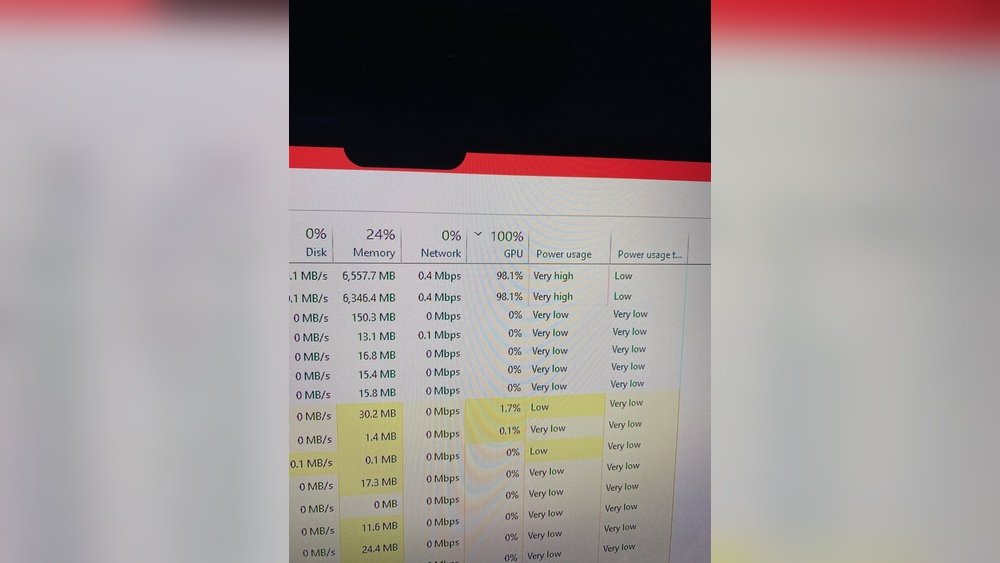
Some programs run quietly in the background. These apps can use GPU resources without your knowledge. System updates, video players, or web browsers may cause this. Checking background apps can reveal hidden GPU use.
Driver And Software Issues
Outdated or faulty drivers can cause high GPU usage. Drivers control how software talks to hardware. Bugs or errors in drivers may lead to unnecessary GPU load. Keeping drivers updated helps keep usage stable.
Malware Impact
Malware can use your GPU for harmful activities. Some viruses mine cryptocurrency using your graphics card. This hidden use spikes GPU usage without your consent. Running antivirus scans can protect your system.

Credit: www.reddit.com
How To Monitor Gpu Usage Effectively
Monitoring GPU usage effectively helps keep your computer running smoothly. It lets you see how hard your GPU works during tasks. This knowledge helps prevent overheating and performance drops. You can also decide if your GPU needs an upgrade. Understanding your GPU’s load ensures better gaming, editing, or everyday use.
Tools And Software Options
Several tools show real-time GPU usage on your screen. Task Manager on Windows provides basic GPU data. For detailed info, try software like MSI Afterburner or GPU-Z. These tools display temperature, clock speed, and usage percentage. Some programs also allow custom alerts for high GPU use. Choose a tool that matches your skill level and needs.
Interpreting Usage Data
High GPU usage means your graphics card works hard. Around 90% usage during gaming or editing is normal. Constant 90% use during simple tasks might signal a problem. Watch for sudden spikes or long periods at 100%. Check temperatures to avoid overheating risks. Balanced usage and cool temperatures keep your GPU healthy.
Steps To Reduce Gpu Usage
High GPU usage can slow down your computer and cause overheating. Lowering GPU usage helps keep your system smooth and cool. Simple steps can reduce the load on your graphics card.
Follow these easy methods to reduce GPU usage and improve performance.
Adjusting Graphics Settings
Lower the resolution and graphics quality in games or apps. Turn off extra effects like shadows or reflections. Reducing settings decreases the work your GPU must do. This helps keep GPU usage at a safer level.
Closing Unnecessary Programs
Many programs run in the background without you knowing. Close apps you do not need while gaming or working. This frees GPU resources for the main tasks. Check your task manager to find and stop heavy programs.
Updating Drivers And Software
Old drivers can cause higher GPU usage and bugs. Download the latest graphics drivers from the manufacturer’s website. Keep your software updated for better GPU management. Updates often improve performance and fix issues.
Improving Cooling Solutions
High temperatures make your GPU work harder. Clean dust from fans and vents regularly. Use extra cooling like fans or a cooling pad. Better cooling helps your GPU run efficiently and lowers usage spikes.

Credit: www.reddit.com
When To Consider Upgrading Hardware
High GPU usage is normal during heavy tasks like gaming or video editing. But constant 90% or higher use can signal a need for better hardware. Upgrading your GPU can improve performance and reduce stress on your system. Knowing when to upgrade helps avoid slowdowns and crashes.
Signs Your Gpu Is Overmatched
Your GPU struggles if games lag or stutter often. Frame rates dropping below 30 FPS is a clear sign. You may see longer loading times or screen tearing. Overheating or loud fan noise also shows the GPU works too hard. If your GPU can’t run new software smoothly, it is overmatched.
Choosing The Right Upgrade
Pick a GPU that matches your main tasks. For gaming, check the recommended specs of your favorite games. For video editing, prioritize VRAM and CUDA cores. Balance the GPU with your CPU to avoid bottlenecks. Consider power supply and case size before buying. A well-chosen GPU upgrade boosts speed and lasts longer.
Frequently Asked Questions
Is 90% Gpu Usage Normal During Gaming?
Yes, 90% GPU usage is normal while gaming. It means your GPU is working hard to render graphics smoothly. High usage indicates efficient resource utilization, but sustained 90% plus usage may increase heat and power consumption.
Can 90% Gpu Usage Damage My Graphics Card?
No, 90% GPU usage alone doesn’t damage your card. Modern GPUs are designed to handle high workloads safely. Ensure proper cooling and ventilation to avoid overheating, which can harm hardware over time.
Why Does My Gpu Usage Hit 90% Suddenly?
Your GPU usage can spike to 90% when running demanding applications or games. This happens as the GPU processes complex graphics and calculations, maximizing performance for smooth visuals and gameplay.
Should I Worry If Gpu Usage Stays At 90%?
Not necessarily. Consistent 90% GPU usage means your GPU is fully utilized. However, monitor temperatures and fan speeds to prevent overheating or hardware throttling during extended high usage.
Conclusion
High GPU usage, like 90%, is not always bad. It shows your graphics card works hard. This can happen during gaming or heavy tasks. Just watch your GPU temperature closely. Too much heat can harm your hardware. Keep your system clean and cool.
Use good ventilation and update drivers often. If your GPU runs hot for long, take breaks. Normal use should not cause serious problems. Knowing your GPU’s limits helps protect your computer. Stay aware and your GPU will serve you well.
