
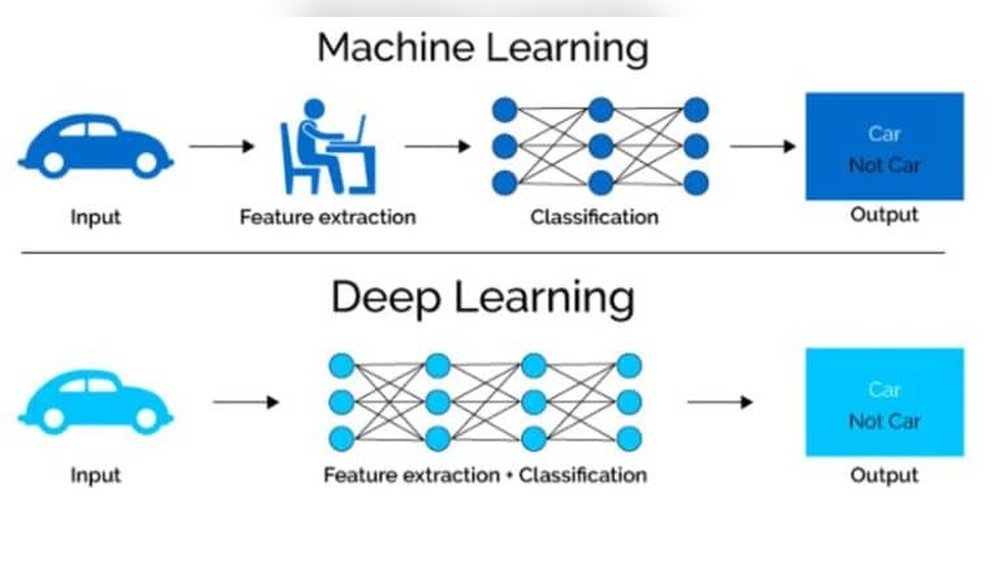
Are you struggling to speed up your machine learning projects? Using a GPU can transform the way you train your models, making the process faster and more efficient.
But how exactly do you tap into the power of a GPU for machine learning? You’ll discover simple steps to get started, practical tips to optimize performance, and common pitfalls to avoid. By the end, you’ll feel confident using your GPU to unlock new potential in your machine learning work.
Keep reading to learn how to make your models run smarter and faster.

Credit: www.weka.io
Benefits Of Gpu In Machine Learning
GPUs offer many benefits for machine learning tasks. They handle complex calculations faster than regular CPUs. This speed helps train models quicker and test ideas more often.
Using GPUs also improves the quality of machine learning models. They support large datasets and complex algorithms easily. This helps create more accurate and reliable results.
Faster Computation
GPUs process many operations at once. This ability makes training machine learning models much faster. Tasks that take hours on a CPU can take minutes on a GPU. Faster computation saves time and allows more experiments.
Enhanced Parallel Processing
GPUs have thousands of small cores working together. These cores handle multiple tasks simultaneously. Parallel processing is ideal for machine learning’s heavy math. It speeds up data processing and model training efficiently.
Improved Model Accuracy
With GPUs, you can use bigger datasets and complex models. This leads to better learning from data. More detailed models often give higher accuracy. GPU power allows exploring more model options quickly.
Choosing The Right Gpu
Choosing the right GPU is important for machine learning tasks. The GPU affects how fast and well your models train and run. Picking the best GPU depends on your needs and budget. Understanding key specs and options helps you make the right choice.
Key Specifications To Consider
Memory size is crucial. Bigger memory holds larger datasets and models. Look for GPUs with at least 8GB of VRAM. CUDA cores impact processing power. More cores usually mean faster computations. Clock speed also matters. Higher speeds improve performance but check compatibility with your system. Tensor cores boost deep learning tasks. Not all GPUs have them, so choose based on your workload.
Popular Gpu Models For Ml
NVIDIA is a top brand for machine learning GPUs. The RTX 30 series offers good performance for many users. The RTX 4090 is powerful for advanced projects but expensive. The RTX 3060 and 3070 provide solid power for mid-range budgets. AMD GPUs are growing in popularity, but software support is less common. Consider your software needs before choosing AMD.
Budget Vs Performance
High-end GPUs deliver faster results but cost more. Mid-range GPUs balance price and power well. Entry-level GPUs are affordable but may limit your work. Think about your project size and growth plans. Spending wisely saves money and meets your machine learning goals. Avoid overspending on features you do not need.
Setting Up Gpu Environment
Setting up a GPU environment is the first step to speed up machine learning tasks. GPUs process many calculations at once. This helps train models faster than using a CPU. Follow these steps to prepare your system for GPU use.
Installing Gpu Drivers
Start by installing the correct GPU drivers. These drivers let your computer talk to the GPU. Visit the GPU maker’s website, like NVIDIA or AMD. Download the latest drivers for your GPU model. Run the installer and follow the instructions. Restart your computer after installation. Confirm the driver works by checking device manager or GPU software.
Configuring Cuda And Cudnn
CUDA is a platform that helps programs use NVIDIA GPUs. Download the CUDA toolkit from NVIDIA’s official site. Choose the version that matches your GPU and operating system. Install it carefully, following the steps on the screen.
cuDNN is a library that speeds up deep learning. Download cuDNN after registering on NVIDIA’s site. Copy the cuDNN files into the CUDA folder. This allows machine learning programs to use GPU power fully.
Integrating With Machine Learning Frameworks
Machine learning frameworks like TensorFlow and PyTorch support GPU. Install the GPU-enabled versions of these frameworks. Use package managers like pip or conda for easy setup.
Test if the GPU is working by running simple code. The framework should detect your GPU automatically. This step ensures your environment is ready for training models fast.
Optimizing Ml Code For Gpu
Optimizing machine learning code for GPUs is key to faster model training and better performance. GPUs handle many tasks at once, unlike CPUs. To get the best results, you must write code that fits GPU strengths. This means using parallel computing, managing memory well, and using special libraries made for GPUs.
Utilizing Parallelism
GPUs have thousands of cores that work together. Divide your tasks into small parts. Run these parts at the same time on many cores. This makes your code run much faster. Use parallel loops and operations that can split easily. Avoid tasks that depend on each other too much. This can slow down the GPU.
Memory Management Techniques
Memory is limited on a GPU. Transfer data to the GPU only once if possible. Keep data on the GPU during calculations. Avoid moving data back and forth between CPU and GPU. Use shared memory to store data that many threads need. This reduces slow access to main memory and speeds up your code.
Leveraging Gpu-accelerated Libraries
Many libraries are built to run fast on GPUs. Libraries like TensorFlow, PyTorch, and cuDNN use GPU power well. Use these libraries instead of writing complex GPU code yourself. They handle parallelism and memory for you. This saves time and improves performance. Make sure to choose the right library for your task.
Common Challenges And Solutions
Using a GPU for machine learning can speed up your work. Yet, it brings some common problems. These problems can slow you down or cause errors. Knowing these challenges helps you fix them fast. This section covers typical issues and easy solutions.
Dealing With Compatibility Issues
GPUs need the right software to work well. Drivers and libraries must match your GPU model. Old drivers cause errors or slow speed. Check the GPU driver version often. Update it from the official website.
Machine learning frameworks also need the right versions. For example, TensorFlow or PyTorch must support your GPU. Use compatible CUDA and cuDNN versions. This helps avoid crashes and improves performance.
Debugging Gpu-related Errors
GPU errors can be hard to find. Common errors include out-of-memory and kernel crashes. Read the error message carefully. It often gives clues about the problem.
Use debugging tools like NVIDIA Nsight or Visual Profiler. These tools show what your GPU is doing. They help find bugs in your code or GPU setup. Testing smaller models first can reduce errors too.
Managing Resource Bottlenecks
GPUs have limited memory and computing power. Running many tasks at once can slow them down. Monitor GPU usage with tools like nvidia-smi. This shows memory and processor use in real time.
Optimize your code to use memory better. Clear unused variables and batch data properly. Splitting large models or data can prevent bottlenecks. Efficient resource use keeps your training smooth and fast.

Credit: totalplumbingfl.com
Measuring Performance Gains
Measuring performance gains is key to understanding the true value of using a GPU for machine learning. It shows how much faster and better your models perform with this powerful hardware. This helps you decide if investing in a GPU is worth it.
Benchmarking Training Speed
Training speed is one of the main benefits of using a GPU. Measure the time it takes to train the same model on a CPU and then on a GPU. Record the difference. Faster training means you can try more ideas quickly.
Use consistent datasets and settings to get fair results. Run multiple tests to avoid errors. Compare the average times to see real speed improvements.
Assessing Model Accuracy Improvements
Speed is important, but accuracy matters too. Check if the GPU helps improve your model’s predictions. Train your model on both CPU and GPU. Test the results on the same data.
Look for changes in accuracy, precision, recall, or other key metrics. A GPU might allow more complex models, improving accuracy. But always verify the actual impact.
Cost-benefit Analysis
Using a GPU costs money. Compare the speed and accuracy gains with the extra expense. Calculate how much time you save and how it benefits your projects.
Consider electricity, hardware cost, and maintenance. If the gains exceed the costs, the GPU is a good investment. Otherwise, it might be better to optimize your CPU setup.
Future Trends In Gpu And Ml
The future of GPUs and machine learning is bright. GPUs keep evolving to meet growing demands. Machine learning models grow larger and more complex. This pushes GPU technology to develop faster. New trends in both fields promise better speed and efficiency.
These changes will help researchers and developers build smarter systems. They will also lower costs and energy use. The following sections explore key future trends shaping GPUs and machine learning.
Advancements In Gpu Technology
GPU makers focus on increasing power and efficiency. New GPUs have more cores and better memory. They handle larger data sets faster than before. Energy-saving features reduce electricity use during training. GPUs also improve in supporting AI-specific tasks. This makes running machine learning models easier and quicker.
Emerging Ml Techniques Leveraging Gpus
Machine learning methods evolve to use GPU strengths. Techniques like deep learning and reinforcement learning benefit the most. Algorithms are designed to run better on GPUs. This speeds up training and improves model accuracy. Some models use parallel processing to handle big data. These changes push AI closer to human-like intelligence.
Cloud-based Gpu Solutions
Cloud services offer powerful GPUs on demand. Users can rent GPU time instead of buying hardware. This lowers the entry barrier for small teams and startups. Cloud GPUs provide flexibility for scaling machine learning projects. They also allow quick access to the latest GPU models. This helps users stay updated with current technology.

Credit: timdettmers.com
Frequently Asked Questions
What Is The Role Of Gpu In Machine Learning?
A GPU accelerates machine learning by processing many tasks simultaneously. It handles complex computations faster than CPUs, improving training speed and model performance. GPUs are essential for deep learning and large datasets, making them a critical tool for efficient machine learning workflows.
How To Choose The Best Gpu For Machine Learning?
Select a GPU with high CUDA cores, large VRAM, and good memory bandwidth. Nvidia GPUs like the RTX and Tesla series are popular for ML tasks. Also, consider compatibility with your software framework and your budget for the best performance.
Can All Machine Learning Models Use Gpu Acceleration?
Not all models benefit equally from GPUs. Deep learning models like CNNs and RNNs gain the most from GPU acceleration. Simple models or small datasets may not see significant speed improvements with GPU use.
How To Set Up Gpu For Machine Learning?
Install the latest GPU drivers and CUDA toolkit from the manufacturer’s website. Configure your ML framework (e. g. , TensorFlow, PyTorch) to use GPU support. Verify the setup by running test scripts to ensure the GPU is properly utilized.
Conclusion
Using a GPU can speed up your machine learning tasks greatly. It handles many calculations at once, saving time. Choose the right GPU for your needs and budget. Remember to install proper software and drivers for smooth use. Practice running simple models first to learn the process.
Over time, you will see better results and faster training. GPUs make complex projects easier and more efficient. Keep experimenting to improve your skills and outcomes.
