
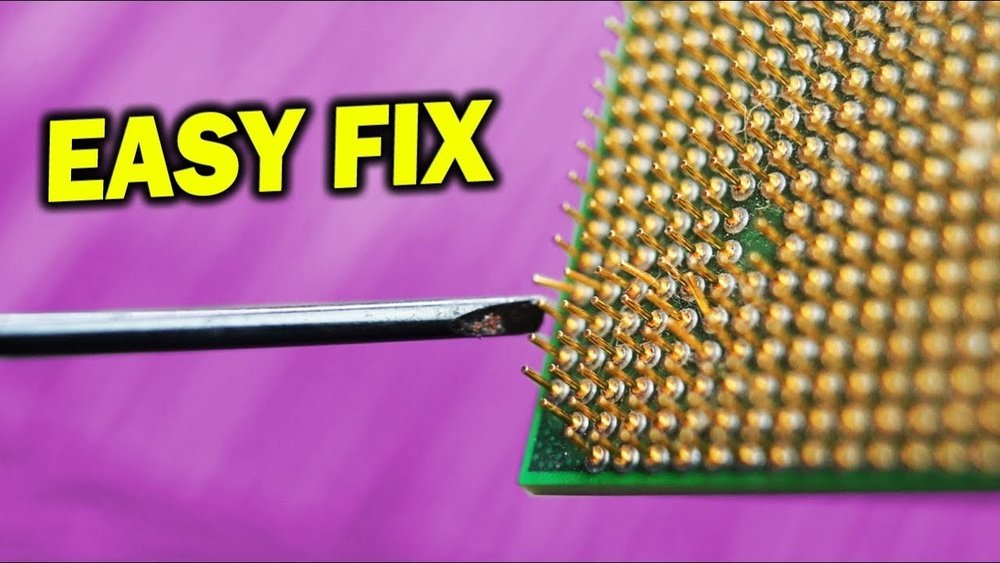
Have you ever handled your CPU carefully, only to notice a bent pin afterward? It’s a frustrating moment that can make you worry about damaging your computer forever.
But don’t panic just yet. You can fix those bent pins yourself with the right steps and a bit of patience. In this guide, you’ll learn simple, effective techniques to carefully unbend CPU pins and get your processor working like new again.
Keep reading, and you’ll soon gain the confidence to tackle this common problem without fear.
Identifying Bent Cpu Pins
Identifying bent CPU pins is crucial before attempting any repairs. Bent pins can cause your computer to fail or behave oddly. Detecting these problems early saves time and money. Examining the CPU carefully helps spot any pin issues. This step ensures your CPU will work properly after fixing.
Signs Of Damaged Pins
Look closely at the CPU pins for any irregularities. Pins that are crooked or out of line are bent. Missing pins or broken tips also mean damage. The CPU may not fit correctly into the socket. Sometimes, the computer does not start or crashes often. These symptoms often point to bent or damaged pins.
Tools Needed For Inspection
Use a magnifying glass or jeweler’s loupe for a clear view. A bright light source helps to see small details. A steady surface is essential to hold the CPU safely. Avoid touching pins with bare hands to prevent oils or dirt. Patience and gentle handling are key during inspection.
Preparing For Pin Repair
Preparing for pin repair is the first step to fix bent CPU pins safely. Careful preparation prevents further damage and helps the repair process go smoothly. Take time to gather tools and set up your workspace with care.
Gathering Essential Tools
Collect tools that help you handle tiny CPU pins with precision. Use a magnifying glass or jeweler’s loupe to see pins clearly. Tweezers with fine tips work best to bend pins gently. A small flat tool like a credit card or mechanical pencil can help align pins. Avoid using large or rough tools that can break pins.
Setting Up A Clean Workspace
Choose a flat, well-lit area to work on your CPU. Clean the surface to remove dust and dirt. Use a soft cloth or anti-static mat to protect the CPU from scratches. Make sure you have enough light to see every pin clearly. Keep distractions away to focus on the delicate task ahead.
Step-by-step Pin Straightening
Step-by-step pin straightening helps fix bent CPU pins carefully. This process avoids damage and restores the CPU’s function. Bent pins can stop the CPU from fitting properly in the socket. Straightening pins gently can save you money and time.
Using A Mechanical Pencil
Choose a mechanical pencil with no lead inside. The hollow tip fits over a bent pin. Gently slide the tip over the pin. Slowly push the pin back to its original position. Use small movements to avoid breaking the pin. Check the alignment often during the process.
Applying A Credit Card Method
Use a thin, stiff credit card or similar object. Place the card flat against the row of bent pins. Press down gently to realign multiple pins at once. Move the card slowly to avoid bending pins more. This method works best for pins bent in one direction.
Tweezers For Precision
Pick fine-tipped tweezers for careful pin adjustment. Hold the pin near the base. Slowly bend the pin to its correct angle. Avoid squeezing too hard to prevent pin damage. Work on one pin at a time for better control. Check the pins under good light for accuracy.

Credit: www.youtube.com
Testing The Cpu After Repair
After unbending CPU pins, testing the CPU is essential. This step ensures the repair was successful and the CPU works correctly. Careful testing helps avoid damage to other parts. Follow simple steps to check the CPU’s function and stability.
Reinstalling The Cpu
Place the CPU gently back into the socket. Align it with the socket marker. Do not force it. Secure the CPU with the locking mechanism. Make sure it sits flat and even. Proper installation prevents future pin damage.
Checking System Boot And Stability
Turn on the computer after reinstalling the CPU. Watch for normal startup screens. Listen for unusual beeps or error messages. Run basic tests to check system stability. Use stress test tools if available. Stable operation means the pins are fixed well.
Preventing Future Pin Damage
Preventing damage to CPU pins is crucial for your computer’s performance. Bent or broken pins can cause hardware failure or poor connections. Taking simple steps can keep your CPU pins safe and extend the life of your processor.
Handling Tips
Always hold the CPU by its edges. Avoid touching the pins directly. Use a clean, flat surface to work on. Keep your hands dry and clean to prevent dirt or moisture. Handle the CPU gently to avoid bending pins. Use tools like tweezers carefully if needed. Never force the CPU into the socket. Align it correctly before placing it down.
Proper Storage Practices
Store the CPU in a protective case or anti-static container. Avoid placing heavy objects on top of the CPU. Keep it away from dust, moisture, and extreme temperatures. Use foam padding or soft material to cushion the pins. Label the storage box to prevent unnecessary handling. Store CPUs in a dry, cool place. Check the pins before installing to ensure no damage occurred during storage.

Credit: www.ifixit.com

Credit: www.ifixit.com
Frequently Asked Questions
How Can I Safely Unbend Cpu Pins At Home?
Use a small, flat tool like a mechanical pencil or credit card. Gently straighten pins one by one. Avoid applying too much pressure to prevent damage.
What Tools Are Best For Fixing Bent Cpu Pins?
Precision tools like tweezers, mechanical pencils, and magnifying glasses work best. They allow careful manipulation without breaking delicate pins.
How Do I Avoid Bending Cpu Pins In Future?
Handle the CPU by its edges only. Always store it in an anti-static case and align carefully when installing.
Can Bent Cpu Pins Cause Computer Failure?
Yes, bent pins can disrupt electrical contact, causing boot failures or hardware issues. Fix pins before use to ensure proper function.
Conclusion
Fixing bent CPU pins takes care and patience. Use gentle tools like tweezers or a mechanical pencil. Work slowly to avoid breaking the pins. Check your progress often under good light. A steady hand helps prevent further damage. Taking these steps can save your CPU and money.
Remember, careful handling makes a big difference. Try these tips next time you face bent pins. Simple actions can bring your CPU back to life.
