
If you’ve ever needed to upgrade or clean your computer, knowing how to take out your CPU is a must. It might sound tricky, but with the right steps, you can do it safely and quickly.
Imagine saving money on repairs or boosting your PC’s performance all by yourself. In this guide, you’ll get clear, simple instructions that anyone can follow—even if you’re not a tech expert. Ready to take control of your computer? Let’s dive in and make the process easy for you.
Preparing Your Workspace
Preparing your workspace is the first step to safely remove a CPU. A clean and organized area helps you work without stress. It also protects your computer parts from damage. Take your time to set up everything before starting.
Gathering Necessary Tools
Collect all tools before opening your computer. You will need a screwdriver, usually a Phillips head. A soft brush or compressed air helps clean dust. Have a small container ready to keep screws safe. Avoid using too many tools to keep things simple.
Ensuring Static Safety
Static electricity can harm your CPU and other parts. Use an anti-static wrist strap if possible. Connect it to a grounded metal object. If you don’t have one, touch a metal part of the case often. Work on a non-carpeted surface to reduce static risks.
Powering Down And Unplugging
Turn off your computer completely before starting. Unplug the power cable from the wall socket. Remove any other connected devices like keyboard or mouse. This prevents electric shocks and protects your components. Double-check that no power is running to your PC.
Opening The Computer Case
Opening the computer case is the first step to remove the CPU. It gives you access to the inside parts. This step needs care and attention. Avoid rushing to prevent damage to the components.
Removing Side Panels
Most computer cases have side panels held by screws. Use a screwdriver to remove these screws. Keep the screws safe for later use. Slide or pull the panel away gently. Some cases have clips instead of screws. Press the clips and pull the panel off carefully.
Locating The Cpu
The CPU sits on the motherboard inside the case. Look for a square chip with a heat sink or fan on top. The heat sink helps cool the CPU. It might cover the CPU entirely. Find the fan or heat sink first to locate the CPU. Be careful not to touch other parts too much.
Removing The Cpu Cooler
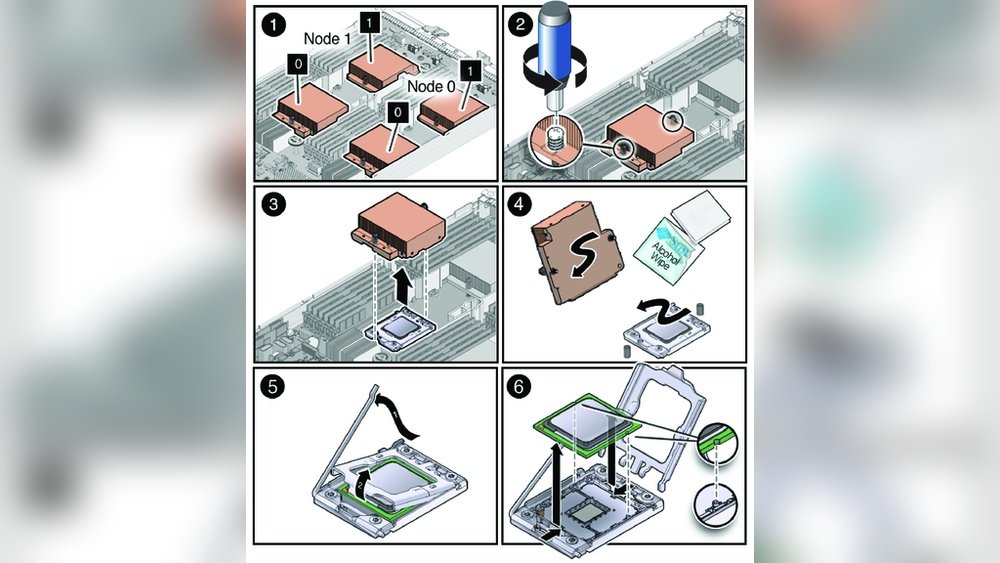
Removing the CPU cooler is an important step before taking out the CPU. The cooler keeps the processor cool during operation. It is attached firmly to the CPU and motherboard. Careful removal prevents damage to the CPU and surrounding parts.
Follow these steps to remove the CPU cooler safely and easily. Take your time and be gentle with each part.
Disconnecting The Fan
Find the fan cable connected to the motherboard. It is usually a small, thin wire near the cooler. Gently pull the connector straight out. Avoid twisting or pulling the wires themselves. This disconnects power from the fan, stopping it safely.
Loosening The Cooler Screws
Look for screws or clips holding the cooler in place. Use a screwdriver to turn each screw counterclockwise. Loosen them evenly in a diagonal pattern. This prevents pressure on one side. Keep screws safe for reassembly later.
Lifting Off The Cooler
After loosening, gently lift the cooler straight up. The thermal paste may cause some resistance. If it feels stuck, wiggle it slightly but do not force. Lift slowly to avoid damaging the CPU or motherboard. Place the cooler aside carefully.

Credit: www.youtube.com
Releasing The Cpu
Releasing the CPU from the motherboard needs care and focus. This step is key to avoid damage to the CPU or the socket. Take your time and follow the right steps. This will help you remove the CPU safely and easily.
Unlocking The Retention Lever
Find the small metal lever next to the CPU socket. This lever holds the CPU firmly in place. Gently push the lever down and away from the socket. This action will release the CPU from its locked position. Do not use force. The lever should move smoothly with light pressure.
Carefully Lifting The Cpu
Once the lever is unlocked, the CPU is free to lift. Hold the CPU by its edges. Avoid touching the pins or the top surface. Slowly lift the CPU straight up from the socket. Do not twist or bend it. Place the CPU on an anti-static surface for safety.
Handling And Storing The Cpu
Handling and storing the CPU carefully is very important. The CPU is a delicate part of your computer. Damage can happen easily if you are not careful. Good handling and storage keep your CPU safe and working well for a long time.
Avoiding Damage
Hold the CPU by its edges. Avoid touching the pins or the top surface. Oils and dirt from your fingers can cause problems. Use an anti-static wrist strap to stop static electricity. Static can harm the CPU in seconds. Always work on a clean, flat surface free of dust and liquids.
Proper Storage Techniques
Store the CPU in an anti-static bag after removal. Keep it in a cool, dry place. Avoid places with high humidity or direct sunlight. Use the original packaging if possible. It offers the best protection. Label the package to identify the CPU easily later.

Credit: softwareg.com.au

Credit: www.youtube.com
Frequently Asked Questions
How Do I Safely Remove A Cpu From A Motherboard?
First, power off and unplug your computer. Open the case, locate the CPU socket, release the retention arm, and carefully lift the CPU straight out. Avoid bending pins or touching the bottom of the CPU to prevent damage.
What Tools Are Needed To Take Out A Cpu?
Typically, no special tools are required to remove a CPU. You only need a screwdriver to open the case. The CPU socket has a lever or latch to release the processor safely.
Can I Remove The Cpu Without Damaging It?
Yes, by handling the CPU carefully and following proper steps. Always discharge static electricity by grounding yourself before touching the CPU. Lift it straight up without twisting or bending pins to avoid damage.
Should Thermal Paste Be Cleaned Before Removing A Cpu?
Cleaning thermal paste before removing the CPU is optional but recommended. Use isopropyl alcohol and a lint-free cloth to clean the old paste. This ensures no residue interferes with the CPU or socket during removal.
Conclusion
Taking out a CPU is simple with the right steps. Always handle parts gently to avoid damage. Keep track of screws and small pieces. Use proper tools for safety and ease. Double-check connections before removing the CPU. Practice makes the process faster and easier.
Follow these tips to remove your CPU safely. You can do it confidently and without stress.
