
Are you ready to upgrade your computer or fix a hardware issue? Knowing how to take a CPU out safely is a skill that can save you time and money.
But if you’ve never done it before, the process might seem tricky or even risky. Don’t worry—this guide will walk you through every step clearly and simply. By the end, you’ll feel confident handling your CPU like a pro. Keep reading to learn the exact steps you need to follow to remove your CPU without causing any damage.

Credit: softwareg.com.au
Prepare Your Workspace
Clear a flat, clean surface to work on. Gather tools like a screwdriver and an anti-static wristband. Make sure the computer is turned off and unplugged before starting.
Gather Necessary Tools
Start by collecting all tools needed for the job. A small screwdriver is essential for opening the computer case. You may also need a thermal paste remover and a new thermal paste for CPU reinstallation. Have a clean cloth or anti-static brush ready to clean dust. Prepare a container to hold screws safely. Organizing tools before starting saves time and prevents loss.
Ensure Static-free Environment
Static electricity can damage sensitive CPU parts. Work on a non-carpeted floor to reduce static buildup. Use an anti-static wrist strap and connect it to a grounded metal object. Avoid wearing clothes that generate static, like wool or polyester. Touch a metal surface frequently to discharge static from your body. A static-free workspace protects your CPU during removal.

Credit: www.youtube.com
Power Down And Unplug
Before removing a CPU, always power down and unplug the computer. This step is crucial to avoid electric shock and protect your hardware. It ensures the computer is safe to open and work on.
Powering down and unplugging also prevents damage to sensitive components. It stops any running processes that might cause errors or data loss. Taking this simple precaution makes the entire CPU removal process safer and smoother.
Shut Down The Computer
Turn off your computer using the operating system’s shutdown option. Avoid just pressing the power button. Let the system close all programs and save data. Wait until the screen goes completely dark before moving on.
Disconnect All Cables
Unplug the power cord from the wall outlet or power strip. Remove all other cables connected to the computer. This includes monitor, keyboard, mouse, and any USB devices. Clear the workspace around your computer for easy access.
Open The Computer Case
Opening the computer case is the first step to access the CPU. The case protects all parts inside. You need to open it carefully to avoid damage. This step allows you to see the CPU and other components clearly. Follow the right steps to open the case safely.
Locate And Remove Screws
Look at the back of the computer case. You will see screws holding the side panel. Most cases use Phillips-head screws. Use a screwdriver to remove these screws. Keep the screws in a safe place. Do not lose them. Sometimes, cases have thumb screws that you can remove by hand.
Carefully Remove Side Panel
After removing the screws, gently pull the side panel away. It might be a bit tight, so wiggle it slowly. Do not use force. The panel should slide off easily. Set the panel aside on a soft surface. This prevents scratches or damage. Now, you can see the inside of the computer clearly.
Locate The Cpu
Before removing a CPU, you must first locate it inside the computer. The CPU is the main chip that runs the computer’s tasks. It sits on the motherboard, a large board inside the case. Finding it carefully helps avoid damage during removal.
Identify The Cpu Socket
The CPU fits into a special slot called the socket. This socket holds the CPU firmly in place. It usually sits near the center of the motherboard. Look for a square area with many small holes or pins. The CPU socket often has a lever or latch to secure the chip.
Note the shape and size of the socket. Different CPUs need different sockets. Knowing this helps you handle the CPU correctly and choose the right replacement later.
Check For Cooling Components
The CPU has a cooling system attached. Usually, a fan or heat sink covers the CPU. These parts keep the CPU cool during use. Before removing the CPU, you must remove the cooling parts first.
Look for screws or clips holding the cooling system. Gently detach these parts to expose the CPU. Handle the cooling parts carefully to avoid damage. This step lets you access the CPU safely.
Remove The Cpu Cooler
Removing the CPU cooler is the first step in taking out the CPU safely. The cooler keeps the processor from overheating. It usually has fans and a heat sink attached. Removing these parts carefully prevents damage to the CPU and motherboard.
Detach Cooling Fans
Start by unplugging the cooling fan from the motherboard. The fan connector is small and easy to miss. Gently pull the connector straight out. Avoid pulling the wires to prevent damage. Once unplugged, unscrew or unclip the fan from the heat sink. Set the fan aside carefully.
Unscrew Heat Sink
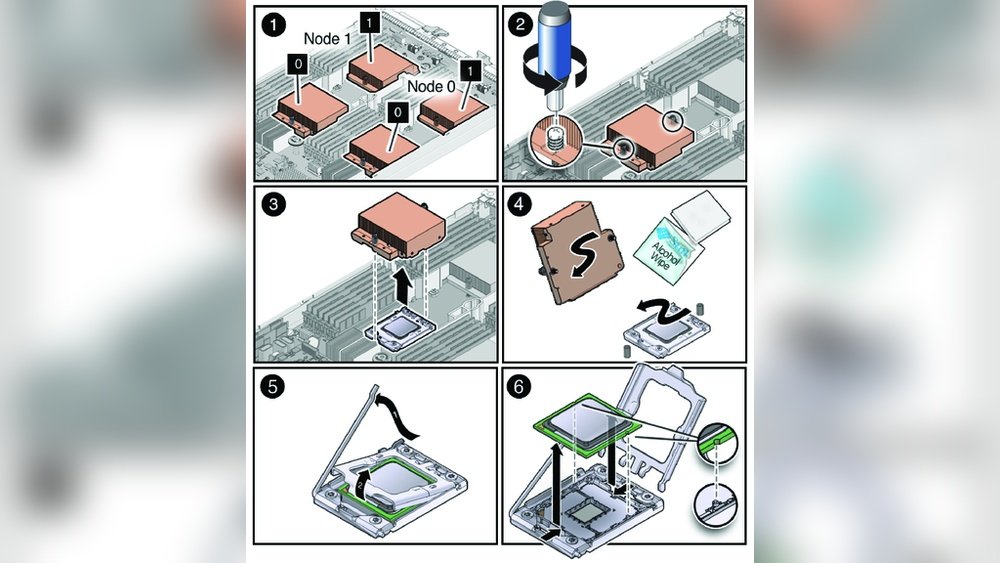
Locate the screws or clips holding the heat sink on the CPU. Use the right screwdriver to avoid stripping screws. Loosen screws in a diagonal pattern to release pressure evenly. Lift the heat sink gently. If it feels stuck, twist slightly to break the seal. Do not force it upward.
Clean Thermal Paste Residue
The heat sink and CPU have thermal paste to improve heat transfer. After removal, clean off old thermal paste using isopropyl alcohol and a soft cloth. Avoid touching the CPU pins or contacts. Clean both the CPU surface and the heat sink base. This prepares the CPU for the next installation.
Unlock The Cpu Socket
Unlocking the CPU socket is the first step to safely remove your processor. It prepares the socket to release the CPU without damage. This process needs care and patience.
Follow clear steps to avoid bending pins or breaking parts. The socket holds the CPU tightly for good contact. You must loosen it gently before pulling the CPU out.
Release Retention Lever
Look for the small metal lever next to the CPU socket. This lever locks the CPU in place. Gently lift it up to unlock the socket.
Do not force the lever. Lift slowly until it stands upright. This action frees the socket clamps that hold the CPU.
Handle Socket Mechanism Gently
The socket has delicate parts that hold the CPU pins. Handle the mechanism with soft hands. Avoid pushing or pulling hard.
Once the lever is up, the socket is loose. Carefully lift the CPU straight up. Do not twist or tilt it.
Extract The Cpu
Extracting the CPU from your computer requires care and attention. This step is delicate but simple if done correctly. Handle the CPU gently to avoid damage. Follow these instructions to remove the CPU safely and correctly.
Lift Cpu Straight Up
Hold the CPU by its edges. Pull it straight up from the socket. Avoid twisting or bending the CPU. This keeps the pins aligned and safe. A steady lift prevents damage to the motherboard and CPU.
Avoid Touching Pins Or Contacts
Never touch the small pins or gold contacts on the CPU. Oils and dirt from your fingers can cause problems later. Hold the CPU by the sides only. Keep your hands clean and dry. This keeps the CPU working well when reinstalled.

Credit: softwareg.com.au
Store Or Replace The Cpu
After removing a CPU, you need to decide whether to store it safely or replace it. Proper care keeps the CPU in good shape for later use. This step protects the delicate pins and prevents damage from dust or moisture.
Use Protective Case
Always put the CPU in a protective case. These cases keep the pins safe and stop bending. If you do not have a case, use an anti-static bag. Avoid touching the pins directly to prevent damage. Keep the case in a dry and clean place.
Prepare For Installation Or Storage
Before installing or storing, clean the CPU carefully. Use a soft, lint-free cloth to remove dust. Avoid using water or liquids. Make sure your hands are dry and clean. For storage, place the CPU in a cool, dry area. Avoid areas with high humidity or heat. For installation, apply fresh thermal paste on the CPU surface. This improves cooling and performance.
Frequently Asked Questions
How Do I Safely Remove A Cpu From Motherboard?
To safely remove a CPU, first power off and unplug the PC. Release the CPU socket lever carefully. Gently lift the CPU straight up to avoid bending pins. Handle the CPU by edges and place it on an anti-static surface.
What Tools Are Needed To Take Out A Cpu?
Generally, no special tools are needed. A screwdriver might be required to open the PC case. Use an anti-static wrist strap to prevent damage. Handling the CPU and socket carefully with hands is sufficient.
Can I Reuse A Cpu After Removal?
Yes, you can reuse a CPU if handled properly. Avoid touching the pins or damaging the contacts. Store it in an anti-static container. Reapply thermal paste before reinstalling to ensure proper heat transfer.
How Do I Avoid Damaging Cpu Pins During Removal?
Lift the CPU straight up without tilting or twisting. Avoid using excessive force when unlocking the socket lever. Handle the CPU gently by its edges. Keep the workspace clean and static-free to prevent damage.
Conclusion
Taking a CPU out is a careful but simple task. Always turn off your computer first. Then, gently unlock the CPU socket and lift the chip straight up. Avoid touching the pins or contacts. Keep the CPU in a safe place to protect it from damage.
Following these steps helps keep your computer parts safe. Now, you can remove a CPU with confidence and care. Practice makes it easier each time.
