
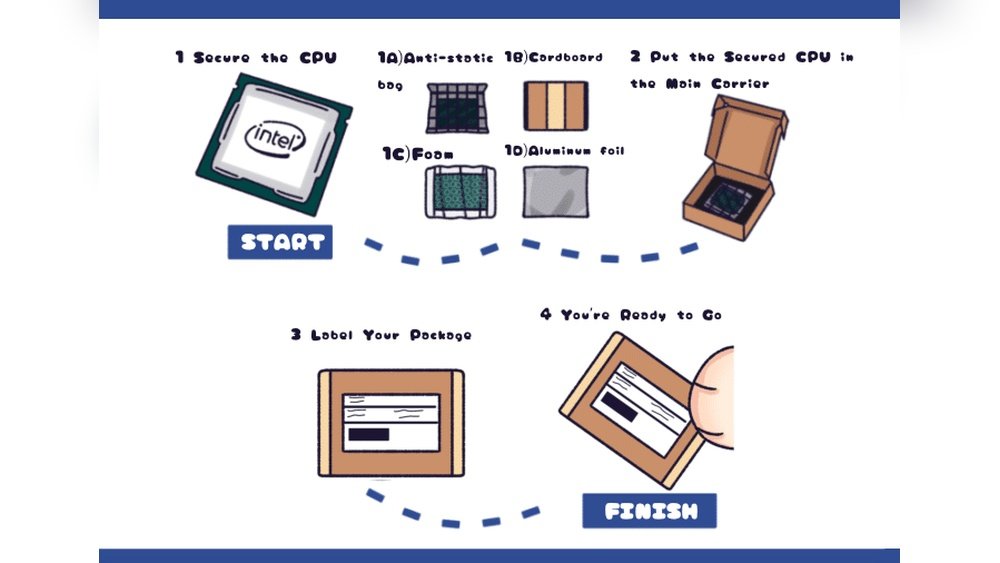
Shipping a CPU might sound simple, but one wrong move can damage this delicate piece of hardware. You want to make sure your CPU arrives safely, whether it’s for a sale, a gift, or a repair.
In this guide, you’ll discover easy steps to pack and ship your CPU securely. By following these tips, you’ll avoid common mistakes that could cost you time and money. Keep reading to learn exactly how to protect your CPU during shipping and get it to its destination without any trouble.
Choosing The Right Packaging
Choosing the right packaging is key to safe CPU shipping. The CPU is delicate and can break if not packed well. Good packaging protects it from shocks, dust, and static electricity during transport. This section explains how to pick the best materials and box for your CPU.
Selecting Anti-static Materials
Static electricity can damage the CPU’s circuits. Use anti-static bags or wraps to cover the CPU. These materials stop static charges from harming the chip. Avoid regular plastic bags because they create static. Anti-static foam or bubble wrap also works well.
Using Protective Padding
Padding cushions the CPU and stops it from moving inside the box. Use foam pieces or bubble wrap around the CPU. Make sure the padding covers all sides evenly. This reduces the risk of damage from drops or bumps.
Picking The Suitable Box Size
Choose a box that fits the CPU and padding without extra space. A box too big lets the CPU move and break. A box too small might crush the padding. Pick a sturdy box made from thick cardboard for the best protection.
Preparing The Cpu For Shipping
Preparing the CPU for shipping is a key step to keep it safe. Proper preparation prevents damage during transit. It also helps keep the CPU clean and ready to use.
Follow these simple steps to prepare your CPU before shipping. Take care to protect the delicate parts. Proper handling ensures the CPU arrives in good condition.
Removing The Cpu From The Socket
First, power off your computer and unplug all cables. Open the case carefully to access the motherboard. Locate the CPU socket and release the locking mechanism. Gently lift the CPU straight out. Avoid bending or touching the pins. Place the CPU on a clean, static-free surface.
Cleaning And Inspecting The Cpu
Check the CPU for dust, dirt, or old thermal paste. Use a soft cloth or isopropyl alcohol to clean it. Be gentle to avoid scratching the surface. Look closely for any damage or bent pins. Clean the socket area on the motherboard too. This step ensures the CPU works well after shipping.
Applying Thermal Paste If Needed
Apply thermal paste only if you plan to ship the CPU with its cooler. Use a small, pea-sized amount in the center. Spread it evenly if needed. Thermal paste helps the CPU cool down when installed. If shipping without the cooler, skip this step to avoid mess.
Sealing And Labeling The Package
Sealing and labeling the package is a crucial step when shipping a CPU. Proper sealing keeps the CPU safe from damage and dust. Clear labeling helps the delivery team handle the package carefully. It also ensures the package reaches the correct address without delay.
Securing The Box With Tape
Use strong packing tape to seal all openings of the box. Wrap tape around the edges to prevent the box from opening. Avoid using thin or weak tape that can break easily. Make sure the tape sticks well to the box surface.
Adding Fragile And Handle With Care Labels
Place “Fragile” and “Handle With Care” labels on the box. These labels alert handlers to be gentle with the package. Use bright, easy-to-read stickers to catch attention quickly. Put labels on multiple sides for better visibility.
Including Shipping And Return Information
Attach a clear label with the shipping address on the box. Add the return address in case the package cannot be delivered. Double-check all information for accuracy and legibility. Use a waterproof marker or printed label to avoid smudging.

Credit: www.youtube.com
Choosing The Best Shipping Method
Choosing the best shipping method for your CPU is very important. The right choice keeps your CPU safe and arrives on time. Different shipping options offer various speeds, costs, and protections. Understanding these can help you pick the best way to send your CPU without damage or delay.
Comparing Carrier Options
Several carriers ship CPUs. Popular ones include FedEx, UPS, and USPS. Each carrier has unique strengths. Some offer faster delivery. Others have better prices. Check reviews and service areas. Choose a carrier known for careful handling. Make sure they deliver to your destination. Compare prices to find the best deal.
Considering Insurance And Tracking
Insurance protects your CPU during shipment. It covers loss or damage. Always add insurance for valuable items. Tracking lets you see your package’s location. It reduces stress and adds security. Choose carriers with reliable tracking. Keep your tracking number handy. This helps you monitor the delivery progress.
Selecting Express Vs Standard Delivery
Express delivery is faster but costs more. Standard delivery is slower and cheaper. Use express for urgent shipments. Standard works well for non-urgent items. Consider your budget and timing needs. Always balance speed with cost. Choose the option that fits your priorities best.
Tips For International Cpu Shipping
Shipping a CPU internationally needs careful planning. You must prepare for rules and costs. Following the right steps helps avoid delays and extra fees. This guide shares key tips for smooth international CPU shipping.
Handling Customs Documentation
Customs forms are essential for shipping a CPU abroad. Fill out each section clearly and accurately. Include details like item description, value, and weight. Use the correct harmonized code for computer parts. Missing or wrong info can delay your shipment. Keep copies of all documents for reference.
Understanding Import Restrictions
Each country sets rules on what can enter. Some places restrict or ban certain electronics. Check the destination country’s import list before sending. Verify if the CPU needs special permits or certifications. Avoid sending items that may get held or returned. Knowing rules saves time and trouble.
Calculating Duties And Taxes
Duties and taxes add to the total shipping cost. These fees depend on the CPU value and destination. Use online calculators or contact customs for estimates. Inform the buyer about possible charges to avoid surprises. Properly declaring the item value helps calculate fees correctly.
Avoiding Common Shipping Mistakes
Shipping a CPU requires care to avoid common mistakes. These errors can cause damage or delays. Paying attention to key details helps keep the CPU safe and ensures it arrives on time. The following tips focus on critical points to avoid during shipping.
Preventing Static Damage
Static electricity can harm the CPU’s delicate circuits. Use an anti-static bag to wrap the CPU before packing. Avoid touching the metal pins directly. Ground yourself by touching a metal surface before handling the CPU. These steps reduce the risk of static damage during shipping.
Avoiding Insufficient Packaging
Thin packaging cannot protect the CPU from shocks. Use a sturdy box with enough padding. Bubble wrap and foam inserts work well. Fill empty spaces to stop movement inside the box. Proper packaging keeps the CPU secure on its journey.
Ensuring Accurate Address Details
Incorrect address details cause delivery delays or loss. Write the full address clearly on the package. Include postal codes and contact numbers. Double-check spelling to avoid mistakes. Accurate address details help the CPU reach the right place quickly.
Monitoring And Confirming Delivery
Monitoring and confirming delivery is a key step in shipping a CPU. It ensures the package arrives safely at the right place. You can keep track of the shipment and solve any issues quickly. This helps avoid loss or damage during transit.
Tracking The Shipment Online
Most shipping services offer online tracking. Enter your tracking number on the carrier’s website. Check the package’s current location and status. Tracking updates show when the CPU leaves, moves, and arrives. Save the tracking number to follow progress easily.
Communicating With The Recipient
Keep the recipient informed about the shipment. Share the tracking number and expected delivery date. Ask them to check the package upon arrival. Clear communication helps avoid missed deliveries. The recipient can alert you if there are any problems.
Handling Delays And Issues
Delays can happen due to weather or other problems. Check tracking updates to spot delays early. Contact the carrier for more information if needed. Inform the recipient about any delivery changes. Act quickly to solve issues and ensure safe delivery.

Credit: www.youtube.com

Credit: www.reddit.com
Frequently Asked Questions
How Do I Package A Cpu For Shipping?
Use anti-static bags to protect the CPU from static damage. Wrap it securely in bubble wrap. Place it in a sturdy box with cushioning materials to prevent movement during transit.
What Shipping Materials Are Best For Cpu Protection?
Use anti-static bags, bubble wrap, and foam padding. Choose a strong, durable box to avoid crushing. These materials prevent static, shocks, and physical damage during shipping.
Should I Remove The Cpu From The Motherboard Before Shipping?
Yes, always remove the CPU from the motherboard. This prevents damage to both components. Pack the CPU separately with proper anti-static protection and cushioning.
How Can I Label The Package For Safe Cpu Delivery?
Mark the box as fragile and handle with care. Include “Electronic Component” labels to alert handlers. Proper labeling ensures careful handling during shipping and delivery.
Conclusion
Shipping a CPU requires care and the right packing materials. Protect the CPU from shocks by using bubble wrap or foam. Use a small, sturdy box to keep the CPU safe. Label the package clearly to avoid confusion during transit.
Always choose a reliable shipping service for better security. Following these steps helps your CPU arrive in perfect condition. Safe shipping means less worry and more trust in your delivery. Now, you are ready to send your CPU with confidence.
