

If you want your CPU to run cooler and perform better, knowing how to put thermal paste on it correctly is essential. Applying thermal paste might seem tricky, but with the right steps, you can do it easily and avoid overheating problems.
In this guide, you’ll learn simple tips that make the process quick and foolproof. Keep reading, and you’ll discover how a small amount of thermal paste can make a big difference in your computer’s health and speed.
Why Thermal Paste Matters
Thermal paste plays a crucial role in keeping your CPU cool. It fills tiny gaps between the CPU and the heat sink. These gaps hold air, which is a poor conductor of heat. Without thermal paste, heat cannot move efficiently from the CPU to the cooler. This can cause the CPU to overheat and slow down or get damaged.
Role In Heat Transfer
Thermal paste helps heat flow from the CPU to the heat sink. It fills microscopic spaces on the surfaces. Air pockets reduce heat transfer. The paste replaces air with a material that conducts heat better. This allows the heat sink to pull heat away faster. A cooler CPU runs better and lasts longer.
Signs Of Poor Application
Poor thermal paste application can cause overheating. Your computer may shut down unexpectedly. Fans might run louder and more often. The CPU temperature may rise quickly under load. If the paste is too thick or too thin, it won’t work well. Old or dried-out paste loses its ability to conduct heat. These signs mean it is time to reapply thermal paste.
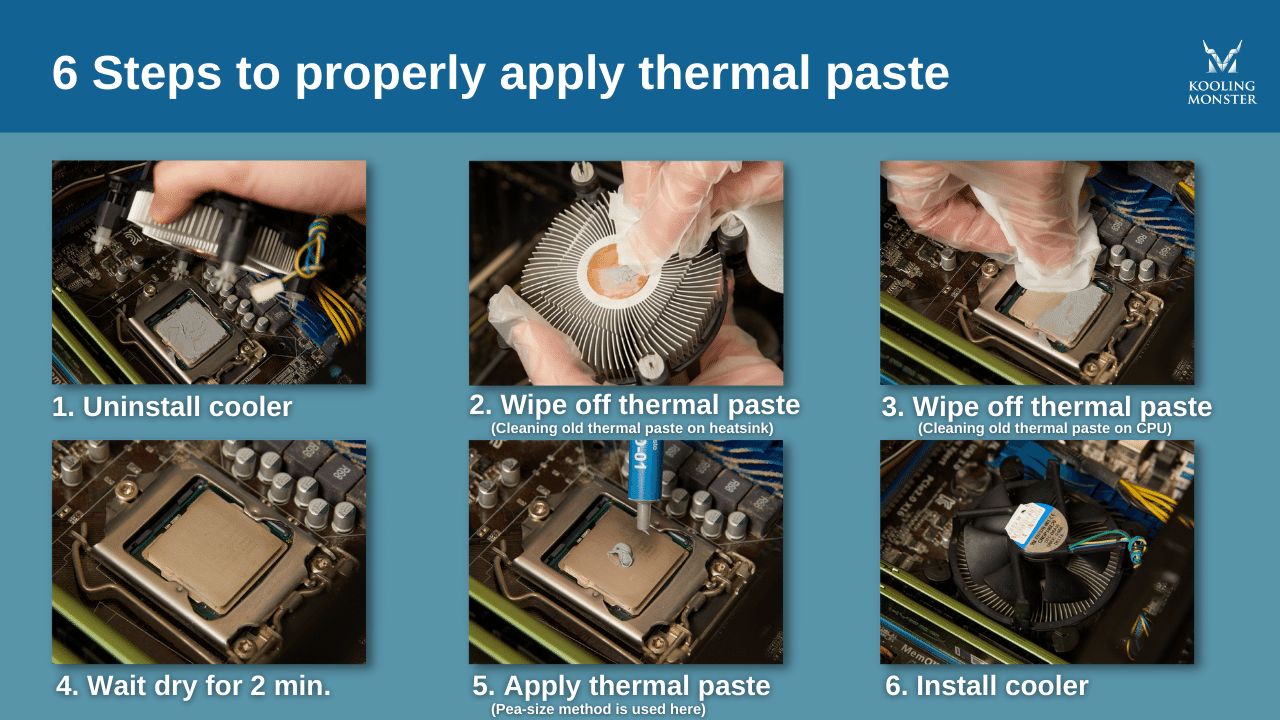
Credit: koolingmonster.com
Choosing The Right Thermal Paste
Choosing the right thermal paste is important for your CPU’s health and performance. The right paste helps your CPU stay cool and prevents overheating. It also ensures your computer runs smoothly and lasts longer. Picking the best paste depends on your needs and the type of CPU you have.
Types Of Thermal Paste
There are several types of thermal paste. Each type has different materials and features. Metal-based pastes contain tiny metal particles and offer excellent heat transfer. Ceramic-based pastes use ceramic particles and are non-conductive. Silicone-based pastes are easy to apply but may not last as long. Some pastes use carbon or graphite, which provide good cooling and safety.
Factors To Consider
Think about thermal conductivity when choosing paste. Higher conductivity means better heat transfer. Check if the paste is electrically conductive. Non-conductive pastes reduce the risk of short circuits. Consider how easy the paste is to apply and clean. Also, look at how long the paste lasts before drying out. Price can matter, but quality should come first.
Preparing The Cpu And Cooler
Preparing the CPU and cooler is the first step to applying thermal paste correctly. This step ensures the best contact between the CPU and cooler for efficient heat transfer. Clean surfaces and the right tools make the process smooth and effective.
Cleaning Old Paste
Remove the cooler carefully from the CPU. Use a lint-free cloth or paper towel to wipe off old thermal paste. Apply isopropyl alcohol (70% or higher) to the cloth for better cleaning. Gently clean the CPU surface and cooler base until no residue remains. Avoid scratching the CPU or cooler.
Gathering Tools
Prepare all necessary tools before starting. You need thermal paste, isopropyl alcohol, a lint-free cloth, and a small plastic card or a scraper. Have a pair of gloves to keep oils from your skin away. Keep everything close to avoid interruptions during application.
Applying Thermal Paste Techniques
Applying thermal paste on a CPU is a key step to keep your processor cool. It helps fill tiny gaps between the CPU and the cooler. This improves heat transfer and prevents overheating. Different techniques exist for applying thermal paste. Each method has its own benefits and suits different types of CPUs and coolers. Let’s explore three common ways to apply thermal paste.
Pea-sized Dot Method
This method uses a small dot of thermal paste in the center of the CPU. The dot should be about the size of a pea. When you attach the cooler, it spreads the paste evenly. It is simple and reduces the chance of using too much paste. This method works well for most CPUs.
Line Method
The line method involves squeezing a thin line of thermal paste across the middle of the CPU. This technique helps cover a larger surface area. It is useful for CPUs with rectangular shapes. When the cooler is mounted, it pushes the paste out to the sides. This ensures good contact and heat transfer.
Spread Method
The spread method requires using a tool or a finger to spread the thermal paste evenly. This covers the entire CPU surface with a thin layer. It can prevent air bubbles and uneven spots. This method takes more time but gives precise control over the paste layer.
Installing The Cooler Properly
Installing the cooler properly is key to keeping your CPU cool. A good installation helps the thermal paste spread evenly. It also makes sure the cooler touches the CPU correctly. This keeps your computer running smoothly and avoids overheating.
Aligning The Cooler
Place the cooler directly above the CPU. Check the position of the screws or clips. Match them with the holes on the motherboard. Make sure the cooler sits flat on the CPU surface. Avoid tilting or shifting it sideways. Proper alignment ensures even contact and good heat transfer.
Securing The Mount
Press the cooler down gently. Tighten the screws or fasten the clips one by one. Use a crisscross pattern when tightening screws. Do not over-tighten to avoid damage. The cooler should feel firm and stable. Secure mounting keeps the thermal paste spread evenly and improves cooling performance.

Credit: www.youtube.com
Testing Thermal Performance
After applying thermal paste on a CPU, testing its thermal performance is crucial. This step ensures the paste spreads well and helps keep the CPU cool. Proper testing prevents overheating and protects your computer parts.
Monitoring Temperatures
Start by turning on your computer and opening a temperature monitoring app. These apps show the CPU temperature in real time. Watch the temperatures during normal use and under heavy tasks.
Ideal CPU temperature varies but should stay below 80°C during heavy use. If temperatures rise quickly or stay high, the thermal paste might not be applied correctly.
Troubleshooting Overheating
If the CPU gets too hot, check the thermal paste application first. Too much or too little paste can cause poor heat transfer. Reapply a small, pea-sized amount evenly on the CPU surface.
Also, ensure the heat sink is firmly attached. Loose contact can create hot spots. Clean any dust from fans and vents to improve airflow.
Maintaining Your Cpu Cooling
Maintaining your CPU cooling is essential to keep your computer running smoothly. Thermal paste helps transfer heat from the CPU to the cooler. Over time, the paste can dry out or become less effective. This can cause your CPU to run hotter and slow down.
Regular care of your CPU cooling system improves performance and extends the life of your computer. Knowing when to reapply thermal paste and how to clean the CPU surface is key. Let’s explore these simple steps.
When To Reapply Paste
Reapply thermal paste every 2 to 3 years. Also, reapply if you remove the CPU cooler for any reason. High CPU temperatures or system crashes can mean the paste is failing. Watch for temperature spikes during heavy use. Fresh paste helps maintain good heat transfer and keeps your CPU cool.
Cleaning Tips
Clean the CPU and cooler surfaces before applying new paste. Use isopropyl alcohol with a soft cloth or paper towel. Gently wipe away old paste without scratching the CPU. Let the surface dry completely before adding new thermal paste. Avoid using water or household cleaners. Keep the area dust-free for the best results.

Credit: www.tglobaltechnology.com
Frequently Asked Questions
What Is The Best Way To Apply Thermal Paste On A Cpu?
Apply a small pea-sized dot of thermal paste in the center of the CPU. When the cooler is installed, it spreads evenly, ensuring good heat transfer. Avoid using too much paste to prevent spillage and poor performance.
How Often Should I Replace Thermal Paste On My Cpu?
Replace thermal paste every 2 to 3 years or when temperatures rise significantly. Old paste dries out and loses effectiveness. Regular replacement helps maintain optimal CPU cooling and prevents overheating issues.
Can I Reuse Thermal Paste After Removing The Cpu Cooler?
No, always clean off old thermal paste and apply fresh paste. Reusing paste can cause poor heat transfer and overheating. Use isopropyl alcohol and a lint-free cloth to clean before reapplying.
How Much Thermal Paste Is Enough For Cpu Application?
A small pea-sized amount or a thin line is sufficient. This amount ensures even spreading without excess paste. Too much paste can cause thermal inefficiency and may damage components.
Conclusion
Applying thermal paste on a CPU is simple and important. It helps keep your processor cool and working well. Use just a small amount and spread it evenly for best results. Avoid using too much paste, as it can cause problems.
Taking your time and being careful pays off. With these steps, your CPU will stay cooler and last longer. Ready for smoother performance? Just follow this guide every time you replace or install your CPU.
