
Are you ready to unlock the true power of your AMD CPU? Overclocking can boost your computer’s speed and performance, making everything from gaming to multitasking smoother and faster.
But if you’re worried about complicated steps or damaging your hardware, don’t be. This guide will walk you through how to safely and effectively overclock your AMD CPU, even if you’re new to it. Keep reading to discover simple tips that can transform your system’s performance without the guesswork.
Your faster, stronger PC is just a few clicks away.
Credit: www.amd.com
Benefits Of Overclocking Amd Cpus
Overclocking AMD CPUs can improve your computer’s speed and performance. It pushes the processor to run faster than its base speed. This can help you get more from your system without buying new hardware.
Many users enjoy better gaming experiences and faster software runs. Overclocking also helps with tasks that need more power, like video editing and 3D rendering. It is a way to extend the life of your current CPU.
Improved Gaming Performance
Overclocking boosts the CPU’s clock speed. This leads to smoother gameplay and higher frame rates. Games run faster and respond better to your commands. This is important for fast-paced action games.
Faster Application Processing
Apps like video editors and design tools work quicker. Overclocking reduces the time needed for complex tasks. You spend less time waiting and more time creating. This improves productivity for many users.
Cost-effective System Upgrade
Overclocking can save money by avoiding new hardware purchases. It makes your current CPU perform like a newer model. This is a budget-friendly way to boost your PC’s power. No need for expensive upgrades.
Better Multitasking Ability
Higher CPU speeds help run many programs at once. Overclocking allows smoother switching between tasks. It reduces lag and freezes during heavy use. This helps users who work with multiple apps.
Essential Tools For Overclocking
Overclocking an AMD CPU requires the right tools. These tools help adjust settings safely and monitor the system’s performance. Choosing the best tools makes the process easier and reduces risks. Two main categories are software utilities and hardware requirements.
Software Utilities
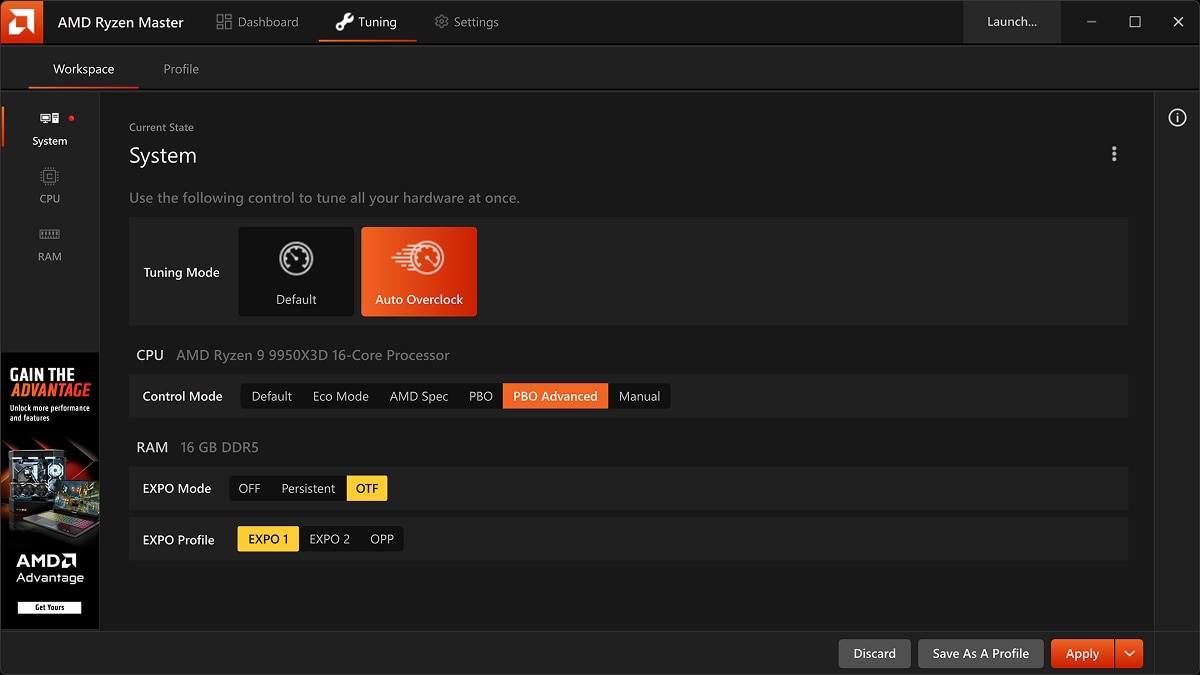
Software utilities allow you to change CPU settings within Windows or BIOS. AMD Ryzen Master is a popular choice for AMD processors. It offers control over clock speeds, voltage, and temperature. Monitoring software like HWMonitor and CPU-Z helps track system stats in real time. Stress testing tools such as Prime95 or Cinebench check system stability after changes. These programs ensure your overclock is safe and stable.
Hardware Requirements
Strong hardware supports successful overclocking. A good quality motherboard with robust power delivery is essential. Look for motherboards designed for overclocking with solid VRMs. Cooling is critical; stock coolers often cannot handle extra heat. Invest in an air cooler or liquid cooling system. A reliable power supply provides stable electricity to your components. Finally, good RAM helps maintain system stability during overclocking.
Preparing Your System
Preparing your system is the first step before overclocking your AMD CPU. A well-prepared system ensures stability and safety during the process. Pay attention to key areas like BIOS, cooling, and power supply. These factors help your computer handle the extra stress from overclocking.
Bios Update
Update your BIOS to the latest version. New BIOS versions fix bugs and improve compatibility. Visit your motherboard’s official website for the correct update. Follow the instructions carefully to avoid errors. A fresh BIOS helps your system run better when overclocked.
Cooling Solutions
Good cooling is vital for overclocking. Stock coolers often cannot handle extra heat. Consider installing a stronger air cooler or a liquid cooling system. Keep your case well-ventilated with extra fans if needed. Lower temperatures protect your CPU and improve performance.
Power Supply Check
Check your power supply unit (PSU) wattage and quality. Overclocking increases power consumption. A weak PSU can cause crashes or damage. Choose a reliable PSU with enough wattage for your setup. Stable power ensures smooth and safe overclocking.

Credit: www.pcmag.com
Step-by-step Overclocking Process
Overclocking your AMD CPU can boost its speed beyond factory settings. This process needs careful steps to keep your system safe and stable. Follow this clear, simple guide to overclock your AMD CPU step-by-step.
Accessing Bios Settings
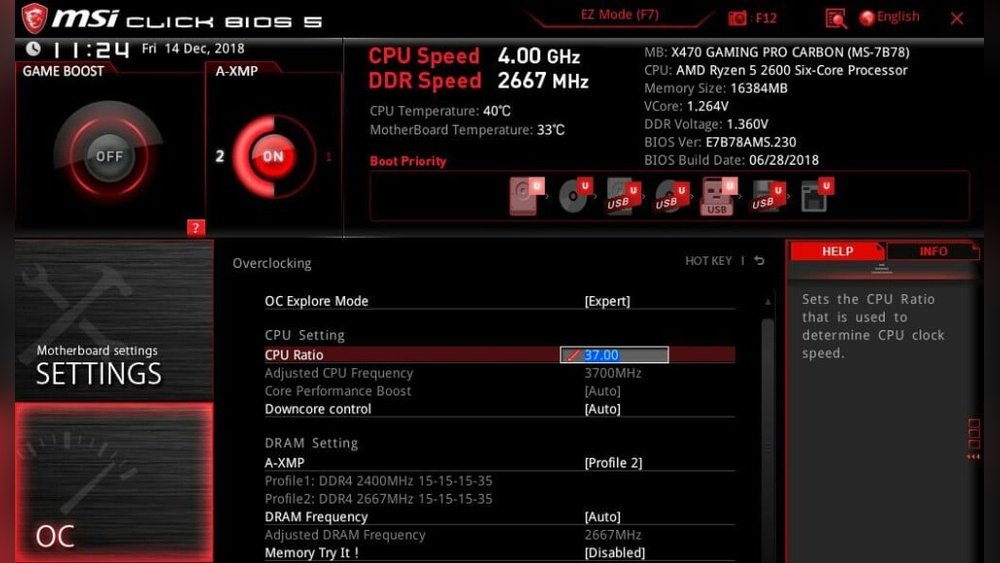
Restart your computer and press the BIOS key during startup. Common keys include Delete, F2, or F10. Check your motherboard manual for the exact key. Inside BIOS, find the CPU or overclocking menu. This area controls your CPU settings.
Adjusting Cpu Multiplier
Locate the CPU multiplier option in BIOS. Increase the multiplier value to raise your CPU speed. Change the multiplier slowly, by one or two steps. Save your changes and reboot to test the new speed.
Modifying Voltage Settings
Find the CPU voltage settings in BIOS. Increasing voltage helps maintain stability at higher speeds. Raise voltage in small steps, never too high. Keep voltage low to avoid overheating and damage.
Testing Stability
After changes, test your CPU with stress programs. Use tools like Prime95 or AIDA64 for stability checks. Run tests for at least 30 minutes. Watch temperatures closely to avoid overheating. If unstable, reduce multiplier or increase voltage slightly.
Benchmarking And Monitoring Performance
Benchmarking and monitoring performance are key steps in overclocking an AMD CPU safely. These steps help check if the CPU runs faster without problems. They also show if temperatures stay within safe limits. Regular checks avoid damage and keep the system stable.
Benchmark Tools
Use benchmark tools to test CPU speed and stability. Popular tools include Cinebench, Geekbench, and Prime95. These programs put the CPU under stress and measure performance. Run benchmarks before and after overclocking to see improvements. They help find the best settings for your CPU.
Temperature Monitoring
Keep a close eye on CPU temperature during overclocking. Use apps like HWMonitor, Core Temp, or Ryzen Master. These tools show real-time temperature readings. High temperatures can cause crashes or hardware damage. Stop overclocking if temperatures rise too much.
Performance Metrics
Track key performance metrics like clock speed, voltage, and power usage. These numbers show how the CPU handles the overclock. Check for any drops in performance or instability. Good metrics mean your overclock is stable and efficient. Adjust settings based on these readings.
Troubleshooting Common Issues
Troubleshooting common issues is key when overclocking an AMD CPU. Problems can stop your PC from working well. Fixing these early helps keep your system stable and safe. Below are some frequent issues and how to solve them.
System Crashes
System crashes happen when the CPU runs too fast or settings are wrong. Restart your PC and enter the BIOS. Lower the clock speed step by step. Test stability with stress tools after each change. Stop lowering when crashes stop. Also, update your motherboard BIOS for better support.
Overheating
Overheating occurs if cooling is not enough for the higher CPU speed. Check your CPU cooler and fans. Clean dust from all parts inside the case. Use quality thermal paste between the CPU and cooler. Monitor temperatures using software. Keep CPU temperature below 85°C to avoid damage.
Voltage Instability
Voltage instability causes crashes or freezes. It happens when the CPU gets too little or too much power. Adjust the CPU voltage in BIOS carefully. Increase voltage in small steps only. Avoid setting voltage higher than recommended. Use a reliable power supply to ensure stable power delivery.
Tips For Safe Overclocking
Overclocking an AMD CPU can improve performance but requires care. Safe overclocking protects your hardware and ensures stable operation. Follow simple tips to avoid damage and keep your system running smoothly.
Gradual Adjustments
Make changes slowly. Increase clock speeds in small steps. Test stability after each change. Avoid big jumps that can cause crashes. This method helps find the best balance between speed and safety.
Regular Monitoring
Watch your CPU temperature and voltage closely. Use reliable software tools for real-time data. High temperatures can harm your processor. Stop overclocking if the system gets too hot or unstable.
Maintaining System Health
Keep your cooling system clean and efficient. Replace thermal paste if needed. Ensure good airflow inside your PC case. Regular maintenance helps prevent overheating and prolongs CPU life.
Credit: www.rtk-holding.ru
Advanced Overclocking Techniques
Advanced overclocking techniques allow users to push their AMD CPUs beyond basic settings. These methods improve performance while maintaining system stability and temperature control. Understanding these techniques helps in fine-tuning your processor for better results.
Precision Boost Overdrive
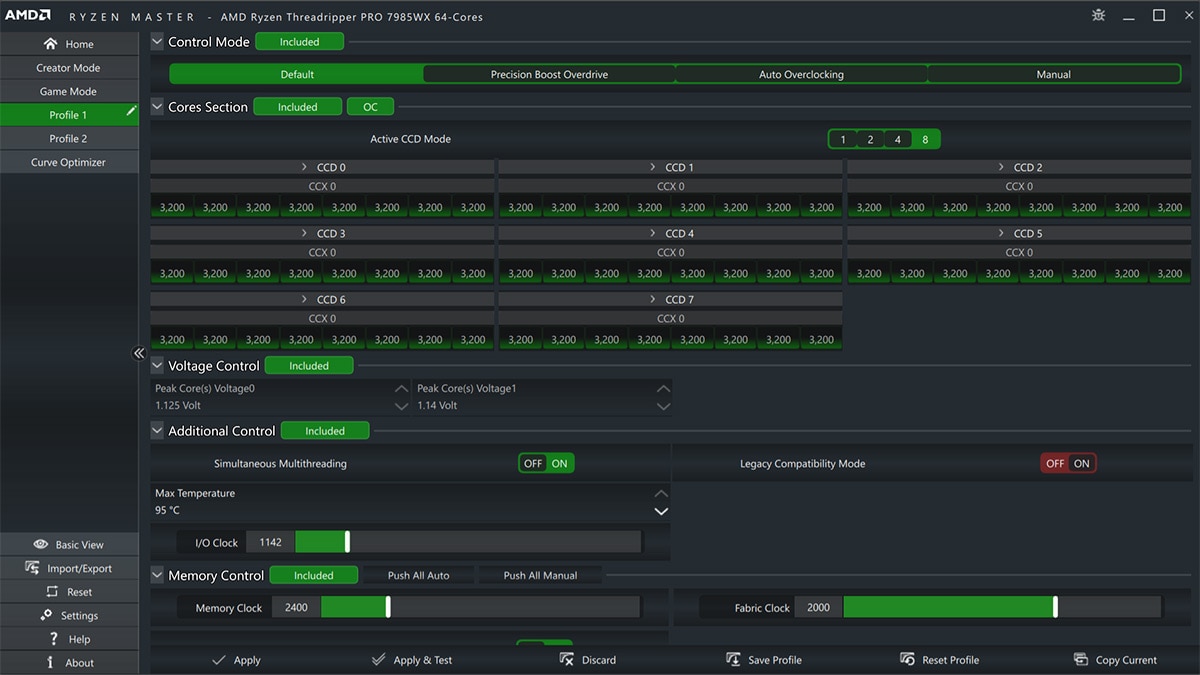
Precision Boost Overdrive (PBO) lets the CPU increase clock speeds automatically. It uses data like temperature, power, and current to decide the boost level. Enabling PBO allows the processor to perform better during heavy tasks. It offers a safe way to gain extra speed without manual tuning.
Memory Overclocking
Memory overclocking improves the speed of RAM, which helps the CPU access data faster. Increasing RAM frequency can boost overall system responsiveness. Adjust timings and voltage carefully to avoid instability. Testing changes step-by-step ensures the memory runs smoothly at higher speeds.
Undervolting
Undervolting reduces the CPU’s voltage while keeping performance stable. This lowers heat output and power consumption, helping the system run cooler. It also extends the lifespan of your hardware. Start with small voltage drops and test stability with stress tools.
Frequently Asked Questions
What Is Amd Cpu Overclocking And Why Do It?
Overclocking AMD CPUs means increasing their clock speed beyond factory settings. This boosts performance for gaming and heavy tasks. It improves speed but may increase heat and power use. Proper cooling and stable settings are essential for safe overclocking.
How To Start Overclocking An Amd Cpu Safely?
Begin by updating your BIOS and installing monitoring software. Increase clock speed gradually while testing stability. Adjust voltage carefully to avoid damage. Always monitor temperatures and system behavior to ensure safe overclocking.
What Tools Are Best For Amd Cpu Overclocking?
AMD Ryzen Master is the official and most user-friendly tool. BIOS settings also offer advanced control. Third-party apps like HWMonitor help track temperatures and voltages during overclocking.
Can Overclocking Damage My Amd Cpu?
Yes, improper overclocking can cause overheating and hardware failure. Always use adequate cooling and increase settings slowly. Staying within voltage and temperature limits reduces risk and maintains CPU lifespan.
Conclusion
Overclocking an AMD CPU can improve your computer’s speed. Start slow and increase settings step by step. Watch the temperature to keep your CPU safe. Test stability often to avoid crashes or errors. Remember, patience and care lead to better results.
This simple process can make your PC work faster. Take your time and enjoy the improved performance.
