
Are you ready to unlock the true power of your AMD CPU? Overclocking can boost your processor’s speed and improve your computer’s performance without spending extra money on new hardware.
But it can also feel tricky if you don’t know where to start. In this guide, you’ll learn simple, clear steps to safely overclock your AMD CPU and get the best results. Keep reading, and you’ll soon discover how to make your system faster and smoother—without the guesswork or risk.
Your computer’s full potential is just a few clicks away.
Credit: www.rtk-holding.ru
Benefits Of Amd Cpu Overclocking
Overclocking an AMD CPU brings several key benefits. It helps users get more power from their hardware. This process pushes the CPU to run faster than its base speed. The result is noticeable improvements in many tasks.
This section covers the main benefits of AMD CPU overclocking. It explains how overclocking improves gaming, boosts productivity, and maximizes your hardware’s potential.
Improved Gaming Performance
Overclocking increases the CPU’s clock speed. Games run smoother with higher frame rates. This reduces lag and stuttering during gameplay. It allows for better graphics settings without losing performance. Players enjoy a more responsive and immersive experience.
Enhanced Productivity
Faster CPUs handle tasks more quickly. Video editing, 3D rendering, and multitasking benefit from overclocking. It shortens the time needed for complex processes. This helps users complete work faster and with less waiting. Overclocking can improve overall workflow efficiency.
Maximizing Hardware Potential
Many AMD CPUs come with extra power left unused. Overclocking taps into this hidden potential. It lets users get the most from their investment. Better performance without upgrading parts saves money. It also extends the useful life of the CPU.
Preparing For Overclocking
Preparing for overclocking your AMD CPU is a crucial step. It ensures your system can handle the extra power and heat. This preparation helps avoid damage and instability during overclocking. Follow these steps carefully to set up your hardware and software.
Checking Cpu And Motherboard Compatibility
Not all CPUs support overclocking. Check if your AMD processor allows it. Also, your motherboard must support overclocking features. Look for chipsets like B350, B450, X370, X470, or X570. Verify your motherboard manual or manufacturer website. Compatibility prevents issues during the process.
Updating Bios And Drivers
Update your motherboard BIOS to the latest version. BIOS updates improve system stability and add overclocking options. Download the update from the motherboard manufacturer’s site. Also, update your chipset drivers for better performance. Proper updates reduce errors and crashes.
Gathering Necessary Tools
Prepare tools before starting overclocking. A good CPU cooler is essential to manage extra heat. Use software like Ryzen Master or BIOS for adjustments. Download hardware monitoring tools to track temperature and voltage. Have stress test programs ready to check stability.
Essential Overclocking Settings
Overclocking your AMD CPU can boost its speed and performance. To do this safely, you need to change some key settings in your computer’s BIOS or UEFI. These settings control how fast your CPU runs and how much power it uses.
Understanding and adjusting these settings correctly helps avoid crashes and overheating. It also helps you get the best speed without damaging your hardware. Here are the essential overclocking settings you must know.
Adjusting Cpu Multiplier
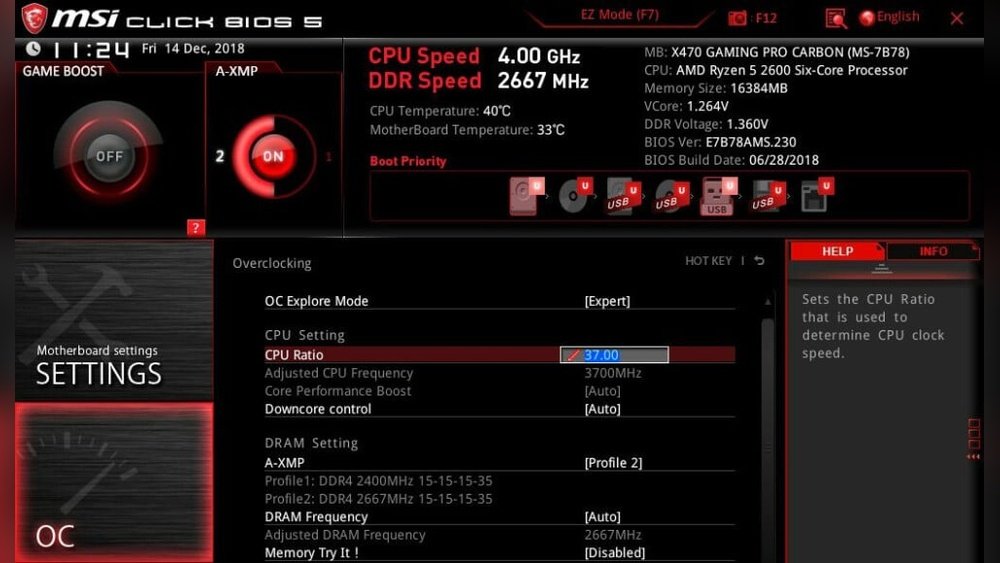
The CPU multiplier controls the processor’s clock speed. It multiplies the base clock to set the CPU’s frequency. By increasing the multiplier, you make the CPU run faster.
Start by raising the multiplier slowly. Test your system stability after each change. Avoid large jumps to prevent system crashes.
Modifying Voltage Settings
Voltage settings control the power supplied to the CPU. Increasing voltage can help stabilize higher speeds. But too much voltage can cause heat and damage.
Raise voltage in small steps. Monitor your CPU temperature carefully. Keep it within safe limits to protect your processor.
Tweaking Ram Timings
RAM timings affect your memory speed and system performance. Lower timings can improve responsiveness but may reduce stability.
Adjust timings gradually and test for stability. Make sure your RAM can handle the new settings. Balanced RAM speeds help maintain overall system performance.
Step-by-step Overclocking Process
Overclocking an AMD CPU can boost your computer’s speed. It involves changing settings to make the processor run faster than its base speed. This step-by-step process helps you do it safely and clearly. Follow each step carefully. Watch your system closely.
Entering Bios/uefi
Start by restarting your computer. Press the key shown on the screen to enter BIOS or UEFI. Common keys are Delete, F2, or F10. Inside BIOS, find the overclocking section. It might be named “CPU settings” or “Advanced.” Be careful here. Avoid changing unrelated settings.
Incremental Frequency Increases
Increase the CPU frequency in small steps. Raise the value by 50 to 100 MHz at a time. Save your changes and restart the computer after each increase. This helps prevent sudden crashes. Small steps let you find the highest stable speed. Patience is key.
Testing Stability And Temperatures
After each frequency change, test the system’s stability. Use stress-testing software like Prime95 or AIDA64. Watch CPU temperatures using HWMonitor or Ryzen Master. Keep temperatures under 85°C to avoid damage. If the system crashes or heats too much, lower the frequency or improve cooling.
Monitoring And Maintaining Stability
Monitoring and maintaining stability is key for a successful AMD CPU overclock. It ensures your system runs smoothly without crashes or errors. Careful checks help protect your hardware from damage. Stability keeps performance high and your PC reliable. Follow clear steps to test and adjust settings for steady operation.
Using Stress Testing Software
Stress testing software pushes your CPU to its limits. It reveals if your overclock can handle heavy work. Popular tools include Prime95, AIDA64, and Cinebench. Run these tests for at least 30 minutes. Watch for errors or system crashes during the test. A stable CPU will complete tests without issues.
Tracking Cpu Temperatures
High temperatures can damage your CPU over time. Use software like HWMonitor or Ryzen Master to track temps. Keep CPU temperatures under 85°C for safety. Check temperatures before, during, and after stress tests. Good cooling helps maintain safe temperature levels. Adjust your cooling system if temps rise too high.
Adjusting Settings For Stability
Unstable overclocks need fine-tuning. Lower CPU voltage or clock speed in small steps. Test stability after each change with stress software. Increase fan speeds or improve cooling if temps remain high. Save your settings only when stability is consistent. Patience is key to a safe, stable overclock.
Credit: www.amd.com
Avoiding Common Overclocking Mistakes
Overclocking an AMD CPU can boost performance but has risks. Avoiding common mistakes keeps your system safe and stable. Understanding key errors helps you get the best results without damage.
Overvolting Risks
Applying too much voltage can harm your CPU. It causes high heat and can shorten the processor’s life. Use only the necessary voltage increase for stability. Always monitor voltage changes carefully during overclocking.
Ignoring Cooling Solutions
Overclocking raises CPU temperature significantly. Without proper cooling, your CPU may overheat and crash. Invest in good air or liquid cooling systems. Keep the cooling system clean and check fans regularly.
Skipping Stress Tests
Stress tests check if your CPU runs stable at higher speeds. Skipping these tests risks crashes or data loss later. Use stress testing software to confirm stability after each change. Run tests long enough to catch errors early.
Tools And Software For Amd Overclocking
Overclocking an AMD CPU requires more than just changing settings in the BIOS. The right tools and software help you adjust speeds, monitor temperatures, and test stability. These programs make overclocking safer and easier. They provide real-time feedback on how your CPU performs under new settings.
Here are some essential tools and software to use for AMD overclocking.
Amd Ryzen Master Utility
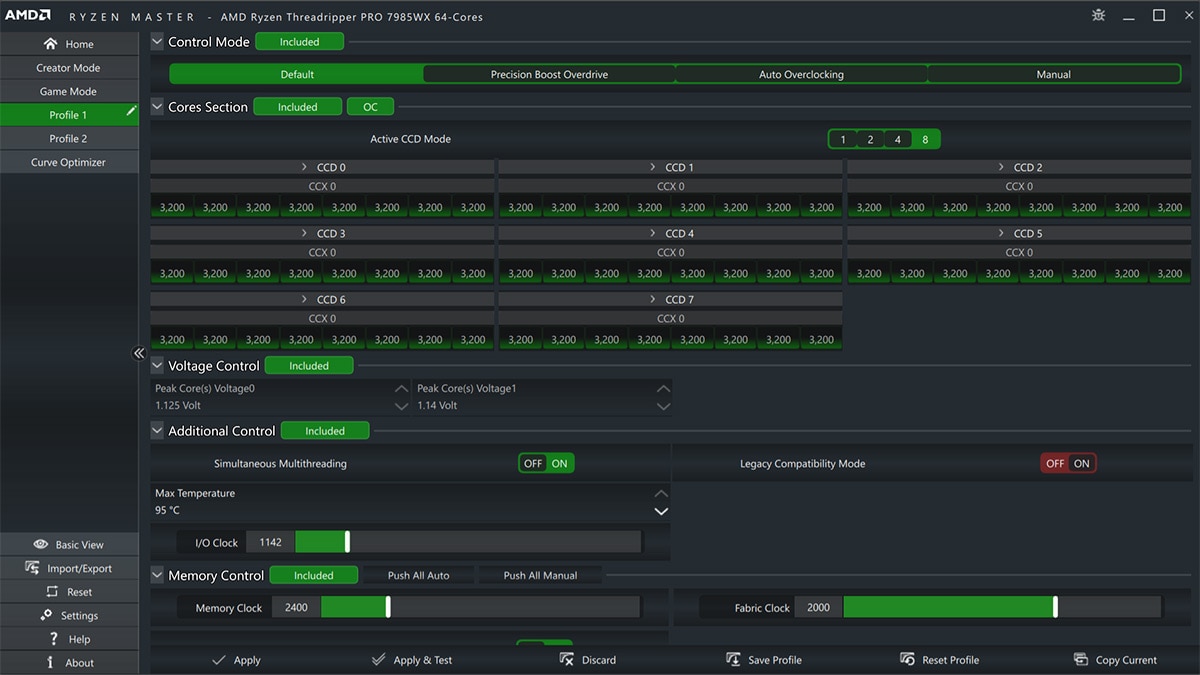
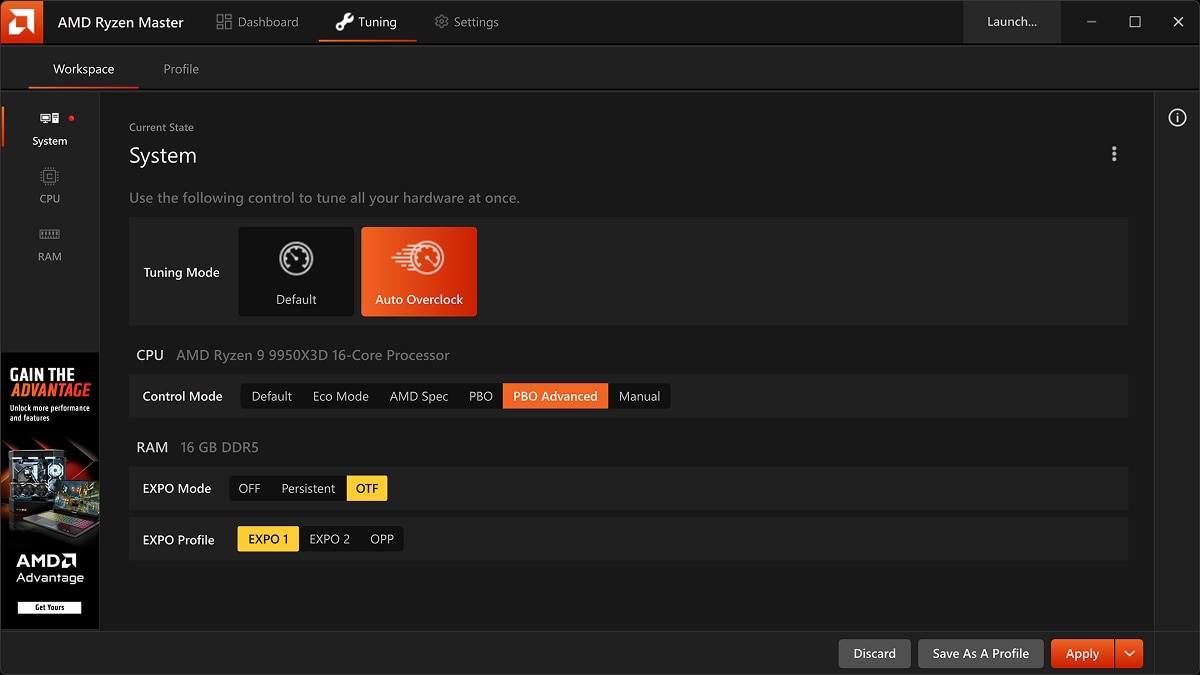
AMD Ryzen Master Utility is the official overclocking software from AMD. It offers a simple interface to change CPU frequencies and voltages. You can adjust settings on the fly without restarting the system. The software shows live data on CPU temperature, speed, and usage. It also includes preset profiles for quick tuning. Ryzen Master is a good starting point for beginners.
Third-party Monitoring Tools
Third-party monitoring tools provide detailed information about your CPU and system health. Programs like HWMonitor, CPU-Z, and HWiNFO track temperatures, voltages, and clock speeds. They help spot overheating or instability during overclocking. These tools run in the background and update data constantly. Using them alongside Ryzen Master improves safety and control.
Benchmarking Applications
Benchmarking apps test your CPU’s performance after overclocking. Tools like Cinebench, Prime95, and AIDA64 stress the processor to check stability. They help find the highest stable overclock settings. Running benchmarks shows if your CPU can handle the new speeds without errors. Benchmarking also compares performance before and after overclocking.

Credit: www.pcmag.com
Safe Practices For Long-term Use
Overclocking your AMD CPU can boost performance. Safe practices help keep your system stable and lasting longer. Protect your hardware by managing heat, monitoring settings, and updating profiles often. Follow these steps for a reliable overclock.
Maintaining Adequate Cooling
Heat is the main enemy of overclocked CPUs. Use a good quality air or liquid cooler. Make sure your case has enough airflow. Clean dust from fans and vents regularly. Cooler temperatures prevent crashes and extend CPU life.
Regular System Monitoring
Check your CPU temperature and voltage often. Use tools like HWMonitor or Ryzen Master. Watch for sudden spikes or unusual behavior. Stop overclocking if temperatures rise above safe limits. Regular checks keep your system safe and stable.
Updating Overclocking Profiles
Save your settings in profiles to switch easily. Update profiles after BIOS or driver updates. Tweak settings if your system becomes unstable. Backup profiles to avoid losing your custom setup. Keeping profiles current helps maintain smooth performance.
Frequently Asked Questions
What Is Cpu Overclocking For Amd Processors?
CPU overclocking for AMD means increasing the processor’s clock speed beyond factory settings. This boosts performance but may increase heat and power use. Proper cooling and stable voltage settings are essential for safe overclocking to avoid hardware damage.
How Do I Safely Overclock My Amd Cpu?
To safely overclock, increase clock speed gradually in BIOS. Monitor temperatures using software tools. Ensure proper cooling and test stability with stress tests. Avoid pushing voltages too high to prevent damage and reduce the risk of system crashes.
Can All Amd Cpus Be Overclocked?
Not all AMD CPUs can be overclocked. Most Ryzen and unlocked models support overclocking. Entry-level or locked CPUs usually don’t allow speed adjustments. Always check your specific CPU model’s capabilities before attempting overclocking.
What Cooling Methods Work Best For Amd Overclocking?
Air coolers with high airflow and quality thermal paste work well. Liquid cooling systems offer better heat dissipation for higher overclocking. Choose cooling based on your overclocking goals and budget to maintain safe CPU temperatures.
Conclusion
Overclocking your AMD CPU can boost its speed and performance. Always start slowly and test stability after each change. Keep an eye on temperature to avoid damage. Use reliable software and follow clear steps for safety. Remember, patience and careful adjustments bring the best results.
Enjoy a faster PC while keeping it safe and cool.
