
Is your GPU drooping inside your PC case? GPU sag is a common issue that can damage your graphics card and affect your computer’s performance.
But don’t worry—you can fix it quickly and easily. In this guide, you’ll discover simple, effective ways to stop your GPU from sagging and keep your system running smoothly. Keep reading, and you’ll learn how to protect your investment and improve your setup in just a few easy steps.
Causes Of Gpu Sag
GPU sag happens when the graphics card tilts or droops inside the computer case. This issue can harm your hardware over time. Understanding the causes helps to prevent and fix the problem quickly. Several factors can lead to GPU sag. Here are the main reasons behind it.
Heavy Graphics Cards
Modern graphics cards are often large and heavy. This weight puts extra pressure on the PCIe slot and the card’s own support. Over time, the card can start to bend downward. Heavy GPUs are the most common cause of sag.
Weak Pcie Slots
The PCIe slot holds the graphics card in place on the motherboard. Some slots are not strong enough to support heavy cards. Weak or damaged slots allow the card to tilt. This makes GPU sag worse and can damage the slot.
Improper Case Support
The computer case should support the graphics card well. Some cases have poor design or lack proper brackets. This causes the card to hang unsupported inside the case. Without solid case support, GPU sag becomes more likely.

Credit: www.youtube.com
Signs Of Gpu Sag
GPU sag happens when the graphics card bends or tilts inside the computer case. It can cause problems that affect your PC’s performance and stability. Knowing the signs of GPU sag helps you spot the issue early. This way, you can fix it before it causes damage.
Look for physical and functional changes. These signs can show up slowly or suddenly. Pay attention to how your GPU looks and works.
Visible Tilt
The most obvious sign is a visible tilt. The graphics card may lean downward at the end. It no longer sits straight in its slot. The heavier cards often sag more. Check your PC from the side to see any bending.
Connection Issues
Sagging can loosen the connection between the GPU and motherboard. This causes your PC to lose signal to the monitor. You may see flickering or no display at all. Sometimes the GPU might disconnect during use.
Performance Drops
GPU sag can affect performance. Your games or programs may lag or stutter unexpectedly. The GPU may overheat if airflow is blocked by the bend. Lower frame rates and crashes can happen too.
Basic Tools And Materials
Fixing GPU sag needs a few simple tools and materials. These help protect your graphics card and keep it straight. You do not need many items to start the repair. Most are easy to find and use. Below are the basic tools that make the task easier and safer.
Support Brackets
Support brackets hold the GPU in place. They stop the card from bending down. These brackets come in different styles and sizes. Choose one that fits your computer case. Metal or plastic brackets work well for support. They also help reduce stress on the motherboard slot.
Screwdrivers
Screwdrivers are needed to open your PC case. They also help install the support bracket. A Phillips-head screwdriver is the most common type used. Keep it handy for removing or tightening screws. Using the right screwdriver prevents damage to screws and parts.
Cable Ties And Clips
Cable ties and clips organize cables inside your PC. They keep wires away from the GPU and support bracket. This stops cables from pulling or blocking airflow. Choose ties that are easy to remove and adjust. Clips can attach cables neatly along the case walls.
Step-by-step Fixes
GPU sag can cause damage to your graphics card and motherboard. Fixing it early protects your hardware and improves system stability. Follow these simple steps to stop the sag and keep your GPU in place.
Using A Gpu Support Bracket
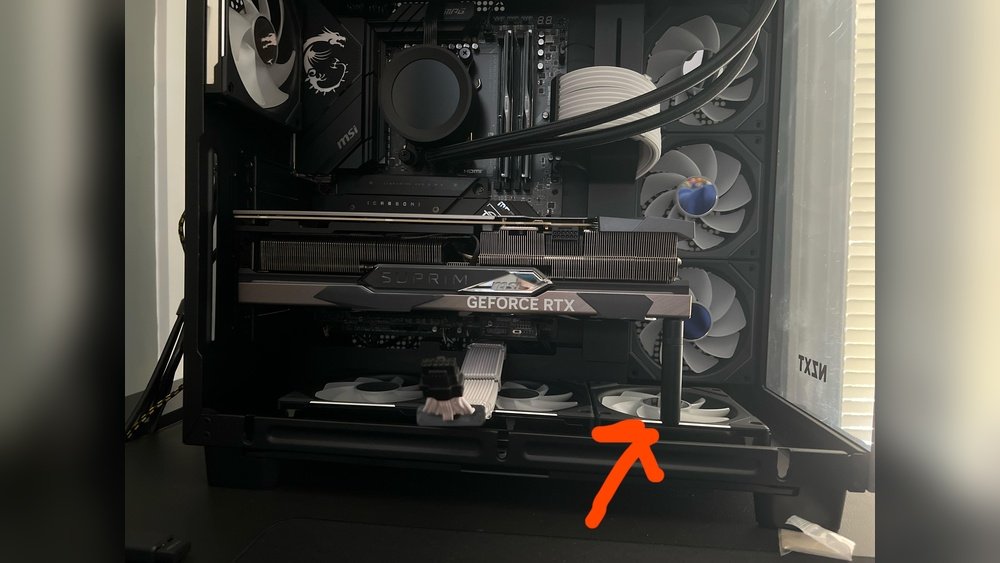
A GPU support bracket holds your graphics card firmly. It fits between the card and the case. Install it by aligning with your GPU and securing it with screws. This prevents the card from bending down over time. Support brackets come in many sizes and styles. Choose one that fits your case and GPU model.
Diy Support Solutions
Simple materials can work as a GPU prop. Try using a small piece of wood or a plastic stand. Cut it to fit under the GPU edge gently. Make sure it does not press too hard on the card. Another idea is to use a LEGO block or a pen. Place these supports carefully to avoid damage. DIY solutions are cheap and easy to adjust.
Reinforcing The Pcie Slot
Strengthening the PCIe slot helps prevent GPU sag. Use a small plastic clip or a piece of tape to hold the card steady. Some users add a metal strip around the slot for extra support. Be careful not to block airflow or damage the slot pins. Reinforcing the slot works best combined with other support methods. This keeps your GPU secure and stable.
Preventive Measures
Preventing GPU sag is better than fixing it later. Taking steps early protects your graphics card and motherboard. Small actions can keep your PC safe and working well for a long time.
Proper Installation Techniques
Install the GPU carefully and evenly. Align it with the PCIe slot before pushing it in gently. Use all screws to secure the card firmly to the case. Avoid forcing the card into the slot to prevent damage.
Choosing The Right Case
Select a case that supports the size and weight of your GPU. Cases with strong support brackets help hold heavy graphics cards. Look for cases with good airflow to prevent heat buildup.
Regular Maintenance
Check your GPU’s position every few months. Tighten any loose screws or brackets immediately. Clean dust from inside the case to keep parts cool. Dust buildup can cause extra weight and sag over time.
Credit: www.reddit.com
When To Seek Professional Help
GPU sag can often be fixed at home with the right tools. Yet, some problems need expert care. Knowing when to seek professional help protects your graphics card and PC. This section explains the signs that suggest a technician’s attention.
Persistent Sag Issues
Sometimes, GPU sag returns even after fixes. Simple supports or braces may not hold the card firmly. Persistent sag can stress the PCIe slot and cause connection problems. A professional can check for hidden issues and provide stronger solutions. They have tools to secure the GPU safely and prevent future sag.
Potential Hardware Damage
Physical damage to the GPU or motherboard requires expert help. Cracks, bent pins, or broken connectors affect performance and can worsen over time. Professionals can assess the damage and suggest repair or replacement. Trying to fix hardware damage without skill risks making it worse. A technician ensures the hardware stays safe and functional.

Credit: www.youtube.com
Frequently Asked Questions
What Causes Gpu Sag In Graphics Cards?
GPU sag occurs due to the heavy weight of the graphics card. Over time, the card bends or droops inside the PC case. Poor support from the motherboard or case can worsen the sag. It mainly affects larger, high-end GPUs.
How Can I Fix Gpu Sag At Home?
To fix GPU sag, use a support bracket or stand. You can also use a small piece of foam or a DIY support. Ensure the fix is stable and doesn’t damage the card. Regularly check and adjust the support if needed.
Does Gpu Sag Affect Performance Or Lifespan?
Yes, GPU sag can impact performance by stressing the PCIe slot. It may cause connection issues or damage over time. Fixing sag helps maintain stability and prolongs your GPU’s lifespan.
Are Gpu Sag Brackets Safe To Use?
Yes, GPU sag brackets are safe if installed properly. They provide stable support without stressing the card or motherboard. Choose quality brackets made specifically for your GPU size and case type.
Conclusion
Fixing GPU sag protects your graphics card and PC’s performance. A sturdy support keeps your GPU steady and safe. Simple fixes like braces or stands work well. Regularly check your GPU to catch sag early. Small efforts can prevent costly damage later.
Keep your PC parts aligned and secure. Your gaming and work experience stays smooth. Take care of your hardware; it lasts longer. GPU sag is easy to fix with care. Stay safe, steady, and enjoy your computer fully.
