
Are you trying to find your GPU serial number but don’t know where to start? Whether you need it for warranty, support, or just to keep track of your hardware, finding your GPU’s serial number can feel confusing.
But don’t worry—this guide will make it simple and clear. By the time you finish reading, you’ll know exactly how to locate your GPU’s serial number quickly, without any technical hassle. Let’s dive in and get you the information you need!
Locate Serial Number Physically
Finding the GPU serial number physically is simple. It helps with warranty claims and support. The serial number is usually on the card or its box. Follow these steps to locate it easily.
Check Gpu Sticker
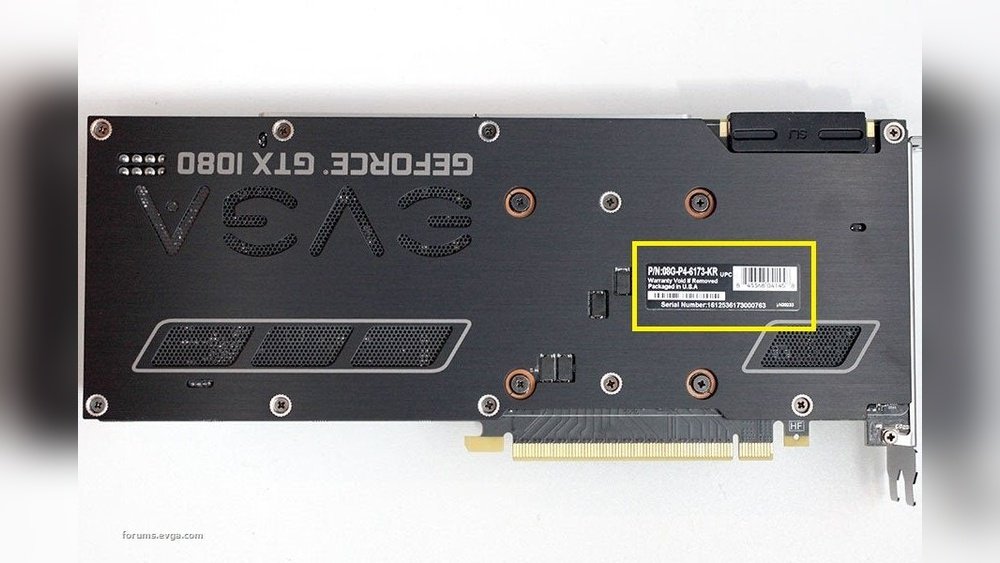
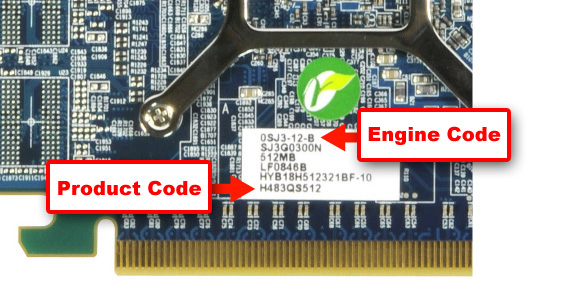
Look closely at your graphics card. Most cards have a sticker with the serial number. This sticker is often on the back or side of the card. It may include other details like model number and barcode. Use a flashlight if the text is hard to see. Write down the serial number or take a clear photo.
Inspect Graphics Card Box
The original box of your GPU often shows the serial number. Find the label on the outside of the box. It usually contains the serial number along with the product name. This method works well if you keep the packaging. Keep the box safe for future reference.
Credit: www.hisdigital.com
Use Software Tools
Finding the GPU serial number can be simple with the right software tools. These tools show detailed information about your graphics card. They save time and avoid opening the hardware case.
Software tools work on Windows and give quick results. They help identify the exact GPU model and serial number. Below are some easy methods using built-in and free utilities.
Device Manager On Windows
Device Manager lists all hardware connected to your PC. To open it, press Windows + X and select Device Manager. Find the “Display adapters” section and click to expand.
Right-click your GPU and select “Properties.” Under the “Details” tab, choose “Device Instance Path” or “Hardware Ids.” These may show some serial or unique identifiers. Full serial numbers may not always appear here but it’s worth checking first.
Gpu-z Utility
GPU-Z is a free tool designed to show detailed GPU info. Download it from the official website and run the program. It displays the GPU name, type, and serial number if available.
The tool shows real-time sensor data and card specifications. The serial number is often under the “Advanced” tab or main screen. GPU-Z is easy to use and trusted by many users.
Command Prompt Techniques
Command Prompt can reveal GPU details using simple commands. Open it by pressing Windows + R, typing “cmd,” and hitting Enter. Use the command wmic path win32_videocontroller get name, pnpdeviceid.
This command lists GPU names and device IDs. The device ID may contain the serial number embedded in it. You can copy and analyze this ID for your GPU’s serial number.
Another command is dxdiag. Run it and go to the Display tab. This shows the GPU model and manufacturer information but rarely the serial number.
Check Manufacturer’s Website
Checking the manufacturer’s website is a reliable way to find your GPU’s serial number. Most brands keep detailed records of their products online. You can access important information about your GPU, including warranty status and registration options.
This method saves time and helps you confirm your GPU’s authenticity. It also provides support options directly from the maker. Follow the steps below to make the most out of the manufacturer’s website.
Register Your Gpu
Registering your GPU on the manufacturer’s site helps keep track of your device. You usually need the serial number for registration. This number might be on the GPU box, receipt, or on the card itself.
Once registered, you get access to updates and support. The registration process is simple and usually free. It also helps the manufacturer notify you about recalls or important news.
Look Up Warranty Details
The manufacturer’s website lets you check your GPU warranty status. Enter the serial number in the warranty section to see the coverage period. This step ensures you know if repairs or replacements are free.
Warranty details vary by brand and model. Checking online saves time compared to calling customer service. You get clear information about what is covered and for how long.

Credit: www.asus.com
Find Serial Number On Linux
Finding the GPU serial number on Linux can be simple with the right tools. Many Linux users want to know their GPU details for support or inventory. Linux offers ways to get this info using the terminal or system logs. These methods do not require extra software and work on most distributions.
Terminal Commands
Open the terminal to start. Use the command lspci to list all PCI devices. Find your GPU in the list. It usually shows as “VGA compatible controller.”
Next, use the command sudo lshw -C display. This shows detailed info about your graphics card. Look for the “serial” or “serial number” field. Not all GPUs show the serial here, but many do.
Another command is nvidia-smi for Nvidia GPUs. This tool gives info about Nvidia cards only. It may display the serial number under the GPU details.
Using System Logs
System logs can also have GPU info. Use the command dmesg | grep -i gpu. This scans the kernel messages for GPU entries. Sometimes the serial number appears here after boot.
Check the log file /var/log/Xorg.0.log. Open it with cat or less and search for your GPU name. The serial number may be listed in the device section.
Logs vary by system and GPU type. Check multiple logs if needed. This method helps if terminal commands do not show the serial number.
Common Issues And Solutions
Finding the GPU serial number can sometimes be tricky. Several common problems can stop you from locating it easily. Knowing these issues helps you solve them fast. This section covers typical problems and simple fixes.
Serial Number Not Found
The serial number might not show up in software tools. Some programs do not read all GPU models correctly. Try different software like GPU-Z or Speccy. Check the manufacturer’s website for specific tools. Also, look in your PC’s device manager for details.
If software fails, check the physical GPU card. The serial number is often printed on a sticker. Make sure your GPU is properly installed and detected by your system.
Dealing With Faded Or Missing Labels
Labels can fade or peel off after long use. This makes the serial number hard to read. Use a flashlight and magnifying glass to see faint numbers. Clean the label gently with a soft cloth to remove dust.
If the label is missing, check your purchase documents. Invoices or warranty papers may have the serial number. Contact the GPU manufacturer with your proof of purchase. They can help you find the serial number or confirm your GPU details.

Credit: forums.tomshardware.com
Frequently Asked Questions
How Can I Locate My Gpu Serial Number Quickly?
You can find your GPU serial number on the physical card label or packaging. Alternatively, use software tools like GPU-Z or check system information utilities on your PC.
Why Is The Gpu Serial Number Important To Know?
The serial number helps verify warranty status, authenticity, and support eligibility. It’s essential for tracking, repairs, and resale purposes.
Can I Find The Gpu Serial Number Via Software?
Yes, software like GPU-Z, HWInfo, or manufacturer apps often display the GPU serial number. This avoids physical inspection and is convenient.
Where Is The Gpu Serial Number On The Graphics Card?
The serial number is usually on a sticker attached to the card’s backplate or side. It’s printed as a barcode or alphanumeric code.
Conclusion
Finding your GPU serial number is simpler than it seems. Check the physical card or use software tools. Keep the number safe for warranty or support needs. Knowing this detail helps with upgrades and troubleshooting. Take your time and follow the steps carefully.
You’ll have the information you need in no time.
