
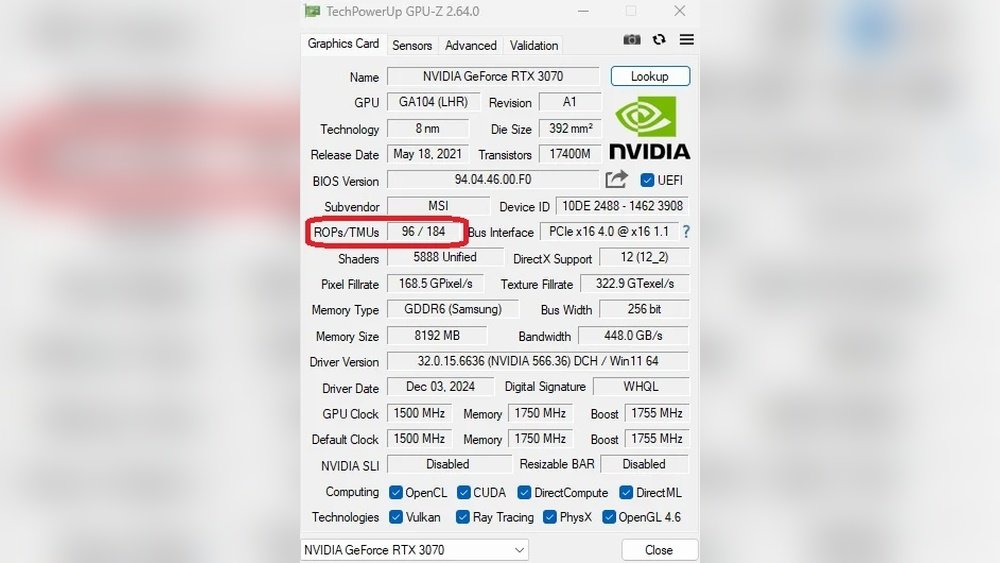
Want to know how powerful your GPU really is? Understanding the number of ROPs (Render Output Units) on your graphics card can give you a clear picture of its performance.
If you’ve ever wondered how to check ROPs on your GPU, you’re in the right place. This guide will walk you through simple steps to find this important detail quickly and easily. Keep reading, and you’ll learn how to unlock insights that can help you choose games, optimize settings, and get the most out of your graphics card.
Don’t miss out—your GPU’s true potential is just a few clicks away!
Credit: www.tweaktown.com
What Is Rops On Gpu
ROPs on a GPU are important for graphics performance. They stand for Raster Operations Pipelines. ROPs help finish the process of drawing images on your screen. They handle tasks like blending pixels and writing the final image to the display.
Understanding ROPs can help you know how well a graphics card will perform. They affect image quality and speed. More ROPs usually mean better handling of high-resolution images and effects.
What Does Rop Stand For?
ROP means Raster Operations Pipeline. It is a part of the GPU. Its main job is to complete the image rendering process. This includes blending colors and writing pixels to the frame buffer.
Why Are Rops Important?
ROPs control how quickly the GPU finishes drawing images. More ROPs can increase frame rates in games and apps. They help make images look smooth and clear, especially at high resolutions.
How Do Rops Affect Gpu Performance?
ROPs work with other GPU parts like shaders and memory. They finalize images before showing them on the screen. A higher number of ROPs allows faster image output. This improves overall visual performance.

Credit: nvidia.custhelp.com
Why Rops Matter For Performance
ROPs, or Render Output Units, play a key role in GPU performance. They handle the final steps of drawing pixels on your screen. This process affects how fast and clear images appear.
The number of ROPs in a GPU can impact how well it renders graphics. More ROPs usually mean better handling of complex scenes. This helps in gaming, video editing, and other graphic tasks.
What Do Rops Actually Do?
ROPs take the processed data and turn it into pixels. They apply effects like blending colors and writing pixels to the display. This makes images smooth and sharp.
Without enough ROPs, your GPU may slow down. The screen could show glitches or lag during heavy graphics work.
How Rop Count Affects Gaming
Games need many pixels drawn quickly. A higher ROP count helps render frames faster. This leads to smoother gameplay and better visual quality.
Low ROP numbers might cause frame drops. This makes games look choppy and less enjoyable.
Rops And Video Editing Speed
Video editing requires fast pixel processing. More ROPs speed up rendering and effects application. This cuts down waiting time and boosts productivity.
Fewer ROPs mean slower video previews and exports. This can frustrate editors working with large files.
Methods To Check Rops On Your Gpu
Knowing how to check ROPs on your GPU helps you understand its performance better. ROPs, or Render Output Units, affect how your graphics card processes images. Different methods exist to find this information. Some are simple, while others need special tools. Choose the best way that fits your needs.
Using Gpu Specifications
Start by checking the basic GPU specifications. Most GPU models list ROPs in their official specs. You can find this data in product manuals or online tech sheets. This method is quick and requires no extra software. It gives a clear number of ROP units your GPU has.
Using Software Tools
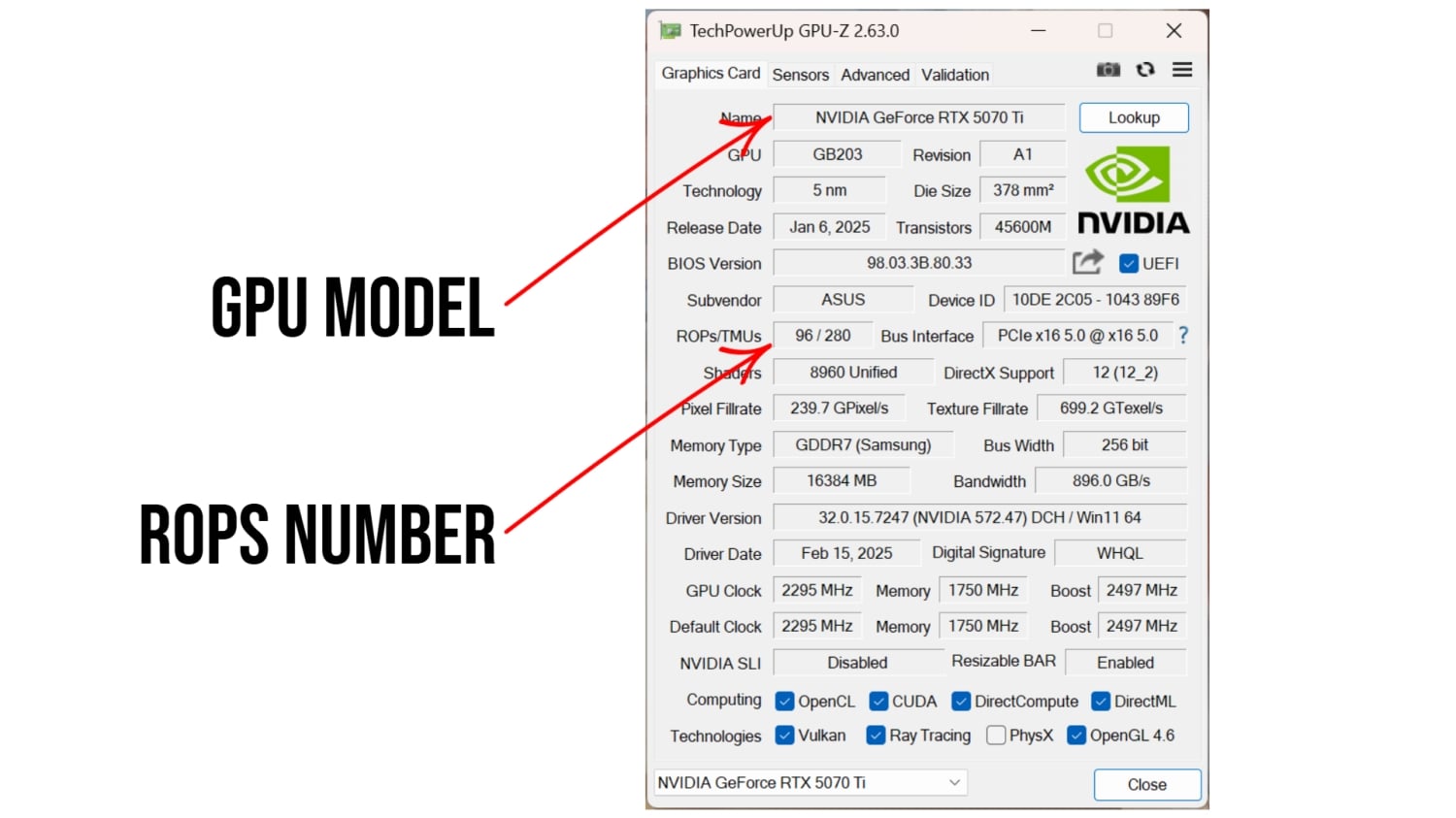
Special software tools can detect detailed GPU info. Programs like GPU-Z or AIDA64 reveal ROP counts easily. Install the tool and run a scan of your hardware. These tools show many GPU features besides ROPs. They provide a simple way to learn about your graphics card.
Checking Through Gpu-z
GPU-Z is a popular free tool for GPU details. It shows ROP count under the “Graphics Card” tab. Download and install GPU-Z from its official site. Open the program and look for “ROP Units” in the report. This method is user-friendly and reliable for beginners.
Using Manufacturer Websites
Official manufacturer websites have detailed specs for every GPU model. Visit the site of brands like NVIDIA or AMD. Enter your GPU model in the search bar. Find the specifications page and check for ROP information. This source is accurate and always updated.

Credit: nvidia.custhelp.com
Interpreting Rops Data
Interpreting ROPs data helps you understand a GPU’s real power. ROPs, or Render Output Units, affect how fast a GPU finishes drawing images. Knowing this number shows how well a GPU handles graphics tasks. It also gives clues about gaming and rendering speed. Reading ROPs data is simple once you know what to look for. This section explains how to compare GPUs and what ROPs mean for performance.
Comparing Different Gpus
ROP count varies between GPUs. Higher-end models usually have more ROPs. More ROPs mean faster image processing. Low ROPs can slow down rendering. Compare ROPs alongside other specs like memory and cores. A balanced GPU performs better in real tasks. Don’t judge a GPU by ROPs alone. Look at the whole picture to choose wisely.
Impact On Gaming And Rendering
Games rely on ROPs to display frames quickly. More ROPs reduce lag and improve frame rate. Rendering 3D models also benefits from high ROP counts. It speeds up finishing touches on images. Low ROP GPUs may struggle with complex scenes. Gamers and designers should check ROPs for smooth work. This helps avoid slowdowns and stuttering in graphics.
Tips To Boost Gpu Performance
Boosting your GPU performance helps you get smoother graphics and faster speeds. Simple steps can improve how your GPU works. This section covers practical tips that anyone can try.
Optimizing Settings
Adjust your game or software settings to reduce GPU load. Lower resolution and turn off extra effects. This helps your GPU run faster and cooler. Use settings like V-Sync only if needed. Keep textures at a balanced level for good visuals and speed.
Driver Updates
Keep your GPU drivers up to date. New drivers fix bugs and improve performance. Visit the GPU maker’s website regularly. Download and install the latest drivers. Updated drivers ensure your GPU works well with new software.
Overclocking Considerations
Overclocking can increase GPU speed but risks overheating. Use trusted software to raise clock speeds carefully. Increase in small steps and test stability each time. Watch temperature closely to avoid damage. Stop overclocking if your GPU gets too hot or crashes.
Common Myths About Rops
ROP stands for Render Output Units on a GPU. Many people have ideas about ROPs that are not true. These myths can confuse those trying to understand GPU performance. Knowing the facts helps you check ROPs correctly.
Myth 1: More Rops Always Mean Better Performance
Some think having more ROPs guarantees faster graphics. This is not always true. Performance depends on many parts of the GPU working together. ROPs help with final image processing, but other factors matter too.
Myth 2: Rop Count Is The Only Important Gpu Number
ROP count is just one part of the GPU specs. Other parts like shaders, memory speed, and clock rate affect speed. Focusing only on ROPs misses the full picture of GPU power.
Myth 3: All Rops Work The Same Across Different Gpus
ROP design can vary between GPU models. Different architectures handle tasks in unique ways. Comparing ROPs across brands or generations may not show true differences.
Myth 4: Rops Affect Only Resolution And Not Game Quality
ROP units help with rendering pixels, which links to resolution. They also impact effects like anti-aliasing and transparency. ROPs influence image quality, not just resolution alone.
Frequently Asked Questions
What Are Rops On A Gpu?
ROPs, or Render Output Units, finalize pixel data in GPU rendering. They handle tasks like blending and writing pixels to memory.
How Can I Check Rops On My Gpu?
Use GPU-Z or similar tools to check ROP count. These apps provide detailed GPU specs, including ROP numbers.
Why Does Rop Count Matter For Gpu Performance?
Higher ROP count improves rendering speed and image quality. It directly impacts pixel processing efficiency in graphics tasks.
Can Rops Affect Gaming Performance?
Yes, more ROPs can enhance frame rates and visual effects. This leads to smoother gameplay and better graphics fidelity.
Conclusion
Checking ROPs on a GPU helps you understand its power. This number shows how many pixels the card can process. Knowing ROPs helps compare different GPUs easily. Use simple tools or software to find this info. It’s a quick step that gives useful details.
Keep this in mind when choosing or upgrading your GPU. Understanding your GPU better leads to smarter choices. Simple checks save time and avoid confusion later. Now, you can confidently check ROPs on any GPU.
