
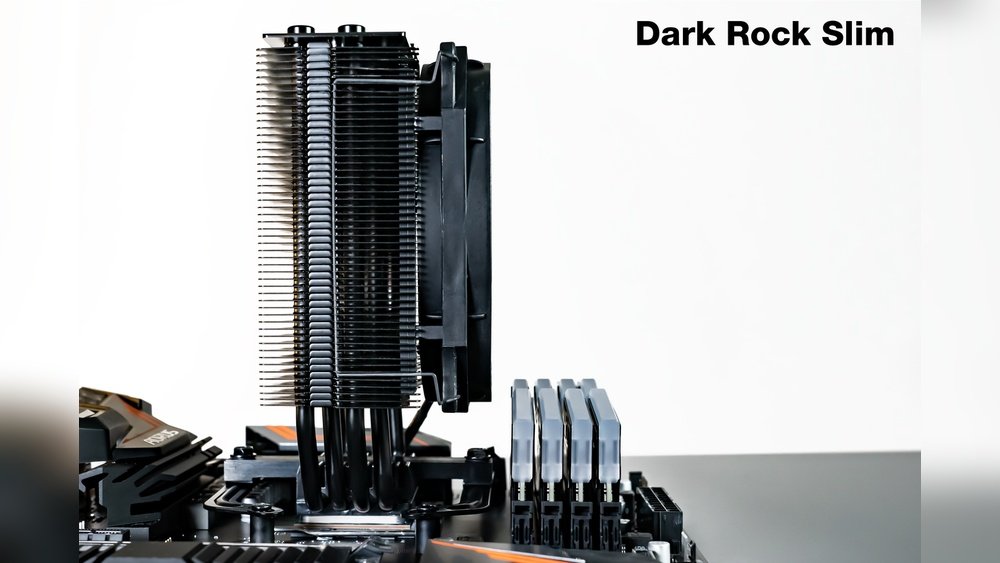
Are you building or upgrading your PC and worried about whether your CPU cooler will fit over your RAM? You’re not alone.
Many people face the challenge of making sure there’s enough space between the cooler and the RAM sticks. If you get it wrong, your system won’t work properly, or you might damage your components. But don’t worry—checking RAM clearance with CPU coolers is easier than you think.
You’ll learn simple, effective ways to measure and ensure the perfect fit, saving you time, money, and headaches. Keep reading to find out exactly how to avoid compatibility issues and build your dream PC with confidence.
Importance Of Ram Clearance
Checking RAM clearance with CPU coolers prevents fitting issues and ensures proper airflow. Measuring space helps avoid damage and keeps your PC running cool. Knowing this step saves time and frustration during installation.
Ram clearance is a key factor when installing CPU coolers. It means the space between your RAM modules and the cooler. Proper clearance prevents physical contact that can damage components.
Good clearance also helps keep your computer cool. Without enough space, airflow can be blocked. This can cause your system to overheat and slow down.
Checking ram clearance ensures your PC runs smoothly and stays safe.
Impact On System Performance
Poor ram clearance can lower system speed. When airflow is blocked, heat builds up. High temperatures force your CPU and RAM to slow down.
Slow components mean your computer works harder and uses more power. This reduces overall performance and can cause crashes.
Proper clearance keeps parts cool and working at full speed.
Common Clearance Issues
Some CPU coolers are large and heavy. They may block tall RAM modules or heat spreaders.
Low-profile RAM can help avoid clearance problems. But many users want high-performance RAM with bigger heatsinks.
Clearance issues can cause installation problems or damage parts. Checking space before buying components is important.
Credit: www.bequiet.com
Measuring Ram Height
Measuring RAM height is a key step before installing a CPU cooler. It ensures the cooler fits well without blocking the RAM slots. Incorrect measurement can cause installation problems or damage parts. Taking precise measurements helps avoid these issues and keeps your build smooth.
Tools Needed For Measurement
You need a ruler or a caliper to measure RAM height. A caliper gives more exact results but a ruler works fine too. Also, have a flashlight to see the RAM slots clearly. A small notebook and pen help to record your measurements.
Step-by-step Measuring Process
First, turn off your PC and open the case. Remove any existing CPU cooler if needed. Next, locate the RAM modules on the motherboard. Use the ruler or caliper to measure from the motherboard surface to the top of the RAM stick. Measure at the tallest part of the RAM, usually the heat spreader.
Write down the height in millimeters. Compare this height with the CPU cooler’s clearance specs. This step prevents buying a cooler that is too tall for your RAM. Repeat the measurement for each RAM stick if they differ in height.
Types Of Cpu Coolers
CPU coolers come in several types. Each type affects RAM clearance differently. Understanding these types helps you choose the right cooler and avoid fit issues.
Air Coolers
Air coolers are the most common type. They use a heat sink and fan to cool the CPU. These coolers can be tall and bulky. This size can block tall RAM modules. Check the cooler’s height and clearance specs before buying.
Liquid Coolers
Liquid coolers use water to move heat away from the CPU. They have a pump, radiator, and tubes. The radiator mounts to the case, freeing space around the CPU. This often improves RAM clearance. Make sure the radiator size fits your case.
Low-profile Coolers
Low-profile coolers are small and compact. They fit in tight spaces and small cases. These coolers clear RAM slots easily. They work well with tall RAM modules. Low-profile coolers may not cool as well as larger ones, but they save space.
Credit: www.cgdirector.com
Assessing Cooler And Ram Compatibility
Assessing cooler and RAM compatibility is a key step before building or upgrading a PC. The CPU cooler can block or limit the space where RAM fits. This can cause problems if the cooler is too large or the RAM has tall heat spreaders. Knowing how to check the clearance helps avoid these issues.
This process ensures both parts fit well and work properly. It saves time and prevents buying parts that do not fit. Here are some simple methods to check cooler and RAM compatibility.
Checking Manufacturer Specs
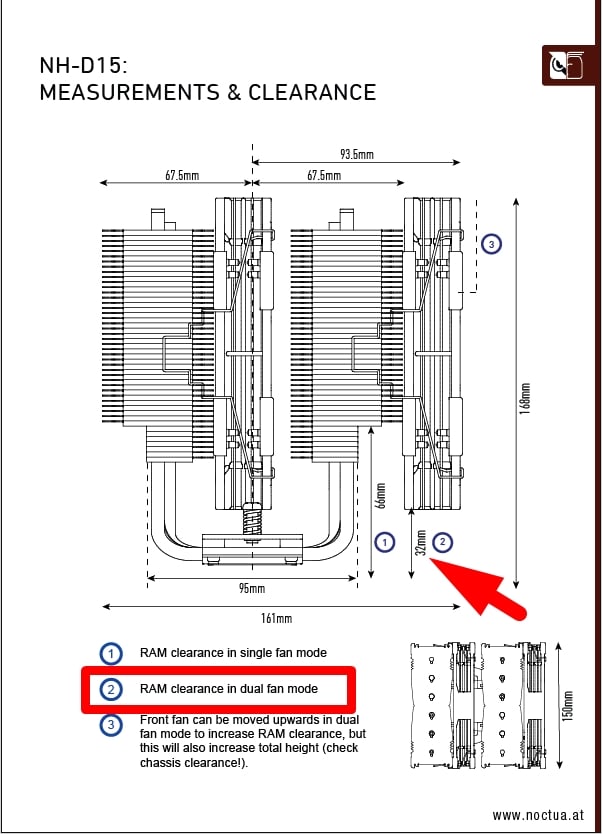
Start by looking at the product details from the manufacturer. They usually list the cooler’s height and the RAM height it supports. This information is often in the specs section or manual. Comparing these numbers helps find if the cooler and RAM match.
Manufacturers sometimes provide a list of compatible RAM modules. This list shows tested products that fit under the cooler. Use this as a guide to pick the right RAM.
Visual Inspection Techniques
Look closely at the cooler and RAM before buying. Check the cooler’s design and how close it sits to the RAM slots. Some coolers have wide bases or large fans that can block tall RAM sticks.
Use a ruler or tape measure to see the space between the cooler and RAM slots. Measure the height of the RAM modules to ensure they fit without touching the cooler. This simple check helps avoid clearance problems.
Using Clearance Charts
Clearance charts show detailed measurements of popular coolers and RAM modules. These charts compare cooler height and RAM height side by side. They help quickly spot which RAM will fit under a cooler.
Many tech websites and forums share updated clearance charts. Use these charts to save time and choose parts with the right size. This method works well for common cooler and RAM models.
Adjusting For Clearance Issues
Adjusting for clearance issues between your CPU cooler and RAM is important. Tight space can stop proper installation or cause heat problems. Small changes help fit both parts securely. This keeps your PC safe and running well.
Reorienting The Cooler
Changing the cooler’s direction can free up space around RAM slots. Some coolers allow rotation of the fan or heatsink. Turning the cooler 90 or 180 degrees may clear tall RAM modules. This simple step often solves tight clearance problems fast.
Selecting Low-profile Ram
Low-profile RAM sticks have shorter heat spreaders. They take less vertical space than standard RAM. Using low-profile RAM reduces clashes with large CPU coolers. These RAM types work well in small or tight builds. They offer good performance with easier installation.
Alternative Cooler Options
Choosing a different cooler can fix clearance issues. Some coolers are designed for compact builds with limited space. Consider low-profile air coolers or all-in-one liquid coolers. These options provide good cooling without blocking RAM slots. They help avoid clearance problems altogether.

Credit: www.reddit.com
Testing Fit Before Installation
Testing fit before installation is a key step when adding a CPU cooler to your PC. It ensures the cooler fits well without blocking your RAM slots. This step helps avoid damage and saves time during final assembly.
Checking clearance prevents issues like tight spaces or poor airflow. It also helps confirm your chosen cooler matches your build. Taking time here makes your build smoother and safer.
Mock Assembly Tips
Start by placing the motherboard on a flat surface. Position the CPU cooler near the CPU socket without locking it in place. Check if the cooler blocks the RAM slots or nearby components.
Use your RAM sticks to test the space. Insert them into slots and see if they fit under the cooler. Move the cooler gently to check for any tight spots.
Measure the height of your RAM modules. Compare it to the cooler’s dimensions. If the cooler is too close or touches the RAM, consider a different cooler or low-profile RAM.
Ensuring Proper Airflow
Good airflow is critical for keeping your PC cool. After mock assembly, see if the cooler blocks airflow near the RAM. Air should flow freely around the memory and heatsinks.
Check the direction of cooler fans. Fans should push air toward exhaust vents in your case. Avoid positioning that traps hot air near RAM or other parts.
Leave small gaps between the cooler and RAM sticks. This space helps air move and cool both components. Proper airflow lowers temperatures and improves PC stability.
Troubleshooting Clearance Problems
Checking RAM clearance with CPU coolers can be tricky. Problems may arise during installation. Troubleshooting clearance problems helps avoid damage and ensures proper fit. This section explains common signs and how to fix them.
Signs Of Insufficient Clearance
RAM sticks do not fit under the cooler. The cooler presses down on the RAM modules. System crashes or freezes after installing the cooler. Loud noises or unusual vibrations near the RAM area. The computer does not boot or shows error beeps. These signs point to clearance issues between the cooler and RAM.
Resolving Installation Conflicts
Try installing low-profile RAM modules first. Remove tall heat spreaders if possible. Adjust the cooler’s position or angle slightly. Use RAM slots farther from the CPU socket. Replace the cooler with a smaller model if needed. Double-check mounting screws are not overtightened. Test the system after each change to confirm clearance is fixed.
Frequently Asked Questions
How Do I Measure Ram Clearance For Cpu Coolers?
Measure the distance from the motherboard to the RAM slots. Compare it to the height of your CPU cooler’s base and fins. This ensures no contact or obstruction, preventing installation issues or damage.
Why Is Ram Clearance Important For Cpu Cooler Installation?
Proper RAM clearance prevents physical interference between RAM modules and the cooler. It ensures stable installation, optimal cooling, and avoids hardware damage or system instability.
Can I Use Low-profile Ram For Better Cooler Clearance?
Yes, low-profile RAM reduces height conflicts with large CPU coolers. It improves compatibility and airflow, allowing easier installation and better thermal performance.
How Do I Check Ram Clearance Before Buying A Cpu Cooler?
Check your motherboard’s RAM slot height and cooler dimensions on product specs. Online compatibility tools and user reviews also help verify clearance before purchase.
Conclusion
Checking RAM clearance with CPU coolers ensures smooth PC building. Measure space carefully before buying parts. Remember to compare cooler height and RAM size. Choose low-profile RAM if space is tight. This avoids fitting problems and overheating risks. Always double-check measurements to save time and effort.
Clear RAM space means better airflow and cooling. A simple step but important for a stable system. Take your time and build with confidence.
