
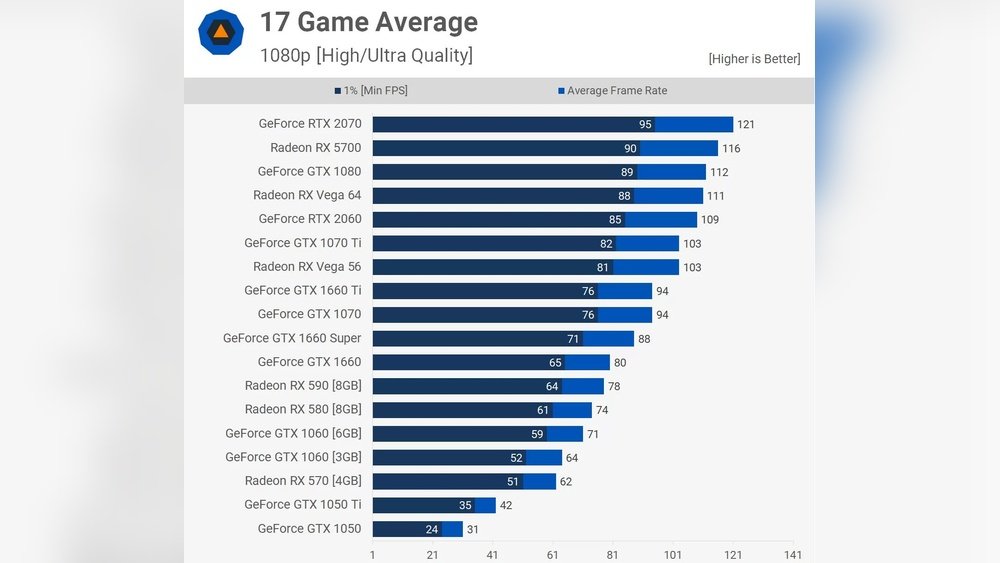
Wondering how much GPU memory you really need? Whether you’re gaming, video editing, or diving into graphic design, the right amount of GPU memory can make all the difference.
Too little, and you’ll face slowdowns and frustration. Too much, and you might be wasting money on hardware you don’t need. This guide will help you figure out exactly what fits your needs—so you get smooth performance without overspending. Keep reading to make sure your next GPU choice is spot on for your goals.
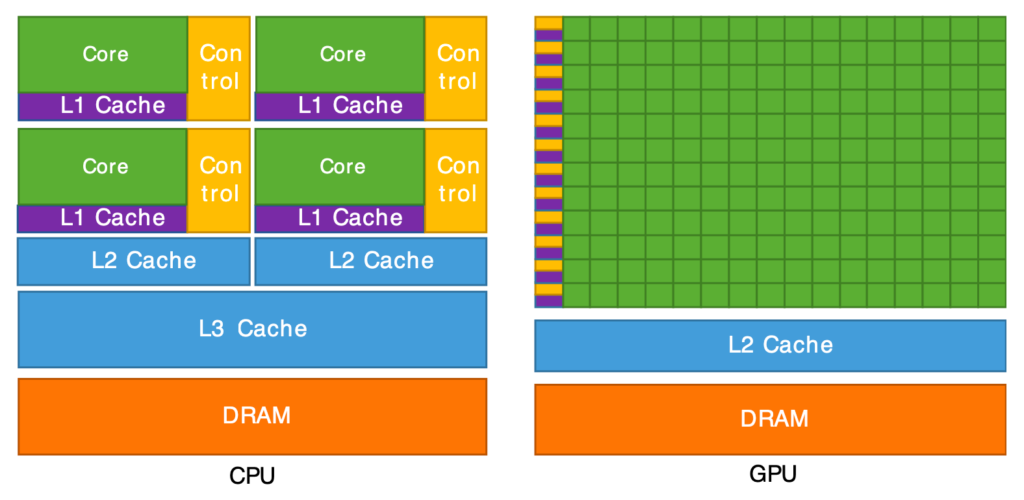
Credit: www.liquidweb.com
Gpu Memory Basics
Understanding GPU memory is key when choosing the right graphics card. It affects how your computer handles images, videos, and games. Knowing the basics helps in picking the correct amount of memory for your needs.
What Gpu Memory Does
GPU memory stores data that the graphics card uses to create images. It holds textures, frame buffers, and other visual information. This memory lets the GPU access data quickly for smooth graphics.
Without enough memory, graphics may slow down or look poor. The GPU reads and writes this data many times per second. It plays a vital role in rendering high-quality visuals.
Types Of Gpu Memory
There are several types of GPU memory with different speeds and sizes. GDDR5 and GDDR6 are common in modern cards. These types provide fast access to data for better performance.
Some GPUs use HBM (High Bandwidth Memory) for faster data transfer. Each type affects how well the GPU handles complex tasks. The choice depends on your budget and needs.
How Gpu Memory Affects Performance
More GPU memory helps handle bigger textures and higher resolutions. It reduces lag and improves frame rates in games and software. Limited memory can cause stuttering and lower graphics quality.
High memory capacity is useful for video editing and 3D modeling. It allows smooth work with large files and effects. Performance depends on both memory size and GPU speed.
Gpu Memory For Gamers
Choosing the right GPU memory is important for gamers. It affects game speed and quality. More memory helps handle bigger game files. This means smoother gameplay and better visuals. Let’s explore how much GPU memory gamers need.
Memory Needs By Game Genre
Different games need different memory sizes. Action and shooter games need moderate memory. Racing and sports games use less memory. Open-world and role-playing games need more memory. These games load large maps and textures. Strategy games vary but usually need less memory. Knowing your game type helps pick the right GPU memory.
Resolution And Memory Usage
Higher screen resolution uses more GPU memory. Playing at 1080p needs less memory than 4K. 4K gaming demands large memory to show details. Using multiple monitors also raises memory needs. Lower resolution means less memory is fine. Match memory size with your screen setup.
Futureproofing Your Setup
Buying extra GPU memory can save upgrades later. New games often need more memory than older ones. Having more memory can keep your PC ready. It avoids slowdowns as games get bigger. Choose memory that lasts for several years. This helps keep games running smoothly.
Gpu Memory For Creators
Creators need the right GPU memory for smooth work. GPU memory helps with handling large files and complex tasks. The amount of memory depends on the type of creative work. Different tasks require different GPU memory sizes.
Choosing enough GPU memory improves speed and quality. It stops slowdowns and makes editing easier. Let’s look at common creative tasks and their memory needs.
Video Editing Requirements
Video editing uses a lot of GPU memory. High-resolution videos need more memory to play smoothly. Editing 4K videos requires at least 8GB of GPU memory. For basic 1080p videos, 4GB can work. More memory helps with effects and fast previews.
3d Rendering And Design
3D work needs more GPU memory than video editing. Models and scenes use large amounts of memory. 8GB to 12GB is common for mid-level 3D design. Complex projects or animations might need 16GB or more. More memory allows better detail and faster rendering.
Photo Editing And Graphic Work
Photo editing needs less GPU memory than video or 3D. Most photo editing runs well with 4GB to 6GB. Large files or many layers need more memory. Graphic design software also works well with 4GB. Extra memory helps with smooth zooming and fast filters.

Credit: www.youtube.com
Choosing The Right Gpu Memory Size
Picking the right GPU memory size is important for good computer performance. Too little memory can slow down your system. Too much memory can waste your budget. Understanding how much GPU memory you need helps balance performance and cost.
Different tasks need different amounts of memory. Gaming, video editing, and 3D design all use GPU memory differently. Knowing your needs guides you to the best choice.
Balancing Budget And Performance
More GPU memory usually costs more money. Find a size that fits your budget but still gives good speed. Spending too little can cause lag. Spending too much may not improve your work or games much. Choose a memory size that matches what you do most.
Comparing Gpu Memory Sizes
Low-end GPUs often have 2 to 4 GB of memory. These work for simple tasks and older games. Mid-range GPUs offer 6 to 8 GB, good for most modern games and editing. High-end GPUs have 10 GB or more, great for heavy gaming and complex 3D work. Pick a size based on how demanding your software is.
Signs You Need More Memory
Slow frame rates or stuttering in games can mean low GPU memory. Programs may crash or freeze during heavy use. Graphics settings might need to be lowered often. If these happen, increasing GPU memory can help. Watch for these signs to decide if an upgrade is needed.
Optimizing Gpu Memory Usage
Optimizing GPU memory usage helps your computer run tasks smoothly. It prevents slowdowns caused by memory overload. Managing memory well boosts performance and keeps your system stable.
Many applications need a lot of GPU memory. Using memory wisely lets you work or play without interruptions. Small changes in settings or tools can make a big difference.
Settings To Improve Efficiency
Lower graphics settings reduce memory use. Try reducing texture quality or screen resolution. Turn off effects like shadows or reflections. These changes save memory and keep good visuals.
Close unused programs running in the background. They can use GPU memory without you knowing. Keep only necessary apps open to free up memory.
Software Tools To Monitor Memory
Use software tools to watch your GPU memory use. Programs like GPU-Z or MSI Afterburner show real-time memory status. These help identify apps that use too much memory.
Monitoring tools alert you before memory runs out. This allows you to adjust settings or close apps. Keeping an eye on memory prevents crashes and lag.
Upgrading Your Gpu Memory
Sometimes, upgrading GPU memory is the best solution. More memory lets you run bigger games and complex programs. Check your system compatibility before buying a new GPU.
Upgrading may cost money but improves long-term performance. It makes your computer ready for future software needs. Balance your budget with your performance goals.
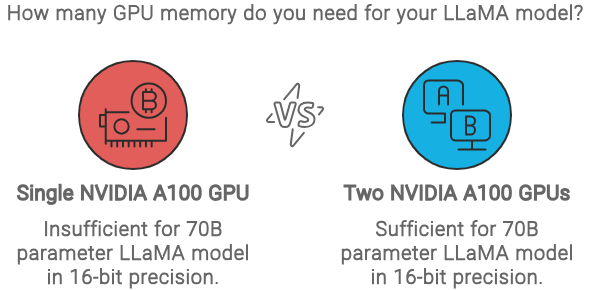
Credit: masteringllm.medium.com
Frequently Asked Questions
How Much Gpu Memory Is Ideal For Gaming?
For gaming, 6GB to 8GB of GPU memory is usually sufficient. High-end games at 1080p need 6GB, while 1440p or 4K gaming requires 8GB or more for smooth performance.
Does Video Editing Need More Gpu Memory?
Yes, video editing benefits from 8GB or more GPU memory. Large 4K or 8K projects require extra memory to handle complex timelines and effects efficiently.
How Does Gpu Memory Affect Performance?
GPU memory stores textures and data for rendering images. Insufficient memory causes lag and lower frame rates. More memory enables better graphics and smoother multitasking.
Is 4gb Gpu Memory Enough For Casual Use?
4GB GPU memory is enough for casual tasks like web browsing and streaming. It supports light gaming and basic creative work without performance issues.
Conclusion
Choosing the right GPU memory depends on your needs. Playing simple games? A smaller memory size may work fine. For graphic design or video editing, more memory helps. Streaming and multitasking demand more space too. Keep in mind, bigger memory often costs more.
Balance your budget with your use cases. Don’t overspend on memory you won’t use. Think about future needs, not just today. A thoughtful choice saves money and boosts performance. Now you know how much GPU memory suits you best.
