
Are you worried about how hot your GPU gets when you’re gaming? You’re not alone.
Your graphics card works hard to deliver smooth gameplay, but if it gets too hot, it can cause problems. Knowing the right temperature range for your GPU is key to keeping your system safe and running well. You’ll discover exactly how hot your GPU should get, what signs to watch for, and simple tips to keep it cool.
Keep reading to protect your gear and enjoy better gaming performance.
Gpu Temperature Basics
Understanding GPU temperature is important for smooth gaming. Your graphics card works hard to show images quickly. This effort creates heat. Managing this heat helps keep your computer safe and fast.
Knowing the basics of GPU temperature helps you avoid problems. It also helps you know when your system needs care. Let’s explore what affects GPU heat and how to measure it.
What Affects Gpu Heat
GPU heat depends on many factors. The game’s graphics intensity can raise the temperature. More details and effects mean more work for the GPU.
Cooling systems also affect heat levels. Good fans or liquid cooling keep temperatures lower. Poor cooling lets heat build up fast.
Room temperature plays a role too. A hot room makes it harder for your GPU to cool down. Dust inside the computer can block airflow and increase heat.
Temperature Measurement Methods
You can check GPU temperature using software tools. Many free apps show real-time GPU heat. These tools read sensors inside the graphics card.
Popular options include MSI Afterburner and HWMonitor. They give accurate temperature data and alert you if heat is too high. Checking these numbers regularly helps protect your GPU.

Credit: www.reddit.com
Safe Gpu Temperature Ranges
Knowing the safe temperature range for your GPU is very important. It helps keep your graphics card working well and lasting longer. GPUs get hot while gaming because they work hard to create smooth graphics.
Too much heat can cause problems like crashes, slowdowns, or even damage. You should watch your GPU temperature to avoid these issues. Let’s look at the typical safe temperatures and how they change.
Idle Vs Gaming Temps
Idle temperature means how hot your GPU is when your computer is not working hard. Usually, this is between 30°C and 45°C. This low temperature shows the GPU is not under stress.
Gaming temperature is higher because the GPU processes many graphics at once. Most GPUs stay safe between 60°C and 85°C while gaming. Some models can handle temperatures near 90°C but try to keep it lower.
Manufacturer Guidelines
Each GPU maker gives temperature limits in the user manual or website. These guidelines tell you the highest safe temperature for your GPU. Most brands like NVIDIA and AMD say 85°C to 95°C is the max.
Staying below these limits helps avoid damage or reduced performance. Check your GPU brand’s recommendations for the best info. Follow these rules to keep your GPU cool and healthy.
Signs Of Overheating
Knowing the signs of GPU overheating helps protect your computer. Overheating can harm your graphics card and affect gaming. Watch for warning signs to avoid damage and keep your system running well.
Performance Drops
When your GPU gets too hot, game speed may slow down. Frame rates can drop suddenly, making gameplay less smooth. This happens because the GPU lowers its power to cool down.
Visual Artifacts
Overheating can cause strange lines or colors on your screen. You might see flickering, dots, or blocks that do not belong. These visual errors show the GPU is under stress and not working right.
System Crashes
Your computer may freeze or restart during gaming sessions. Sudden shutdowns often happen to stop the GPU from overheating. These crashes protect your hardware but can cause lost game progress.
Credit: www.reddit.com
Factors Influencing Gpu Temps
Many things affect how hot your GPU gets during gaming. Understanding these factors helps keep your GPU safe and running well. Some factors are easy to change, while others depend on your setup or environment. Knowing what influences GPU temperatures can help you manage heat better.
Case Airflow
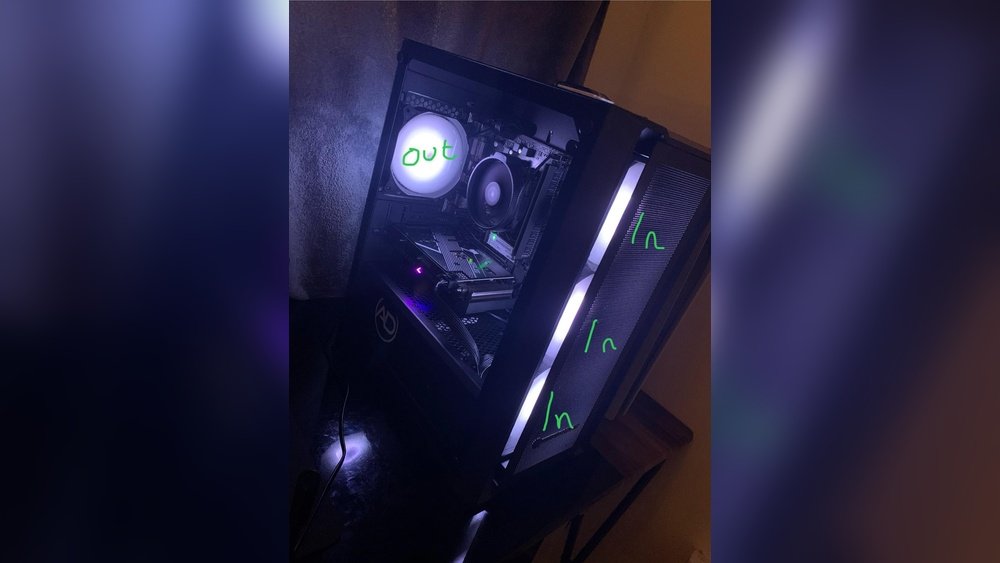
Good airflow inside your PC case moves hot air out. This helps the GPU stay cooler. Poor airflow traps heat and raises temperatures. Make sure your case has enough fans and space for air to flow. Clean dust from fans and vents often. This keeps air moving freely and cools your GPU better.
Ambient Room Temperature
The room temperature affects your GPU’s heat. Warmer rooms make it harder for your GPU to cool down. Cooler rooms help lower GPU temperatures. Try to keep your gaming area cool and well-ventilated. This simple step can reduce GPU heat by several degrees.
Overclocking Effects
Overclocking makes your GPU run faster than normal. This raises the power use and heat output. Overclocked GPUs get hotter and need better cooling. Without proper cooling, overclocking can cause overheating. Always monitor temperatures if you overclock your GPU.
Cooling Solutions
Keeping your GPU cool is key to good gaming performance and long hardware life. High temperatures can cause your graphics card to slow down or even fail. Cooling solutions help control heat and keep your GPU running smoothly. There are different types of cooling methods you can use. Each has its own benefits and fits different setups.
Air Cooling
Air cooling uses fans to move air over the GPU. This method is common and easy to install. Most graphics cards come with built-in fans. These fans blow hot air away from the GPU to cool it down. Air cooling works best in cases with good airflow. Dust can reduce fan efficiency, so clean your PC often.
Liquid Cooling
Liquid cooling uses water or coolant to take heat away from the GPU. It is more efficient than air cooling. This method keeps temperatures lower and noise levels down. Liquid cooling systems can be closed-loop or custom loops. They require more care and setup but provide better performance. Great for high-end gaming PCs or overclocked GPUs.
Thermal Paste Importance
Thermal paste sits between the GPU chip and the cooler. It helps transfer heat from the GPU to the cooling system. Over time, thermal paste can dry out and lose effectiveness. Replacing old thermal paste improves cooling and lowers temperatures. Use good quality paste and apply it evenly for best results.
Monitoring Gpu Temperature
Monitoring your GPU temperature is important for smooth gaming and long hardware life. High temperatures can cause slowdowns and damage. Watching the heat helps you keep your system safe and running well.
Simple checks let you act fast. You can prevent crashes or permanent harm by knowing your GPU’s temperature in real time. It is easy with the right tools and settings.
Popular Software Tools
Many programs show your GPU temperature clearly. MSI Afterburner is a favorite for gamers. It shows temps, fan speed, and more. HWMonitor gives detailed info about all hardware parts. GPU-Z focuses only on your graphics card. These tools run in the background while you play games. They update numbers often so you always see the current heat level.
Setting Alerts
Alerts warn you if the GPU gets too hot. You can set a temperature limit in many tools. When the heat crosses this line, the program sends a notification. Some even reduce fan speed or lower GPU power to cool it down. Alerts help avoid damage by giving early warnings. It is smart to set alerts a few degrees below the max safe temperature.
Tips To Lower Gpu Temperature
Keeping your GPU cool helps your computer run smoothly. High temperatures can slow down your gaming and damage parts. Many easy steps can lower GPU heat. Small changes make a big difference.
Try these tips to keep your GPU temperature down and enjoy better gaming performance.
Improving Case Ventilation
Good airflow inside your computer case is very important. Make sure your case fans push air in and out properly. Place fans at the front to bring cool air in. Use fans at the back or top to push hot air out. Avoid blocking air paths with cables or other parts. A clean and open space inside the case helps cool air move freely.
Adjusting Fan Curves
Fan curves control how fast your fans spin based on temperature. Set fans to run faster as your GPU gets hotter. Many GPU software tools let you change fan curves easily. Faster fans cool your GPU better but may be louder. Find a balance between noise and cooling that works for you. Custom fan speeds can keep your GPU safe during long gaming sessions.
Avoiding Dust Build-up
Dust blocks airflow and traps heat inside your case. Clean your computer regularly to stop dust from piling up. Use a soft brush or compressed air to remove dust from fans and vents. Keep your computer in a clean, dust-free room if possible. Less dust means better cooling and longer life for your GPU.
When To Be Concerned
Knowing when your GPU temperature is too high matters a lot. It protects your computer from damage and keeps games running smoothly. Sometimes, temperatures rise, but not all heat is dangerous. You need to spot the signs that mean trouble. This part explains when to worry about your GPU heat and what risks it brings.
Temperature Thresholds
Most GPUs work well under 85°C while gaming. Temperatures between 70°C and 85°C are normal. Above 85°C, your GPU may start to throttle performance. Throttling means the GPU slows down to cool itself. Reaching 90°C or more is a warning sign. At this heat, your computer may crash or show errors. Keeping your GPU below 85°C is a safe rule.
Long-term Damage Risks
High heat over time harms your GPU’s life. Constant temperatures above 85°C speed up wear and tear. The GPU’s parts can degrade or fail sooner. This damage causes slower games and sudden crashes. Heat also affects other PC parts near the GPU. Cooling your GPU helps avoid costly repairs and replacements. Regular cleaning and good airflow reduce long-term risks.

Credit: www.reddit.com
Frequently Asked Questions
What Is The Ideal Gpu Temperature For Gaming?
The ideal GPU temperature for gaming ranges between 65°C to 85°C. Staying within this range ensures good performance and avoids overheating. Temperatures above 90°C can cause thermal throttling or damage. Proper cooling and ventilation help maintain safe temperatures during intense gaming sessions.
Can A Gpu Get Too Hot While Gaming?
Yes, a GPU can get too hot while gaming. Excessive heat above 90°C may reduce performance and shorten GPU lifespan. Overheating can cause crashes or shutdowns. Using quality cooling solutions and monitoring temperatures can prevent damage and maintain stable gaming performance.
How To Check Gpu Temperature During Gameplay?
You can check GPU temperature using software like MSI Afterburner or GPU-Z. These tools display real-time temperature data while gaming. Monitoring helps ensure your GPU stays within safe limits. Most modern GPUs also provide temperature info in their control panels or drivers.
Does Gpu Temperature Affect Gaming Performance?
Yes, GPU temperature significantly affects gaming performance. High temperatures trigger thermal throttling, lowering clock speeds and FPS. Keeping the GPU cool allows it to run at optimal speeds. Proper cooling solutions improve stability and maintain smooth gameplay without slowdowns.
Conclusion
A GPU running too hot can cause problems during gaming. Aim to keep your GPU temperature below 85°C for safety. Temperatures between 60°C and 80°C are normal while playing games. Good airflow and clean fans help maintain these temperatures. Check your GPU temperature often to avoid overheating.
Cooler GPUs last longer and perform better. Remember, keeping your GPU cool improves your gaming experience. Simple steps can protect your hardware and keep games running smoothly. Stay aware and keep your GPU temperature in the safe range.
