
Are you wondering if Ubuntu needs a GPU to run smoothly? You’re not alone.
Whether you’re setting up a new system or thinking about upgrading your hardware, knowing how Ubuntu handles graphics can save you time and money. You’ll discover exactly when a GPU is necessary for Ubuntu and when it’s not. By the end, you’ll have a clear answer that fits your needs, helping you make smarter decisions for your computer setup.
Keep reading to find out what really matters for Ubuntu and your hardware.
Credit: linuxcapable.com
Ubuntu And Gpu Basics
Understanding the basics of Ubuntu and GPUs helps you decide on your system needs. Both play important roles in computing tasks. Knowing what each does clarifies if a GPU is necessary for Ubuntu users.
This section explains Ubuntu as an operating system and the role of GPUs in computing. It guides you through key points without complex terms.
What Is Ubuntu?
Ubuntu is a free operating system based on Linux. It runs on computers, laptops, and servers. It offers a user-friendly interface and many applications. Ubuntu supports software development, web browsing, and office tasks. It is popular for its security and regular updates. Many people choose Ubuntu for its stability and open-source nature.
Role Of Gpu In Computing
A GPU, or Graphics Processing Unit, handles image and video tasks. It helps display graphics smoothly on your screen. GPUs speed up games, video editing, and 3D modeling. They also assist in complex calculations like machine learning. Without a GPU, your computer uses the CPU for these tasks. This can make some programs slower. A GPU improves visual quality and performance in many applications.

Credit: forums.developer.nvidia.com
Does Ubuntu Need A Gpu?
Ubuntu is a popular Linux operating system used by many people worldwide. A common question is whether Ubuntu needs a GPU to work well. The answer depends on what you want to do with Ubuntu. This section explores if Ubuntu requires a GPU and what benefits a GPU can bring.
Running Ubuntu Without A Gpu
Ubuntu can run without a dedicated GPU. Many older computers and servers run Ubuntu fine using only the built-in graphics of the CPU. Basic tasks like web browsing, document editing, and watching videos do not need a powerful GPU.
Without a GPU, the system uses integrated graphics, which save power and reduce heat. This setup works well for users who do not need heavy graphics or fast rendering. Ubuntu’s lightweight desktop environments also help it run smoothly without a GPU.
Gpu Advantages On Ubuntu
A GPU can improve Ubuntu’s performance for specific tasks. Graphic design, video editing, and gaming benefit a lot from a good GPU. The GPU handles complex graphics and speeds up rendering processes.
Machine learning and data science also use GPUs to run faster. Ubuntu supports many GPU drivers, allowing users to install and update them easily. With a GPU, Ubuntu can manage multiple high-resolution displays and offer better visual effects.
Gpu Drivers On Ubuntu
Ubuntu supports many types of GPUs and needs drivers to work well. GPU drivers help the operating system use the graphics card properly. Without the right drivers, graphics may not show correctly or run slow. Ubuntu offers both open source and proprietary drivers for GPUs.
Open Source Vs Proprietary Drivers
Open source drivers are free and made by the community. They come pre-installed in Ubuntu and work well for basic tasks. These drivers are safer and update often.
Proprietary drivers are made by the GPU makers like Nvidia or AMD. They offer better performance for gaming and heavy graphics work. These drivers may need manual installation and updates.
Installing Gpu Drivers
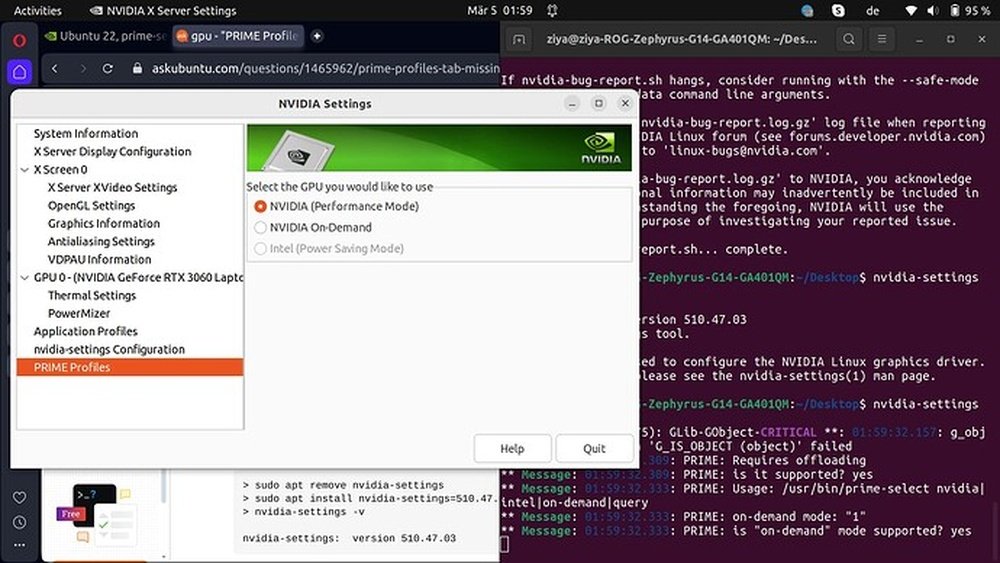
Ubuntu can detect your GPU and suggest drivers automatically. Use the “Software & Updates” tool to find available drivers. Choose either open source or proprietary based on your needs.
For Nvidia cards, you can install drivers using the terminal with commands like “sudo apt install nvidia-driver-XXX”. Replace “XXX” with the correct version number.
Restart your computer after installing drivers to apply changes. Check the driver status with “nvidia-smi” for Nvidia or system info tools for others.
Gpu Use Cases On Ubuntu
Ubuntu supports GPU use for many tasks. A GPU helps with more than just gaming. It speeds up work that needs heavy computing power. Ubuntu users benefit from GPUs in several key areas. These areas include gaming, machine learning, and video editing. Each uses the GPU in a different way.
Gaming And Graphics
Games need fast graphics processing. GPUs render images smoothly and quickly. Ubuntu supports many GPUs for gaming. This allows better frame rates and visuals. Graphics applications also rely on GPUs. Artists create and edit images with ease. The GPU handles complex effects and layers.
Machine Learning And Ai
Machine learning needs large data processing. GPUs can process many calculations at once. This speeds up training of AI models. Ubuntu users can run AI software using GPUs. This makes AI work faster and more efficient. Without GPUs, machine learning tasks take longer.
Video Editing And Rendering
Video editing requires fast rendering times. GPUs accelerate video effects and transitions. Ubuntu users benefit from GPU-powered software. This reduces wait times during editing. Rendering high-quality videos becomes smoother. The GPU handles complex video processing tasks.
Troubleshooting Gpu Issues
Troubleshooting GPU issues on Ubuntu can be tricky. Problems may cause slow graphics or system crashes. Fixing these issues improves performance and stability. Understanding common GPU problems helps find the right solutions quickly.
GPU issues often involve drivers or hardware conflicts. Ubuntu supports many GPUs, but sometimes drivers clash. Knowing how to detect and fix driver conflicts is key. This section guides you through common problems and their fixes.
Common Gpu Problems
Ubuntu users may face screen flickering or freezing. Black screens during boot are also common. Some GPUs cause poor video playback or low resolution. Errors in the system log can indicate GPU troubles. Performance drops in 3D applications may signal GPU issues. Identifying these symptoms helps in choosing the right fix.
Fixing Driver Conflicts
Driver conflicts often cause GPU problems on Ubuntu. Multiple drivers might try to control the GPU simultaneously. Removing unused or outdated drivers avoids conflicts. Use Ubuntu’s “Additional Drivers” tool for recommended drivers. Installing the latest official drivers ensures better compatibility. Sometimes, purging old drivers from the terminal is needed. Restart the system after driver changes to apply fixes. Proper driver management leads to smoother GPU performance.
Credit: spin.atomicobject.com
Frequently Asked Questions
Does Ubuntu Need A Gpu For Basic Use?
No, Ubuntu does not require a GPU for basic tasks. It runs smoothly on CPUs alone for web browsing, office work, and coding. A GPU is only necessary for graphics-intensive applications like gaming or video editing.
Can Ubuntu Run Without A Dedicated Gpu?
Yes, Ubuntu can run without a dedicated GPU. It supports integrated graphics found in most CPUs. This makes Ubuntu suitable for low-power systems and laptops without extra graphics hardware.
How Does Gpu Improve Ubuntu Performance?
A GPU accelerates graphics rendering and computation tasks in Ubuntu. It enhances gaming, video editing, and machine learning performance. Using a GPU can significantly speed up graphical and parallel processing workloads.
Is Gpu Required For Ubuntu Gaming?
While not mandatory, a GPU is highly recommended for gaming on Ubuntu. It provides better frame rates and smoother gameplay. Integrated graphics usually struggle with modern, graphics-intensive games.
Conclusion
Ubuntu runs well without a GPU for most tasks. It uses the computer’s CPU to handle graphics and processes. A GPU helps with heavy work like gaming or video editing. For basic use, Ubuntu works fine with integrated graphics. Choosing the right hardware depends on what you want to do.
Ubuntu stays flexible and adapts to many setups. So, you don’t always need a GPU to enjoy Ubuntu. Simple, reliable, and easy to use. That’s the strength of Ubuntu for everyone.
