
Have you ever wondered if keeping your PC cool can actually make it run faster? You might think cooling is just about preventing overheating, but it plays a bigger role in your computer’s performance than you realize.
Imagine unlocking your PC’s full potential by simply managing its temperature better. You’ll discover how cooling affects your PC’s speed, why it matters to you, and simple ways to boost your system’s power. Ready to see if cooling can take your PC to the next level?
Keep reading to find out!
How Heat Affects Pc Performance
Heat plays a big role in how well your PC works. When parts get too hot, they do not work as fast or well. This can cause slowdowns and crashes. Keeping your PC cool helps it run smoothly and last longer.
High temperatures can damage parts inside your computer. This damage lowers performance and can cause failures. Understanding how heat affects your PC helps you keep it safe.
Thermal Throttling Explained
Thermal throttling is when the PC slows down to cool off. The processor reduces its speed to lower heat. This prevents damage but also lowers performance. You may notice lag or slower responses during heavy use.
Component Wear And Tear
Heat causes parts to wear out faster. Constant high temperatures break down materials inside the PC. Fans and circuits suffer damage over time. This leads to more repairs and shorter PC life.
Impact On Processing Speed
Hot components run slower to avoid damage. This means tasks take longer to finish. Games and apps may stutter or freeze. Cooling helps keep the processor at top speed for better performance.
Credit: gamemaxpc.com
Types Of Cooling Solutions
Cooling solutions are important for keeping a PC running well. Heat can slow down parts and cause problems. Different cooling types help manage this heat. Each type has its own way of moving heat away from the computer parts. Choosing the right cooling method depends on the PC’s use and budget.
Air Cooling Systems
Air cooling uses fans and heat sinks to move heat. Fans blow air over hot parts, like the CPU and GPU. Heat sinks absorb heat and spread it out. This method is common and affordable. It works well for everyday tasks and light gaming. It is easy to install and maintain. Good airflow inside the case is key for air cooling.
Liquid Cooling Options
Liquid cooling uses water or special fluids to cool parts. It moves heat faster than air. Tubes carry the liquid to and from the hot parts. A radiator cools the liquid before it returns. This method is quieter and better for heavy use. It helps keep high-performance PCs stable. Liquid cooling needs more care and setup than air cooling.
Hybrid Cooling Methods
Hybrid cooling combines air and liquid cooling. It uses liquid cooling for the hottest parts. Fans then help move heat out of the case. This method balances power and noise levels. It suits users who want strong cooling but less fuss. Hybrid systems can be more costly. They offer good cooling for serious tasks and gaming.
Cooling And Speed Boost
Cooling plays a key role in improving PC speed. It keeps the computer parts from getting too hot. When parts stay cool, they work better and faster. This section explains how cooling helps boost your PC’s performance.
Reducing Thermal Throttling
Thermal throttling happens when a PC gets too hot. To protect itself, the CPU or GPU slows down. This reduces performance and makes the PC lag. Proper cooling stops parts from overheating. It keeps the CPU and GPU running at full speed without slowing down.
Stable Overclocking Benefits
Overclocking means running your CPU or GPU faster than normal. It can make your PC much quicker. Overclocking creates more heat, which can cause crashes or damage. Good cooling lets you overclock safely. It keeps temperatures low and your PC stable during high speeds.
Faster Task Execution
Cooler parts work better for longer. This means your PC can finish tasks faster. From simple browsing to heavy programs, cooling helps keep speed steady. You get smooth performance without slowdowns. Cooling helps your PC handle work quickly and reliably.
Cooling And Pc Longevity
Cooling plays a key role in how long a PC lasts. Keeping parts cool helps the computer run well for years. Heat can damage parts and cause failures. Proper cooling protects the PC and keeps it stable.
Good cooling stops problems before they start. It helps avoid costly repairs and keeps the system working smoothly. Let’s explore how cooling affects PC longevity.
Preventing Overheating Damage
High temperatures can harm PC parts quickly. Overheating can cause chips to fail or melt solder. Cooling removes heat and stops this damage. It keeps the processor and graphics card safe.
Fans, heat sinks, and liquid cooling systems lower heat. They prevent crashes and data loss caused by overheating. A cool PC means fewer breakdowns over time.
Extending Component Lifespan
Heat ages PC parts faster. Electronic components last longer at lower temperatures. Cooling lowers the risk of early failure. It helps hard drives, memory, and CPUs work longer.
Consistent cooling reduces wear and tear on the hardware. It means better performance for many years. Keeping parts cool saves money on replacements.
Maintaining System Stability
Heat can cause a PC to slow down or freeze. Cooling keeps the system stable and responsive. It prevents sudden shutdowns and errors during use.
Stable temperatures help the PC run at its best. Cooling ensures smooth operation during work or play. This reliability improves the overall user experience.
Optimizing Cooling For Best Results
Optimizing cooling is key for the best PC performance. Good cooling keeps your PC parts at safe temperatures. This helps your computer run faster and last longer.
Cooling is not just about adding fans. It involves smart setup and regular care. Small changes can make a big difference in how well your PC performs.
Proper Airflow Management
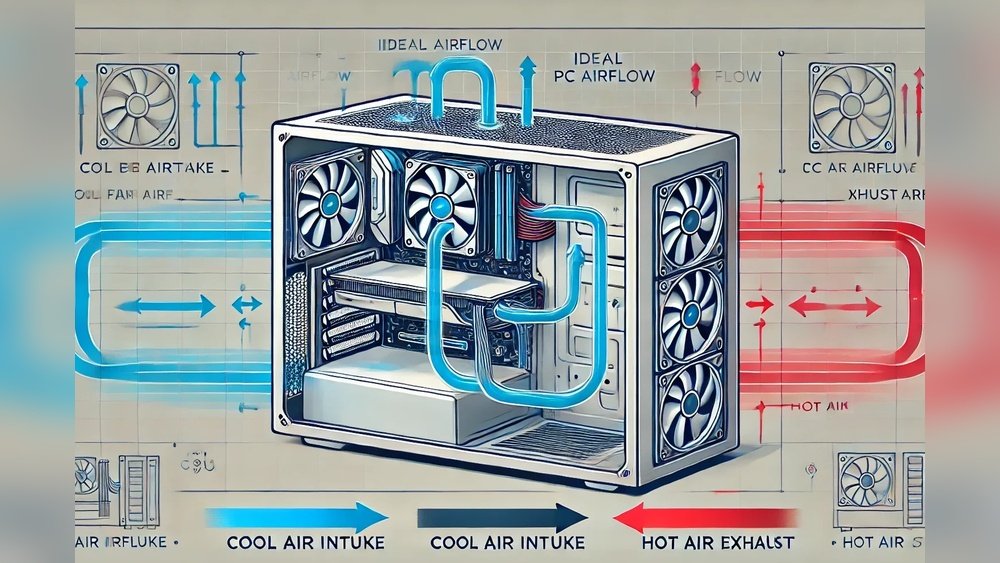
Airflow moves hot air out and brings cool air in. Arrange fans so air flows smoothly through the case. Front fans should pull in cool air. Rear or top fans push hot air out.
Keep cables neat and away from fans. This stops blocking air paths. Good airflow lowers temperatures without extra noise.
Regular Maintenance Tips
Dust buildup slows fans and traps heat. Clean your PC regularly with a soft brush or air blower. Check fans for dust and dirt.
Replace old thermal paste on your CPU every year. This improves heat transfer to the cooler. Clean parts help your PC stay cool and work well.
Choosing The Right Cooling Setup
Pick cooling parts that fit your PC size and use. Air coolers are simple and cost-effective. Liquid coolers can cool better but cost more.
Consider how loud the fans are. Some coolers are quieter than others. Match the cooling setup to your needs for the best balance.

Credit: www.sindathermal.com
Signs Your Pc Needs Better Cooling
Your PC needs good cooling to work well and last longer. Overheating can cause many problems. Watch for clear signs that show your PC needs better cooling. These signs help you avoid damage and keep your computer running smoothly.
Frequent Overheating Issues
Your PC gets very hot often. Fans run loudly or at full speed. The case feels warm or hot to touch. Overheating can slow down parts and cause errors. This means your cooling system is not enough.
Unexpected Shutdowns
The PC turns off without warning. This happens to protect parts from heat damage. Sudden shutdowns point to poor cooling inside the case. It is a sign to check fans and air flow.
Sluggish Performance
Programs and games run slower than usual. The system lags or freezes during tasks. Heat makes the CPU and GPU reduce speed. Better cooling helps maintain steady and fast performance.

Credit: www.corsair.com
Frequently Asked Questions
Does Cooling Affect Pc Gaming Performance?
Yes, efficient cooling prevents overheating, ensuring stable frame rates and smoother gameplay. It helps maintain optimal CPU and GPU speeds during intense gaming sessions.
How Does Cooling Improve Pc Speed?
Cooling reduces thermal throttling, allowing the CPU and GPU to run at full speed. This leads to faster processing and better multitasking performance.
Can Poor Cooling Damage Pc Components?
Yes, excessive heat can shorten component lifespan and cause hardware failures. Proper cooling protects your PC parts from overheating and ensures longevity.
Is Liquid Cooling Better Than Air Cooling?
Liquid cooling generally offers superior heat dissipation and quieter operation. However, air cooling is simpler, cost-effective, and sufficient for most users.
Conclusion
Cooling plays a key role in keeping your PC running well. It stops parts from getting too hot and slowing down. Good cooling helps the computer work faster and last longer. Without it, the PC may crash or reduce speed to cool off.
Simple steps like cleaning fans or adding coolers make a big difference. So, keeping your PC cool means better performance and fewer problems. Easy to do, and worth the effort.
