
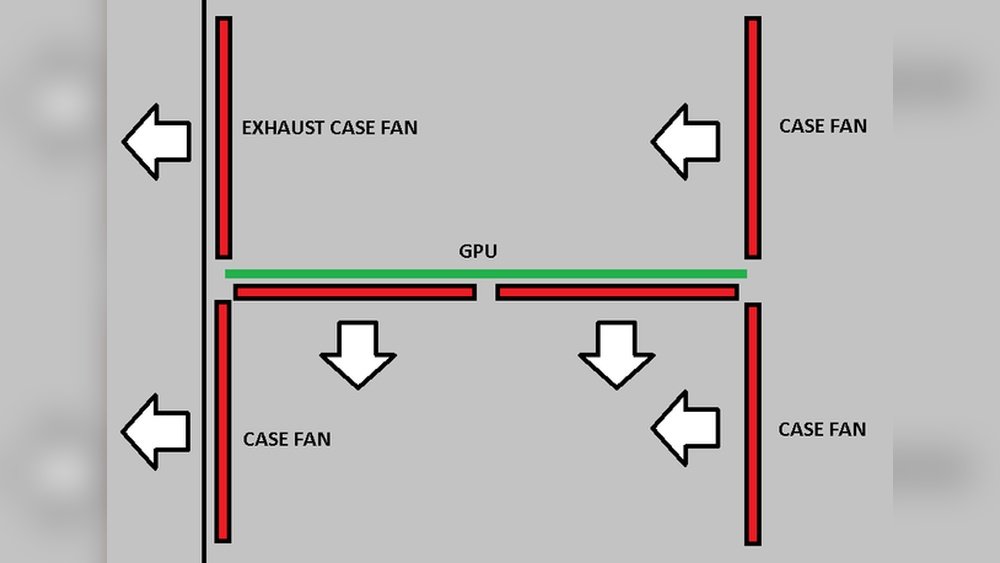
Have you ever wondered how your GPU fans actually work? Do they push air into your graphics card, or do they pull it out?
Understanding this simple but important detail can make a big difference in keeping your computer cool and running smoothly. You’ll discover the truth about GPU fan direction and how it affects your system’s performance. Stick around—you might be surprised by what you learn and how it can help you get the most out of your gaming or work setup.

Credit: www.reddit.com
How Gpu Fans Work
GPU fans play a key role in keeping your graphics card cool. They move air across the GPU to stop it from overheating. Understanding how these fans work helps you know their role in computer cooling.
Basic Fan Mechanics
GPU fans spin fast to push or pull air. They use blades that cut through the air. The spinning blades create airflow by moving air in one direction. The motor inside the fan powers the blades. This simple movement helps cool the GPU chips.
Airflow Direction
Fans can either push air into the GPU or pull air away. Most GPU fans push air towards the heatsink. The heatsink spreads heat from the GPU to the air. Pushing cool air helps the heatsink work better. Some designs pull hot air out to clear heat quickly.
Fan Placement On Gpus
GPU fans sit on top or inside the card. They are placed near the heatsink or cooling pipes. This setup helps fans move air where heat builds up. Proper fan placement ensures the GPU stays cool during use. Good placement prevents hot spots on the card.
Credit: www.reddit.com
Push Vs Pull Fan Setup
The push vs pull fan setup plays a key role in GPU cooling. Fans can either push air toward the heatsink or pull air away from it. Each method affects airflow and heat dissipation differently. Understanding these setups helps improve GPU performance and lifespan.
What Push Fans Do
Push fans move air directly onto the GPU heatsink. They force cool air to pass through the fins. This action helps carry heat away quickly. Push fans increase airflow pressure on the heatsink surface. They are common in many GPU cooling designs.
What Pull Fans Do
Pull fans draw hot air away from the heatsink. They create a vacuum that pulls air through the fins. This removes heat from the GPU more efficiently in some cases. Pull fans help maintain steady airflow around the GPU. They are useful in compact or tight spaces.
Differences In Air Movement
Push fans focus on moving cool air in one direction. Pull fans concentrate on pulling warm air out. Push setups create positive air pressure near the heatsink. Pull setups create negative pressure, pulling air through. The choice affects how heat leaves the GPU. It also impacts overall case ventilation and noise levels.
Impact On Gpu Cooling
The way GPU fans push or pull air plays a key role in cooling the graphics card. This impacts how heat moves away from the GPU. It also affects how well the GPU keeps its temperature low during work. Understanding this helps in choosing or adjusting GPU cooling systems.
Cooling Efficiency
Fans that push air force cool air through the heatsink. This helps remove heat faster. Pull fans draw hot air away from the GPU area. Both types affect how cool the GPU stays. The right fan setup keeps the GPU running at safe temperatures.
Heat Dissipation Patterns
Push fans move air directly onto the GPU’s hot parts. This cools the heat faster. Pull fans suck warm air out, clearing space for cooler air. Heat moves differently depending on the fan direction. Proper airflow design avoids hot spots on the GPU.
Effect On Gpu Performance
Cooler GPUs perform better and last longer. If fans do not cool well, the GPU slows down to avoid damage. Good fan direction helps keep stable speeds. This means smoother graphics and less chance of crashes.
Common Gpu Fan Configurations
GPU fans play a key role in keeping the graphics card cool. Different designs serve various needs. These designs affect how air flows around the GPU. Understanding these common fan setups helps in knowing how they push or pull air.
Each GPU fan type has its own way to move air. This affects the card’s performance and noise level. Let’s explore the typical fan configurations found in GPUs.
Single Fan Designs
Single fan GPUs are common in entry-level cards. They usually pull air from above the card and push it down. The fan cools the heatsink directly under it. This design is compact and cost-effective. It works well for cards that do not produce much heat.
Dual And Triple Fan Systems
Higher-end GPUs often use two or three fans. These fans pull air into the card and push it through the heatsinks. The extra fans help spread the air evenly. This improves cooling efficiency and lowers temperature. These designs are louder but keep the card cooler under load.
Blower Style Fans
Blower fans pull air from inside the case. They push the hot air out of the back of the GPU. This helps keep the case cooler. It is useful for small or tightly packed cases. Blower fans are usually louder but better for airflow in limited space.
Choosing The Right Fan Setup
Choosing the right fan setup for your GPU affects its temperature and performance. Fans can either push air into the heatsink or pull air away from it. Picking the best setup depends on your case design, cooling needs, and noise limits. Understanding these factors helps keep your GPU cool and quiet.
Fans that push air blow cool air directly onto the GPU parts. Pull fans remove warm air from the heatsink. The best choice varies for every system and setup.
Case Airflow Considerations
Your PC case airflow guides fan choice and placement. A good case has clear air paths for cool air intake and hot air exhaust. Push fans can add fresh air to the GPU area. Pull fans help remove hot air from the case. Match fan direction with your case airflow to avoid trapping heat inside.
Overclocking And Cooling Needs
Overclocked GPUs run hotter and need stronger cooling. Push fans increase air pressure on the heatsink, improving heat transfer. Pull fans can clear hot air faster but might reduce airflow pressure. For heavy cooling, push or push-pull setups often work best. Keep your GPU temperatures low for stable performance.
Noise Levels And Fan Speed
Fan speed affects noise and cooling power. Faster fans cool better but make more noise. Push fans usually run at lower speeds for the same cooling effect. Pull fans may need higher speeds, causing more noise. Choose fans with good balance between quiet operation and cooling. Quality fans can keep noise down while pushing or pulling air effectively.
Maintaining Gpu Fans
Maintaining GPU fans is key to keeping your graphics card cool and running well. Dust and dirt can build up quickly, which blocks airflow. This causes the GPU to heat up and work harder. Regular care helps avoid overheating and hardware damage.
Proper fan maintenance also improves the lifespan of your GPU. Clean fans spin better and use less power. Knowing when to clean or replace fans keeps your system stable and quiet.
Cleaning Tips
Turn off your PC and unplug it first. Use compressed air to blow dust off fan blades. Hold the fan still to avoid spinning it too fast. Clean the vents and heatsink too. Use a soft brush for stubborn dirt. Avoid liquids near electrical parts.
Signs Of Fan Failure
Listen for unusual noises like grinding or rattling. Fans that spin too slowly or stop can cause overheating. Your GPU may throttle or shut down to protect itself. Check if fans spin unevenly or wobble. Sudden temperature spikes also indicate fan issues.
When To Replace Fans
Replace fans if cleaning does not fix noises or heat problems. Broken blades or loose bearings mean it’s time for new fans. Use compatible fans made for your GPU model. Faulty fans reduce performance and risk damage. Timely replacement protects your GPU’s health.

Credit: softwareg.com.au
Frequently Asked Questions
Do Gpu Fans Push Air Or Pull Air?
GPU fans primarily push air through the heatsink to cool the GPU. They push hot air away from the components, improving heat dissipation and maintaining optimal performance.
How Do Gpu Fans Affect Cooling Efficiency?
GPU fans enhance cooling by pushing air across heatsinks, reducing temperature. Proper airflow prevents overheating and extends GPU lifespan, ensuring stable performance during heavy use.
Can Gpu Fans Work As Both Push And Pull?
Typically, GPU fans push air only. However, some custom setups use separate fans for push-pull configurations to optimize airflow and improve cooling performance in high-end systems.
Why Is Fan Direction Important For Gpu Cooling?
Fan direction determines airflow, affecting heat dissipation. Correct fan orientation pushes hot air away from the GPU, maintaining lower temperatures and preventing thermal throttling or hardware damage.
Conclusion
GPU fans mainly push air through the heatsink to cool the GPU. This helps move hot air away from the chip quickly. Some designs also pull air from the sides or back. The goal is always to keep the GPU temperature low.
Good airflow improves performance and prevents overheating. Understanding fan direction helps you maintain your GPU better. Keep fans clean and clear of dust for best results. Proper cooling means your GPU runs smoothly and lasts longer. Simple steps make a big difference in your PC’s health.
