
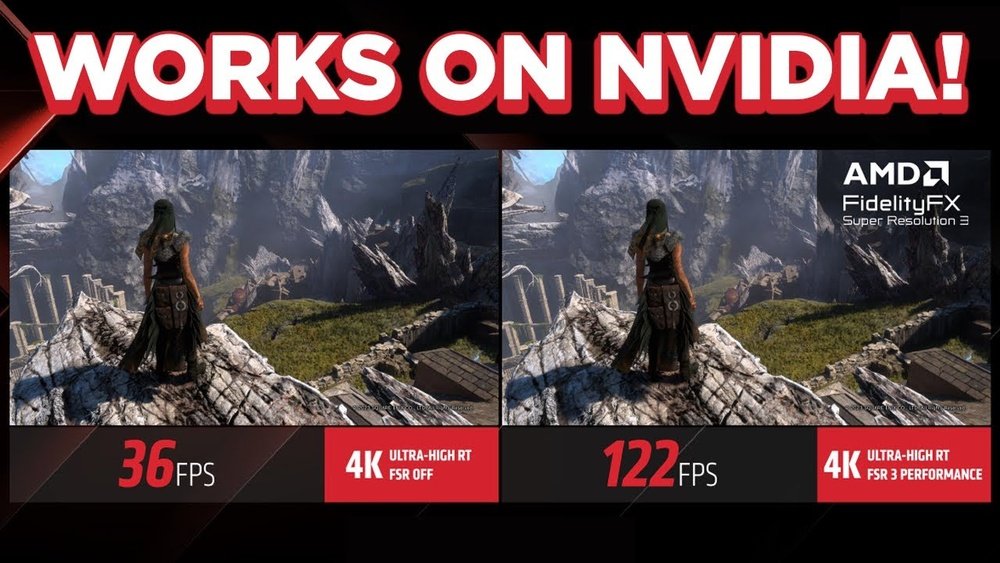
Are you wondering if you can use AMD FSR on your Nvidia GPU? You’re not alone.
Many gamers want to boost their graphics performance without switching hardware. Imagine getting sharper visuals and smoother gameplay without breaking the bank. This article will clear up the confusion and show you exactly how AMD FSR works with Nvidia cards.
Keep reading to discover if this game-changing technology can unlock new power for your setup.
What Is Amd Fsr
AMD FSR stands for FidelityFX Super Resolution. It is a technology that helps improve game graphics and performance. FSR makes games look better without needing very powerful hardware. It works by increasing the frame rate while keeping images sharp and clear.
This technology is popular because it supports many different graphics cards, not only AMD. Players often ask if they can use AMD FSR on Nvidia GPUs. Understanding what FSR is and how it works helps answer this question.
Core Technology Behind Fsr
FSR uses an upscaling method. It takes a lower resolution image and makes it look like a higher resolution one. This process reduces the work a GPU must do. The result is smoother gameplay and better visuals.
The technology relies on advanced algorithms. These algorithms fill in missing details and reduce blur. FSR does not need special hardware, making it flexible for many devices. It runs fast and improves game speed without losing quality.
Versions And Improvements
AMD released multiple versions of FSR. Each version improves image quality and performance. FSR 1.0 used spatial upscaling, which looks good but has limits. FSR 2.0 introduced temporal upscaling for better detail and less blur.
FSR 2.0 works with motion data from games to create sharper images. The latest versions keep improving speed and visual clarity. Developers can choose the best version depending on their game and hardware needs.

Credit: www.reddit.com
Nvidia Gpus And Fsr Compatibility
Nvidia GPUs are very popular for gaming and graphics work. Many users want to try AMD’s FidelityFX Super Resolution (FSR) on their Nvidia cards. FSR is a technology that improves game performance by upscaling images. It helps games run smoother without losing much quality. The question is, can Nvidia GPUs use FSR? Let’s explore how well Nvidia cards work with FSR technology.
Official Support Status
AMD designed FSR to work on many graphics cards. It supports not only AMD GPUs but also Nvidia and Intel GPUs. Officially, Nvidia GPUs can use FSR, but the level of support varies. Nvidia does not include FSR in its own drivers. Instead, game developers add FSR support into their games. This means Nvidia users rely on game updates for FSR compatibility. Nvidia does promote its own upscaling tech called DLSS, which is different from FSR.
Community And Developer Insights
The gaming community actively tests FSR on Nvidia GPUs. Many players report good performance and image quality with FSR on Nvidia cards. Developers find FSR easier to integrate than some alternatives. FSR works across many games and graphics hardware because of its open nature. Some users notice slight differences compared to Nvidia’s DLSS. Still, FSR offers a solid option for Nvidia GPU owners who want better performance. Community feedback helps improve FSR in future updates.
Performance Impact On Nvidia Cards
Using AMD FSR (FidelityFX Super Resolution) on Nvidia GPUs has become a topic of interest. Nvidia cards do not officially support FSR as a native feature. Still, many games and apps now include FSR as a built-in option. This allows Nvidia users to benefit from its upscaling technology. The performance impact on Nvidia cards varies depending on the GPU model and game. It is essential to understand these effects to get the best experience from FSR on Nvidia hardware.
Benchmark Results
Tests show Nvidia GPUs gain a noticeable boost in frame rates with FSR enabled. Older Nvidia models see larger performance improvements than newer ones. For example, GTX 10-series cards show up to 30% higher FPS. RTX 20 and 30-series cards have smaller gains but still benefit. The performance boost depends on the game and resolution. Higher resolution settings tend to show better FPS improvements. FSR does not require specialized hardware, so it runs well on most Nvidia cards.
Quality And Visual Differences
FSR improves frame rate by upscaling lower resolution images. This can cause some loss in sharpness and detail. Nvidia users may notice slight blurring compared to native resolution. Visual quality varies by FSR mode: Ultra Quality, Quality, Balanced, or Performance. Ultra Quality mode offers the best visuals but lower performance gain. Performance mode delivers the highest FPS but reduces image clarity. Many users find the balance mode acceptable for good visuals and speed. Overall, FSR provides a smooth experience on Nvidia cards with minor visual trade-offs.
How To Enable Fsr On Nvidia Gpus
Enabling AMD FidelityFX Super Resolution (FSR) on Nvidia GPUs can improve game performance without losing much visual quality. FSR is a technology that works on many graphics cards, not just AMD. You can use it on Nvidia cards to boost frame rates in supported games.
Setting up FSR on Nvidia GPUs is simple. It involves selecting the right games and adjusting settings in the game or through software. This guide helps you activate FSR quickly and easily.
Supported Games And Software
FSR works with many popular games. Titles like “Cyberpunk 2077,” “Far Cry 6,” and “Resident Evil Village” support FSR. Many new games also add FSR support during updates.
Besides games, some software tools help activate FSR. For example, game launchers or graphics control panels may have options for FSR. Make sure your game or software version supports FSR before trying to enable it.
Step-by-step Activation Guide
First, open your game and go to the graphics settings menu. Look for the “Resolution Scaling” or “Upscaling” option.
Next, select “FidelityFX Super Resolution” or “FSR” from the list. Choose the quality level you want, such as “Performance” or “Quality.”
Save your settings and restart the game if needed. You should now see smoother gameplay with better frame rates.
For games without direct FSR options, check for updates or use third-party tools that support FSR. Always keep your GPU drivers updated for the best experience.
Comparing Fsr With Nvidia Dlss
Comparing AMD’s FidelityFX Super Resolution (FSR) with Nvidia’s Deep Learning Super Sampling (DLSS) helps to understand their strengths. Both improve game performance and visuals but use different methods. This section breaks down their differences and shows where each works best.
Technology Differences
FSR uses a spatial upscaling technique. It works by sharpening and resizing images. This method needs no special hardware support. FSR runs on many GPUs, including Nvidia cards.
DLSS relies on AI and deep learning. It requires Nvidia’s Tensor Cores found in RTX GPUs. DLSS builds frames using data from previous frames. This creates sharper images and smoother motion.
FSR is easier to implement across games. DLSS requires game developers to add specific support. DLSS generally provides better image quality but only on Nvidia RTX cards.
Use Cases And Effectiveness
FSR works well on older and budget GPUs. It boosts frame rates without needing special hardware. This makes it popular for gamers without the latest Nvidia cards.
DLSS offers higher quality upscaling with better detail. It excels in demanding games on high-end Nvidia GPUs. DLSS also improves ray tracing performance.
FSR is great for broad compatibility. DLSS is best for Nvidia users who want top image quality and smooth gameplay.

Credit: www.reddit.com
Troubleshooting Fsr On Nvidia
Troubleshooting FSR on Nvidia GPUs can be tricky. AMD’s FidelityFX Super Resolution (FSR) is designed primarily for AMD hardware. Yet, Nvidia users want to try it too. Running FSR on Nvidia cards may cause issues. Understanding common problems helps fix them fast. Small tweaks can improve performance. Keep your drivers updated and settings right. This guide helps Nvidia users enjoy FSR smoothly.
Common Issues
FSR may not show up in some games on Nvidia GPUs. This happens because developers mainly build FSR for AMD. Sometimes, image quality looks blurry or has strange artifacts. Frame rates might drop unexpectedly. Crashes or freezes can happen during gameplay. Conflicts with Nvidia’s own upscaling tech cause problems. Incorrect game settings also block FSR from working. Knowing these issues saves time and frustration.
Tips For Optimal Performance
Update your Nvidia drivers regularly to avoid bugs. Use the latest game patches for better FSR support. Disable Nvidia’s DLSS or other upscaling features. Set FSR in the game’s graphics menu if available. Lower other graphics settings to balance performance. Restart your PC after changing settings. Close background apps to free up resources. Test different FSR modes to find the best fit. These steps help Nvidia GPUs run FSR more smoothly.
Future Prospects For Fsr On Nvidia
The future of AMD FSR on Nvidia GPUs looks promising. AMD’s FidelityFX Super Resolution (FSR) technology aims to improve game performance and image quality. Nvidia users want to know if FSR will work better on their hardware soon. The answer depends on AMD’s updates and industry support. FSR is open-source, which means it can run on many GPUs. This opens doors for Nvidia compatibility in the future.
Upcoming Updates
AMD plans to improve FSR with new versions. These updates may bring better support for Nvidia cards. FSR 2.0 and later versions focus on image quality and performance. Nvidia users could benefit from these improvements. Developers are also working to make FSR easier to implement in games. This could lead to wider adoption on all GPUs, including Nvidia.
Potential Industry Impact
FSR on Nvidia GPUs could change the gaming experience. Players might enjoy higher frame rates without losing image quality. Game makers may add FSR support to reach more users. This could create competition with Nvidia’s own DLSS technology. More options mean better choices for gamers. Open technologies like FSR encourage innovation across the industry.

Credit: www.digitalcitizen.life
Frequently Asked Questions
Can Amd Fsr Work On Nvidia Gpus?
Yes, AMD FSR (FidelityFX Super Resolution) is compatible with Nvidia GPUs. It enhances performance by upscaling lower resolution images. Nvidia users can benefit from better frame rates without major quality loss.
How Does Amd Fsr Compare To Nvidia Dlss?
AMD FSR works on a wider range of GPUs, including Nvidia. DLSS uses AI for upscaling, while FSR relies on spatial upscaling. FSR offers good performance boosts but may have slightly less image quality than DLSS.
Is Amd Fsr Free To Use On All Gpus?
Yes, AMD FSR is an open-source technology and free to use. It supports various GPUs, including AMD and Nvidia models. This makes it accessible for many gamers seeking performance improvements.
Do Nvidia Gpus Need Special Drivers For Amd Fsr?
No special Nvidia drivers are required for AMD FSR. The technology works through game integration and is independent of GPU-specific drivers. Users just need games that support FSR to benefit.
Conclusion
AMD FSR does not work natively on Nvidia GPUs yet. Nvidia has its own technology called DLSS for better performance. Some users try unofficial methods, but they may not be stable or safe. For now, using Nvidia’s tools is the best choice.
Keep an eye on updates, as tech changes fast. Your gaming experience depends on compatible software and hardware working well together. Choose the right tools for your system to enjoy smooth gameplay.
