
Are you wondering if you can pair an Nvidia GPU with an AMD CPU for your next build? It’s a common question that many tech enthusiasts face when trying to get the best performance without overspending.
The good news is, mixing these two powerful brands might be easier than you think. But before you make any decisions, you need to understand how they work together and what benefits or challenges you might encounter. Keep reading to discover everything you need to know about using an Nvidia GPU with an AMD CPU and make the best choice for your setup.
Credit: vicentetorns.com
Nvidia Gpus And Amd Cpus Compatibility
Nvidia GPUs and AMD CPUs can work together in most computers. These two parts come from different brands but can still be compatible. Many users wonder if mixing them causes problems. The good news is that these components are designed to cooperate well. You can build a strong PC using an AMD processor and an Nvidia graphics card.
Key Differences Between Nvidia And Amd
Nvidia mainly makes graphics cards. AMD produces both CPUs and GPUs. Nvidia focuses on high-performance graphics technology. AMD offers processors with multiple cores and graphics solutions. Nvidia GPUs use drivers that optimize gaming and creative tasks. AMD CPUs handle the computer’s main processing work. Their designs differ, but they follow industry standards. This allows them to operate smoothly in the same system.
Cross-brand Hardware Interaction
The motherboard connects the CPU and GPU. It supports AMD CPUs and Nvidia GPUs without issues. Drivers from Nvidia work with AMD processors perfectly. The operating system manages how these parts communicate. Proper driver installation ensures stable performance. Users must check motherboard compatibility before buying parts. Power supply and cooling are also important for system stability. Mixing brands does not reduce speed or quality. Many gamers and professionals use this setup successfully.
Installation Basics
Installing an Nvidia GPU with an AMD CPU is straightforward. The process involves careful steps to ensure compatibility and performance. Understanding the installation basics helps avoid common mistakes. The following sections cover physical installation and BIOS settings.
Physical Installation Steps
First, turn off your computer and unplug all cables. Open the case by removing the side panel. Locate the PCIe slot on your motherboard. Remove the slot cover where the GPU will sit. Align the Nvidia GPU with the PCIe slot carefully. Press down firmly until it clicks into place. Secure the GPU with screws to the case. Connect the GPU power cables from your power supply. Double-check all connections before closing the case. Plug the cables back and power on the system.
Bios And Firmware Considerations
Access the BIOS by pressing the designated key during startup. Check if your motherboard recognizes the new GPU. Update the BIOS if it does not detect the card. Disable integrated graphics if your CPU or motherboard has them. Set the primary display to PCIe or PEG in BIOS settings. Save changes and exit to reboot the system. Install the latest Nvidia drivers for full compatibility. Keep BIOS and drivers up to date for best results.
Driver Support And Software
Using an Nvidia GPU with an AMD CPU is common for many PC builders. One key point is driver support and software compatibility. Drivers help the hardware parts talk to each other and to the operating system. Good driver support ensures smooth performance and fewer problems. Software also plays a role in how well the GPU and CPU work together.
Nvidia Drivers On Amd Systems
Nvidia provides regular driver updates for all its GPUs. These drivers work on systems with both AMD and Intel CPUs. Nvidia drivers do not depend on the CPU brand. Installing the latest Nvidia driver is simple and helps the GPU run well. The driver includes tools for settings and performance tuning. This makes Nvidia GPUs easy to use on AMD systems.
Common Software Issues And Fixes
Some users report software glitches like crashes or freezes. These can happen due to outdated drivers or system conflicts. Updating to the newest Nvidia driver often fixes many issues. Running Windows updates also helps stability. If problems continue, reinstalling the driver can clear errors. Using software like DDU (Display Driver Uninstaller) ensures a clean install. This helps Nvidia GPUs run smoothly with AMD CPUs.
Credit: www.shoshitamam.com
Performance Factors
Performance plays a key role when pairing an Nvidia GPU with an AMD CPU. Both components must work well together. This balance affects gaming, video editing, and daily tasks. Understanding performance factors helps you make a smart choice.
Benchmark Comparisons
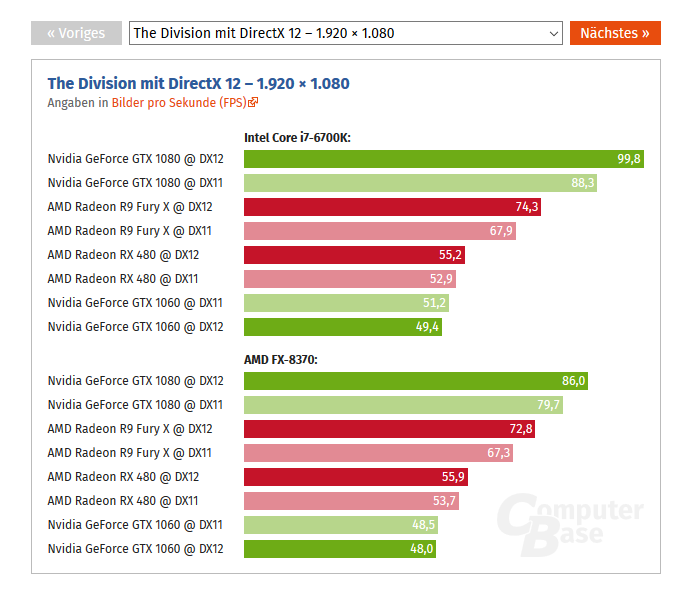
Benchmarks show how different setups perform under stress. Tests often compare Nvidia GPUs with AMD CPUs against other combos. These comparisons reveal frame rates, load times, and power use. Most setups with Nvidia and AMD score well in popular games. This proves they can handle demanding tasks smoothly.
Bottlenecking Concerns
Bottlenecking happens when one part limits the other’s speed. A weak CPU can slow down a powerful GPU. Or a slow GPU can hold back a fast CPU. Choosing a balanced Nvidia GPU and AMD CPU reduces bottlenecks. This ensures better overall performance and smoother gameplay.
Use Cases And Recommendations
Choosing the right GPU and CPU combination matters for your computer’s performance. Nvidia GPUs work well with AMD CPUs in many cases. This section explores common uses and gives tips for pairing these parts.
Gaming Scenarios
Nvidia GPUs pair well with AMD CPUs for gaming. Most games rely on the GPU for graphics and the CPU for processing game logic. AMD CPUs offer strong multi-core performance, which helps run games smoothly.
Using an Nvidia GPU with an AMD CPU often results in good frame rates. This combo handles modern games at high settings without issues. It also supports features like ray tracing and DLSS for better visuals.
Choose an AMD CPU that matches the Nvidia GPU’s power. Avoid weak CPUs that limit gaming performance. Balance your budget to get the best experience.
Professional Workloads
Nvidia GPUs are popular for professional tasks like video editing and 3D rendering. AMD CPUs provide strong processing power for multitasking and running complex software.
This combination suits creative professionals and engineers. Nvidia’s CUDA cores accelerate many software applications, making workflows faster. AMD CPUs help manage multiple applications without slowdowns.
Pick an AMD CPU with enough cores and threads for your workload. Match it with an Nvidia GPU that fits your software’s needs. This setup improves productivity and efficiency.
Credit: www.cgdirector.com
Troubleshooting Tips
Troubleshooting a setup with an Nvidia GPU and an AMD CPU can be tricky. Many users face issues that block smooth performance. Knowing common errors helps solve problems faster. Some fixes work around compatibility challenges. This section shares practical tips to get your system running well.
Common Errors
One common error is driver conflicts. Nvidia and AMD drivers may clash, causing crashes. Another issue is BIOS settings not supporting the GPU fully. Sometimes, the system does not recognize the GPU at all. Power supply problems can also stop the GPU from working correctly. Watch for screen flickering or freezing during use. These errors often appear after updates or hardware changes.
Compatibility Workarounds
Updating both Nvidia and AMD drivers solves many problems. Use the latest versions from official websites only. Reset BIOS to default settings to clear conflicts. Disable integrated graphics if your motherboard has them. Check that the power supply meets the GPU’s requirements. Adjust Windows settings for better hardware support. Installing motherboard chipset drivers also improves compatibility. These steps help Nvidia GPUs work well with AMD CPUs.
Frequently Asked Questions
Can I Use An Nvidia Gpu With An Amd Cpu?
Yes, Nvidia GPUs are fully compatible with AMD CPUs. They work together without issues, offering excellent performance for gaming and computing tasks.
Does An Amd Cpu Limit Nvidia Gpu Performance?
No, an AMD CPU does not limit Nvidia GPU performance. Both components can operate efficiently when paired correctly.
Are There Driver Conflicts Using Nvidia Gpu On Amd Cpu?
No, there are no driver conflicts when using an Nvidia GPU on an AMD CPU. Each hardware uses separate drivers.
Is Nvidia Gpu Better For Amd Cpu Gaming Builds?
Nvidia GPUs often perform well in AMD CPU gaming setups. The choice depends on budget, game optimization, and personal preference.
Conclusion
Yes, you can use an Nvidia GPU with an AMD CPU without issues. They work well together for most tasks and games. Just make sure your motherboard supports the GPU and has enough power. Drivers are easy to install and keep updated.
This combo offers good performance at a fair price. Choose parts carefully to avoid bottlenecks or compatibility problems. Overall, mixing Nvidia GPUs with AMD CPUs is a smart and common choice for many PC builders. It gives you flexibility and solid results.
