
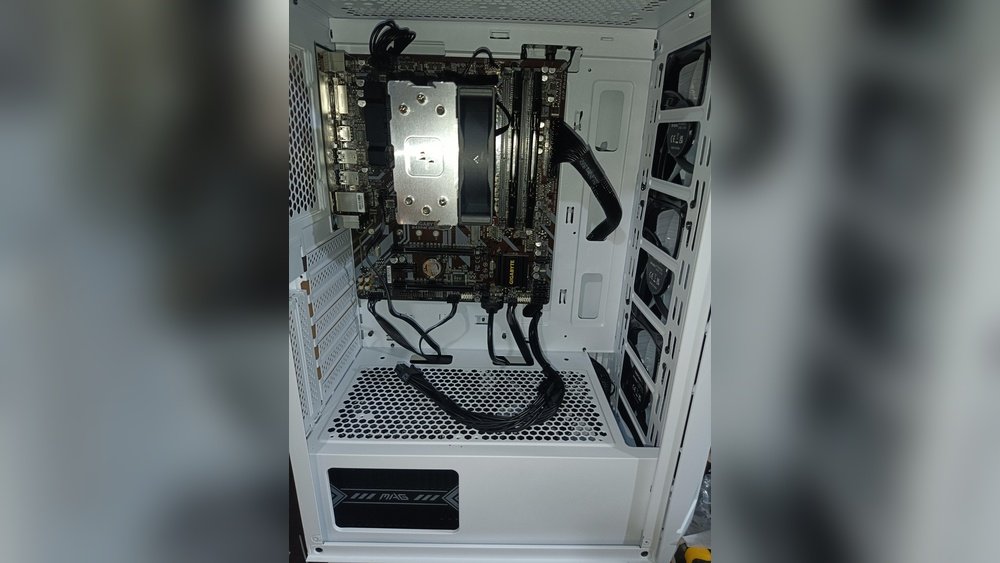
Have you ever wondered if you can run your PC without a GPU? Maybe you’re building a budget computer, or your graphics card is on the fritz.
The good news is, you might not always need a dedicated GPU to get your system up and running. But is it really that simple? Can your PC handle everyday tasks, gaming, or creative work without one? Keep reading to discover how your computer behaves without a GPU, what limitations you might face, and whether skipping a graphics card could work for you.
This could save you money and help you make smarter decisions for your setup.

Credit: www.youtube.com
Gpu Basics
A GPU is an important part of many computers. It helps the computer show images on the screen. Without a GPU, some tasks become slow or impossible. Understanding the basics of a GPU helps you decide if you need one or not.
Let’s explore what a GPU does and the different types you might find in a PC.
What Does A Gpu Do
A GPU processes graphics and images quickly. It turns data into pictures on your monitor. This makes videos and games run smoothly. It also helps with tasks like video editing and 3D design. The GPU works alongside the main CPU to share the load. This speeds up visual tasks and improves performance.
Types Of Gpus
There are two main types of GPUs: integrated and dedicated. Integrated GPUs are built into the CPU or motherboard. They use the system’s memory and are good for basic tasks. Dedicated GPUs are separate cards with their own memory. They offer higher power for gaming and heavy software. Some laptops use integrated GPUs to save battery life. Desktop PCs often have dedicated GPUs for better performance.

Credit: www.youtube.com
Integrated Graphics Explained
Many computers can run without a separate graphics card. This is possible due to integrated graphics. Integrated graphics are built into the CPU or motherboard. They handle basic video and graphics tasks. This makes PCs work without a dedicated GPU. Integrated graphics are common in laptops and budget desktops. They help reduce cost and power use. Understanding how they work helps to know their strengths and limits.
How Integrated Graphics Work
Integrated graphics share system memory instead of having their own. The CPU sends graphics data to this shared memory. This setup saves space and lowers power needs. Integrated graphics use fewer resources than dedicated GPUs. They are enough for everyday tasks like web browsing and video watching. The performance depends on the CPU and memory speed. Newer CPUs have better integrated graphics than older ones.
Performance Compared To Dedicated Gpus
Dedicated GPUs have their own memory and power. This allows them to run demanding games and software smoothly. Integrated graphics are slower and less powerful. They can struggle with high-end games and heavy video editing. For simple tasks, integrated graphics perform well. Dedicated GPUs offer higher frame rates and better visuals. Choosing between them depends on your needs and budget.
Running A Pc Without A Gpu
Running a PC without a GPU is possible for many users. Not all computers need a dedicated graphics card. Some tasks, like browsing the web or writing documents, do not require heavy graphics power. This setup can save money and reduce power use. It also simplifies building or upgrading a computer.
Requirements For Gpu-less Systems
To run a PC without a GPU, certain parts must work together. The CPU must have integrated graphics. This means the processor includes a small graphics chip. It handles basic video and display tasks. The motherboard must support video output. It should have ports like HDMI or VGA. Without these, connecting a monitor is impossible. Memory also plays a role. Some integrated graphics use system RAM. More RAM can improve graphics performance.
Motherboards And Cpu Compatibility
Not all motherboards support GPU-less setups. The motherboard must match the CPU’s socket type. It should have video output ports. Popular ports include DisplayPort, HDMI, and VGA. Some motherboards lack these ports. They require a dedicated GPU to display images. The CPU must have integrated graphics, such as Intel’s UHD Graphics or AMD’s Radeon Vega. Older CPUs may not include this feature. Check the CPU and motherboard specs before buying. Compatibility ensures the system boots and displays correctly.
Use Cases Without A Dedicated Gpu
Many people wonder if a PC can run without a dedicated GPU. The answer depends on what you want to do with your computer. Some tasks do not need a powerful graphics card. Others require more graphics power to work well. This section explains common use cases without a dedicated GPU.
Everyday Computing Tasks
Basic tasks like browsing the internet, writing documents, and watching videos do not need a dedicated GPU. Most modern CPUs have built-in graphics that handle these activities smoothly. This makes running a PC without a dedicated GPU practical for simple use. You can save money and energy this way.
Gaming Limitations
Playing games without a dedicated GPU is possible but limited. Simple games or older titles may run okay on integrated graphics. Newer or demanding games need a dedicated GPU for good performance. Without one, games might lag or have low-quality visuals. Casual gamers can still enjoy light gaming without a dedicated card.
Professional Workloads
Many professional tasks need more graphics power than integrated GPUs offer. Video editing, 3D rendering, and graphic design often require dedicated GPUs. These tasks involve complex visuals and fast processing. Without a dedicated GPU, work speed and quality may suffer. Some professionals can use integrated graphics for basic projects, but most rely on dedicated GPUs.
Performance Considerations
Running a PC without a GPU affects its overall performance. This section explains how the system speed and video quality change without a dedicated graphics card. Understanding these points helps you decide if you can skip the GPU for your needs.
Impact On System Speed
The CPU handles all tasks when there is no GPU. This can slow down the computer, especially during graphic-heavy tasks. Simple activities like browsing or writing documents run fine. But video editing or gaming might lag or stutter. Systems with integrated graphics on the CPU perform better than those without any graphics hardware. Still, the overall speed is lower compared to PCs with a dedicated GPU.
Video Output Quality
Without a GPU, video quality depends on the integrated graphics. These are good for watching videos and basic tasks. High-resolution videos may not play smoothly. Colors and sharpness can be less vibrant than with a GPU. Monitors with high refresh rates or 4K resolution might not work well. For clear and smooth video output, a dedicated GPU is usually better.
Troubleshooting And Alternatives
Running a PC without a GPU can cause some problems. This section helps with common issues and offers alternatives. Understanding these can save time and improve your PC’s performance.
Common Issues Without A Gpu
Without a GPU, your PC might show a black screen or no display. Some systems may not boot properly. Performance in games and graphic tasks drops significantly. Video playback can be choppy or laggy. Software that needs graphic power may crash or freeze. Drivers might not install or update correctly. Overheating can occur if the CPU works too hard on graphics tasks. Troubleshooting these issues often starts with checking BIOS settings. Make sure integrated graphics are enabled if no GPU is present.
Using External Graphics Solutions
External graphics solutions offer a good alternative to internal GPUs. These include eGPUs connected via Thunderbolt or USB-C ports. They boost graphics power without opening your PC case. External GPUs help with gaming, video editing, and 3D modeling. Setup requires compatible ports and drivers. They can be costly but provide flexibility. External graphics units improve performance on laptops and small PCs. Choose the right external GPU based on your PC’s compatibility and needs.
Credit: www.partitionwizard.com
Frequently Asked Questions
Can A Pc Run Without A Dedicated Gpu?
Yes, a PC can run without a dedicated GPU if it has integrated graphics. Integrated GPUs are built into the CPU or motherboard. They handle basic graphics tasks well but may struggle with demanding applications like gaming or video editing.
What Are Integrated Graphics In A Pc?
Integrated graphics are GPU capabilities built into the CPU or motherboard. They allow the PC to display images without a separate graphics card. Integrated graphics are suitable for everyday tasks, office work, and light multimedia use but not for heavy gaming.
Will My Pc Performance Suffer Without A Gpu?
Without a dedicated GPU, PC performance depends on the integrated graphics quality. For simple tasks, performance remains stable. However, for gaming, 3D rendering, or video editing, performance will be lower compared to having a dedicated GPU.
Can I Play Games Without A Gpu On My Pc?
You can play some games without a dedicated GPU using integrated graphics. However, gaming performance will be limited to low settings and resolutions. High-end or graphics-intensive games require a dedicated GPU for a smooth experience.
Conclusion
Running a PC without a GPU is possible for basic tasks. Many CPUs have built-in graphics that handle everyday use. You can browse the internet, watch videos, and work on documents. But for gaming or heavy graphics work, a GPU is necessary.
Always check your CPU’s specs before deciding. This helps avoid surprises and ensures smooth performance. Overall, simple computing does not always need a separate graphics card. Think about what you need before building or upgrading your PC.
