
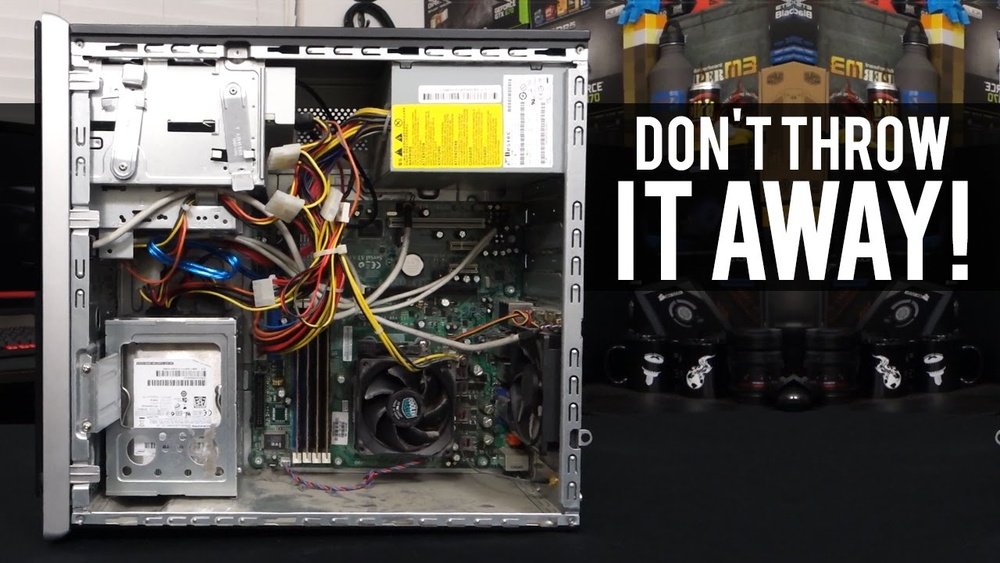
Are you thinking about building a new PC but wondering if your old parts can still be useful? It’s a smart question because reusing old components can save you money and reduce waste.
But not every old part will fit or work well with the latest technology. You’ll discover which PC parts are worth keeping and how to make the most of them in your new build. Keep reading to find out how to get the best value from your old gear and avoid costly mistakes.
Evaluating Old Pc Parts
Evaluating old PC parts is an important step before using them in a new build. It helps avoid compatibility problems and ensures good performance. Careful checks save time and money while building a PC that works well.
Checking Compatibility
Start by confirming the old parts fit the new motherboard. Check the CPU socket type and RAM slots. Make sure the power supply can support the components. Verify connectors match the new case and other devices. Compatibility prevents installation issues and damage.
Assessing Performance
Test each part to see if it meets your needs. Check the processor speed and core count. Look at the graphics card’s power and memory. Measure the RAM size and speed. Evaluate the storage drive’s read and write speeds. Performance matters for smooth computing.
Inspecting Physical Condition
Examine parts for signs of wear or damage. Look for dust, corrosion, or broken pins. Check fans and heatsinks for cleanliness and function. Inspect cables and connectors for frays or cracks. Physical condition affects reliability and lifespan.
Common Parts To Reuse
Reusing old PC parts in a new build saves money and reduces waste. Many components can still perform well with modern systems. Checking compatibility is key before reusing any part.
Some parts last longer and work better across different builds. These parts often handle simple tasks that do not demand the latest technology. Below are common parts you can reuse from old PCs.
Power Supplies
Power supplies often have a long life if well maintained. They provide steady power to all components. Choose one with enough wattage for your new build. Check for the right connectors and efficiency rating. A good power supply protects your new parts from damage.
Storage Drives
Hard drives and SSDs store your data and programs. Many old drives work fine in new computers. SSDs offer faster speeds, but older hard drives still hold lots of space. Clean the drive and run tests to ensure reliability. Using an old drive can reduce your build cost.
Ram Modules
RAM helps your system run multiple programs smoothly. Older RAM can fit new builds if the motherboard supports it. Match the type, speed, and size for best performance. Adding old RAM can boost your computer’s multitasking ability. Check for any physical damage before use.
Cooling Systems
Cooling parts keep your PC from overheating. Fans and heatsinks can often be reused if they are clean. Ensure they fit your new case and CPU socket. Good cooling extends the life of your computer parts. Reusing coolers saves money and reduces waste.
Parts Best Replaced
Some PC parts get outdated faster than others. These parts often limit the performance of a new build. Replacing them can improve speed and compatibility. It also helps avoid future problems.
Motherboards
Motherboards control communication between all parts. Old motherboards may not support new CPUs or memory. They might lack modern ports like USB-C or M.2 slots. Using an outdated motherboard can slow down the whole system. A new motherboard ensures better performance and future upgrades.
Cpus
CPUs handle all instructions for your computer. Older CPUs are slower and less efficient. They may not work well with new software or games. New CPUs have more cores and better speed. Replacing the CPU can give your PC a big boost.
Graphics Cards
Graphics cards show images on your screen. Old cards struggle with new games and high resolutions. They may not support the latest graphics technologies. A new graphics card helps run programs smoothly. It also improves video editing and streaming quality.

Credit: www.youtube.com
Upgrading Tips With Old Components
Upgrading your PC with old parts can save money and reduce waste. It also helps extend the life of components that still work well. Using old parts needs careful planning to get the best results. This section shares tips for upgrading using old components. Follow these tips to build a balanced and stable system.
Mixing New And Old Parts
Choose old parts that match new ones in speed and size. For example, pair old RAM with new RAM of the same type. Check the motherboard supports all parts before buying. Mixing old and new parts can cause conflicts if they are very different. Use components that work well together to avoid issues.
Optimizing Performance
Clean old parts before installing to ensure good contact and cooling. Update drivers for old hardware to improve speed and compatibility. Use software tools to test old parts and find any weaknesses. Overclocking old parts is risky but may boost performance slightly. Balance old and new parts to keep the system fast.
Ensuring Stability
Test the system thoroughly after adding old parts. Watch for crashes or slowdowns that show instability. Use a good power supply to avoid power issues with mixed parts. Keep your system cool with proper fans or cooling systems. Stable systems last longer and avoid data loss.
Cost-effective Strategies
Saving money is a big reason to reuse old PC parts in a new build. Using parts you already have cuts costs on new purchases. It also reduces waste, making your build more eco-friendly.
Finding smart ways to combine old and new parts takes some planning. This helps avoid mistakes that waste time and money. The right strategies make your build work well without breaking the bank.
Budget Planning
Start by listing all old parts you want to reuse. Check which parts still work well and fit your needs. Set a clear budget for new parts you must buy. This helps keep your spending in control. Prioritize parts that affect performance the most, like the CPU or RAM.
Sourcing Reliable Parts
Buy new parts from trusted sellers or stores. Read reviews to ensure quality and durability. Avoid very cheap parts that may fail soon. Consider buying parts with warranties. This saves money if a part breaks early. Look for used parts in good condition as a cheaper option.
Avoiding Compatibility Pitfalls
Check if old parts fit with new ones before buying. Look at motherboard socket types and RAM speed limits. Make sure the power supply supports all parts. Confirm the case size fits your components. Using incompatible parts can cause system errors or no boot. Double-checking saves frustration and extra costs.
Credit: www.build-gaming-computers.com
Maintenance And Safety Checks
Reusing old PC parts in a new build saves money and reduces waste. Proper maintenance and safety checks help these parts work well and last longer. Checking and fixing each component is important before installing them.
Cleaning And Testing
Dust and dirt can harm old PC parts. Clean fans, heatsinks, and circuit boards carefully. Use compressed air or soft brushes to remove dust. Test parts like RAM and hard drives with simple tools. Make sure they work without errors before use.
Firmware And Driver Updates
Old parts often need updated firmware or drivers. These updates fix bugs and improve performance. Visit the manufacturer’s website to download the latest versions. Updated software helps parts run smoothly in a new system.
Preventing Hardware Failures
Check cables and connectors for damage or wear. Replace any faulty wires to avoid short circuits. Monitor temperatures to prevent overheating. Use thermal paste on CPUs and GPUs for better cooling. Routine checks reduce the chance of sudden hardware failure.

Credit: www.reddit.com
Frequently Asked Questions
Can Old Pc Parts Work In A New Build?
Yes, some old PC parts like RAM, storage drives, and power supplies can work if compatible. Check socket types and connections to ensure they fit the new motherboard and case.
Which Old Pc Parts Are Best To Reuse?
Reusing storage drives, power supplies, and sometimes RAM is common. CPUs and GPUs may need upgrades due to compatibility and performance improvements in new builds.
How To Check Compatibility Of Old Pc Parts?
Verify motherboard socket type, RAM type, and power supply wattage. Use online tools or manuals to confirm if old parts fit and function in your new build.
Is It Cost-effective To Reuse Old Pc Parts?
Reusing parts can save money, but outdated components might bottleneck performance. Balance cost savings against potential upgrades for better reliability and speed.
Conclusion
Old PC parts can often find new life in a fresh build. They save money and reduce waste. Not all parts fit or work well, so check compatibility first. Some parts may be outdated but still useful for basic tasks.
Using old parts can speed up your build process. It is smart to mix new and old components wisely. This approach keeps your computer functional and budget-friendly. Think carefully about what parts to reuse and what to replace. Reusing parts is a practical choice for many PC builders.
