
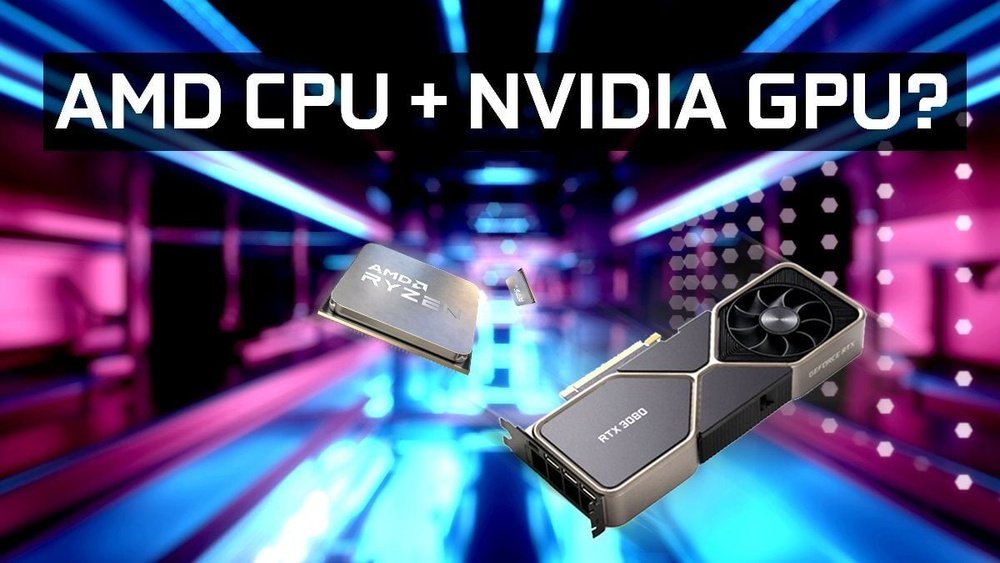
Are you wondering if you can pair an Nvidia GPU with an AMD CPU for your next build? This question comes up a lot, especially when you want the best performance without breaking the bank.
You might be worried about compatibility, speed, or even if the two will work smoothly together. The good news is, you don’t have to choose one brand over the other blindly. Keep reading to discover how combining Nvidia graphics cards with AMD processors can give you a powerful setup—and what you need to know to make it work perfectly for you.
Credit: www.shoshitamam.com
Nvidia Gpus And Amd Cpus Compatibility
Nvidia GPUs and AMD CPUs often raise questions about compatibility. Many wonder if these two brands work well together. The truth is, Nvidia graphics cards can work smoothly with AMD processors. This combination is common in many PC builds.
Understanding their compatibility helps in making better choices for your computer setup. It ensures you get good performance without issues.
Basic Compatibility Factors
Nvidia GPUs connect to the motherboard through a PCIe slot. AMD CPUs also support PCIe slots. This shared standard makes Nvidia GPUs physically compatible with AMD CPUs.
The main factor is the motherboard. It must support both the AMD CPU and Nvidia GPU. Most modern motherboards do this easily.
Drivers from Nvidia work independently of the CPU brand. The GPU driver runs on the operating system, not the CPU. This means Nvidia drivers will work with AMD CPUs without conflict.
Common Misconceptions
One myth is that Nvidia and AMD hardware cannot work together. This is not true. Many users run Nvidia GPUs on AMD CPUs without problems.
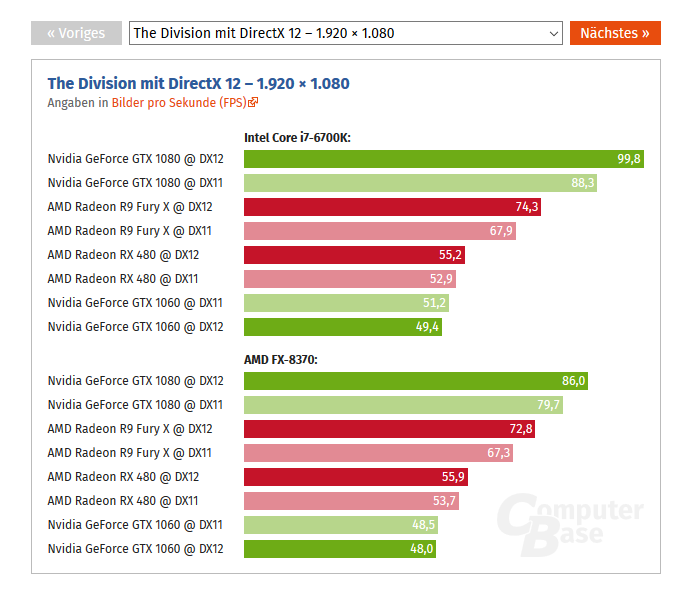
Another misconception is about performance issues. Nvidia GPUs do not lose power or speed when paired with AMD CPUs. Performance depends more on specific models and system balance.
Some believe only Intel CPUs pair well with Nvidia GPUs. This idea is outdated. Both Intel and AMD CPUs support Nvidia graphics cards equally well.

Credit: softwareg.com.au
Performance With Nvidia Gpu And Amd Cpu
Using an Nvidia GPU with an AMD CPU can deliver strong performance. Both brands work well together in many setups. This pairing suits gamers and professionals alike. The combination helps balance power and efficiency. It also offers good value for the cost.
Understanding how this setup performs helps make better choices. Different tasks show different strengths and limits. Below, we explore gaming and productivity performance.
Gaming Performance
Games run smoothly with an Nvidia GPU and AMD CPU. Nvidia graphics cards handle complex visuals with ease. AMD CPUs provide fast processing for game logic and physics. This mix reduces lag and improves frame rates. Most popular games show no issues using this combo. It also supports features like ray tracing and DLSS for better visuals. The balance between CPU and GPU keeps gameplay steady.
Productivity And Workloads
Productivity tasks benefit from this hardware pair. AMD CPUs excel in multi-threaded work like video editing. Nvidia GPUs speed up rendering and AI-based tasks. Together, they cut down project times effectively. Software that uses GPU acceleration runs faster. This setup suits creative professionals and engineers. It offers reliable power for diverse workloads.
Motherboard And Chipset Considerations
Choosing the right motherboard and chipset is important when pairing an Nvidia GPU with an AMD CPU. These components must work well together for the system to run smoothly. The motherboard connects the CPU and GPU and controls how they communicate. The chipset helps manage data flow between parts. Understanding these aspects helps ensure compatibility and good performance.
Pcie Slot Compatibility
The PCIe slot on the motherboard holds the graphics card. Most modern Nvidia GPUs use PCIe x16 slots. AMD CPUs and motherboards usually support PCIe slots too. Check the motherboard’s specs for PCIe version and slot type. PCIe 3.0 and 4.0 are common. A newer PCIe version offers better speed but PCIe is backward compatible. The GPU will work but may run slower with older PCIe slots.
Bios And Firmware Updates
BIOS controls motherboard functions and hardware support. Sometimes, a BIOS update is needed to support new GPUs. Check the motherboard maker’s website for updates. Updating BIOS can improve compatibility and fix bugs. Follow update instructions carefully. A wrong update can harm your system. Keep your BIOS updated for better Nvidia GPU and AMD CPU support.
Credit: stributoscaroni.gconex.com
Driver Support And Software
Using an Nvidia GPU with an AMD CPU raises questions about driver support and software compatibility. Both components need proper drivers to work smoothly together. Drivers help the system recognize hardware and enable features. Software tools from both companies also affect performance and stability.
Nvidia Drivers On Amd Systems
Nvidia provides drivers that support many AMD CPUs. These drivers focus on the GPU and work with different processors. The Nvidia driver installs easily on systems with AMD CPUs. It manages the graphics card and updates regularly to fix bugs. This ensures the GPU runs at its best on AMD platforms.
Users can expect similar driver support on AMD and Intel systems. Nvidia does not limit driver features based on CPU brand. The GPU functions fully with AMD CPUs as long as the driver is up to date.
Amd Software Impact
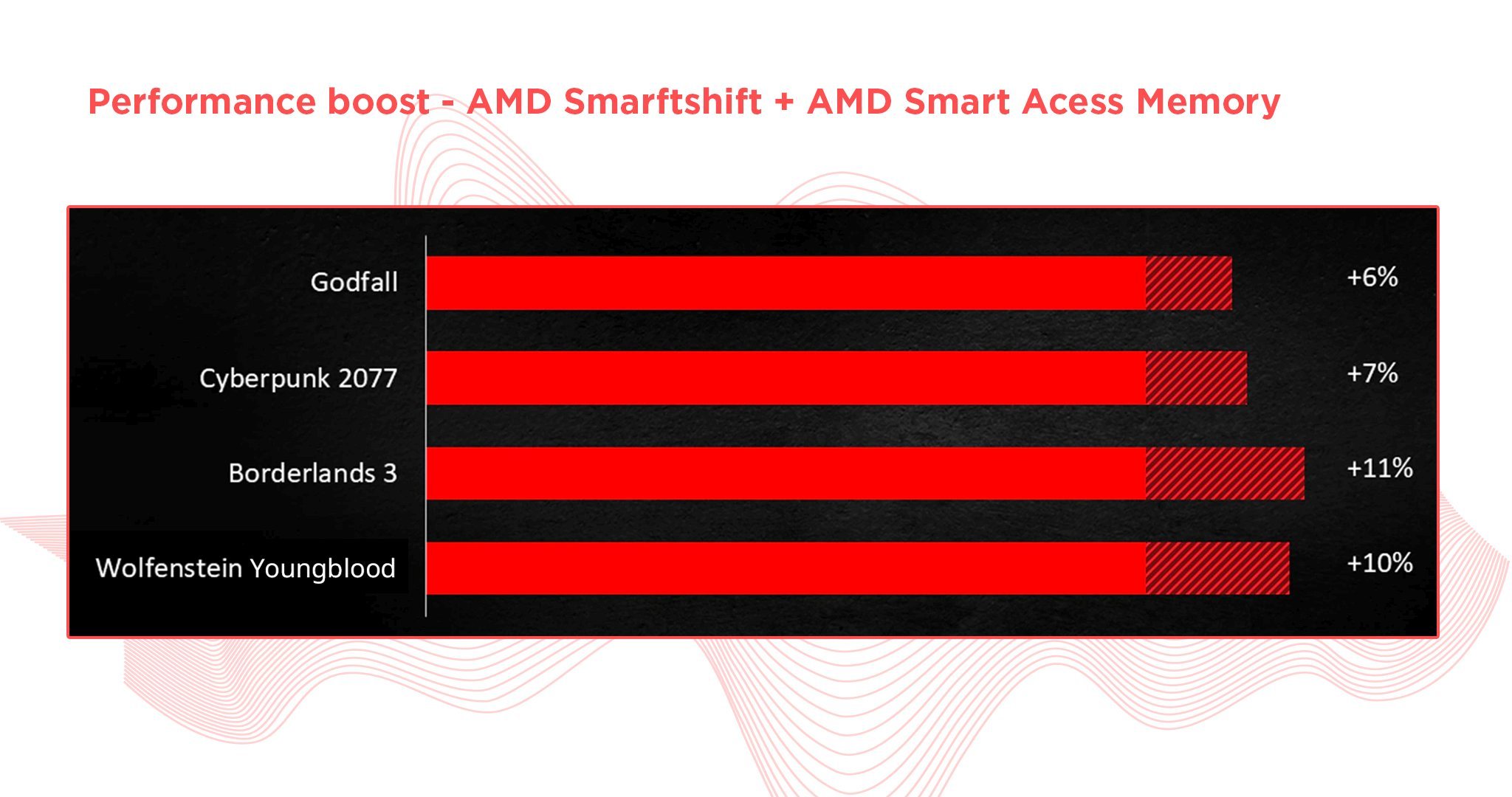
AMD software mainly targets AMD GPUs and CPUs. Some tools, like Ryzen Master, optimize AMD CPU performance but do not affect Nvidia GPUs. AMD’s chipset drivers improve motherboard features and system stability. These drivers work well with Nvidia GPUs and do not cause conflicts.
Installing AMD chipset drivers helps the system run smoothly. They improve communication between CPU, RAM, and other parts. This support benefits Nvidia GPU users with AMD CPUs by enhancing overall system reliability.
Potential Issues And Troubleshooting
Using an Nvidia GPU with an AMD CPU is common in many PC builds. This mix usually works well. Yet, some users face issues that affect performance or stability. Knowing possible problems and how to fix them saves time and stress. This section covers key troubles and solutions for this setup.
Common Problems
One frequent problem is driver conflicts. Nvidia and AMD drivers can clash, causing errors or crashes. Another issue is BIOS settings. Incorrect configurations may block the GPU from working properly. Users might also see lower performance than expected. This can be due to bottlenecks or wrong power settings. Some PCs show screen flickering or freezing. These symptoms often relate to hardware or software mismatches.
Fixes And Workarounds
Start by updating both AMD and Nvidia drivers to the latest versions. Clean installation of drivers helps avoid conflicts. Reset BIOS to default and check PCIe slot settings. Ensure the GPU has enough power from the PSU. Adjust Windows power options to high performance. Use tools like DDU (Display Driver Uninstaller) to remove old drivers fully. Testing with different PCIe slots or cables can find hardware issues. Lastly, check system temperatures to prevent overheating problems.
Building A Balanced Nvidia Gpu And Amd Cpu System
Building a balanced system with an Nvidia GPU and an AMD CPU is possible and popular. Both brands offer strong performance and can work well together. The key is to select compatible parts and set them up correctly. A balanced system ensures smooth operation and better value. This guide helps you choose parts and optimize performance.
Choosing The Right Components
Select an AMD CPU that matches your Nvidia GPU’s power. Avoid a very weak CPU that limits the GPU’s speed. Look at benchmarks to find balanced pairs. Check motherboard compatibility with the AMD CPU socket type. Ensure it supports the GPU’s interface, usually PCIe. Choose enough RAM for your tasks, ideally 16GB or more. A good power supply is essential to support both parts. Make sure it has the right wattage and connectors.
Optimizing System Performance
Update the motherboard BIOS to support the AMD CPU fully. Install the latest Nvidia drivers for best GPU performance. Use the AMD chipset drivers to improve CPU function. Adjust settings in the BIOS to enable features like XMP for faster RAM. Monitor temperatures to avoid overheating. Clean dust from fans and heatsinks regularly. Use software tools to check system balance and performance. This keeps the Nvidia GPU and AMD CPU working well together.
Future Trends And Compatibility
The future of using Nvidia GPUs with AMD CPUs looks promising. Technology is changing fast. Compatibility between different brands is getting better. New hardware and software updates help make systems work smoothly. These trends improve performance and user experience for many PC builders.
Upcoming Hardware Releases
Both Nvidia and AMD plan to launch new products soon. Nvidia’s next GPUs offer better power and efficiency. AMD’s new CPUs focus on speed and multitasking. These releases aim to fit well together in custom builds. Many users expect improved support for mixed-brand setups. This helps gamers and professionals build strong computers.
Evolving Compatibility Landscape
Software updates improve how AMD CPUs and Nvidia GPUs work together. Drivers become more stable and efficient over time. Motherboard manufacturers also add features for better integration. This reduces issues like bottlenecks and crashes. Compatibility is no longer a big problem for most users. Future updates will likely increase system stability and speed.
Frequently Asked Questions
Can I Use Nvidia Gpu With An Amd Cpu?
Yes, you can use an Nvidia GPU with an AMD CPU. They are compatible and work well together. Most modern motherboards support this combination without issues. This setup offers great performance for gaming and productivity tasks.
Does Amd Cpu Limit Nvidia Gpu Performance?
No, AMD CPUs do not limit Nvidia GPU performance. Both components operate independently. Performance depends on the CPU and GPU models, not their brands. Pairing a strong AMD CPU with a powerful Nvidia GPU ensures balanced system performance.
Are Nvidia Drivers Compatible With Amd Cpus?
Yes, Nvidia drivers are fully compatible with AMD CPUs. Drivers focus on the GPU, not the CPU brand. Nvidia regularly updates drivers to support various hardware configurations, including AMD-based systems.
Will An Nvidia Gpu Fit In An Amd Motherboard?
Most Nvidia GPUs fit in AMD motherboards easily. Modern motherboards use standard PCIe slots compatible with all GPUs. Ensure your motherboard has the correct slot version and enough power connectors for the GPU.
Conclusion
Yes, you can use an Nvidia GPU with an AMD CPU without issues. Both parts work well together in most setups. Just make sure your motherboard supports the components. Drivers for Nvidia GPUs work fine on AMD systems. This combo can run games and apps smoothly.
It also gives you more options when building a PC. So, don’t worry about mixing these brands. Focus on choosing the right parts for your needs. That way, your computer will perform just the way you want.
