
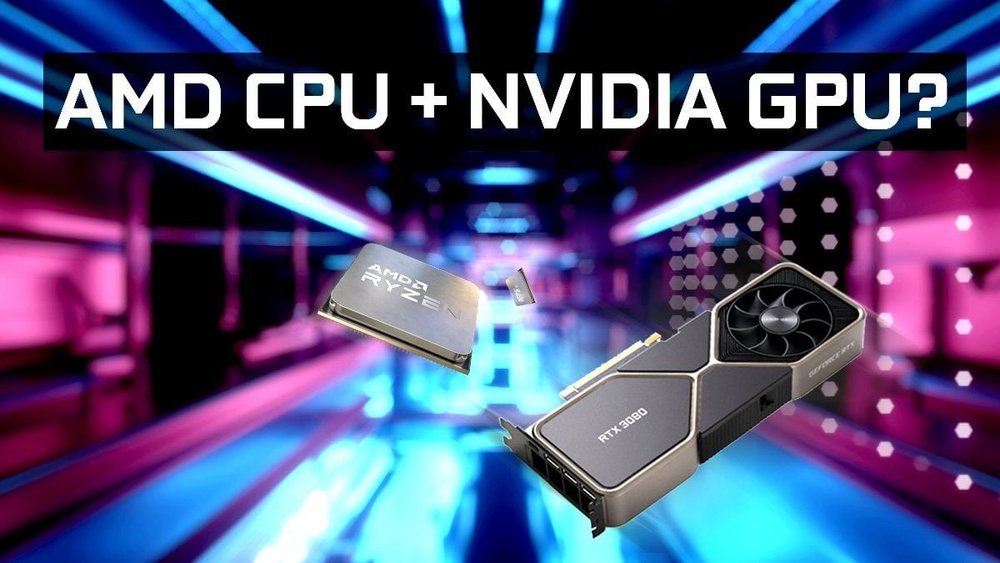
Are you wondering if an AMD CPU can work smoothly with an Nvidia GPU? You’re not alone.
Many people face this exact question when building or upgrading their computers. Choosing the right combination matters because it affects your system’s speed, performance, and even your gaming or work experience. You’ll discover how these two powerful components interact, what you need to watch out for, and how to make sure your setup runs perfectly.
Keep reading to unlock the secrets of pairing AMD CPUs with Nvidia GPUs and get the most out of your machine.
Amd Cpus And Nvidia Gpus Compatibility
Choosing the right CPU and GPU is important for building a smooth computer system. Many wonder if AMD CPUs can work well with Nvidia GPUs. The good news is that these two parts are often compatible. Understanding how they fit together helps in making smart choices.
Basic Compatibility Factors
AMD CPUs and Nvidia GPUs do not have direct compatibility issues. The CPU and GPU connect through the motherboard. As long as the motherboard supports both, they work together. The CPU processes tasks while the GPU handles graphics. They work as a team for good performance.
Motherboard And Slot Requirements
The motherboard must have the right slots for the GPU. Nvidia graphics cards usually need a PCI Express x16 slot. Most modern motherboards support this slot. The CPU socket should match the AMD processor. The motherboard acts as the bridge between CPU and GPU.
Bios And Firmware Considerations
BIOS updates can improve compatibility with new hardware. Check for the latest BIOS version for your motherboard. Sometimes, firmware updates fix issues with AMD CPUs and Nvidia GPUs. Keeping BIOS updated helps the system run smoothly. It avoids hardware conflicts and boosts stability.
Credit: www.shoshitamam.com
Performance Benefits And Limitations
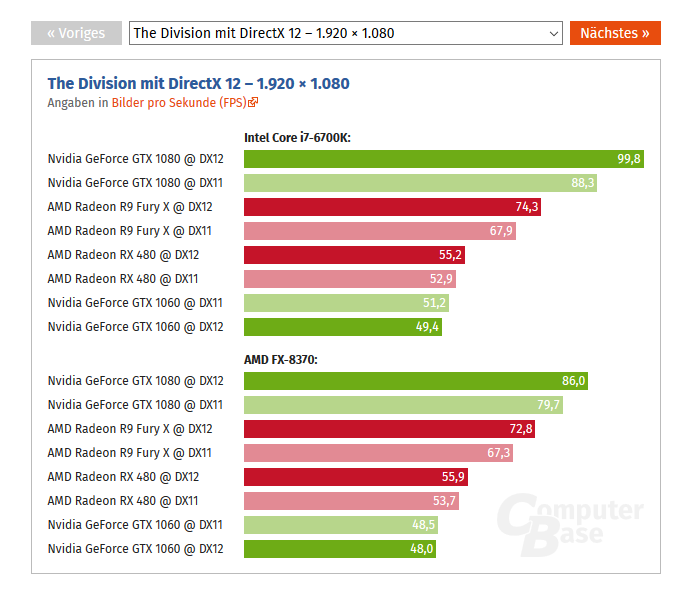
Using an AMD CPU with an Nvidia GPU can offer good performance for many users. This combination often works well for gaming and creative tasks. Still, some limits and challenges exist. Understanding these can help you choose the right parts and avoid problems.
Gaming Performance
AMD CPUs pair nicely with Nvidia GPUs for most games. The CPU handles game logic and physics. The GPU focuses on graphics and rendering. Together, they create smooth gameplay and detailed visuals.
Some games run better on specific hardware, but this combo is strong overall. Frame rates stay high and stutters are rare. Nvidia’s drivers support many games well. AMD’s CPUs offer good speed for gaming tasks.
Productivity And Creative Workloads
For tasks like video editing and 3D rendering, AMD and Nvidia work well. Nvidia GPUs accelerate rendering and effects. AMD CPUs process calculations and data fast.
This setup handles software like Adobe Premiere and Blender efficiently. It reduces wait times and improves workflow. Still, some programs optimize better for one brand over the other. Check compatibility before buying.
Potential Bottlenecks
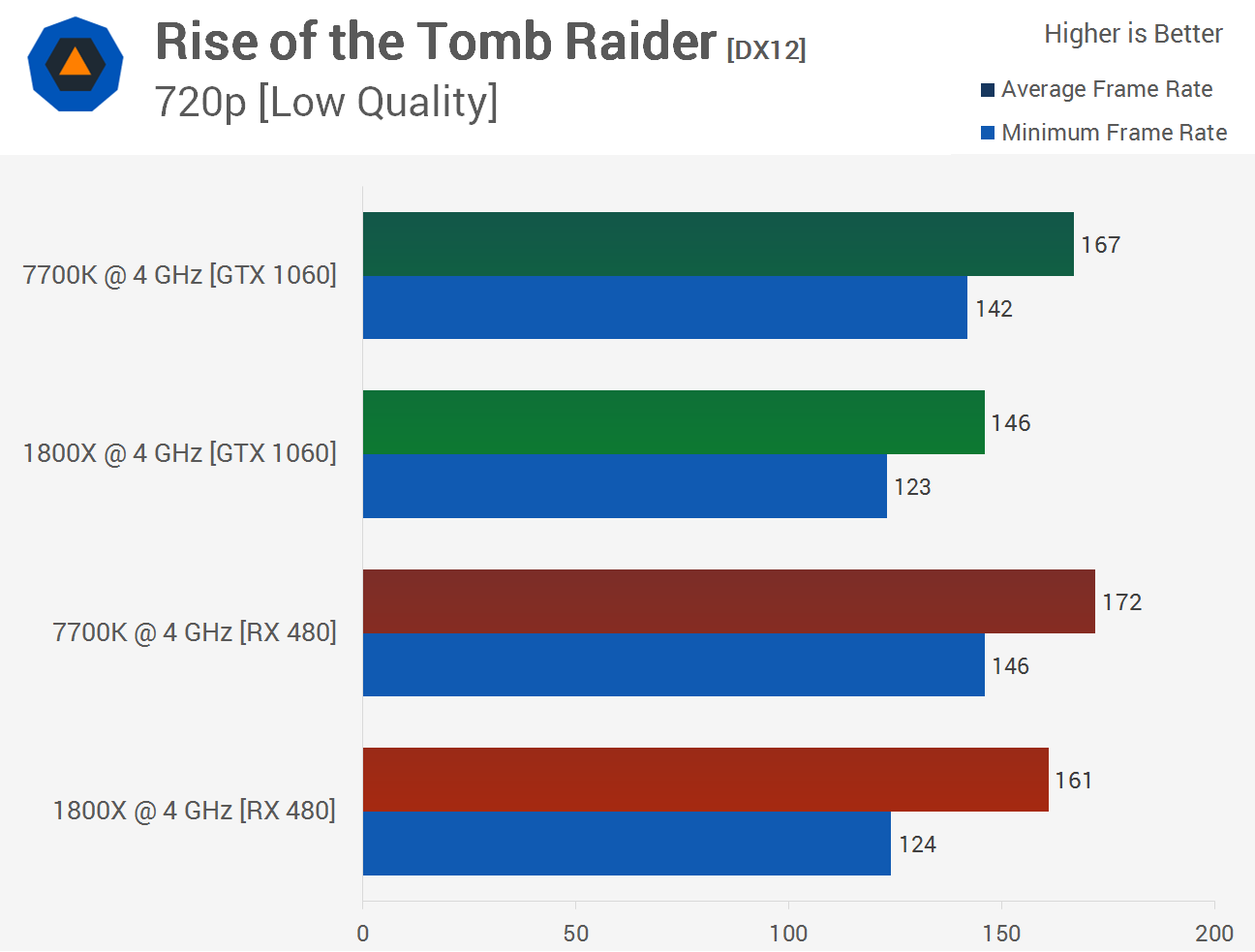
Bottlenecks happen when one part limits the other. A slow CPU can hold back a powerful GPU. Or a weak GPU may not keep up with a fast CPU.
Balance matters. Choose parts that match in speed and power. Also, motherboard and memory affect performance. Poor cooling or outdated drivers cause issues too.
Driver And Software Support
Driver and software support is key when using an AMD CPU with an Nvidia GPU. Both parts need proper drivers to work well together. Drivers help your computer talk to the hardware. Without the right drivers, your GPU might not perform at its best. Software also helps improve gaming and other tasks by using the hardware efficiently.
Installing the correct drivers is the first step. Updating drivers keeps your system stable and fast. Software updates fix bugs and add new features. Knowing how to manage drivers and software helps avoid common problems.
Installing Nvidia Drivers On Amd Systems
Start by visiting the official Nvidia website. Download the latest driver for your GPU model. Choose the correct Windows version to avoid errors. Run the installer and follow the instructions on screen. Restart your PC after installation to apply changes. Use the Nvidia Control Panel to check driver status and settings.
Common Driver Issues And Fixes
Sometimes drivers cause crashes or poor performance. One issue is driver conflicts with other software. Another is using outdated drivers that lack fixes. To fix problems, uninstall old drivers first. Use tools like DDU (Display Driver Uninstaller) for clean removal. Then, install the newest driver version. Check for Windows updates to ensure compatibility.
Software Optimization Tips
Adjust Nvidia settings for better performance on AMD CPUs. Enable features like G-Sync and adjust power management mode. Close unnecessary background apps to free resources. Use Nvidia GeForce Experience to optimize games automatically. Regularly update both drivers and software for smooth operation. Keep your system clean and organized to avoid slowdowns.
Credit: vixencomposites.com
Power Supply And Cooling Needs
Power supply and cooling are critical when using an AMD CPU with an Nvidia GPU. These components need enough power and proper cooling to run smoothly. Without the right setup, your system might crash or slow down.
Power Requirements For Nvidia Gpus
Nvidia GPUs often need a lot of power. High-end models can draw 200 watts or more. Check your GPU’s power rating before buying. Your power supply should handle the total wattage of all parts. A 650-watt or higher power supply is common for mid-range Nvidia cards. Make sure it has enough PCIe power connectors for your GPU.
Cooling Solutions For Mixed Hardware
AMD CPUs and Nvidia GPUs both produce heat. Good airflow inside the case helps keep temperatures low. Use quality CPU coolers and case fans. Consider extra fans if your case allows. Some users choose liquid cooling to better manage heat. Keep cables tidy to improve airflow. Proper cooling prevents overheating and extends hardware life.
Ensuring System Stability
Stable power and cooling support system reliability. Monitor temperatures with software tools. Avoid running parts at maximum power for long times. Use a power supply with a high efficiency rating. Ensure all components are compatible and properly installed. Regular maintenance like dust cleaning also helps stability.
Building A Balanced Amd Cpu And Nvidia Gpu Setup
Building a balanced AMD CPU and Nvidia GPU setup creates a powerful and efficient PC. Matching the right CPU with your Nvidia graphics card avoids slowdowns. This balance boosts performance in gaming, video editing, and everyday tasks.
Choosing the right parts helps your computer run smoothly. It prevents bottlenecks where one part waits for another. Planning your build carefully saves money and improves your experience.
Choosing The Right Cpu For Your Gpu
Select a CPU that matches your Nvidia GPU’s power. A strong GPU needs a CPU that can keep up. For example, pair an AMD Ryzen 5 with a mid-range Nvidia card. Higher-end Nvidia GPUs pair well with Ryzen 7 or Ryzen 9 CPUs. Avoid using a low-end CPU with a high-end GPU. This mismatch limits performance and wastes your GPU’s potential.
Selecting Compatible Motherboards
Motherboards must support your AMD CPU and Nvidia GPU. Check the motherboard socket type for your AMD processor. Make sure it has enough PCIe slots for your Nvidia card. PCIe 4.0 support improves data transfer and future-proofs your build. Also, verify RAM slots and USB ports to meet your needs. Compatibility ensures stable performance and easier upgrades.
Memory And Storage Considerations
Choose enough RAM to support your CPU and GPU tasks. At least 16GB of RAM suits most gaming and editing needs. Faster RAM improves overall speed and responsiveness. Storage speed affects load times and system performance. Use SSDs for your operating system and key applications. Large HDDs can store games and files without slowing down your PC.
Credit: vixencomposites.com
Troubleshooting Common Issues
Troubleshooting common issues is key for a smooth PC experience. AMD CPUs and Nvidia GPUs usually work well together. Still, some problems can arise. Knowing how to fix these helps keep your system stable and fast. Below are common problems and quick tips to solve them.
System Crashes And Freezes
System crashes may happen due to driver conflicts or overheating. Check if your Nvidia drivers are updated. Use software like MSI Afterburner to monitor temperatures. Ensure your CPU and GPU fans work correctly. Restart your PC after updates to clear temporary glitches. Run a memory test to spot faulty RAM. These steps reduce crashes and freezes.
Display And Output Problems
Display issues include no signal, flickering, or wrong resolution. Verify the GPU is properly seated in the slot. Try different cables or ports to rule out hardware faults. Update both AMD chipset drivers and Nvidia graphics drivers. Adjust the display settings in Windows or Nvidia Control Panel. These fixes solve most output problems.
Performance Drops And Lag
Performance drops can frustrate any user. Close unnecessary background apps to free resources. Check for thermal throttling by monitoring CPU and GPU temps. Use Nvidia’s GeForce Experience to optimize game settings. Disable power-saving modes in Windows to boost performance. Regular system cleaning removes dust that blocks airflow. These tips help maintain smooth and fast performance.
Future Trends And Upgrades
The future of combining AMD CPUs with Nvidia GPUs looks promising. Both companies are pushing new technologies that could improve mixed hardware setups. Understanding these trends helps users plan upgrades smartly. This section explores upcoming tech, upgrade paths, and tips for long-lasting performance.
Upcoming Amd And Nvidia Technologies
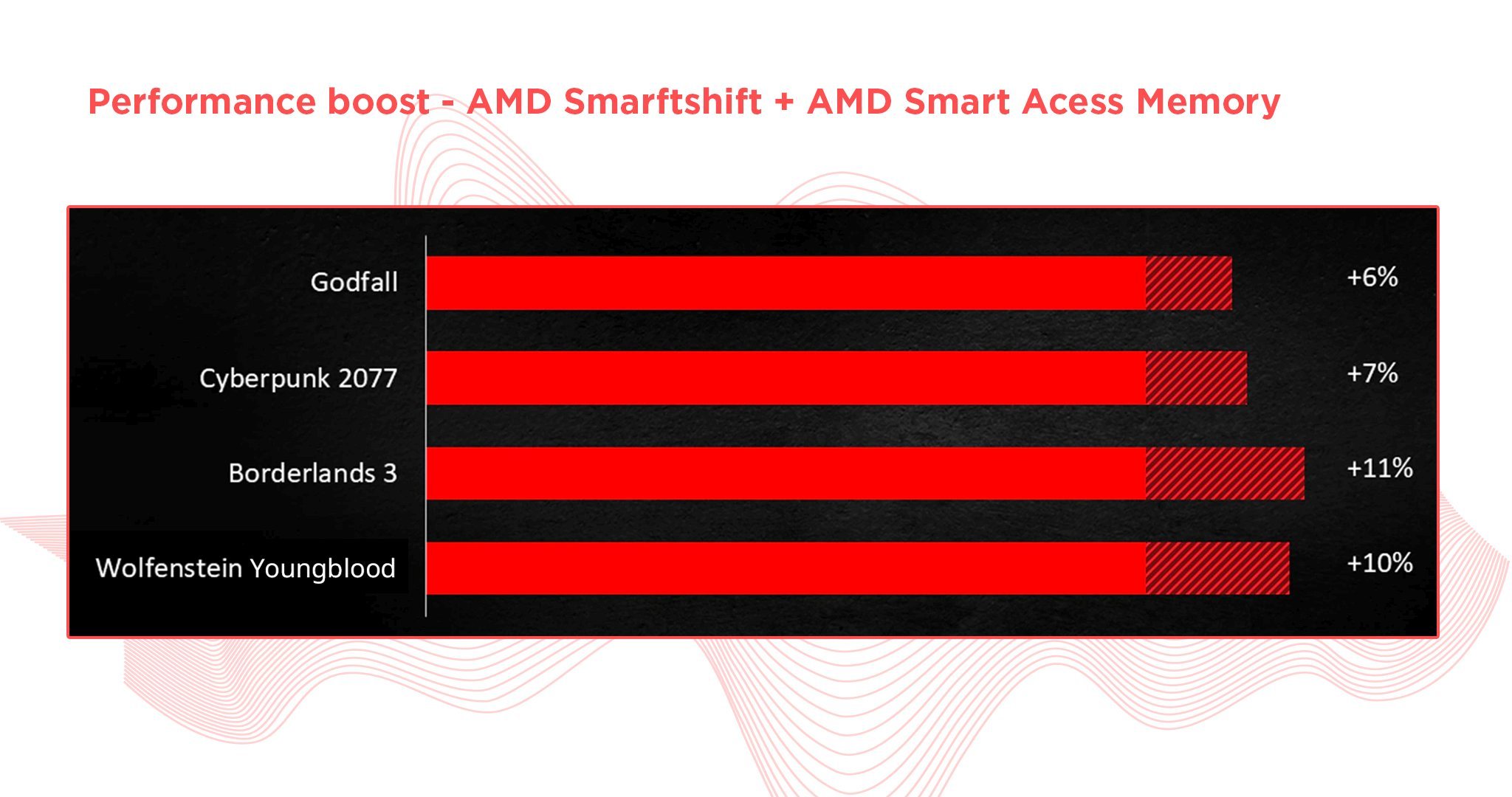
AMD is developing new CPUs with better power efficiency and faster speeds. They focus on improving multi-core performance for gaming and work tasks. Nvidia continues to enhance its GPUs with advanced ray tracing and AI features. These improvements aim to boost graphics quality and frame rates. Both firms release hardware that supports the latest software standards. This progress helps mixed setups run smoothly and with fewer issues.
Upgrade Paths For Mixed Builds
Users can upgrade either the CPU or GPU without full system replacement. AMD CPUs often fit into motherboards that support future CPU generations. Nvidia GPUs come in many price points, allowing step-by-step upgrades. Mixing AMD CPUs with Nvidia GPUs remains a popular choice. It offers flexibility in balancing budget and performance. Choosing compatible parts ensures better system stability and fewer driver conflicts.
Maximizing Longevity And Performance
Keep drivers updated to maintain compatibility and fix bugs. Regular system cleaning helps avoid overheating and hardware wear. Use software tools to monitor CPU and GPU health. Avoid bottlenecks by matching CPU and GPU power levels. A balanced system runs efficiently and lasts longer. Proper maintenance extends the life of mixed AMD and Nvidia builds.
Frequently Asked Questions
Can Amd Cpus Work With Nvidia Gpus?
Yes, AMD CPUs are fully compatible with Nvidia GPUs. They work together seamlessly in most systems.
Will Amd Cpu Limit Nvidia Gpu Performance?
No, AMD CPUs generally do not bottleneck Nvidia GPUs. Performance depends on specific models and settings.
Do Amd Cpus Support Nvidia Gpu Drivers?
Yes, Nvidia GPU drivers work perfectly with AMD CPUs. Driver support is independent of CPU brand.
Is Building A Pc With Amd Cpu And Nvidia Gpu Recommended?
Yes, combining AMD CPUs and Nvidia GPUs is common and recommended for balanced performance.
Conclusion
AMD CPUs work well with Nvidia GPUs in most setups. They communicate smoothly through the motherboard and drivers. Choosing one does not limit the other’s performance. You can build a powerful PC by mixing these brands. Just ensure your power supply and cooling meet the system’s needs.
This combo suits gamers, creators, and everyday users alike. Compatibility is rarely an issue in modern PCs. So, using an AMD CPU with an Nvidia GPU is a smart choice. It offers flexibility and strong performance without extra hassle.
