
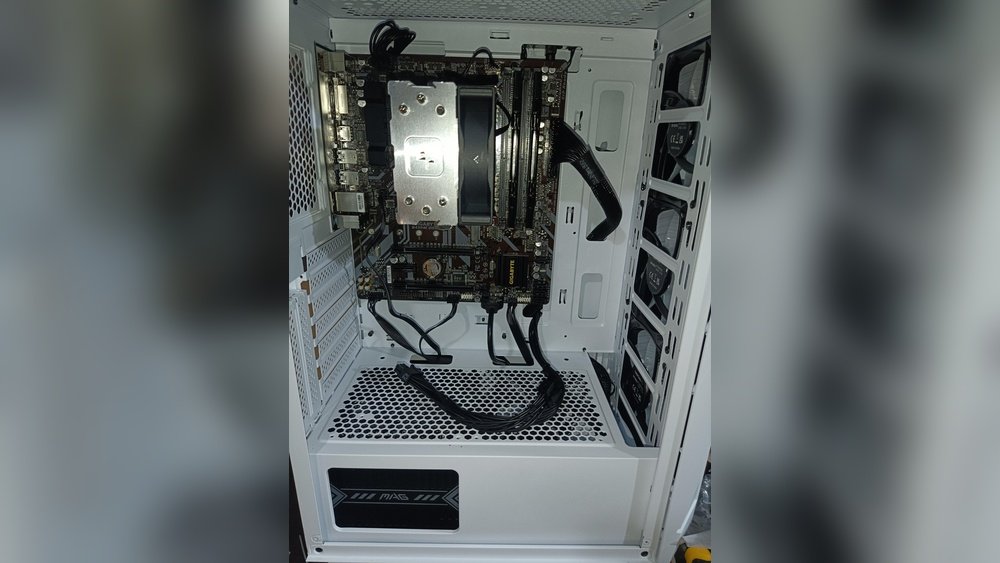
Have you ever wondered if your computer can work without a GPU? You might think a graphics card is essential for any PC to run, but the truth might surprise you.
Whether you’re building a new system or troubleshooting an old one, understanding how your computer operates without a GPU can save you time and money. Keep reading to discover how your computer manages tasks without a dedicated graphics card and what that means for your everyday use.
Credit: www.partitionwizard.com
Role Of A Gpu In Computing
The GPU plays an important role in modern computers. It handles many tasks that involve images and videos. Without a GPU, some processes would slow down or not work properly. The GPU helps the computer show graphics clearly and smoothly. It works alongside the CPU but focuses on specific jobs.
Understanding what a GPU does helps to see why it matters. Some computers can run without a GPU, but the experience changes. Knowing the GPU’s role shows why it is often needed.
Graphics Processing Basics
A GPU is designed to process images and videos fast. It breaks down pictures into small parts called pixels. Then, it changes these pixels to create the final image on your screen. This process is called rendering.
GPUs have many small cores that work together. This allows them to handle many tasks at the same time. This design makes GPUs very good for graphics work. They also help with 3D graphics and video playback.
Gpu Vs Cpu Tasks
The CPU is the brain of the computer. It handles all general tasks and runs the operating system. The CPU works on tasks one or a few at a time but very quickly.
The GPU handles specific tasks like drawing images and videos. It works on many small tasks at once. This makes it faster for graphics work but less flexible than the CPU.
Some tasks need both the CPU and GPU. The CPU manages the overall work. The GPU takes care of graphics and heavy calculations related to images.

Credit: www.youtube.com
Integrated Graphics Explained
Integrated graphics play a key role in many computers today. They allow a computer to display images without needing a separate graphics card. This makes computers simpler and often less expensive. Understanding integrated graphics helps explain how a computer can run without a dedicated GPU.
What Are Integrated Gpus?
Integrated GPUs are graphics processors built into the computer’s main chip. They share memory with the CPU instead of having their own. This means they use part of the computer’s RAM to create images. Integrated GPUs handle everyday tasks like watching videos and browsing the web. They are not designed for heavy gaming or complex 3D work. Many laptops and budget desktops rely on integrated graphics to save space and power.
Benefits Of Integrated Graphics
Integrated graphics use less power than dedicated GPUs. This helps laptops last longer on a single charge. They also make computers smaller and lighter. Integrated GPUs reduce the overall cost of a computer. They provide enough power for most daily tasks and simple apps. Since they are part of the main processor, they generate less heat. This means quieter and cooler systems. Integrated graphics are a practical choice for many users without high graphics needs.
Running Without A Dedicated Gpu
Running a computer without a dedicated GPU is possible. Many computers use integrated graphics built into the CPU. These integrated graphics handle basic display tasks without a separate graphics card. This setup can save money and reduce power use. It also makes the computer quieter and cooler.
Still, not all tasks can run smoothly without a dedicated GPU. The need depends on what the computer does. Some systems work well without extra graphics power. Others require a GPU for good performance.
When Is A Gpu Necessary?
A dedicated GPU is needed for heavy graphics work. Tasks like 3D gaming, video editing, and 3D modeling require strong graphics power. These tasks need fast processing and high-quality visuals. Without a GPU, these programs run slow or may not run at all.
Also, some software uses GPU to speed up calculations. This helps in scientific computing and machine learning. In these cases, a GPU boosts overall system speed.
Systems That Don’t Need A Gpu
Many everyday computers do not need a dedicated GPU. Office computers, web browsers, and media players work fine with integrated graphics. Simple tasks like writing documents and watching videos do not need extra graphics power.
Small form-factor PCs and budget laptops often skip the dedicated GPU. They rely on the CPU’s built-in graphics to save space and cost. These systems suit users who do not run demanding applications.
Performance Considerations
Performance matters a lot when a computer runs without a GPU. A GPU handles graphics and visual tasks. Without it, the CPU takes over these jobs. This shift changes how well the computer performs, especially in tasks needing strong graphics power. Some tasks run fine, but others may slow down or struggle.
Impact On Gaming And Multimedia
Games need fast graphics to run smoothly. Without a GPU, games often lag or have low frame rates. Visual quality also drops. Multimedia tasks like video playback or editing may suffer too. Videos might not play in high resolution. Streaming can become choppy. Basic games or older titles may still work okay but expect limits.
Effect On Professional Applications
Professional apps like 3D modeling or video editing rely on GPUs. Without one, these apps run slower. Rendering times increase, and previews lag. Complex designs or large files become hard to handle. Some software may not run at all without a GPU. For simple office tasks, a GPU is less important, but for creative work, it matters a lot.
Troubleshooting Without A Gpu
Troubleshooting a computer without a GPU can feel tricky. Many systems rely on a graphics card for display and performance. Without it, you must use the integrated graphics on the CPU or motherboard. This setup may cause different issues than usual. Understanding these problems helps you fix them faster. This section covers common issues and ways to improve performance without a GPU.
Common Issues And Fixes
One common problem is no display on the monitor. Check if the monitor cable is plugged into the motherboard’s video output. Make sure the BIOS settings enable integrated graphics. Sometimes, the system may freeze or run very slow. This happens because the CPU handles all graphics tasks. Closing background apps can help reduce lag. Drivers can cause issues too. Install the latest chipset and integrated graphics drivers from the manufacturer’s site.
Optimizing Performance
Performance without a GPU depends on your CPU’s graphics power. Lowering screen resolution can improve smoothness. Use simple themes and reduce animations in your operating system. Keep your system clean from unnecessary files and programs. Running updates regularly ensures better compatibility and stability. Adjust power settings to prioritize performance over energy saving. These steps help your computer run more efficiently without a dedicated GPU.

Credit: www.youtube.com
Future Of Gpu-less Computing
Computers without GPUs are becoming more capable. The future of GPU-less computing looks promising. Developers and engineers focus on improving systems without needing separate graphics cards. This approach can lower costs and reduce power use. Many tasks may not require a dedicated GPU soon.
Advances In Integrated Graphics
Integrated graphics have improved a lot in recent years. They now handle many everyday tasks smoothly. Tasks like video streaming, light gaming, and photo editing run well. New processors have stronger built-in graphics. These chips share memory with the CPU. This design saves space and energy. More users can rely on integrated graphics alone.
Potential For Gpu Alternatives
New technologies may replace traditional GPUs in some cases. Specialized chips for AI and machine learning grow more common. These chips handle specific tasks efficiently. Cloud computing also offers powerful remote graphics processing. Users connect to servers with strong GPUs online. This reduces the need for local graphics hardware. The rise of such alternatives changes how computers use graphics power.
Frequently Asked Questions
Can A Computer Operate Without A Dedicated Gpu?
Yes, many computers run without a dedicated GPU using integrated graphics built into the CPU. This suits basic tasks like browsing and office work but limits gaming or graphic-intensive applications.
What Tasks Can A Computer Handle Without A Gpu?
Without a GPU, a computer can handle web browsing, streaming videos, office software, and light photo editing. However, it struggles with heavy gaming, 3D rendering, or video editing.
Do All Cpus Have Integrated Graphics To Replace Gpus?
Not all CPUs have integrated graphics. Some processors lack built-in graphics, requiring a dedicated GPU to display visuals. Always check your CPU specs before assuming no GPU is needed.
How Does Running Without A Gpu Affect Computer Performance?
Running without a GPU reduces graphics performance significantly. Integrated graphics use shared system memory, which is slower than dedicated GPU memory. This limits performance in games and graphic design tasks.
Conclusion
A computer can run without a GPU in many cases. Basic tasks like browsing and writing work fine. But for games or heavy graphics, a GPU helps a lot. Some CPUs have built-in graphics that cover simple needs. Yet, serious video editing or 3D work needs a dedicated GPU.
Choosing the right setup depends on what you want to do. Understanding your needs saves money and avoids frustration. So, a GPU is useful but not always required. Think about your tasks before deciding on your computer parts.
