Is 70 Celsius Hot for Gpu: Safe or Overheating Warning?
Is 70 Celsius hot for your GPU? If you’ve been keeping an eye on your graphics card temperature, this question might have popped into your mind.
You want to make sure your GPU is running safely without risking damage or losing performance. But what does 70°C really mean for your hardware? Is it something to worry about or perfectly normal? Keep reading, and you’ll get clear answers that help you protect your investment and get the most out of your gaming or work setup.
Gpu Temperature Basics
Understanding GPU temperature is important for your computer’s health. The GPU, or graphics processing unit, works hard to display images and videos. It creates heat while running. Keeping track of this heat helps prevent damage and keeps performance smooth.
GPU temperature basics give you a clear idea of what numbers are safe. This knowledge helps you avoid overheating problems. It also helps you know when your cooling system works well.
Typical Operating Ranges
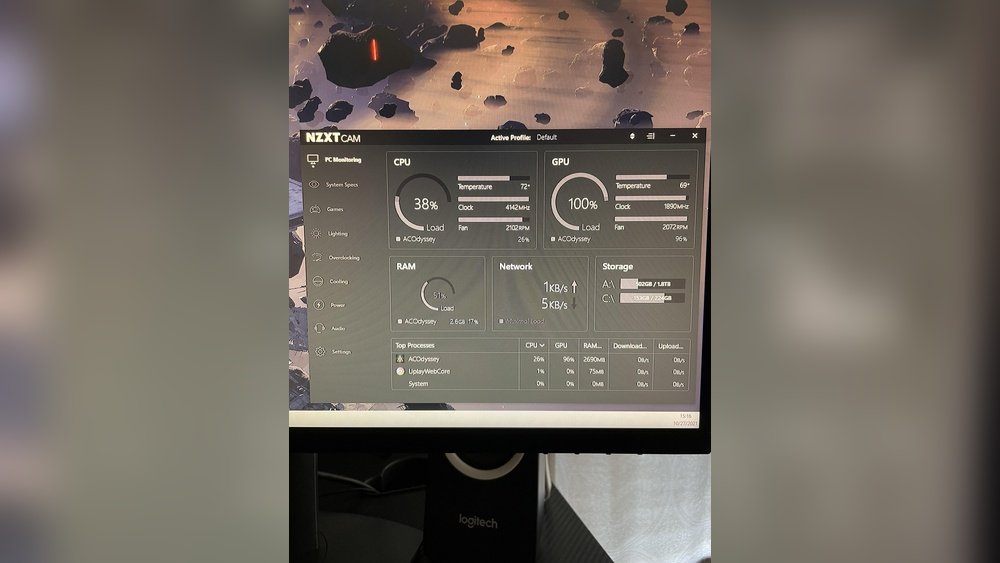
Most GPUs run safely between 30°C and 85°C. Idle temperatures usually sit around 30°C to 45°C. While gaming or working on heavy tasks, temperatures can rise to 65°C to 85°C. Temperatures near 70°C are normal during full use. Some models can handle up to 90°C but try to keep it cooler.
Factors Affecting Temperature
Several things change GPU temperature. The quality of your cooling system matters a lot. Good fans and heatsinks help lower heat. The case airflow also plays a key role. Dust build-up can block airflow and raise temperature. Room temperature affects your GPU too. Higher room heat means your GPU runs hotter. Overclocking the GPU makes it work harder, increasing heat. Software settings and driver updates can also impact temperature.

Credit: sysprobs.com
Is 70 Celsius Hot For Gpu
Is 70 Celsius hot for a GPU? Many people worry about GPU temperatures during gaming or work. The short answer is that 70°C is usually safe. But understanding more helps keep your GPU healthy and fast.
Comparing With Manufacturer Guidelines
Most GPU makers set safe temperature limits between 80°C and 90°C. They design GPUs to run well below these limits. A temperature of 70°C stays comfortably under the max safe point. It means your GPU is working fine and not overheating.
Some high-performance GPUs can even reach 85°C without damage. The key is to avoid constant high heat near the limit. Running at 70°C means your GPU stays cool enough for good health and performance.
Real-world Usage Scenarios
During gaming or heavy tasks, GPUs heat up quickly. Reaching 70°C means your card handles the workload well. Normal use like web browsing or light apps keeps the GPU cooler, around 40°C to 60°C.
In warm rooms or small PC cases, 70°C might feel higher but stays safe. Good airflow and clean fans help keep temperatures low. If your GPU often hits 70°C, it’s working properly and not overheating.
Signs Of Overheating
Knowing the signs of GPU overheating helps protect your computer. Overheating harms your graphics card and lowers its lifespan. Watch for these common signs to catch problems early.
Detecting overheating early can save you from costly repairs. Your system may show clear symptoms that your GPU is too hot. Recognizing these helps you act fast.
Performance Drops
Your games or programs may run slower than usual. Frame rates fall, and loading times increase without reason. Overheating makes the GPU reduce power to cool down. This leads to weaker performance and lag.
Visual Artifacts
Strange lines, flickering, or colors appear on the screen. These glitches show the GPU struggles to process graphics properly. Overheated chips can cause these visual errors. The display might also freeze or distort.
Unexpected Shutdowns
The computer may turn off without warning during use. This protects the hardware from heat damage. Sudden shutdowns often mean the GPU temperature is too high. Your system forces itself off to avoid permanent harm.

Credit: www.reddit.com
Cooling Solutions
Keeping your GPU cool is important for performance and lifespan. High temperatures can cause slowdowns and damage over time. Cooling solutions help keep the GPU temperature in a safe range. There are different ways to cool your GPU effectively. Each method has its own benefits and costs.
Air Cooling Techniques
Air cooling uses fans to move heat away from the GPU. Most GPUs come with built-in fans. Adding more case fans can improve air flow. Clean dust from fans and heatsinks regularly. This keeps cooling efficient. Air cooling is easy and affordable. It works well for most users.
Liquid Cooling Options
Liquid cooling uses water or coolant to absorb heat. It moves heat away faster than air. This keeps the GPU cooler during heavy use. Closed-loop systems are easy to install. Custom loops offer better cooling but need maintenance. Liquid cooling is quieter than air fans. It suits users with high-performance GPUs.
Improving Case Airflow
Good case airflow helps air cooling work better. Place intake fans at the front and bottom. Exhaust fans should be at the rear and top. Keep cables tidy to avoid blocking airflow paths. Use dust filters on intake fans. Proper airflow lowers overall system temperature. A cool case means a cooler GPU.
Preventing High Temperatures
Preventing high temperatures in your GPU is important to keep it working well. High heat can reduce your GPU’s life and performance. Taking steps to manage temperature helps your computer stay stable and fast. Simple actions can lower the heat and protect your graphics card.
Regular Maintenance
Dust and dirt block airflow inside your PC. Clean your GPU and case often with compressed air. Check fans for dust build-up. Replace worn-out fans to keep air moving. Good airflow helps lower GPU temperature quickly.
Optimizing Fan Curves
Fan curves control how fast your fans spin at different temperatures. Set fan speed higher when GPU heats up. Use software tools to adjust fan curves easily. Faster fans cool your GPU better. This keeps temperature in a safe range.
Undervolting And Underclocking
Undervolting lowers the power your GPU uses. It reduces heat without losing much speed. Underclocking slows down the GPU core clock. This also cuts heat output. Both methods help keep your GPU cooler during use.

Credit: softwareg.com.au
When To Be Concerned
Knowing when to worry about your GPU temperature helps protect your computer. GPUs get hot during use, but not all heat is dangerous. Recognizing critical temperatures can prevent damage and keep performance steady.
Temperature Thresholds
Most GPUs work well up to 85°C. Temperatures below 70°C are usually safe. If the GPU temperature hits 85°C or more, it needs attention. At 90°C, the risk of damage grows. Many modern GPUs start throttling performance around 80-85°C. Throttling lowers heat but also slows down the GPU.
Long-term Effects On Hardware
Constant high temperatures shorten GPU lifespan. Heat stresses the GPU’s circuits and solder joints. Over time, this causes failures or crashes. Running a GPU near 90°C often increases wear. Keeping temperatures below 80°C helps hardware last longer. Good cooling and clean fans reduce heat and extend GPU life.
Frequently Asked Questions
Is 70 Celsius Hot For A Gpu During Gaming?
70°C is generally safe for most GPUs during gaming. Modern graphics cards are designed to operate efficiently up to 85-90°C. Staying around 70°C ensures good performance without overheating risks or thermal throttling.
Can 70°c Damage My Gpu Over Time?
No, 70°C won’t damage your GPU over time. It’s within the safe operating temperature range for most GPUs. Consistently higher temperatures above 85°C may reduce lifespan, but 70°C is considered normal and safe.
How To Lower Gpu Temperature From 70 Celsius?
Improve airflow inside your PC case to lower GPU temperature. Clean dust from fans and heatsinks regularly. Adjust fan curves or upgrade cooling solutions like better fans or liquid cooling for optimal GPU temperatures.
Is 70 Celsius Normal For Idle Gpu Temperature?
No, 70°C is high for an idle GPU. Idle temperatures usually range between 30-50°C. If your GPU stays at 70°C while idle, check for dust buildup, poor ventilation, or background processes causing excess load.
Conclusion
A GPU temperature of 70 Celsius is generally safe and normal. Most graphics cards can handle this heat during heavy use. Keeping good airflow helps prevent higher temperatures. Watching your GPU’s heat ensures it runs well and lasts longer. Small changes, like cleaning fans, can reduce heat easily.
Remember, every GPU has its own ideal range. Stay aware and keep your system cool for better performance.