How Many Pcie Lanes Does a Gpu Use: Ultimate Guide Explained
If you’ve ever wondered how your GPU connects to your computer and why it matters, understanding PCIe lanes is key. Knowing how many PCIe lanes your GPU uses can help you unlock better performance and avoid costly mistakes when building or upgrading your PC.
This simple detail can make a big difference in gaming, video editing, and other tasks that rely on your graphics card. Stick with me, and by the end of this article, you’ll have a clear grasp of PCIe lanes and how they impact your GPU’s power.
Ready to get started? Let’s dive in!
Pcie Lanes Basics
Understanding PCIe lanes is essential to grasp how GPUs connect and communicate with a computer. These lanes act as the highways for data between the GPU and the motherboard. Knowing the basics helps you see why lane count affects GPU performance and compatibility.
What Are Pcie Lanes
PCIe lanes are pairs of wires that send and receive data. Each lane has two pairs: one for sending and one for receiving. More lanes mean more data can move at the same time. Think of it as more lanes on a road allowing more cars to travel.
Lane Configurations
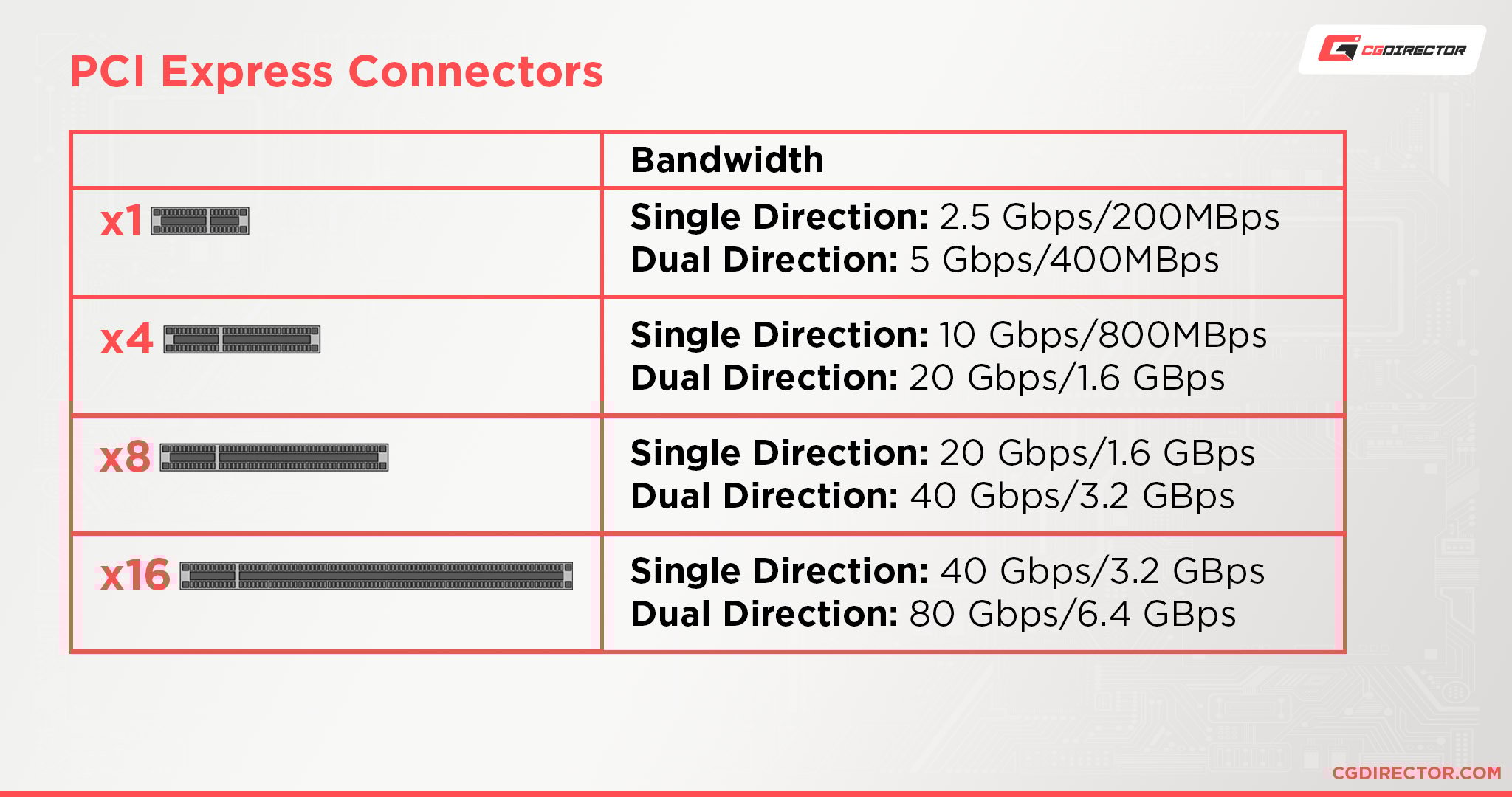
PCIe lanes come in different configurations like x1, x4, x8, and x16. The “x” number shows how many lanes are active. A GPU usually uses a x16 slot to maximize data flow. Devices with fewer data needs use fewer lanes.
Lane Bandwidth And Speed
The speed of each lane depends on the PCIe generation. Newer generations offer higher bandwidth per lane. For example, PCIe 3.0 delivers less bandwidth than PCIe 4.0. Total bandwidth is lanes multiplied by bandwidth per lane. This affects how fast your GPU can work.
Gpu And Pcie Lane Relationship
The relationship between a GPU and PCIe lanes is important for understanding how graphics cards connect to the motherboard. PCIe lanes are pathways that allow data to move between the GPU and the rest of the computer. The number of lanes a GPU uses affects its speed and performance. Each lane can send and receive data, so more lanes mean more data transfer at once.
Knowing how GPUs use PCIe lanes helps in choosing the right motherboard and GPU combination. It also explains why some GPUs need more lanes than others. This section covers typical lane usage, how lane count affects GPU performance, and PCIe versions with their compatibility.
Typical Lane Usage By Gpus
Most modern GPUs use 16 PCIe lanes. This is the standard for high-end and gaming graphics cards. Some lower-end or budget GPUs may use fewer lanes, such as 8 or even 4 lanes. Using fewer lanes limits the data speed but can still work fine for less demanding tasks.
High-performance GPUs rely on 16 lanes to handle large amounts of data quickly. This helps with tasks like gaming, video editing, and 3D rendering. The motherboard must support enough lanes to match the GPU’s needs.
Effect Of Lane Count On Performance
The number of PCIe lanes affects how fast data moves between the GPU and CPU. More lanes mean faster communication. This can improve frame rates and reduce lag in games and applications.
However, using fewer lanes does not always cause a big drop in performance. Many GPUs perform well even with 8 lanes. The difference becomes noticeable in very data-heavy tasks or when running multiple GPUs.
Choosing the right lane count depends on your GPU and what you use it for. High lane counts suit heavy workloads better.
Pcie Versions And Compatibility
PCIe versions show how fast each lane can transfer data. Newer versions offer higher speeds per lane. For example, PCIe 4.0 doubles the speed of PCIe 3.0 lanes.
GPUs and motherboards can work together across different PCIe versions. A PCIe 4.0 GPU will run on a PCIe 3.0 slot but at lower speeds. This backward compatibility helps users upgrade parts gradually.
Understanding PCIe versions helps in picking compatible hardware that matches your GPU’s lane requirements and speed needs.
Motherboard And Cpu Influence
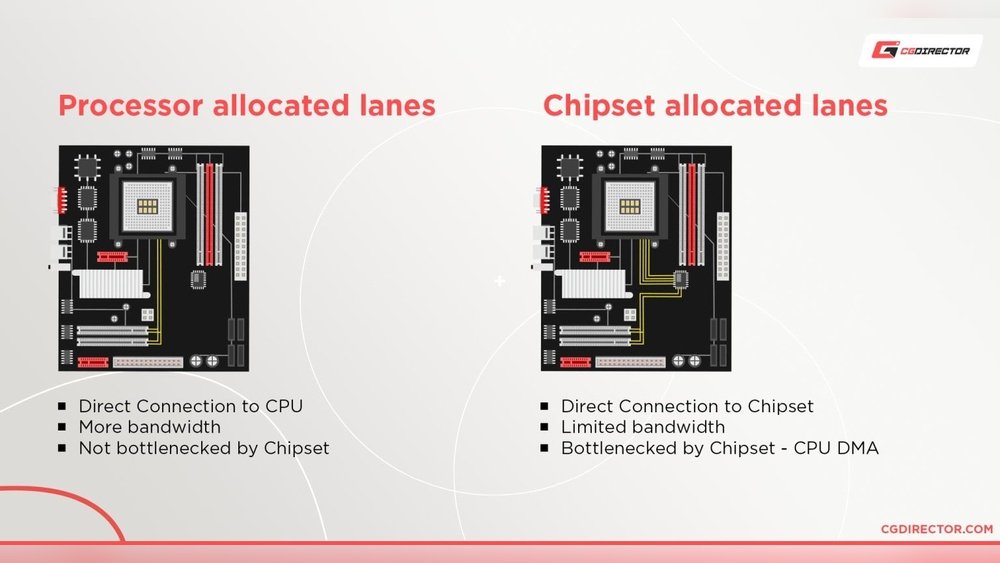
The number of PCIe lanes a GPU uses depends on both the motherboard and CPU. These two parts work together to control lane distribution. Understanding their role helps you choose the right components for your system. This knowledge also explains why some setups have fewer lanes available.
Lane Availability On Cpus
CPUs have a fixed number of PCIe lanes. Most consumer CPUs offer 16 lanes for GPUs. High-end CPUs and server processors provide more lanes, often 24 or 40. The total lanes affect how many devices can run at full speed. If the CPU has fewer lanes, GPU performance might drop.
Motherboard Slot Configurations
Motherboards have PCIe slots with different lane counts. A slot may support x16, x8, or x4 lanes. Slot speed depends on CPU lanes and motherboard design. Some boards split lanes between slots when multiple GPUs are installed. This split can reduce each GPU’s lane count and bandwidth.
Impact On Multi-gpu Setups
Multiple GPUs share PCIe lanes from the CPU. The CPU divides lanes among all GPUs connected. This division can limit each GPU to x8 or fewer lanes. Performance may drop compared to a single GPU at x16 lanes. Choosing a CPU with more lanes helps maintain speed for all GPUs.

Credit: linuxhint.com
Real-world Performance Impact
The number of PCIe lanes a GPU uses can affect its real-world performance. This impact changes based on the workload and the lane count available. Many users wonder if fewer lanes mean lower performance. The answer depends on the type of task and how much data the GPU needs to move.
Benchmarks With Different Lane Counts
Tests show that GPUs using 16 PCIe lanes usually perform best. Dropping to 8 lanes causes a small drop in speed, often under 5%. Reducing to 4 lanes can cut performance more noticeably. This is especially true in data-heavy tasks. Benchmarks reveal that most games run smoothly with 8 lanes. Some benchmarks test synthetic workloads to stress the PCIe connection. These tests show bigger gaps between lane counts than typical games.
Gaming Vs. Professional Workloads
Games often do not fully use the PCIe bandwidth. Graphics data stays in the GPU memory, needing less frequent data transfers. Professional tasks like 3D rendering or video editing move more data in and out. These tasks can slow down more when lane counts are reduced. Some professional workloads benefit from full 16 lanes to keep speeds high. Gamers may not notice much difference between 8 and 16 lanes.
When Lane Count Matters Most
Lane count matters most in data-heavy workloads. If the GPU needs to communicate a lot with the CPU or storage, more lanes help. Examples include machine learning, simulation, and large dataset processing. Also, multi-GPU setups may split lanes and limit bandwidth per card. In these cases, performance can drop if lanes are too few. For everyday use and gaming, lane count often has less impact.
Optimizing Pcie Lane Usage
Optimizing PCIe lane usage helps your GPU run smoothly and fast. Proper lane allocation improves data flow between the GPU and CPU. This reduces bottlenecks and increases overall system performance. Small adjustments can make a big difference in your computer’s speed and stability.
Choosing The Right Slot
Motherboards have multiple PCIe slots with different lane counts. Use the primary slot designed for your GPU. It usually offers the maximum number of lanes. Installing your GPU in a slower slot limits its data transfer speed. Check your motherboard manual to find the best slot for your graphics card.
Bios Settings And Lane Allocation
Some motherboards allow manual lane configuration in BIOS. Access BIOS settings to verify lane assignments. Ensure your GPU uses the full lanes available in its slot. Disabling unused PCIe devices can free up lanes. Save changes and reboot to apply new lane settings.
Upgrading For Better Lane Support
Older motherboards may have fewer PCIe lanes. Upgrading to a newer motherboard can increase lane count. Newer CPUs often support more PCIe lanes too. More lanes mean better GPU performance and faster data transfer. Consider your system’s PCIe lane limits before upgrading components.
Credit: www.cgdirector.com
Future Of Pcie Lanes
The future of PCIe lanes holds exciting changes for GPUs and computers. Faster data transfer and better efficiency will shape how devices connect and perform. These improvements will support new tech and enhance user experience.
Understanding upcoming PCIe developments helps us prepare for next-generation hardware. It shows how GPUs will use lanes to deliver more power and speed.
Pcie 5.0 And Beyond
PCIe 5.0 doubles the speed of PCIe 4.0. It offers up to 32 GT/s per lane, boosting data flow. This means GPUs can send and receive data faster than before. PCIe 6.0 is also in development, aiming to double speed again. These advances reduce delays and improve performance in high-demand tasks.
Emerging Technologies
New technologies will shape how PCIe lanes are used. AI and machine learning require fast data access, which PCIe can provide. Storage devices like NVMe SSDs also benefit from faster lanes. Innovations like chiplet designs may change lane distribution on GPUs. This helps balance power and efficiency better.
What To Expect In Next-gen Gpus
Next-gen GPUs will likely use more PCIe lanes for better speed. They may support PCIe 5.0 or 6.0 for faster data exchange. Lane allocation may adapt to different workloads dynamically. This means smoother gaming, rendering, and computing. Expect GPUs to become more versatile with PCIe improvements.

Credit: www.reddit.com
Frequently Asked Questions
How Many Pcie Lanes Does A Typical Gpu Use?
Most modern GPUs use 16 PCIe lanes for optimal performance. This provides enough bandwidth for high-speed data transfer. Some lower-end GPUs may use fewer lanes, like 8, but 16 lanes is the standard for gaming and professional GPUs.
Can A Gpu Run With Fewer Pcie Lanes?
Yes, GPUs can run with fewer PCIe lanes, like 8 or 4 lanes. However, performance might slightly decrease in data-heavy tasks. For most gaming and typical use, 8 lanes still offer good performance, but 16 lanes ensure the best results.
Does Pcie Lane Count Affect Gpu Speed?
PCIe lane count impacts data transfer speed between the GPU and CPU. More lanes mean higher bandwidth and better performance in data-intensive tasks. However, beyond PCIe 3. 0 x8 or PCIe 4. 0 x8, most games see minimal difference.
What Happens If A Gpu Uses Fewer Pcie Lanes?
Using fewer PCIe lanes limits bandwidth, potentially reducing performance in some workloads. Tasks like gaming might not be heavily affected, but professional applications may see slower data processing. Always try to match GPU lane requirements with your motherboard’s capabilities.
Conclusion
A GPU usually uses multiple PCIe lanes to work well. Most modern GPUs need at least 16 lanes for full speed. Using fewer lanes can slow down performance a little. The motherboard and CPU decide how many lanes your GPU gets.
Knowing this helps you pick the right parts for your PC. It keeps your system balanced and running smooth. So, understanding PCIe lanes is key for good gaming or work. Simple but important for building or upgrading your computer.