How to Read Intel Cpu Names: Decode Specs Like a Pro
Have you ever looked at an Intel CPU name and felt completely lost? Those numbers and letters might seem like a secret code made to confuse you.
But what if you could easily understand what each part means? Knowing how to read Intel CPU names can help you pick the right processor for your needs—whether you’re gaming, working, or just browsing. Keep reading, and you’ll unlock the simple tricks to decode these names like a pro.
Your next smart computer choice starts here.
Intel Cpu Naming Basics
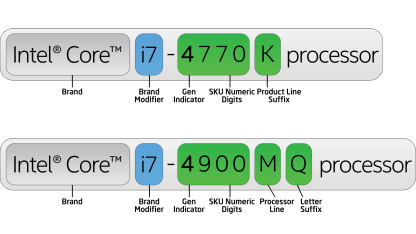
Understanding Intel CPU names helps you choose the right processor. Each part of the name shows specific features. These features include the brand, generation, model, and special functions. This guide breaks down the basics of Intel CPU names. You will learn to read and understand each part clearly.
Brand And Product Line
Intel uses brands like Core, Pentium, and Celeron. The Core series is popular for most users. Inside Core, you find product lines like i3, i5, i7, and i9. Higher numbers usually mean better performance. These lines fit different needs from basic tasks to high power use.
Generation Indicator
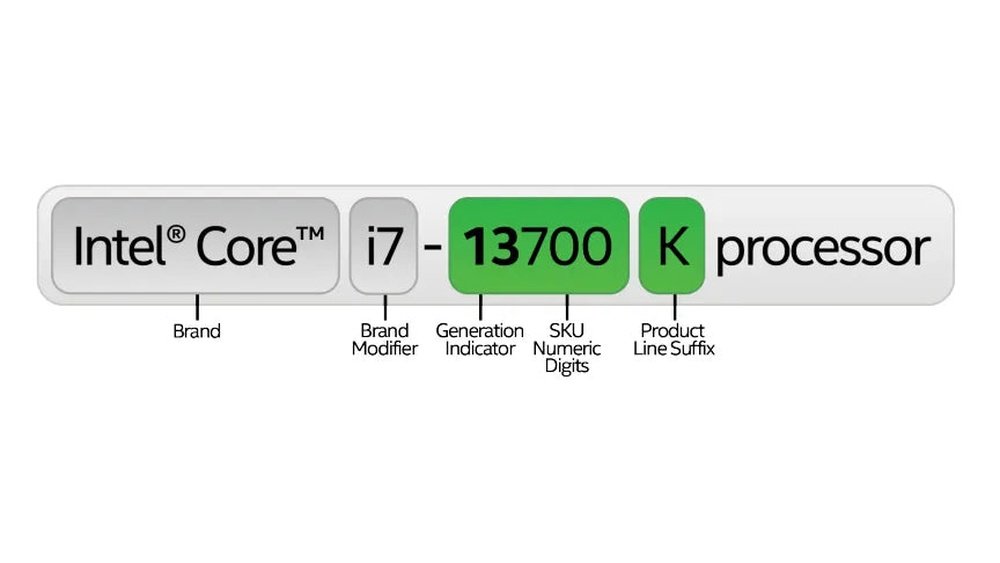
The CPU generation is shown by numbers after the brand. For example, in i7-10700, “10” means 10th generation. Newer generations have better technology and speed. This helps you know how recent and advanced a CPU is. Always check the generation for modern features.
Sku Numbers
SKU numbers follow the generation and show the model. They usually have three or four digits. Higher numbers often mean better performance and more features. They help compare CPUs within the same generation and product line. This makes choosing easier and more precise.
Suffix Letters Explained
Suffix letters tell about the CPU’s special features. For example, “K” means the CPU can be overclocked. “U” stands for low power, good for laptops. “F” means the CPU needs a separate graphics card. Knowing suffixes helps pick the right CPU for your needs.
Credit: www.intel.com
Decoding Intel Cpu Generations
Understanding Intel CPU generations helps you choose the right processor. Each generation brings changes in speed, efficiency, and technology. Decoding these generations lets you see how modern or powerful a CPU is. This guide breaks down how to identify Intel’s CPU generations and what they mean for performance.
Identifying The Generation Number
Intel CPU names include numbers that show the generation. The generation number is usually the first digit after the brand name. For example, in “Intel Core i5-10400,” the “10” means it is a 10th generation CPU. Older CPUs have smaller numbers like 7 or 8. Newer ones go up to 12, 13, or even higher.
Sometimes, the generation number has two digits, like “11” or “12.” This number tells you the CPU’s age and technology level. Knowing this helps you avoid very old models with less power and features.
Impact On Performance And Features
Newer generations often have better speed and use less power. They support the latest technology like faster memory and improved graphics. This means smoother multitasking and better gaming or work performance.
Each generation may add new features like improved security or AI support. Older CPUs might lack these enhancements. Choosing a newer generation ensures longer usability and better software compatibility.
Understanding Sku Numbers
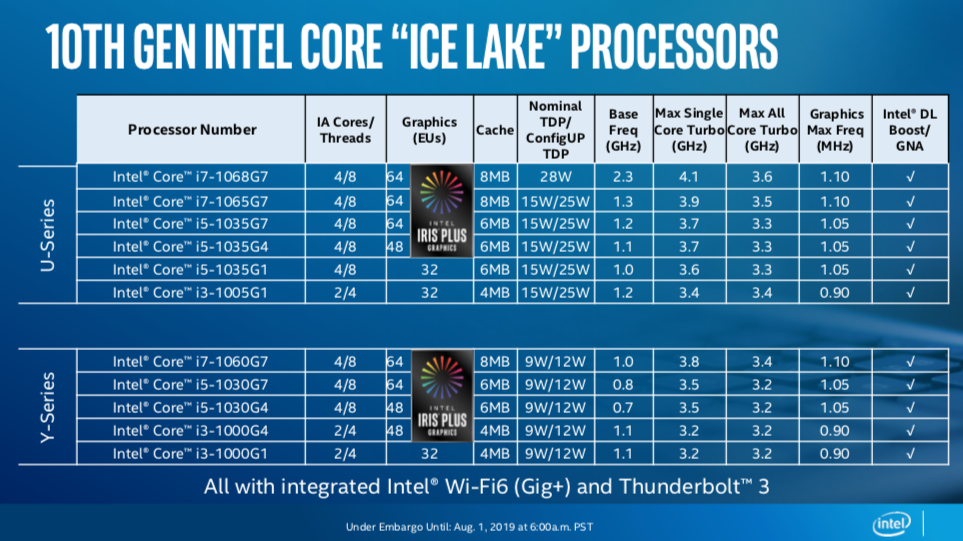
Understanding SKU numbers helps you identify Intel CPUs quickly. These numbers give key details about the processor’s features and performance. They show the product line, generation, and specific model. Knowing SKU numbers makes comparing CPUs easier. This knowledge saves time and helps choose the right processor.
What Sku Numbers Represent
SKU stands for Stock Keeping Unit. Intel uses SKU numbers to name each CPU model. The number shows the processor’s generation and relative power. For example, in the Core i7-10700K, “10” means 10th generation. “700” indicates the model’s position in the lineup.
SKU numbers also hint at the processor’s speed and features. Higher numbers usually mean better performance. Letters at the end show special functions. For instance, “K” means the CPU is unlocked for overclocking.
How To Compare Different Skus
Compare SKU numbers by checking the generation first. Newer generations offer better technology and efficiency. Next, look at the model number within the generation. Higher numbers mean more cores or faster speeds.
Check the suffix letters too. They tell if the CPU is for laptops, desktops, or has special features. This helps you pick a CPU that fits your needs. Remember, SKU numbers make it easier to spot differences fast.
Credit: www.tomshardware.com
Meaning Behind Suffix Letters
Intel CPU names often end with letters called suffixes. These letters tell you about the chip’s features. They help you understand what the processor can do. Learning these suffixes makes it easier to pick the right CPU.
Performance And Power Efficiency
Some suffixes show how fast the CPU runs. Others tell about power use. For example, an “K” means the processor is unlocked. You can overclock it for better speed. The “T” suffix means the chip uses less power. It runs cooler and lasts longer on batteries.
Suffix “F” means the CPU needs a separate graphics card. It has no built-in graphics. The “S” suffix often means special performance tuning. These CPUs balance speed and heat well. They suit desktop users who want solid performance.
Special Features And Use Cases
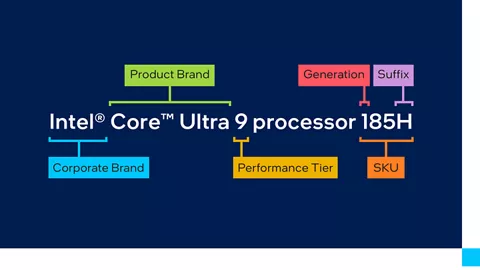
Suffix letters also reveal special uses. The “H” suffix is for high-performance laptops. It shows the chip can handle heavy tasks. The “U” suffix stands for ultra-low power. These CPUs fit thin and light laptops. They focus on longer battery life.
Some suffixes like “G” indicate built-in graphics with extra power. The “X” suffix means extreme performance. These CPUs are for enthusiasts and creators. Knowing these suffixes helps find the best CPU for your needs.
Spotting Key Specs In Cpu Names
Intel CPU names carry important details about the processor’s power and abilities. Knowing how to spot these details helps you pick the right chip for your needs. Key specs like core count, clock speeds, and integrated graphics appear in the CPU name. Understanding these specs makes shopping easier and smarter.
Core Count And Threads
The core count tells how many processing units a CPU has. More cores mean the CPU can handle more tasks at once. Threads show how many tasks each core can work on. A CPU with more threads runs programs more smoothly. For example, “i7-10700K” has 8 cores and 16 threads, good for multitasking.
Clock Speeds
Clock speed measures how fast the CPU runs, shown in gigahertz (GHz). Higher clock speeds mean faster performance for tasks. CPUs often list a base speed and a boost speed. The boost speed is the maximum speed the CPU can reach under heavy work. For example, a CPU with 3.8 GHz base and 5.1 GHz boost is fast for gaming and editing.
Integrated Graphics
Some Intel CPUs include built-in graphics. This means you don’t need a separate graphics card for basic display tasks. Integrated graphics are noted with a “G” or “F” in the name. For instance, “i5-11400” has integrated graphics, but “i5-11400F” does not. Knowing this helps decide if you need extra graphics hardware.
Tips For Choosing The Right Intel Cpu
Choosing the right Intel CPU can seem hard. Many options and numbers appear confusing. This guide helps you pick a CPU that fits your needs and budget. It also shows how to think about future use. Follow these tips to make a smart choice.
Matching Cpu To Your Needs
Think about what you will do with your computer. For simple tasks like browsing or writing, a basic CPU works well. For gaming or video editing, choose a CPU with more cores and higher speed. More cores help run many tasks at once. Faster speed improves how quickly programs work.
Budget Considerations
Set a clear budget before buying. CPUs vary widely in price. Higher price often means better performance, but not always needed. Balance what you pay with what you need. Sometimes mid-range CPUs offer the best value. Avoid spending too much on features you won’t use.
Future-proofing Your Choice
Pick a CPU that stays useful for years. New programs and games need more power over time. Choosing a CPU with extra cores and good speed helps. Also, check if your motherboard supports upgrades. A CPU that lasts longer saves money later.
Credit: ms.codes
Frequently Asked Questions
What Do Intel Cpu Name Letters Mean?
Intel CPU name letters indicate processor features. For example, “K” means unlocked for overclocking. “F” means no integrated graphics. These letters help identify CPU capabilities quickly.
How To Decode Intel Cpu Generation Number?
The generation number is the first digit after the dash. For instance, i7-10700 shows 10th generation. It helps know the processor’s release and performance improvements.
What Is The Significance Of Intel Cpu Model Numbers?
Model numbers represent CPU performance tiers. Higher numbers usually mean better speed and features. They help compare processors within the same generation.
How To Identify Intel Cpu Series From Names?
Intel series like i3, i5, i7, and i9 show processor class. I3 is entry-level, i9 is high-end. This classification guides users for suitable performance needs.
Conclusion
Understanding Intel CPU names helps you pick the right processor. Each part of the name tells you about its speed, generation, and features. This knowledge saves time and avoids confusion. You can compare models clearly and make better choices. Next time you shop, reading CPU names will feel easy.
Keep this guide handy for quick reference. Choosing a CPU no longer needs to be hard or confusing. Simple decoding makes tech talk less scary and more useful.