How to Ship Cpu: Expert Tips for Safe, Fast Delivery
Shipping a CPU might seem simple, but one wrong move can damage your valuable hardware. You want to make sure your CPU arrives safely, right?
Whether you’re sending it to a friend, a buyer, or a repair shop, knowing the right steps can save you time, money, and stress. You’ll learn exactly how to pack and ship your CPU so it stays protected every step of the way.
Keep reading—you don’t want to risk damaging your processor by missing these key tips.

Credit: www.youtube.com
Choosing The Right Packaging
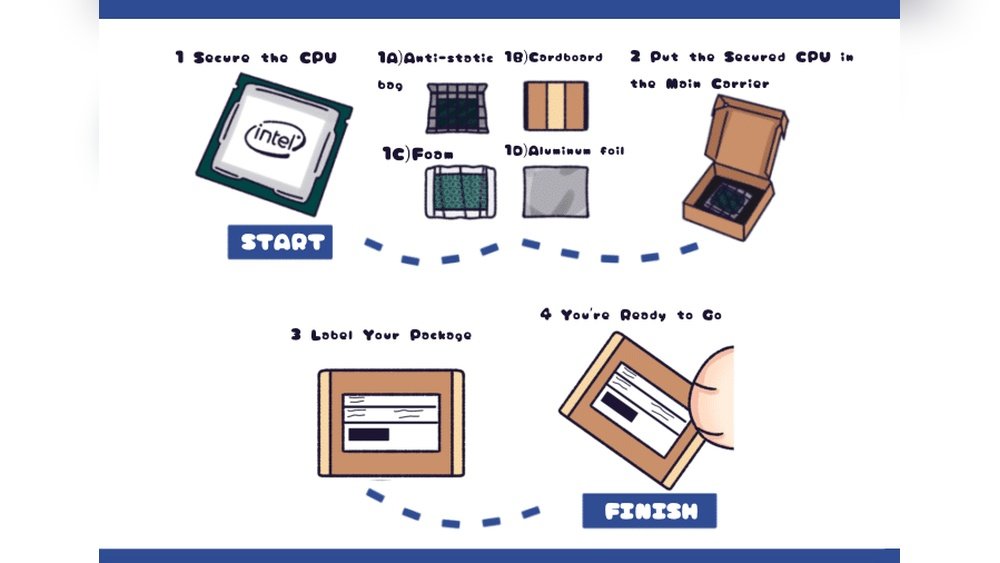
Choosing the right packaging is key to shipping a CPU safely. CPUs are delicate and need careful handling. Proper packaging protects the CPU from shocks, dust, and static damage during transit. Small mistakes can cause big problems. Use materials that guard the CPU well. Follow simple steps to pack it securely.
Selecting Anti-static Materials
CPUs are sensitive to static electricity. Static can damage the tiny circuits inside. Use anti-static bags to wrap the CPU. These bags stop static from building up. Avoid regular plastic bags. They can cause static shocks. Anti-static foam or bubble wrap is also good. Always keep the CPU away from static sources.
Using Protective Padding
Padding absorbs shocks and vibrations during shipping. Use foam or bubble wrap around the CPU. Make sure the padding is thick enough. It should cover all sides of the CPU. Avoid loose packing materials. They do not protect well. The padding must hold the CPU tightly in place.
Securing The Cpu In The Box
Choose a strong, small box for the CPU. The box should fit the padded CPU snugly. Fill any empty space with packing peanuts or foam. This stops the CPU from moving inside. Seal the box with strong tape. Label the box as fragile. This alerts handlers to be careful.
Preparing The Cpu For Shipment
Preparing the CPU for shipment is a key step to avoid damage and ensure safe delivery. Proper preparation protects the delicate parts from dust, moisture, and physical harm. It also helps the receiver identify the CPU easily and handle it correctly.
Cleaning And Inspecting The Cpu
Start by cleaning the CPU gently with a soft brush or cloth. Remove any dust or thermal paste residue carefully. Check the pins or contacts for any bends or dirt. Look for cracks or visible damage on the surface. A clean and intact CPU reduces the risk of problems during installation.
Removing Heat Sinks And Accessories
Take off any heat sinks, fans, or other accessories attached to the CPU. These parts can cause damage if shipped together. Detach them slowly to avoid bending pins or breaking components. Package these accessories separately in padded materials for extra safety.
Labeling And Documentation
Label the CPU clearly with its model and serial number. Attach any necessary documents like warranty cards or proof of purchase. Include instructions for handling if needed. Clear labeling helps with tracking and avoids confusion during shipment and delivery.
Selecting The Best Shipping Method
Choosing the right shipping method for a CPU is very important. The method affects the safety and speed of delivery. It also impacts the cost and tracking options. This section helps you pick the best way to ship your CPU with care and confidence.
Comparing Carrier Options
Several carriers offer shipping services. Each has its own strengths and weaknesses. Some focus on fast delivery, others on low cost. Check their reputation for handling electronics carefully. Look at customer reviews and service ratings. Choose a carrier known for safe and reliable shipping.
Choosing Between Ground And Air Shipping
Ground shipping is usually cheaper but slower. It works well for less urgent shipments. Air shipping is faster but costs more. It suits urgent or high-value packages. Consider the CPU’s value and delivery time. Pick the option that balances speed and cost for you.
Considering Insurance And Tracking
Insurance protects against loss or damage during transit. Always insure valuable items like CPUs. It offers peace of mind and financial protection. Tracking lets you follow your package’s journey. Choose services that provide real-time tracking updates. This helps you know where your CPU is at all times.

Credit: www.youtube.com
Packaging Techniques For Safety
Shipping a CPU safely starts with good packaging. Proper packaging protects the CPU from damage during transit. It keeps the delicate parts safe from shocks, dust, and moisture. Using the right techniques helps avoid costly replacements and delays.
Layering And Cushioning Tips
Use multiple layers of protection around the CPU. Begin with an anti-static bag to prevent electrical damage. Add soft foam or bubble wrap around the bag. Wrap the CPU gently but firmly to avoid movement. Place the wrapped CPU inside a sturdy box. Fill empty spaces with packing peanuts or crumpled paper. This cushions the item and absorbs shocks.
Sealing And Reinforcing The Package
Close the box with strong packing tape. Seal all edges and openings carefully. Use extra tape on corners and seams. This stops the box from opening during shipping. Label the box clearly with “Fragile” stickers. Reinforce weak spots with cardboard inserts if needed. Secure packaging ensures the CPU stays inside safely.
Avoiding Common Packaging Mistakes
Do not ship the CPU without padding. Avoid using thin or damaged boxes. Never wrap the CPU directly with tape. Do not use materials that can cause static. Avoid loose packing that lets the CPU move. These mistakes increase the risk of damage. Proper care keeps the CPU safe and sound.
Handling And Shipping Best Practices
Shipping a CPU needs careful handling to avoid damage. Proper packing and clear communication with the carrier help protect this delicate item. Follow these best practices to ensure the CPU arrives safely and on time.
Labeling Fragile Items
Mark the package clearly as “Fragile.” Use bright, easy-to-read labels on all sides. Place the CPU in a sturdy box with bubble wrap or foam inside. This prevents movement and shields the CPU from shocks.
Communicating With The Carrier
Inform the carrier about the fragile nature of the package. Request special handling if available. Provide your contact details for updates or any delivery issues. Clear communication reduces the risk of mishandling.
Monitoring Shipment Progress
Track the package regularly through the carrier’s website. Set up alerts for status changes. Prompt action helps solve problems quickly and keeps you informed about delivery time.
Dealing With Customs And International Shipping
Shipping a CPU internationally requires careful attention to customs rules and regulations. Customs can cause delays or extra fees if documents are not correct. Understanding how to handle customs paperwork and import laws helps the shipment move smoothly.
Clear communication with the shipping service and the buyer is essential. Knowing the right steps reduces the risk of problems at the border. This section explains how to prepare for customs and ensure a smooth delivery.
Preparing Customs Documentation
Fill out all required customs forms accurately. Include a detailed description of the CPU, its value, and its purpose. Use the correct Harmonized System (HS) code for electronics. Attach invoices and proof of purchase if needed. Incorrect or missing documents cause delays and fines.
Understanding Import Regulations
Each country has different rules for importing electronics. Some may require special licenses or certifications. Check for restrictions on CPUs or computer parts. Be aware of taxes, duties, and import fees. Knowing these rules helps avoid surprises and extra costs.
Tips For Smooth International Delivery
Choose a reliable courier with experience in international shipments. Package the CPU securely to prevent damage during transit. Label the package clearly with the recipient’s full address and contact details. Keep tracking information handy to monitor the shipment. Communicate with the buyer about customs status and delivery times.
Troubleshooting Common Shipping Issues
Shipping a CPU can sometimes bring unexpected problems. Knowing how to fix these issues helps save time and stress. This section covers common shipping problems and easy ways to solve them.
Handling Delays And Lost Packages
Delays happen often during shipping. Weather, holidays, or high demand can slow deliveries. Track your package regularly using the carrier’s website. Contact the shipping company if the package is late beyond the expected date.
Lost packages are rare but possible. Report the missing item to the carrier quickly. Provide all shipment details like tracking number and address. This speeds up the search for your CPU.
Dealing With Damaged Shipments
CPUs are fragile and need careful packing. If you receive a damaged CPU, take photos of the package and the item. Keep all packaging materials until the issue is resolved. Contact the seller or carrier immediately to report damage.
Do not install or use a damaged CPU. This could cause more problems or void warranties. Follow the seller’s or carrier’s instructions for returns or replacements.
Claiming Insurance And Refunds
Many shipping options include insurance. Check your coverage before shipping. If your CPU is lost or damaged, file a claim with the carrier.
Provide proof of value, photos, and shipping details for the claim. Keep copies of all communication. Refunds or replacements may take time but keep tracking progress.

Credit: www.reddit.com
Frequently Asked Questions
How Do I Safely Pack A Cpu For Shipping?
Use anti-static bags to protect the CPU from static. Wrap it in bubble wrap for cushioning. Place it in a sturdy box with padding to avoid movement and damage during transit.
What Shipping Materials Are Best For Cpu Protection?
Use anti-static bags, bubble wrap, and foam padding. Choose a rigid cardboard box that fits well. These materials prevent static damage and cushion the CPU from shocks.
Can I Ship A Cpu Without Original Packaging?
Yes, but use anti-static bags and secure bubble wrap. Ensure the CPU is tightly packed in a strong box. Avoid movement inside the box to prevent damage.
Should I Insure My Cpu Shipment?
Yes, always insure valuable electronics like CPUs. Insurance covers loss or damage during transit. Choose coverage matching the CPU’s value for peace of mind.
Conclusion
Shipping a CPU needs care and the right materials. Protect it well with bubble wrap and a sturdy box. Label the package clearly to avoid delays or loss. Choose a reliable courier to keep your CPU safe. Keep tracking information handy to follow your shipment.
Small steps make a big difference in safe delivery. Take your time, and your CPU will arrive without damage. Safe shipping helps keep your tech working perfectly.