Does Cpu Affect Multitasking: Unlocking Speed and Efficiency
Have you ever wondered why your computer slows down when you open too many apps at once? If you’re juggling multiple tasks on your device, you might be asking yourself, “Does the CPU affect multitasking?” The answer could change how you use your computer every day.
Understanding this can help you work faster and avoid frustrating delays. Keep reading to discover how your CPU impacts your ability to multitask smoothly—and what you can do to make the most of it.
Credit: cameraderie.org
Role Of Cpu In Multitasking
The CPU plays a key role in multitasking on any computer. It acts as the brain, managing tasks and processes. The ability to handle many tasks depends largely on the CPU’s design and power.
Understanding how the CPU works helps explain its effect on multitasking. Different CPUs perform differently based on their features and structure.
Cpu Basics And Performance Metrics
The CPU, or Central Processing Unit, executes instructions from programs. It uses cores to process tasks. More cores often mean better multitasking.
Clock speed shows how many cycles a CPU runs per second. Higher speeds can boost task handling but are not the only factor. Cache size also matters. It stores data for quick access, reducing delays.
How Cpus Handle Multiple Tasks
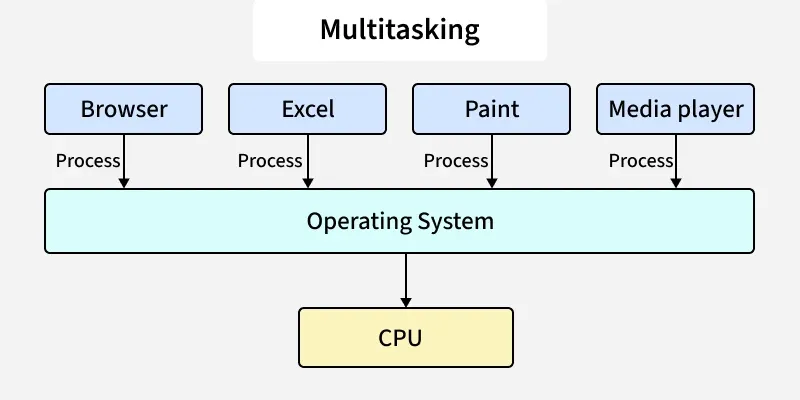
CPUs use time-sharing to manage multiple tasks. They switch between tasks quickly to give the illusion of simultaneous work. This is called multitasking or multiprocessing.
Each core can work on a different task at once. More cores mean more tasks can be handled simultaneously. Threads help by breaking tasks into smaller parts for faster processing.
Impact Of Cpu Architecture
CPU architecture defines how a CPU is built and functions. Modern architectures improve efficiency and speed. They handle multitasking better by optimizing core and thread use.
Some CPUs support hyper-threading, allowing one core to handle two threads. This improves multitasking without extra cores. The architecture also affects power use and heat, which impact performance under load.
Core Count And Multitasking
Core count plays a key role in how well a CPU handles multitasking. It means the number of processing units inside the CPU. More cores can divide tasks and run many programs at once. This section explains how core count affects multitasking performance.
Single-core Vs Multi-core Cpus
Single-core CPUs have one processing unit. They handle one task at a time. This limits multitasking ability. Multi-core CPUs have two or more cores. Each core can run a separate task. This lets the CPU work on many things at once. Multi-core chips are better for multitasking.
Benefits Of More Cores
More cores mean more tasks can run in parallel. This reduces slowdowns when many apps are open. Programs that support multiple cores run smoother. Tasks like video editing, web browsing, and gaming improve. More cores also help with background processes. The system stays responsive and fast.
Limitations Of Core Scaling
Adding cores does not always double performance. Some software cannot use many cores well. Sometimes, tasks depend on single-core speed instead. More cores can increase power use and heat. There is a point where extra cores add little benefit. Balanced core count and clock speed matter most.
Clock Speed And Efficiency
Clock speed and efficiency play a big role in how a CPU handles multitasking. Clock speed measures how many cycles a CPU can perform per second. Higher speeds often mean faster processing. Efficiency relates to how well the CPU uses power while working fast. Together, they shape how smoothly your computer runs multiple tasks at once.
Effect Of Clock Speed On Task Switching
Clock speed impacts how quickly a CPU switches between tasks. A faster clock speed reduces delay when moving from one job to another. This makes programs respond faster. Low clock speeds can cause lag or slow switching. Task switching benefits from a CPU that runs at higher speeds.
Turbo Boost And Dynamic Frequency
Many CPUs have Turbo Boost or similar features. These allow the CPU to increase clock speed temporarily. The CPU speeds up only when extra power is needed. This helps improve performance during heavy multitasking. It balances speed without running full power all the time.
Balancing Speed And Power Consumption
High clock speeds use more energy and create more heat. Efficient CPUs manage speed to save power. They slow down during light tasks and speed up when needed. This balance helps keep the computer cool and extends battery life. Good efficiency supports better multitasking without wasting energy.
Cache Size And Multitasking
Cache size plays a key role in how well a CPU handles multitasking. It stores important data close to the processor for quick access. Larger cache means the CPU can manage tasks faster and switch between them smoothly. This reduces waiting time and boosts overall performance.
Role Of Cache In Task Management
Cache acts as a small, fast memory inside the CPU. It holds data that the processor uses often. During multitasking, the CPU needs quick access to different data sets. A bigger cache stores more information, allowing the CPU to work on several tasks without delay. It helps in handling multiple programs efficiently.
Cache Levels And Their Impact
CPUs have different cache levels: L1, L2, and L3. L1 is the smallest and fastest, located closest to the CPU cores. L2 is larger but slower, while L3 is the biggest and shared among cores. Each level helps the CPU access data faster than from the main memory. More cache at any level improves multitasking by reducing the time to fetch data.
Optimizing Cache For Efficiency
Software and CPUs are designed to use cache effectively. Programs that fit data into cache run faster. Operating systems also prioritize tasks to match cache size. Efficient cache use means less waiting for data and quicker task switching. This makes multitasking smoother and more responsive on your computer.
Ram And Cpu Interaction
CPU and RAM work closely to manage multitasking. The CPU processes tasks, while RAM holds data for quick access. This teamwork affects how smoothly multiple tasks run at once.
Memory Bandwidth And Multitasking
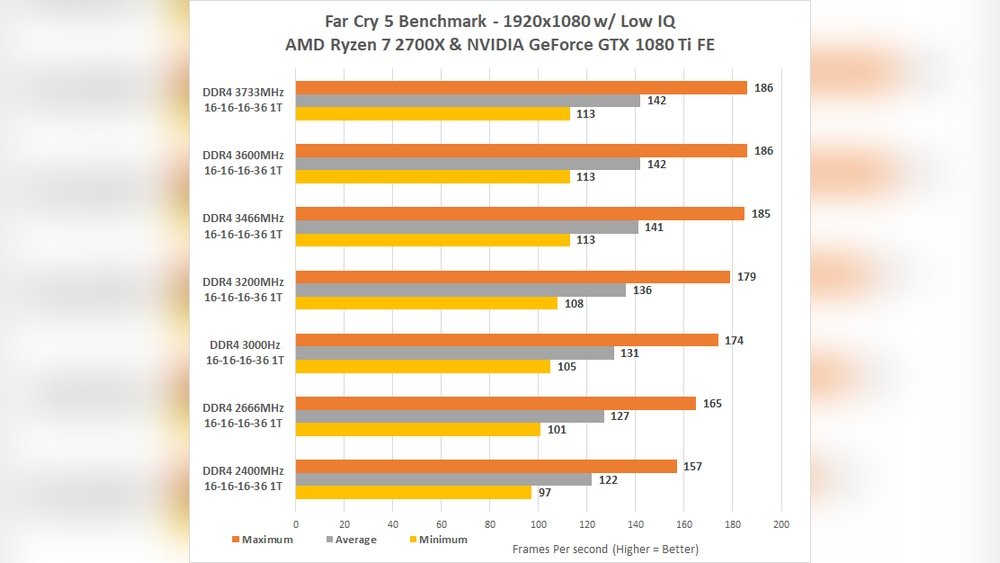
Memory bandwidth is the speed at which data moves between CPU and RAM. Higher bandwidth lets the CPU get data faster. This helps handle many tasks without slowdowns. Low bandwidth can cause delays, making multitasking sluggish and frustrating.
How Ram Complements Cpu Performance
RAM supports the CPU by storing active data. The CPU fetches instructions from RAM to execute tasks. More RAM means the CPU can access more data quickly. This reduces waiting time and speeds up multitasking. Without enough RAM, the CPU must wait or use slower storage.
Avoiding Bottlenecks
A bottleneck happens when one part limits the system’s speed. If RAM is slow or too small, the CPU waits for data. This slows down all tasks. Matching CPU speed with enough RAM size and speed prevents bottlenecks. Balanced parts keep multitasking smooth and efficient.
Real-world Multitasking Scenarios
Real-world multitasking puts your CPU to the test. It handles many tasks at once, affecting speed and smoothness. Different activities demand different CPU power. Understanding these scenarios helps you see how CPU affects multitasking.
Everyday Productivity Tasks
Running web browsers, word processors, and email apps all at once is common. These tasks need moderate CPU power. A good CPU can switch between apps quickly. Slow CPUs cause delays and freezes during simple tasks. Efficient multitasking makes work easier and faster.
Gaming And Streaming Simultaneously
Playing games while streaming requires strong CPU performance. The CPU processes game data and encodes video streams. A weak CPU can cause lag and low frame rates. More CPU cores help handle both tasks smoothly. Gamers need a balanced CPU for a smooth experience.
Professional Workloads And Cpu Demand
Professionals use software that needs heavy CPU power. Video editing, 3D rendering, and programming are examples. These tasks use many CPU cores and high clock speeds. A powerful CPU reduces waiting time and improves workflow. Multitasking is crucial in professional settings to stay productive.
Tips To Enhance Multitasking Speed
Improving multitasking speed depends on several factors. The CPU plays a key role, but other elements matter too. Small changes can make your computer work faster and handle more tasks smoothly. Follow these tips to boost your multitasking experience.
Choosing The Right Cpu
Pick a CPU with multiple cores and high clock speed. More cores let your computer run many programs at once. A faster clock speed helps tasks finish quickly. Look for CPUs designed for multitasking and heavy workloads. Avoid old or low-end models that slow down your system.
Optimizing Software And Settings
Close unused programs and browser tabs to free up resources. Adjust your operating system settings for best performance. Disable startup apps that you do not need. Update your software regularly to fix bugs and improve speed. Use lightweight applications when possible to reduce CPU load.
Upgrading System Components
Add more RAM to support running multiple programs smoothly. Upgrade to a solid-state drive (SSD) for faster data access. Better cooling systems can prevent CPU overheating and slowdowns. Check your motherboard compatibility before buying new parts. Balanced upgrades create a faster, more responsive system for multitasking.

Credit: www.scaler.com
Credit: www.geeksforgeeks.org
Frequently Asked Questions
Does Cpu Speed Influence Multitasking Performance?
Yes, CPU speed impacts multitasking by processing tasks faster. Higher speeds allow smoother switching between applications and reduce lag during heavy workloads.
How Do Cpu Cores Affect Multitasking Ability?
More CPU cores improve multitasking by handling multiple tasks simultaneously. Each core processes different tasks, boosting overall system responsiveness and efficiency.
Can A Weak Cpu Limit Multitasking Capacity?
A weak CPU struggles with multitasking, causing slowdowns and delays. It cannot efficiently manage many applications, leading to reduced productivity and frustration.
Is Cpu Cache Important For Multitasking Efficiency?
CPU cache stores frequently used data for quick access. Larger caches reduce delays during multitasking, enhancing speed and smoothness in handling tasks.
Conclusion
A CPU plays a key role in multitasking performance. Faster processors handle tasks smoothly and quickly. More cores mean better ability to manage many apps. But RAM and storage also matter for multitasking. A balanced system gives the best experience.
Choose a CPU that fits your needs and budget. Good multitasking depends on several parts working well. Keep this in mind when upgrading your computer.